1. Киришүү
Thank you for choosing the ANRAN Q04 Solar Security Camera and ANRAN F2M3 Solar Door Light Security Camera. This manual provides detailed instructions for the setup, operation, and maintenance of your new security devices. Please read this manual thoroughly before installation and retain it for future reference.
These devices are designed to provide reliable outdoor surveillance with the convenience of solar power and wireless connectivity.
2. Продукт бүтүп калдыview
The ANRAN Q04 and F2M3 are advanced solar-powered security solutions. The Q04 is a pan-tilt camera, while the F2M3 integrates a security camera with a motion-activated light.

Image 2.1: ANRAN Q04 Solar Security Camera (left) and ANRAN F2M3 Solar Door Light Security Camera (right).
2.1 Негизги өзгөчөлүктөрү
- Күн энергиясы: Both cameras feature integrated solar panels for continuous charging. The F2M3 includes a 3W solar panel and a 5000 mAh battery.
- Зымсыз туташуу: Connects to 2.4GHz WiFi for remote access and control.
- 2K токтому: Provides clear 3MP video footagкүнү-түнү.
- Эки тараптуу аудио: Реалдуу убакыт режиминде байланышуу үчүн орнотулган микрофон жана динамик.
- ANRAN Q04 Specifics:
- 355° Pan & 90° Tilt for wide area surveillance.
- Three Night Vision Modes: Smart, Color, and Infrared.
- ANRAN F2M3 Specifics:
- Integrated Wall Light: 200-lumen brightness.
- PIR Detection & Motion Activated Light: Light turns on when motion is detected.
- 70db Siren for deterrence.
3. Орнотуу жана орнотуу
Both ANRAN cameras are designed for simple and easy installation.

Image 3.1: The ANRAN Q04 camera features simple installation, requiring no separate solar panel setup.

Image 3.2: The ANRAN F2M3 camera is easily mounted to an exterior wall.
3.1 Монтаждалуучу жер
- менен жерди тандаңыз ample direct sunlight exposure for optimal solar charging.
- Ensure the camera is within range of your 2.4GHz WiFi network. Note: 5GHz WiFi is not supported.
- Mount the camera at a height that provides the desired viewing angle and security coverage.
3.2 Орнотуу кадамдары
- Батареяны заряддоо: Before initial use, fully charge the camera's internal battery using a USB power adapter (not included) for several hours.
- Download the ANRAN App: Издөө "ANRAN" in your mobile app store (iOS or Android) and download the application.
- Каттоо эсебин түзүү: Open the ANRAN app and follow the on-screen instructions to create a new user account.
- Түзмөк кошуу: In the app, tap the "+" icon to add a new device. Select your camera model (Q04 or F2M3) and follow the in-app pairing instructions. This typically involves scanning a QR code on the camera or connecting to a temporary WiFi hotspot created by the camera.
- Камераны орнотуу: Use the provided mounting bracket and screws to securely attach the camera to your chosen outdoor location. Ensure the solar panel is positioned to receive maximum sunlight.
4. Иштөө нускамалары
Control and monitor your ANRAN cameras using the ANRAN mobile application.
4.1 Live View жана Жаздыруу
- Open the ANRAN app and select your camera to view жандуу тоют.
- Record video or capture screenshots directly from the live view интерфейс.
4.2 Pan and Tilt (ANRAN Q04 Only)

Image 4.1: The ANRAN Q04 camera offers 355° pan and 90° tilt for comprehensive area coverage.
Түз эфирден view of your Q04 camera, use the on-screen controls to remotely adjust the camera's viewing angle (355° horizontal pan, 90° vertical tilt).
4.3 Түнкү көрүү режимдери
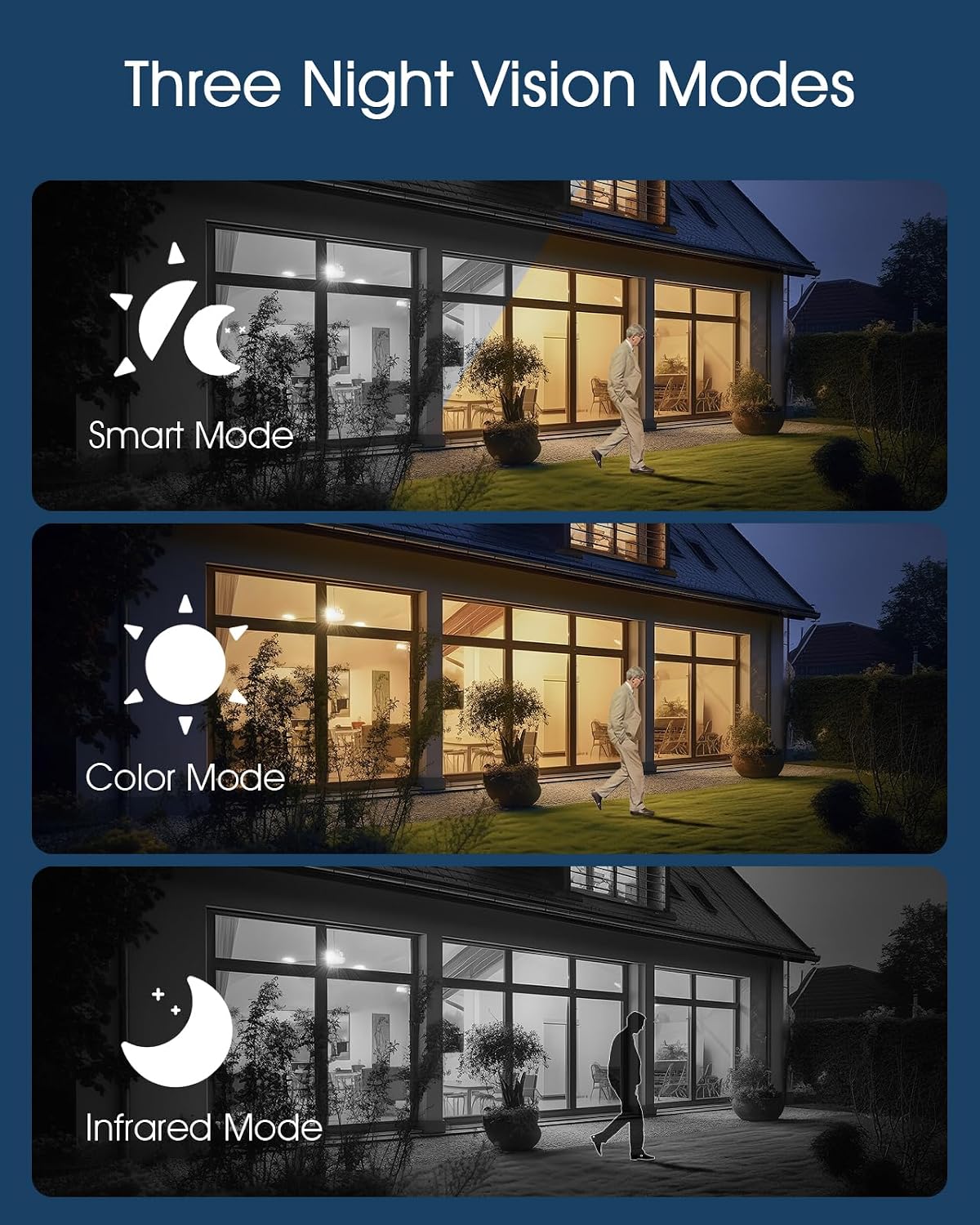
Image 4.2: The camera supports Smart, Color, and Infrared night vision modes for various low-light conditions.
The ANRAN Q04 camera offers three night vision modes, configurable in the app settings:
- Smart Mode: Кыймыл же жарык шарттары аныкталганда, инфракызыл жана түстүү түнкү көрүүнүн ортосунда автоматтык түрдө которулат.
- Түс режими: Utilizes built-in spotlights to provide full-color video in low-light environments.
- Infrared режими: Толук караңгылыкта ак жана кара видео үчүн инфракызыл LEDди колдонот.
4.4 Эки тараптуу аудио

Image 4.3: Engage in real-time two-way audio communication through the ANRAN app.
Use the microphone icon in the app to speak through the camera's speaker, and listen to audio from the camera's microphone.
4.5 Кыймылды аныктоо жана эскертүүлөр

Image 4.4: The F2M3 camera features PIR detection, motion-activated light, siren, and sends notifications.
Both cameras feature motion detection. The F2M3 camera also includes a PIR sensor for more accurate human detection and a motion-activated light and siren.
- Configure motion detection sensitivity and alert preferences in the ANRAN app.
- Кыймыл аныкталганда смартфонуңузга push эскертмелерин алыңыз.
- For the F2M3, the integrated light will activate upon motion detection, and the siren can be triggered manually or automatically via app settings.
5. Техникалык тейлөө
Proper maintenance ensures optimal performance and longevity of your ANRAN security cameras.
5.1 Күн панелдеринин эффективдүүлүгү

Image 5.1: Advanced solar technology ensures efficient charging for continuous security.
- Regularly inspect the solar panel for dirt, dust, or debris.
- Clean the solar panel surface gently with a soft, damp cloth to ensure maximum sunlight absorption. Avoid abrasive cleaners.
- Ensure no obstructions (e.g., tree branches, leaves) are blocking sunlight from reaching the panel.
5.2 Батареяны башкаруу
- The cameras are designed for continuous operation through solar charging. However, in prolonged periods of low sunlight, the battery level may decrease.
- Monitor the battery status via the ANRAN app. If the battery level is consistently low, consider temporarily repositioning the camera to a sunnier spot or manually charging it via USB.
6. Кыйынчылыктарды
If you encounter issues with your ANRAN cameras, refer to the following common solutions:
- Камера Wi-Fiга туташпай жатат:
- WiFi тармагыңыз 2.4 ГГц экенин текшериңиз.
- Check that the camera is within range of your WiFi router.
- Колдонмого киргизилген WiFi сырсөзүнүн туура экенин текшериңиз.
- Роутериңизди жана камераңызды өчүрүп күйгүзүңүз.
- Видеонун сапаты начар:
- Интернетке туташуу ылдамдыгын текшериңиз.
- Камеранын линзасы таза жана тактар же кир жок экенин текшериңиз.
- Батарея заряддалбай жатат:
- Күн панелинин күн нуру күндүн нуру астында бир нече саат бою турганын текшериңиз.
- Күн панелинин бетин тазалаңыз.
- Ensure the ambient temperature is within the operating range for battery charging.
- Кыймылды аныктоо иштебей жатат:
- Check motion detection settings in the ANRAN app (sensitivity, detection zones).
- Камеранын иштешине эч кандай физикалык тоскоолдуктар жок экенин текшериңиз view or the PIR sensor (F2M3).
7. Техникалык шарттар
| Өзгөчөлүк | Спецификация |
|---|---|
| Модел | ANRAN Q04, ANRAN F2M3 |
| Резолюция | 2K (3 МП) |
| Байланыш | 2.4 ГГц WiFi (IEEE 802.11b/g/n) |
| Power Source | Integrated Solar Panel, Rechargeable Battery |
| F2M3 Solar Panel | 3W |
| F2M3 Battery Capacity | 5000 мАч |
| Q04 Pan/Tilt Range | 355° Пан, 90° Тилт |
| Түнкү көрүнүш | Infrared, Color, Smart Modes |
| Аудио | Эки тараптуу аудио |
| F2M3 Light Brightness | 200 Lumens |
| F2M3 Siren | 70дб |
| ASIN | B0FDW9C9CK |
| Дата биринчи жеткиликтүү | 11-апрель, 2025-жыл |
8. Кепилдик жана колдоо
ANRAN products are designed for reliability and performance. For warranty information, please refer to the specific terms provided at the time of purchase or visit the official ANRAN webсайт.
For technical support, troubleshooting assistance, or any questions regarding your ANRAN Q04 or F2M3 cameras, please contact ANRAN customer service through the ANRAN app or the official ANRAN support channels. You can often find contact information on the ANRAN website or within the app's 'Help' or 'About Us' sections.
Колдоо кызматына кайрылганыңызда продуктуңуздун үлгүсүн жана сатып алуу чоо-жайын даяр болуңуз.


