Introduction
The Mercusys MA72XH is a high-performance Wi-Fi 6 AX1800 USB adapter designed to provide fast and stable wireless connectivity for your desktop or laptop computer. Featuring dual-band support, USB 3.0 interface, and advanced security protocols like WPA3, this adapter enhances your online experience for streaming, gaming, and video calls. This manual provides detailed instructions for the proper installation, operation, and maintenance of your MA72XH adapter.
Пакеттин мазмуну
Пакетиңизде төмөнкү заттар бар экенин текшериңиз:
- 1 x Mercusys MA72XH AX1800 High-Performance Dual-Band Wireless USB Adapter
- 1 x Ыкчам орнотуу колдонмосу
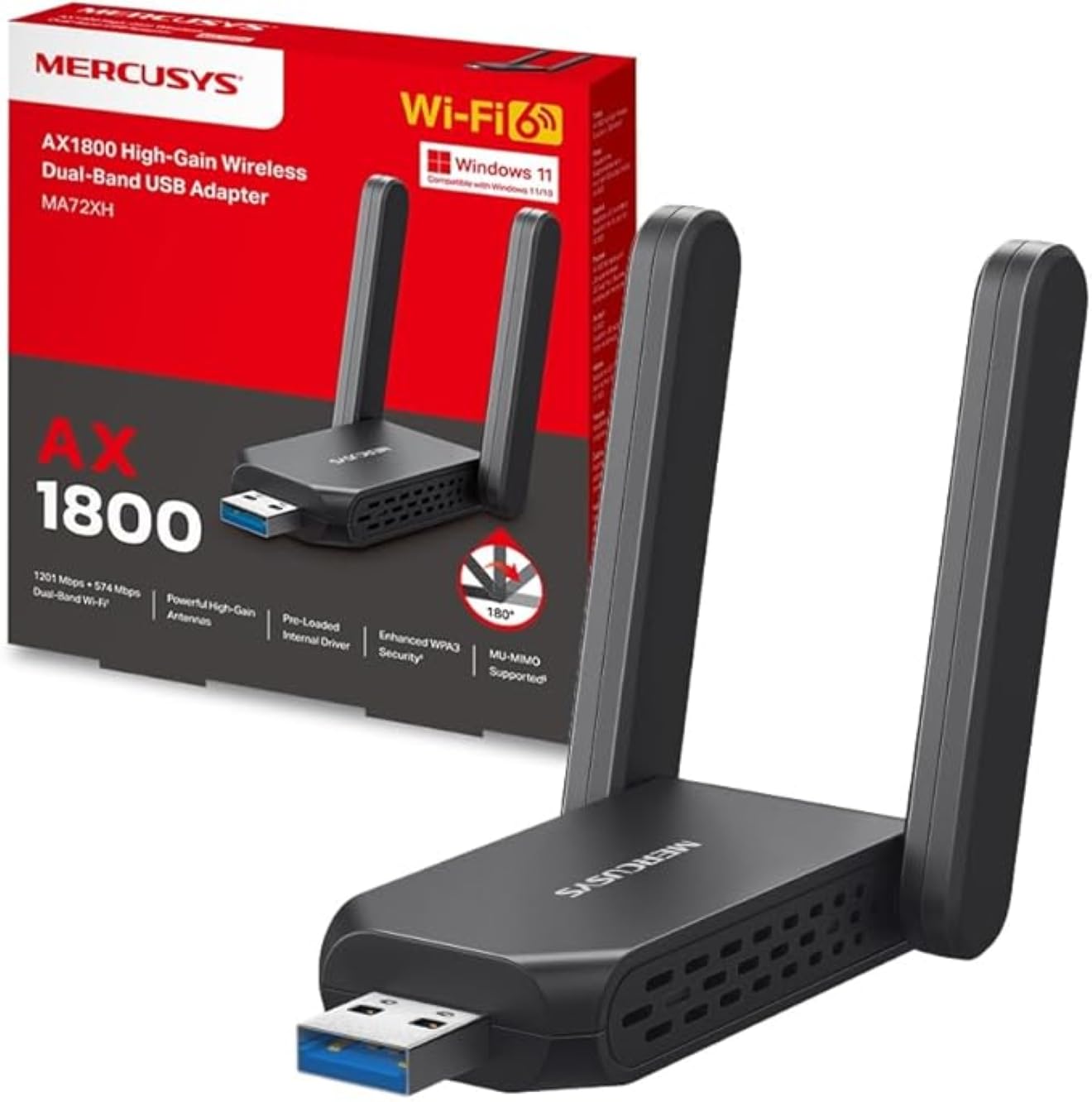
Image: The Mercusys MA72XH WiFi 6 AX1800 USB Adapter, showcasing its compact design and two adjustable external antennas.
Продукт өзгөчөлүктөрү
- Жогорку ылдамдыктагы эки диапазондуу Wi-Fi: Achieves speeds up to 1201 Mbps on the 5 GHz band and 574 Mbps on the 2.4 GHz band, supported by two high-performance antennas.
- Preloaded Internal Driver: Offers simple plug-and-play installation for most Windows 10/11 systems, eliminating the need for manual driver downloads in many cases.
- MU-MIMO технологиясы: Enables the adapter to communicate with multiple devices simultaneously, reducing latency and improving overall network efficiency.
- Enhanced WPA3 Security: Utilizes the latest Wi-Fi security standard to provide robust protection for your network and personal data against unauthorized access.
- USB 3.0 интерфейси: Ensures superior data transfer speeds, optimizing performance for high-definition streaming, online gaming, and large file transfers when paired with Wi-Fi 802.11ax.
- Кеңири шайкештик: Fully compatible with Windows 10 and Windows 11 operating systems.
Орнотуу колдонмосу
Follow these steps to install your Mercusys MA72XH WiFi adapter:
- Адаптерди салыңыз: Plug the MA72XH adapter into an available USB 3.0 port on your desktop or laptop computer. For optimal performance, use a USB 3.0 port (often blue inside).
- Драйверди орнотуу:
- Автоматтык орнотуу: In most cases, Windows 10 or 11 will automatically detect the adapter and install the necessary drivers from its preloaded internal memory. Wait for a notification indicating successful driver installation.
- Кол менен орнотуу (зарыл болсо): If the driver does not install automatically, or if you encounter issues, you may need to download the latest drivers from the official Mercusys support website. Insert the adapter, then navigate to the Mercusys support page for the MA72XH model, download the driver, and follow the on-screen instructions for installation.
- Антенналарды тууралоо: Position the two external antennas for optimal signal reception. Generally, pointing them upwards or slightly angled can improve performance.
- Wi-Fi тармагына туташуу:
- Once the driver is installed, click the Wi-Fi icon in your computer's system tray (usually in the bottom-right corner).
- Жеткиликтүү тармактардын тизмесинен каалаган Wi-Fi тармагын тандаңыз.
- Эгер суралса, тармактын коопсуздук ачкычын (сырсөзүн) киргизиңиз, андан кийин "Туташуу" баскычын басыңыз.
Your Mercusys MA72XH adapter should now be connected to your wireless network.
Иштөө нускамалары
The Mercusys MA72XH operates as a standard Wi-Fi adapter once installed.
- Connecting/Disconnecting: Manage your Wi-Fi connections through the standard Windows network settings. Click the Wi-Fi icon in the system tray to view available networks, connect to a new one, or disconnect from an existing one.
- Кош тилкелүү операция: The adapter automatically selects the optimal band (2.4 GHz or 5 GHz) based on network conditions and router capabilities. If your router broadcasts separate SSIDs for each band, you can manually choose to connect to the 5 GHz network for higher speeds or the 2.4 GHz network for better range.
- MU-MIMO Benefits: When connected to a MU-MIMO compatible router, the MA72XH can process data streams to and from multiple devices simultaneously, leading to more efficient network usage and reduced buffering, especially in busy network environments.
Техникалык тейлөө
To ensure the longevity and optimal performance of your MA72XH adapter:
- Драйвер жаңыртуулары: Periodically check the Mercusys official website for the latest driver updates. Keeping your drivers current can improve performance, stability, and security.
- Физикалык кам көрүү: Keep the adapter clean and free from dust. Avoid exposing it to extreme temperatures, humidity, or direct sunlight. Do not attempt to disassemble the device.
- Антеннаны жайгаштыруу: Ensure the antennas are not obstructed and are positioned for the best possible signal reception. Avoid placing the adapter near large metal objects or other electronic devices that may cause interference.
- Коопсуз туташуу: Always ensure the adapter is firmly seated in the USB port to prevent intermittent connections.
Проблемаларды чечүү
If you encounter issues with your Mercusys MA72XH adapter, refer to the following common solutions:
- Wi-Fi туташуусу жок:
- Ensure the adapter is securely plugged into a functioning USB port. Try a different USB port.
- Verify that Wi-Fi is enabled in your computer's settings.
- Check if the adapter's driver is correctly installed in Device Manager (Windows Key + X > Device Manager > Network adapters). If there's a yellow exclamation mark, reinstall the driver.
- Компьютериңизди жана Wi-Fi роутериңизди өчүрүп-күйгүзүңүз.
- Жай Wi-Fi ылдамдыгы:
- Ensure you are connected to the 5 GHz band if available and your router supports it, as it generally offers higher speeds.
- Move closer to your Wi-Fi router or adjust the adapter's antennas for better signal strength.
- Башка электрондук шаймандардын (мисалы, микротолкундар, зымсыз телефондор) кийлигишүүсүн текшериңиз.
- Адаптериңиздин драйверлерин эң акыркы версияга жаңыртыңыз.
- Тез-тез өчүрүүлөр:
- Ensure the adapter is not loose in the USB port.
- Disable any power-saving features for the USB port in Device Manager (right-click the adapter > Properties > Power Management tab, uncheck "Allow the computer to turn off this device to save power").
- Роутериңиздин микропрограммасын жаңыртыңыз.
- Try connecting to a different Wi-Fi channel on your router to avoid congestion.
- Драйверди орнотуудагы ката:
- Драйверди орнотуу учурунда антивирус программасын убактылуу өчүрүңүз.
- Download the driver directly from the Mercusys official website and run the installer as an administrator.
- Windows операциялык тутумуңуз жаңыртылганын текшериңиз.
Техникалык шарттар
| Бренд | MERCUSYS |
| Модель номери | MA72XH |
| Зымсыз стандарт | IEEE 802.11ax (Wi-Fi 6) |
| Маалыматтарды өткөрүү ылдамдыгы | 1800 Мбит/сек чейин (5 ГГцде 1201 Мбит/сек, 2.4 ГГцде 574 Мбит/сек) |
| Жыштык | Кош диапазон (2.4 ГГц жана 5 ГГц) |
| Интерфейс | USB 3.0 |
| Коопсуздук | WPA3, WPA2, WPA |
| Шайкештик | Windows 10, Windows 11 |
| Антенналар | 2 High-Performance External Antennas |
| Өлчөмдөрү (L x W x Y) | 11.3 x 10.1 x 2.7 см |
| Салмагы | 50 г |
Кепилдик жана колдоо
For warranty information and technical support, please refer to the official Mercusys website or the documentation included with your product. You can typically find support resources, FAQs, and contact information by visiting www.mercusys.com/support and searching for your model (MA72XH).


