1. Киришүү
This manual provides essential information for the proper setup, operation, and maintenance of your UPERFECT Delta Pro Touch 16" 2K Portable Dual Monitor. This innovative device offers a pressure-sensitive touchscreen experience, enhancing productivity and versatility for various computing tasks. Please read this manual thoroughly before using the product.
2. Пакеттин мазмуну
Төмөндө көрсөтүлгөн бардык буюмдар продуктуңуздун таңгагында бар экенин текшериңиз:
- UPERFECT Delta Pro Touch 16" 2K Portable Dual Monitor
- User Manual
- Кубаттуу адаптер
- HDMI кабели
- 2 x USB-C - USB-C кабелдери
- Microsoft MPP-Certified Stylus
3. Продукт бүтүп калдыview
3.1 Физикалык өзгөчөлүктөрү
The UPERFECT Delta Pro Touch monitor features a sleek metal body with thin bezels, providing a modern and robust design. It weighs approximately 2.2 pounds (1 kg) and has dimensions of 0.39 x 12.64 x 8.27 inches when folded, making it highly portable.

Image: UPERFECT Delta Pro Touch Portable Dual Monitor in a folded position, showcasing анын компакттуу дизайны.
3.2 Integrated Stand
The monitor includes an integrated, adjustable stand that folds out from the back. This stand is designed for stability and durability, featuring rubber stoppers to prevent slipping and surface damage. It also supports VESA mounting for alternative setup options.

Сүрөт: Арткы view of the UPERFECT Delta Pro Touch Portable Dual Monitor showing its integrated stand extended.
3.3 Порттор жана башкаруу каражаттары
The monitor is equipped with various ports for connectivity and control:
- USB-C порттору (x2): One port for audio/video signal transmission and another for power input.
- HDMI порту (x1): For video input from devices without USB-C display output.
- 3.5 мм аудио уяча (x1): Кулакчындарга же тышкы динамиктерге аудио чыгаруу үчүн.
- Кубат баскычы: Мониторду күйгүзүү/өчүрүү үчүн.
- Башкаруу баскычтары: To switch display modes and adjust settings such as brightness.
4. Орнотуу
- Мониторду жайгаштыруу: Unfold the integrated stand and adjust it to your desired viewing angle. The monitor can be used in various orientations, including vertical.
- Кубат туташуу: Connect the provided power adapter to a power outlet and then to one of the USB-C ports on the monitor (designated for power input).
- Түзмөк туташуу:
- USB-C туташуу: If your device supports USB-C display output, connect one of the provided USB-C to USB-C cables from your device to the monitor's USB-C audio/video port.
- HDMI туташуу: If your device uses HDMI, connect the provided HDMI cable from your device to the monitor's HDMI port. Note that an additional USB-C cable for power will still be required.
- Күйгүзүү: Press the power button on the side of the monitor to turn it on.
5. Иштөө режимдери
The UPERFECT Delta Pro Touch monitor supports multiple display modes to suit your needs:
- Duplicate Mode (Mirroring): This mode mirrors the content of your primary device's screen onto the portable monitor. It is ideal for presentations or sharing content with others.
- Узартуу режими: This mode expands your desktop across the portable monitor, providing additional screen real estate for multitasking. You can drag windows between your primary device and the portable monitor.
- Портрет багыты: The monitor can be physically rotated and configured in your operating system to display content vertically. This is beneficial for viewузун документтерди, кодду же социалдык медиа каналдарын иштетүү.
Use the control buttons on the side of the monitor or your device's display settings to switch between these modes and adjust display parameters.
6. Негизги өзгөчөлүктөрү
6.1 Pressure-Sensitive Touch Display
Experience the world’s first portable monitor featuring pressure-sensitive touch input. Write, sketch, and annotate naturally with 4096 levels of pen sensitivity, delivering precision for both professionals and creatives.

Image: Close-up of the UPERFECT Delta Pro Touch Portable Dual Monitor showing a hand interacting with the touchscreen using a stylus.
6.2 MPP-Certified Stylus
The included Microsoft MPP-certified stylus ensures ultra-smooth, virtually zero-latency input. From fine sketches to bold strokes, every line feels as natural as pen on paper, perfect for notes, design, and digital art.
Video: This video demonstrates the pressure-sensitive touch capabilities of the UPERFECT Delta Pro Touch monitor, highlighting its responsiveness and precision with the included stylus.
6.3 2.5K өтө тунук чечилиши
Unlike most portable monitors stuck at 1080P, our upgraded 2560×1600 2.5K panel delivers 78% more pixels, sharper text, and finer details for an enhanced visual experience.

Image: The UPERFECT Delta Pro Touch Portable Dual Monitor displaying a vibrant, high-resolution image, emphasizing its 2.5K clarity.
6.4 Dual-Screen Productivity Boost
Work smarter with an innovative vertical dual-screen design. Compare documents, code and debug, edit and preview, or multitask effortlessly without constant tab switching. Twice the screen means twice the efficiency.
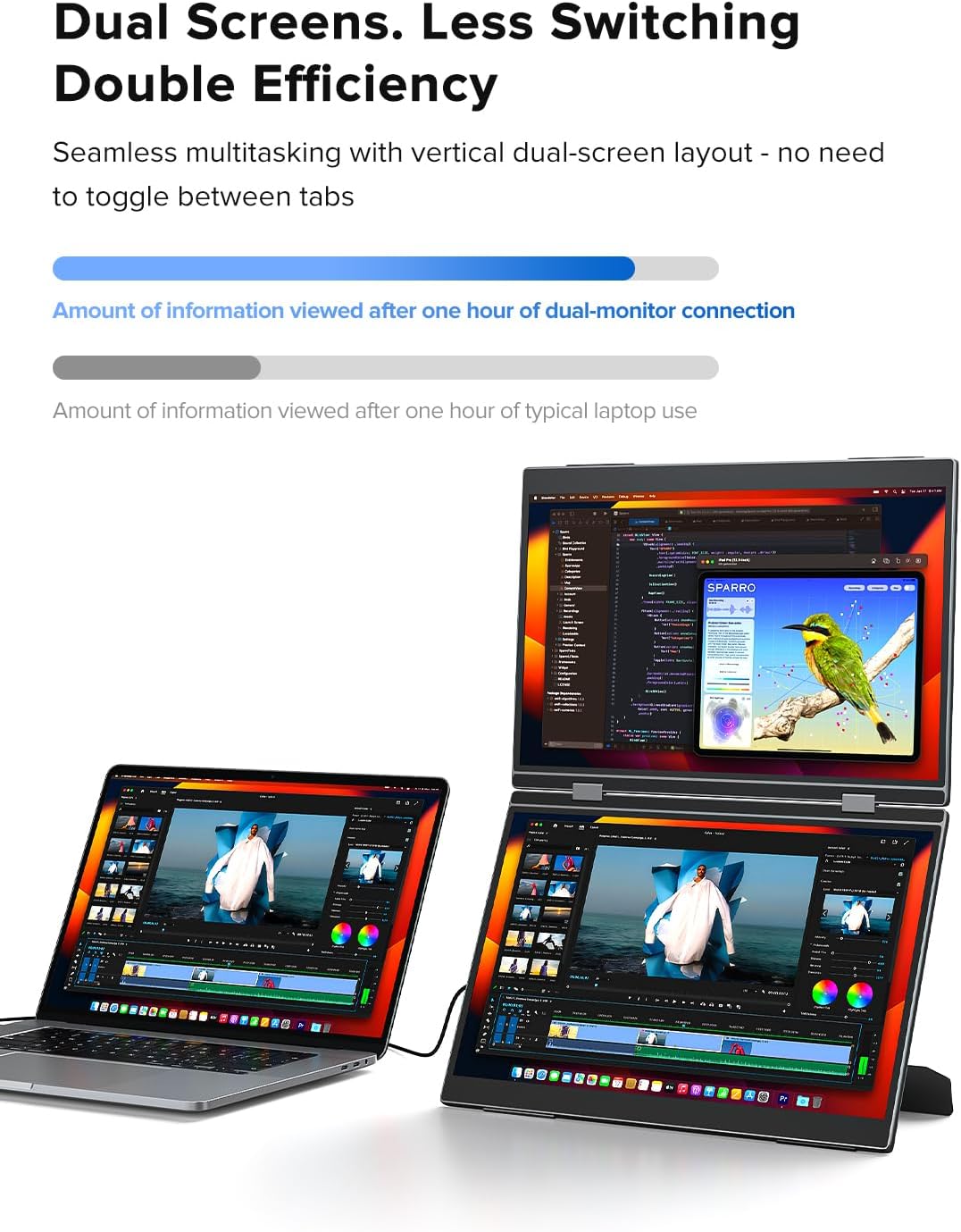
Image: A user working with a laptop and the UPERFECT Delta Pro Touch Portable Dual Monitor in a stacked vertical configuration, demonstrating enhanced productivity.
7. Техникалык шарттар
| Өзгөчөлүк | Деталь |
|---|---|
| Продукциянын өлчөмдөрү | 0.39 x 12.64 x 8.27 дюйм |
| Элемент Салмагы | 2.2 фунт |
| Өндүрүүчү | МЫКТЫ |
| Элемент моделинин номери | Delta Pro Touch |
| Туруктуу экран дисплей өлчөмү | 16 дюйм |
| Аспект катышы | 16:10 |
| Резолюция | 2560 x 1600 Pixels (2.5K QXGA Wide) |
| Сүрөттүн жарыктыгы | 400 Кандела (нитс) |
| Screen Surface Description | Мт |
8. Техникалык тейлөө
- Экранды тазалоо: Бир аз жумшак, түксүз кездемени колдонуңуз dampсуу же экран тазалоочу эритме менен эритиңиз. Катуу химиялык заттардан же абразивдүү материалдардан алыс болуңуз.
- Жалпы тазалоо: Монитордун сыртын жумшак, кургак чүпүрөк менен сүртүңүз.
- Сактагыч: When not in use, fold the monitor to protect the screens and store it in a safe, dry place away from extreme temperatures.
- Колдонуу: Handle the monitor with care to avoid dropping or impacting it, which could damage the screens or internal components.
9. Кыйынчылыктарды
If you encounter issues with your UPERFECT Delta Pro Touch monitor, please refer to the following common solutions:
- Дисплей/сигнал жок:
- Бардык кабелдердин (электр жана видео) бекем туташтырылганын текшериңиз.
- Монитор күйгүзүлгөнүн текшериңиз.
- Check your device's display settings to ensure the external monitor is detected and configured correctly (e.g., extended or duplicated).
- Try a different USB-C or HDMI cable.
- Сенсордук экран жооп бербейт:
- Ensure the USB-C cable used for video transmission also supports touch data (most modern USB-C cables do).
- Restart both the monitor and your connected device.
- Check for any driver updates for your device's graphics or touch input.
- Кубат маселеси:
- Confirm the power adapter is correctly plugged into both the wall outlet and the monitor's power input USB-C port.
- If using a power bank, ensure it provides sufficient power output.
- Image Quality Issues (Flickering, Distorted):
- Adjust the display settings (resolution, refresh rate) on your connected device.
- Видео кабелдин бузулбагандыгын текшериңиз.
10. Кепилдик жана колдоо
UPERFECT offers a 100% money-back guarantee within 30 days and a 90-day replacement policy for product issues. A 12-month warranty is provided for any manufacturing defects. Professional technical support is available to ensure a worry-free experience.
For any queries, problems, or support needs, please contact UPERFECT customer service via support@uperfectmonitor.com.


