Introduction
Thank you for choosing the Blukar K9129 Rechargeable HeadlampБул колдонмо башыңызды коопсуз жана натыйжалуу колдонуу үчүн маанилүү маалыматты беретampСураныч, колдонуудан мурун аны кунт коюп окуп чыгып, келечекте колдонуу үчүн сактап коюңуз.
Продукт бүттүview
Негизги өзгөчөлүктөрү
- Кош түстүү температуралар: Features both white and warm light options for various environments.
- Бир нече жарык режимдери: Offers 12 modes, including standard and motion sensor modes, with XPG White, XPG Warm, COB White, XPG+COB White, COB Red, and COB Red Strobe.
- Кыймыл сенсорун башкаруу: Allows hands-free operation by waving your hand within 15cm.
- USB-C кайра заряддалуучу: Built-in 1200mAh battery provides up to 30 hours of runtime on a single charge.
- Өнүгүү жарыктыгы: Stepless dimming from 100% to 30% with memory function.
- Adjustable & Comfortable: 45° жөнгө салынуучу лamp head and a comfortable, washable elastic headband.
- IPX5 Суу өткөрбөйт: Designed to resist water splashes from all angles.
Пакеттин мазмуну
- Blukar K9129 Headlamp
- USB-C заряддоо кабели
- Helmet Clips (4x)
- Колдонуучунун Колдонмосу (бул документ)
Жайгашуу
1. Баштапкы заряддоо
Биринчи колдонуудан мурун, башты толук заряддаңызampБерилген USB-C кубаттоочу кабелин баш жагына туташтырыңыз.amp's charging port and to a USB power source (e.g., AC charger, power bank, computer). The 4 battery indicators will show charging progress. A full charge typically takes 2-3 hours.
Сүрөт: башamp being charged via its USB-C port. It can be connected to various USB power sources like an AC adapter, power bank, or computer.
2. Баш боосун тууралоо
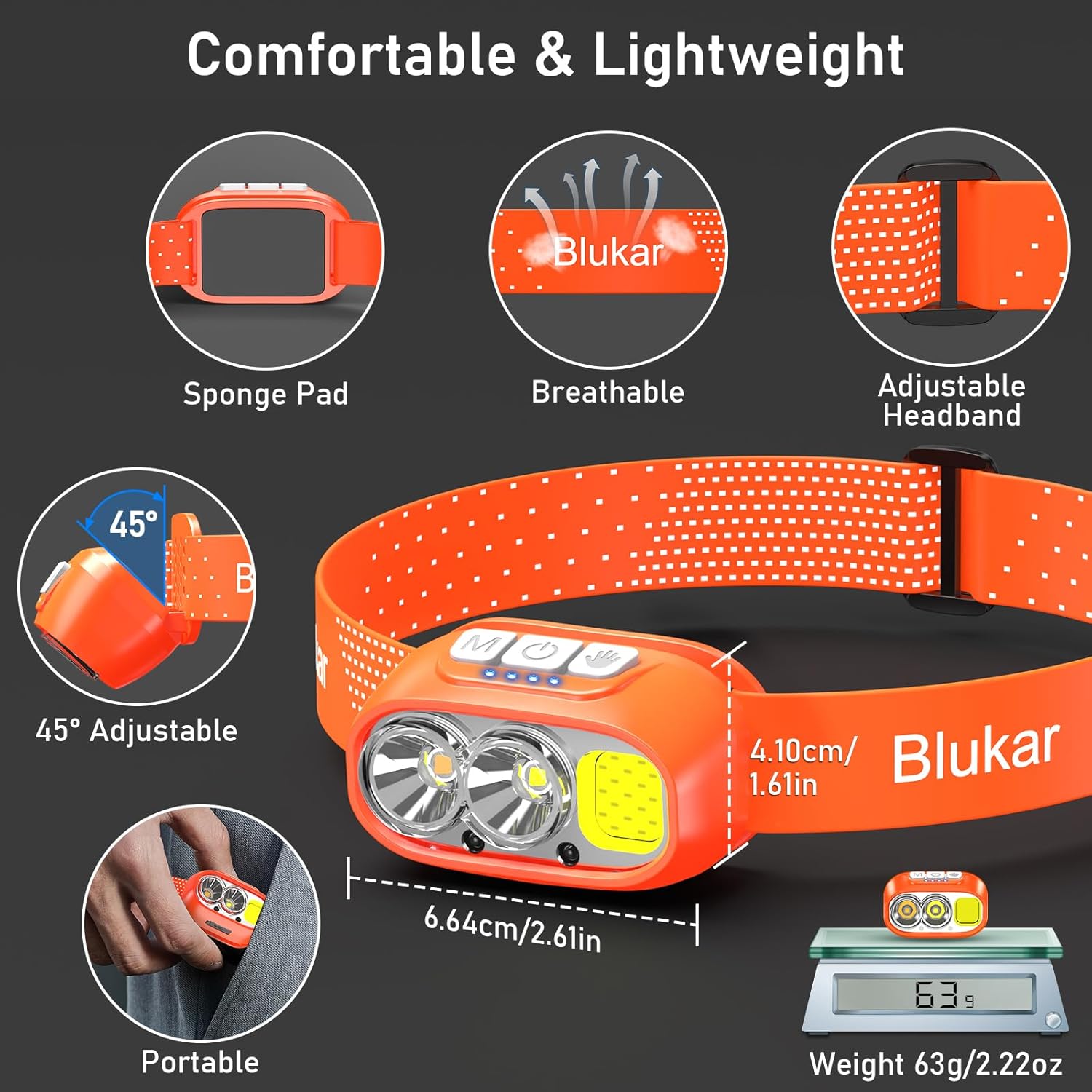
The elastic headband is adjustable to fit various head sizes. Adjust the length for a comfortable and secure fit. The headband is also removable and washable for hygiene.

Image: Details of the headlamp's comfortable and lightweight design, showing the adjustable headband, sponge pad, and 45-degree tilt capability.
3. Attaching to a Helmet (Optional)
Use the included 4 helmet clips to securely attach the headlamp to a helmet for a stable fit during activities.
Иштөө нускамалары
Баскыч функциялары

Сүрөт: Башкы беттин жакындан тартылган сүрөтүamp's top panel, highlighting the three independent control buttons: 'M' for Normal Mode, a hand icon for Sensor Mode, and a power icon for Power & Dimmer.
- Кадимки режим баскычы (M): Short press to cycle through standard lighting modes.
- Сенсор режиминин баскычы (кол сүрөтчөсү): Short press to activate motion sensor mode (green light indicates activation). Once active, wave your hand within 15cm to turn the light on/off.
- Кубат жана күңүрттөө баскычы (Кубат сүрөтчөсү):
- Short press to turn the light on/off.
- Long press to adjust brightness steplessly (100%-30%).
- Features a memory function for the last used brightness and mode.
Жарык режимдери
Башчыamp offers 12 lighting modes, accessible via the Normal Mode button and Sensor Mode button.

Image: Visual representation of the 12 lighting modes available, including various white light combinations, red light, and sensor modes. It also illustrates the stepless dimming function.
- Standard Modes (6): XPG White Light, XPG Warm Light, COB White Light, XPG+COB White Light, COB Red Light, COB Red Light Strobe.
- Sensor Modes (6): The same 6 modes as above, activated by the Sensor Mode button.
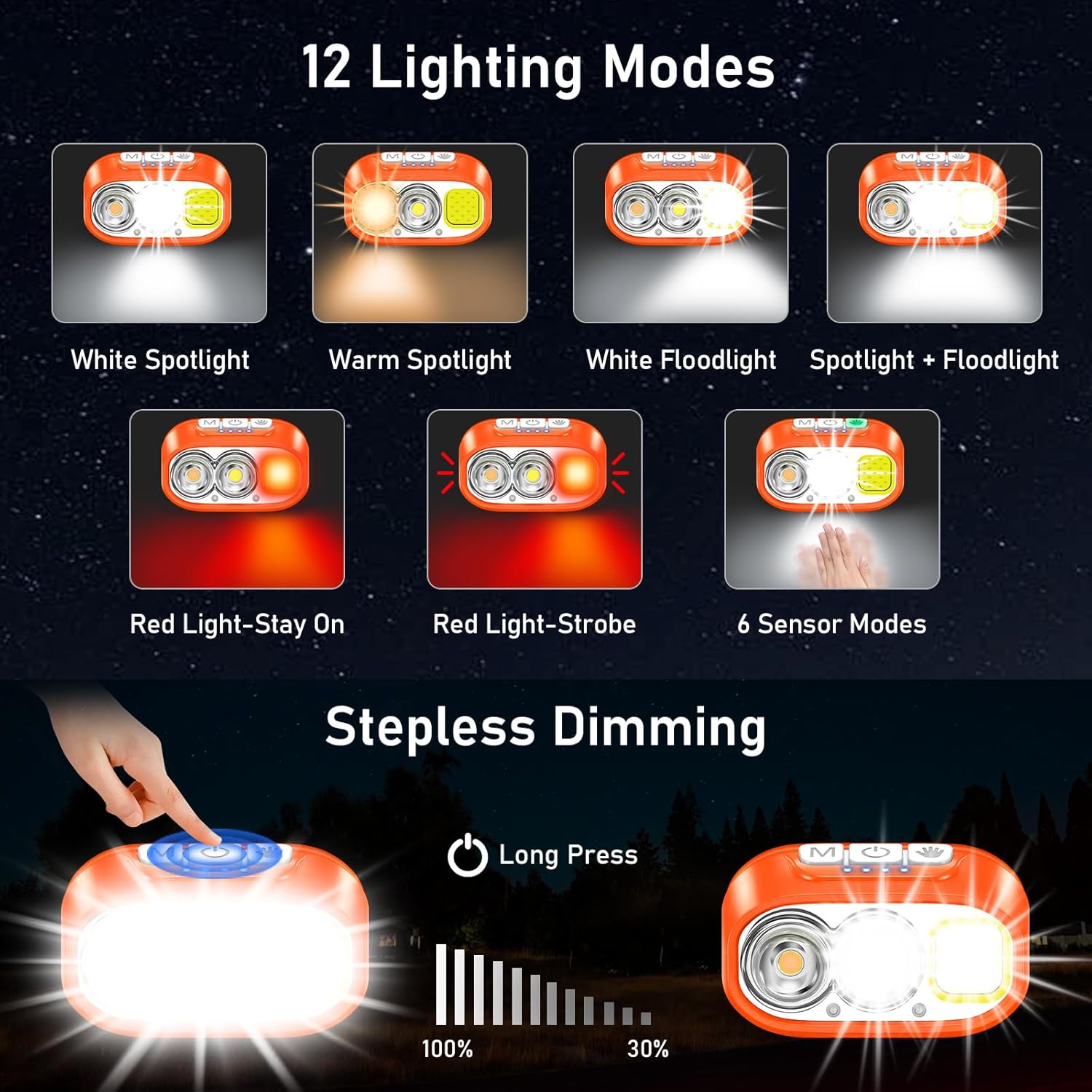
Image: Illustration of the three main light sources: White Light for general use, Warm Light for challenging weather conditions like fog or snow, and Red Light for specialized uses like night fishing or emergency signaling.
Кыймыл сенсорунун иштеши
To use the motion sensor, press the Sensor Mode button. A green indicator light will illuminate. Once active, simply wave your hand within 15cm (approximately 6 inches) in front of the headlamp to toggle the light on or off without touching the buttons.
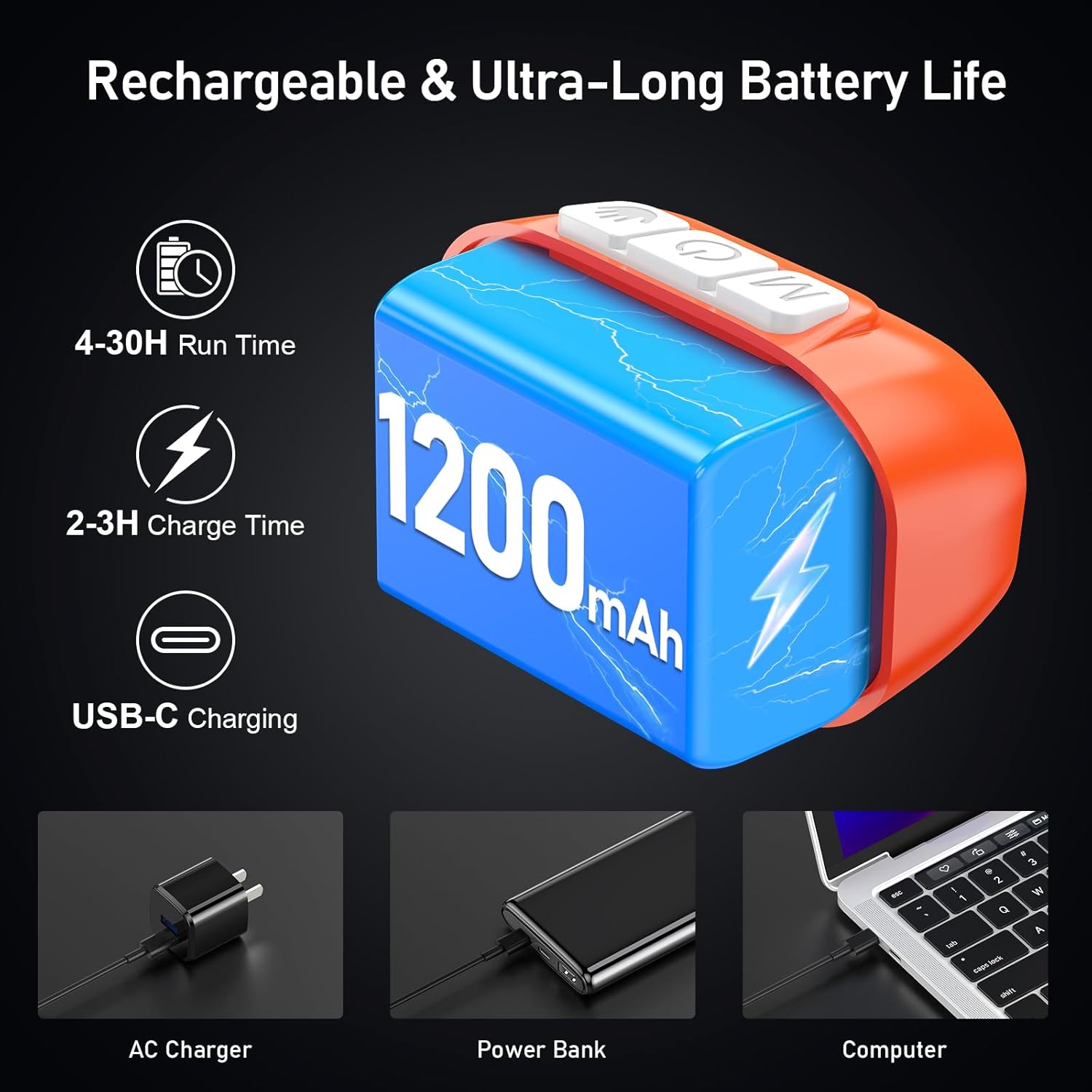
Image: A person demonstrating the motion sensor mode, turning the headlamp on and off with a hand wave while working on a car engine, highlighting the 15cm sensing distance.
Нур бурчту тууралоо
Башчыamp unit can be tilted up or down by 45° to direct the light precisely where needed.
Сүрөт: башamp unit is shown with an arrow indicating its 45-degree adjustable tilt capability.
Техникалык тейлөө
- Тазалоо: The elastic headband is removable and washable. Clean the headlamp денеси жумшак, гamp кездеме. Абразивдүү тазалагычтарды же эриткичтерди колдонбоңуз.
- Батареяга кам көрүү: Батареянын иштөө мөөнөтүн узартуу үчүн башты заряддаңызamp regularly, even if not in frequent use. Avoid fully discharging the battery for extended periods.
- Сактагыч: Башты сактаңызamp күн нурунан жана экстремалдык температурадан алыс салкын, кургак жерде.
- Суу каршылык: Башчыamp is IPX5 waterproof, meaning it can resist water splashes. Do not submerge the headlamp сууда.
Сүрөт: башamp is shown with water splashing over it, illustrating its IPX5 waterproof capability, which protects against water jets from any direction.
Проблемаларды чечүү
| Көйгөй | Мүмкүн себеп | Чечим |
|---|---|---|
| Headlamp turns off unexpectedly in sensor mode. | Sensor reacting to unintended movement or objects. | Switch off the sensor mode if not needed, or ensure no objects are passing within 15cm of the sensor. |
| Headlamp күйбөйт. | Батарея түгөнүп калды. | Башты заряддаңызamp берилген USB-C кабелин толугу менен колдонуу. |
| Жарыктын чыгышы күңүрт. | Low battery or dimming function activated. | Recharge the battery. Long press the Power & Dimmer button to increase brightness. |
| Headlamp заряддалбай жатат. | Кабель же кубат булагы туура эмес. | Try a different USB-C cable or a different USB power source. Ensure the cable is securely connected. |
Техникалык шарттар
| Модель номери | K9129 |
| Бренд | Blukar |
| Материал | ABS |
| Түс | Ачык күрөң |
| Продукциянын өлчөмдөрү | 2.61"D x 1.61"W x 1.38"H |
| Элемент Салмагы | 84 грамм (2.96 унция) |
| Батарея сыйымдуулугу | 1200mAh |
| Батарея түрү | Литий полимери |
| Заряддоо убактысы | 2-3 саат |
| Runtime | 4 саатка чейин (өтө жарык режим), 30 саатка чейин (жумшак жарык режими) |
| Суу өткөрбөйт рейтинги | IPX5 |
| Камтылган компоненттер | USB кабели |
Кепилдик жана колдоо
Blukar products are designed for reliability and performance. For any questions, technical support, or warranty inquiries, please contact Blukar customer service through the retailer where the product was purchased or visit the official Blukar webсайт.
Кепилдик дооматтары үчүн сатып алганыңыздын далилин сактап коюңуз.


