1. Киришүү
This manual provides detailed instructions for the installation, operation, and maintenance of your AQUBT Smart RGB Ceiling Fan with Lights and Remote, Model 1065. Please read this manual thoroughly before installation and use to ensure safe and efficient operation. Keep this manual for future reference.

Image 1.1: The AQUBT Smart RGB Ceiling Fan with Lights and Remote.
2. Коопсуздук маалыматы
Төмөнкү коопсуздук чараларын сактаңыз, зыян же буюмдун бузулушуна жол бербөө үчүн:
- Орнотуудан, тазалоодон же тейлөөдөн мурун электр кубаты өчүрүлгөнүн текшериңиз.
- Орнотуу жергиликтүү электр эрежелерине ылайык квалификациялуу электрик тарабынан аткарылышы керек.
- Вентиляторду шыптын устунуна же желдеткичтин салмагын көтөрө алган ылайыктуу тирөөч конструкцияга бекем орнотуңуз.
- Do not connect the fan to a dimmer switch or a variable speed switch designed for traditional fans. Use only a standard on/off switch.
- Keep hands, hair, and clothing clear of the fan blades during operation.
- Бул желдеткич имараттын ичинде гана колдонуу үчүн иштелип чыккан.
- The protective grille is designed to prevent accidental contact with rotating blades, making it suitable for rooms with children and pets.

Image 2.1: Correct and incorrect switch types for installation.
3. Пакеттин мазмуну
Орнотууну баштоодон мурун бардык компоненттердин бар экенин жана бузулбаганын текшериңиз. Эгерде кандайдыр бир тетиктер жок болсо же бузулган болсо, кардарларды колдоо кызматына кайрылыңыз.
- AQUBT Smart RGB Ceiling Fan (Model 1065)
- Алыстан башкаруу
- Mounting Hardware (Self-tapping screws, Expansion tubes, Expansion screws, Junction box screws, Washers, Wire connectors)
- Көрсөтмө (бул документ)

Image 3.1: Included accessories and fan components.
4. Орнотуу жана орнотуу
The AQUBT Smart RGB Ceiling Fan is designed for flush mount installation. No assembly of fan blades is required as it features a bladeless design with a protective grille.
4.1 Алдын ала орнотуу текшерүү тизмеси
- Ensure power is turned off at the circuit breaker before starting.
- Бардык керектүү шаймандардын (отвертка, зым чечкич, тепкич ж.б.) бар экенин текшериңиз.
- Verify the mounting location can support the fan's weight (approximately 6 pounds).
4.2 Орнотуу кадамдары
- Монтаждык кронштейнди орнотуу: Secure the mounting bracket to the ceiling junction box using the provided screws and washers. Ensure it is firmly attached.
- Зымдар: Connect the fan's electrical wires to the household wiring according to standard electrical codes (e.g., black to black, white to white, ground to ground). Use the included wire connectors.
- Fan Housing Attachment: Carefully lift the fan housing and attach it to the mounting bracket. Secure it with the appropriate screws.
- Электр энергиясын калыбына келтирүү: Once the fan is securely mounted and wired, restore power at the circuit breaker.
5. Иштөө нускамалары
Your AQUBT Smart RGB Ceiling Fan offers multiple control methods for convenience.
5.1 Алыстан башкаруунун иштеши
The included remote control provides direct access to all fan and light functions.

Image 5.1: Remote control functions.
- ON/OFF баскычы: Вентиляторду жана жарыкты күйгүзөт же өчүрөт.
- Желдеткич КҮЙГҮЗҮҮ/ӨЧҮРҮҮ: Controls the fan motor independently.
- Желдетүүчү ылдамдык (1-6): Adjusts the fan speed from 1 (low) to 6 (high).
- Алга/артка: Changes the direction of airflow (summer/winter mode).
- Main Light ON/OFF: Controls the main white light independently.
- Жарыктык +/-: Adjusts the brightness of the light (10% to 100%).
- Түс температурасы +/-: Cycles through warm, neutral, and cool white light temperatures.
- RGB чөйрө жарыгы: Activates and cycles through 1000+ RGB color modes.
- Түнкү жарык режими: Activates a low-brightness light setting.
- Timer Mode (1-4H): Sets a timer for the fan and/or light to turn off automatically after 1, 2, 3, or 4 hours.
5.2 App Control (Tuya Smart Life)
For advanced features and remote access, download the Tuya Smart Life app on your smartphone.
- Колдонмону жүктөп алуу: Издөө "Tuya Smart" or "Smart Life" in your app store.
- Жупташтыруу: Follow the in-app instructions to pair your fan with your 2.4GHz Wi-Fi network.
- Өзгөчөлүктөрү: The app allows for global remote control, one-touch preset modes (Away/Home/Sleep), precision countdown timers, customizable recurring timer functions, and access to 1000+ RGB color modes. The power outage mode ensures lights remain off after restoration.

Image 5.2: Remote control via mobile application.

Image 5.3: App-controlled timer function.
5.3 Үн менен башкаруу (Alexa/Google Home)
The fan is compatible with Amazon Alexa and Google Home for convenient voice commands.
- Үн жардамчысына туташыңыз: Link your Tuya Smart Life account to your Alexa or Google Home app.
- Үн буйруктары: Use commands such as "Alexa, turn on the ceiling fan," "Hey Google, set the fan speed to 3," or "Alexa, change the ceiling fan light to blue."

Image 5.4: Voice control integration with smart home devices.
5.4 Жарыктын өзгөчөлүктөрү
- Өнүгүү LED: Жарыктыкты 10%дан 100%ке чейин тууралаңыз.
- Түс температурасы: Choose from warm, neutral, or cool white light (e.g., 3000K-6500K range).
- RGB чөйрө жарыгы: Access over 1000 vibrant RGB color modes to set various moods.

Image 5.5: Lighting features including brightness, RGB, and color temperature adjustments.
5.5 Fan Features
- 6 ылдамдыктагы шамал: Select from six fan speeds for optimal comfort.
- Reversible аба агымы: Change fan direction for summer (downward airflow for cooling) or winter (upward airflow for better air circulation).
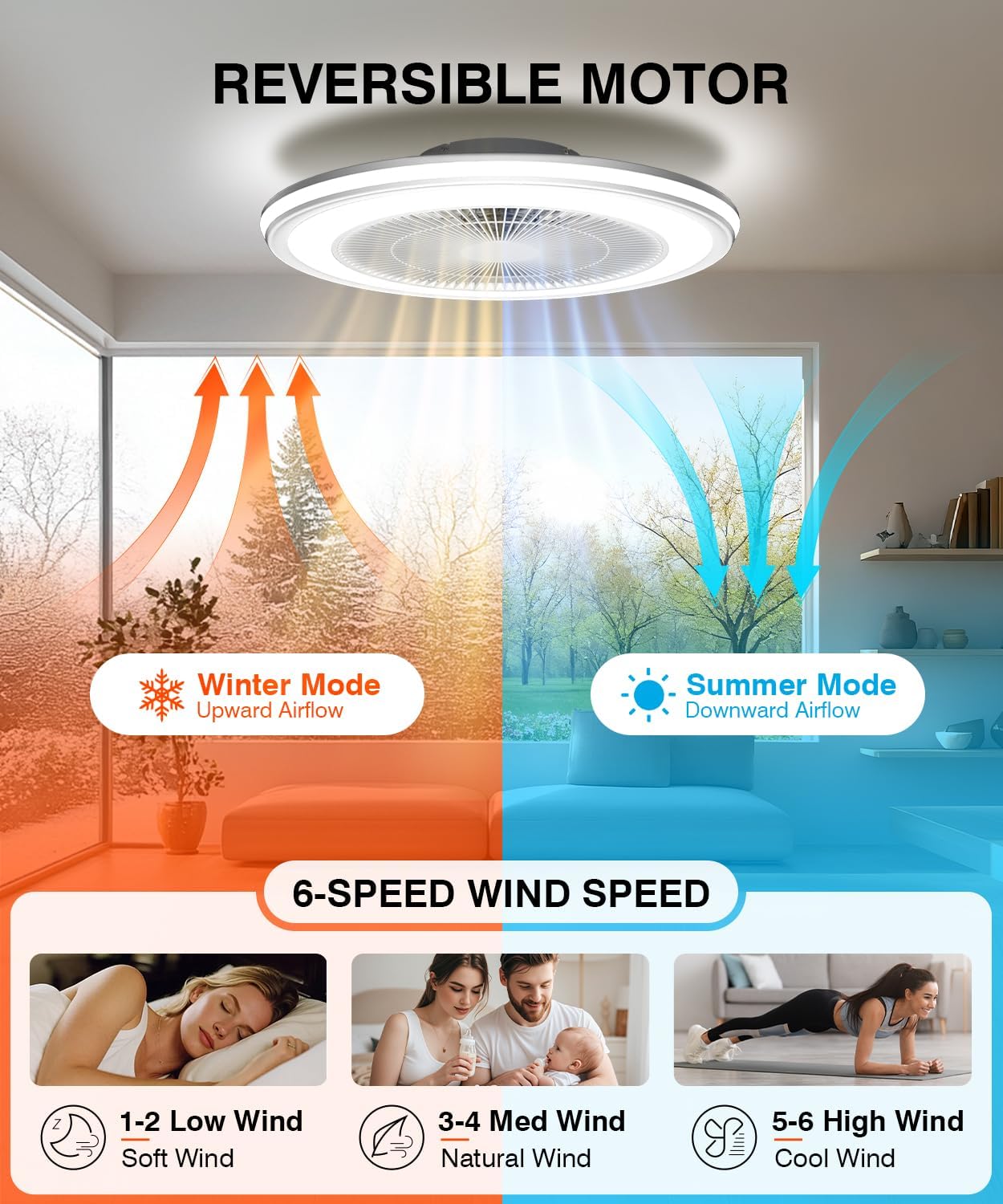
Image 5.6: Reversible motor and 6-speed fan settings.
6. Техникалык тейлөө
Үзгүлтүксүз тейлөө сиздин шыптын желдеткичиңиздин узак иштөөсүн жана оптималдуу иштешин камсыз кылат.
- Тазалоо: Тазалоодон мурун электрди өчүрүңүз. жумшак колдонуу, damp cloth to wipe down the fan housing and grille. Do not use abrasive cleaners or solvents.
- Текшерүү: Бардык бекитүүчү бурамалар менен туташуулардын бекем экенине ынануу үчүн мезгил-мезгили менен текшерип туруңуз.
- Майлоонун кереги жок: Желдетүүчү мотор туруктуу майлануучу жана кошумча майлоону талап кылбайт.
7. Кыйынчылыктарды
Эгер күйөрманыңызда көйгөйлөргө туш болсоңуз, төмөнкү жалпы көйгөйлөрдү жана чечимдерди караңыз:
| Көйгөй | Мүмкүн себеп | Чечим |
|---|---|---|
| Желдеткич күйбөйт. | Электр энергиясы жок; зымдары бош; пульттун батареясы аз. | Check circuit breaker; ensure all wires are securely connected; replace remote control batteries. |
| Жарык күйбөйт. | No power supply; loose wiring; light function off on remote/app. | Check power; verify wiring; ensure light is activated via remote or app. |
| Пульт иштебей жатат. | Low battery; obstruction; pairing issue. | Replace remote batteries; ensure no obstructions between remote and fan; re-pair remote if necessary (refer to specific pairing instructions if provided separately). |
| Колдонмону башкаруу иштебей жатат. | Wi-Fi connectivity issue; incorrect pairing; app outdated. | Ensure 2.4GHz Wi-Fi is active; re-pair fan with app; update app to the latest version. |
| Желдетүүчү адаттан тыш үн чыгарат. | Loose mounting; internal component issue. | Check mounting screws for tightness; if noise persists, contact customer support. |
8. Техникалык шарттар
| Өзгөчөлүк | Спецификация |
|---|---|
| Модел | 1065 |
| Бренд | AQUBT |
| Өлчөмдөрү (L x W x Y) | 20" x 20" x 6.5" |
| Материал | Акрил |
| Жарык булагы | Интегралдык LED |
| Жарыктык | Up to 4800 Lumens (Dimmable 10%-100%) |
| Түс температурасы | Warm/Neutral/Cool (3000K-6500K) |
| RGB режимдери | 1000+ Ambient Light Colors |
| Күйөрмандардын ылдамдыгы | 6-тез |
| Аба агымынын багыты | Reversible (Summer/Winter) |
| Контролдоо ыкмалары | Remote Control, Mobile App (Tuya Smart Life), Voice Control (Alexa/Google Home) |
| Wi-Fi шайкештиги | 2.4 ГГц |
| Элемент Салмагы | 6 фунт |
| Ассамблея талап кылынат | Жок |
9. Кепилдик жана колдоо
AQUBT is committed to providing quality products and customer satisfaction.
- Кепилдик: This product includes a two-year quality guarantee service from the date of purchase.
- Техникалык колдоо: We offer 24-hour online technical support. For assistance, please refer to the contact information provided with your purchase or visit the official AQUBT webсайт.

Image 9.1: AQUBT Warranty and Support Information.


