1. Киришүү
This manual provides detailed instructions for the setup, operation, maintenance, and troubleshooting of your DIERYA DK68 Wireless Mechanical Keyboard. Please read this manual thoroughly before using the product to ensure proper functionality and to maximize your user experience.
2. Пакеттин мазмуну
Пакетте бардык буюмдар бар экенин текшериңиз:
- 1 x DIERYA DK68 68-Key Wireless Mechanical Keyboard
- 1 x 2.4G зымсыз кабыл алгыч
- 1 x USB-C - USB-A кабели
- 1 х Инструкция (бул документ)
3. Продукт бүтүп калдыview
The DIERYA DK68 is a compact 68-key mechanical keyboard featuring triple-mode connectivity (wired USB-C, 2.4GHz wireless, and Bluetooth 5.0). It is equipped with linear red mechanical switches and customizable RGB backlighting.

Image: The DIERYA DK68 Wireless Mechanical Keyboard in white, showcasing анын компакттуу 68 баскычтуу жайгашуусу жана RGB жарыктандыруусу.
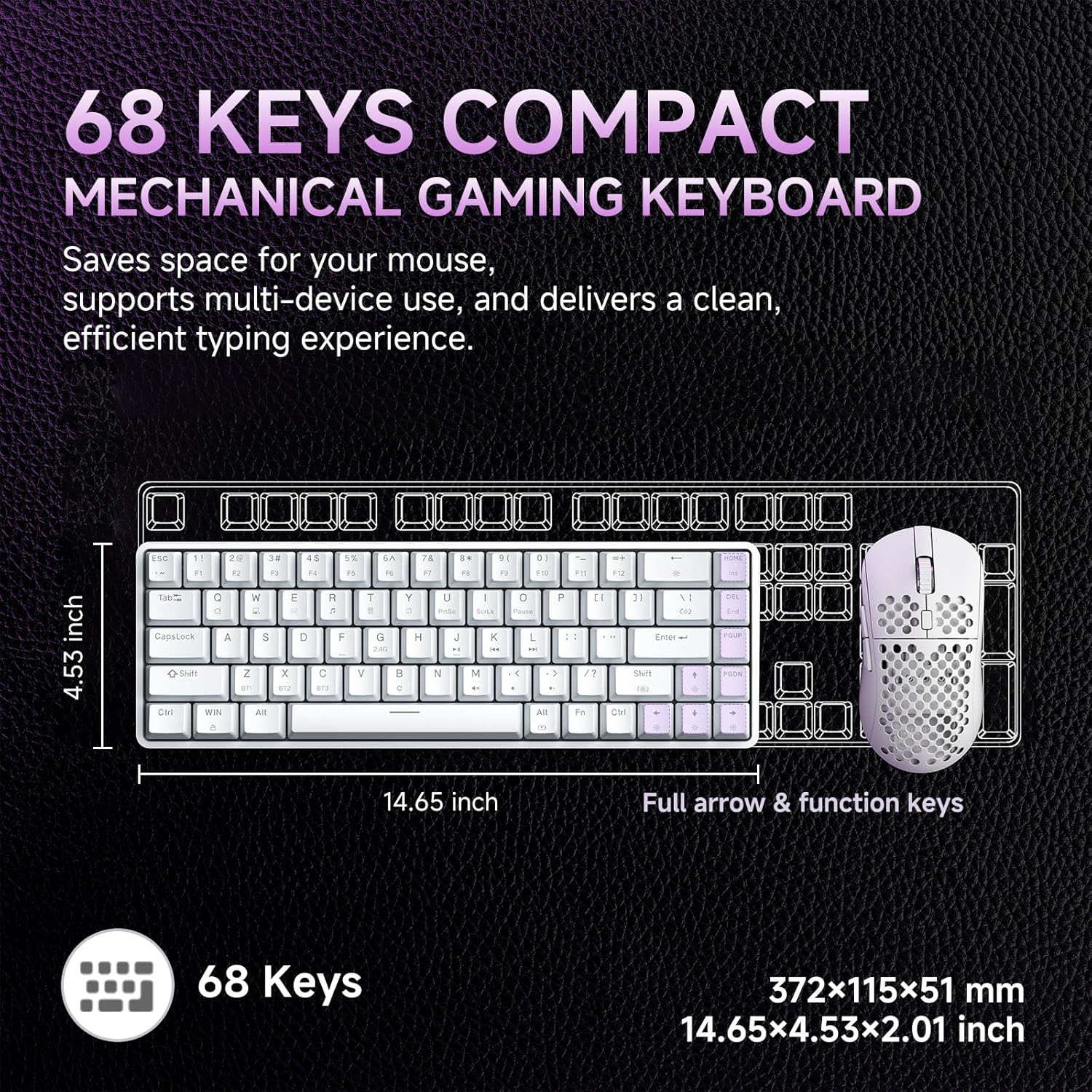
Image: A diagram illustrating the compact dimensions of the DIERYA DK68 keyboard, measuring 14.65 inches in length and 4.53 inches in width.
4. Орнотуу
4.1 Зымдуу туташуу (USB-C)
- Берилген USB-C кабелин клавиатуранын USB-C портуна туташтырыңыз.
- USB-C кабелинин экинчи учун компьютериңиздеги жеткиликтүү USB-A портуна туташтырыңыз.
- Баскычтоп автоматтык түрдө таанылып, колдонууга даяр болот.
4.2 2.4 ГГц зымсыз туташуу
- Locate the 2.4G wireless receiver included in the package.
- Plug the 2.4G receiver into an available USB-A port on your computer.
- Turn on the keyboard using the switch located on the back or side of the keyboard.
- Клавиатура автоматтык түрдө кабыл алгычка туташышы керек. Эгер андай болбосо, баскычын басыңыз Fn + R жупташууну баштоо.
4.3 Bluetooth 5.0 туташуу
Баскычтоп үч Bluetooth түзмөгүнө чейин туташууну колдойт.
- Баскычтоп күйгүзүлгөнүн текшериңиз.
- Басып кармап туруңуз Fn + Z, Fn + X, же Fn + C for 3-5 seconds to enter pairing mode for Bluetooth device 1, 2, or 3 respectively. The indicator light will flash rapidly.
- Түзмөгүңүздө (компьютер, ноутбук, планшет, смартфон) Bluetooth иштетиңиз жана жаңы түзмөктөрдү издеңиз.
- Select "DIERYA DK68" from the list of available devices to pair.
- Once paired, the indicator light will stop flashing and remain solid for a few seconds.
- Жупташтырылган Bluetooth түзмөктөрүнүн ортосунда которулуу үчүн басыңыз Fn + Z, Fn + X, же Fn + C кыскача.

Image: Visual representation of the DIERYA DK68's triple-mode connectivity options: USB-C, Bluetooth 5.0, and 2.4GHz wireless, compatible with various operating systems.
5. Иштөө нускамалары
5.1 Негизги баскычтоп функциялары
The DK68 features a 68-key layout. Many standard functions are accessed via the Fn ачкыч айкалыштары.
- Fn + 1-12: F1-F12 function keys.
- Fn + Q/W/E/R/T/Y: Multimedia controls (specific functions may vary).
- Fn + Жебе баскычтары: Page Up, Page Down, Home, End.
- Fn + Backspace: Delete.
5.2 RGB жарыкты башкаруу
The keyboard offers 20 built-in RGB lighting effects and 16.8 million customizable colors.
- Fn + Backspace: Turn backlight On/Off.
- Fn+Shift: Switch light colors (for certain modes).
- Fn + |\: Switch light modes (cycle through 20 effects).
- Fn + Өйдө жебе: Жарыктыкты жогорулатуу.
- Fn + Төмөн жебе: Decrease brightness.
- Fn + Сол жебе: Decrease light speed.
- Fn + Оңго жебе: Increase light speed.

Image: A visual guide to controlling the RGB backlighting on the DIERYA DK68 keyboard using Fn key combinations for mode, color, brightness, and speed adjustments.
5.3 Батареяны башкаруу
The keyboard is equipped with a 3000mAh lithium battery.
- Заряддоо: Connect the keyboard via the USB-C cable to a power source (computer USB port or USB wall adapter). The charging indicator light will show charging status.
- Батареянын иштөө мөөнөтү: Up to 12 hours with backlighting on, and up to 333 hours with backlighting off.
- Автоматтык уйку: The keyboard enters auto-sleep mode after 3 minutes of inactivity to conserve power. Press any key to wake it up.

Image: An infographic detailing the 3000mAh battery capacity, showing 12 hours of use with lights on, 333 hours with lights off, 3-minute auto-stop, and Type-C charging.
5.4 Программалык камсыздоону ыңгайлаштыруу
For advanced customization of keys, macros, and lighting effects, download the dedicated software from the official DIERYA website. This software allows for:
- 16.8 million customizable lighting colors.
- Music-sync lighting effects.
- Full-key macro programming.
- Macro recording and editing.
- Custom shortcut keys.
6. Техникалык тейлөө
- Тазалоо: Use a soft, dry cloth to wipe the keyboard surface. For deeper cleaning, use compressed air to remove dust and debris from between keycaps. Avoid using liquid cleaners directly on the keyboard.
- Сактагыч: Клавиатураны күн нурунан жана экстремалдык температурадан алыс, салкын, кургак жерде сактаңыз.
- Клавиатураны алып салуу: If removing keycaps for cleaning or switch replacement, use a keycap puller to avoid damage.
7. Кыйынчылыктарды
| Маселе | Чечим |
|---|---|
| Баскычтоп жооп бербей жатат (Зымдуу) | USB-C кабели клавиатурага жана компьютерге бекем туташып турганын текшериңиз. Башка USB портун же кабелин колдонуп көрүңүз. |
| 2.4GHz wireless connection unstable or not connecting | Ensure the 2.4G receiver is plugged in and the keyboard is powered on. Re-pair by pressing Fn + R. Move the receiver closer to the keyboard. Avoid interference from other wireless devices. |
| Bluetooth байланышы көйгөйлөрү | Ensure Bluetooth is enabled on your device. Re-enter pairing mode (Fn + Z/X/C) and re-pair. Forget the device on your computer/phone and try pairing again. Ensure the keyboard is charged. |
| RGB backlighting not working | Басыңыз Fn + Backspace to toggle the backlight. Check brightness settings (Fn + Өйдө/Төмөн жебе). Ensure the keyboard battery is not critically low. |
| Keys not registering (Anti-Ghosting) | The keyboard features full N-Key Rollover (NKRO). If specific keys are not registering, try cleaning under the keycap or contact support. |
| Баскычтоп кубатталбай жатат | Verify the USB-C cable and power source are functional. Try a different cable or charging port. |
8. Техникалык шарттар
| Өзгөчөлүк | Деталь |
|---|---|
| Модел | DIERYA DK68 |
| Байланыш | USB-C Wired, 2.4GHz Wireless, Bluetooth 5.0 |
| Которуу түрү | Linear Red Mechanical Switches |
| Ачкыч саны | 68 баскыч (60% жайгашуу) |
| Арткы жарыктандыруу | RGB (16.8 Million Colors, 20 Modes) |
| Батарея сыйымдуулугу | 3000mAh |
| Батареянын иштөө мөөнөтү | Up to 12 hours (backlight on), 333 hours (backlight off) |
| Anti-Ghosting | Full N-Key Rollover (NKRO) |
| Клавиатура материалы | Acrylonitrile Butadiene Styrene (ABS) Double-shot |
| Шайкеш түзмөктөр | Ноутбук, компьютер, смартфон |
| Өлчөмдөр | 14.65 x 4.53 x 2.01 дюйм (372 x 115 x 51 мм) |
| Элемент Салмагы | 1.83 фунт (820 г) |
| Камтылган компоненттер | Keyboard, 2.4G Receiver, USB Cable, Instruction Manual |
9. Кепилдик жана колдоо
DIERYA products are designed for reliability and performance. For warranty information, technical support, or service inquiries, please refer to the official DIERYA webсайтка же түздөн-түз кардарларды колдоо менен байланышыңыз. Сатып алуу квитанциясын кепилдик дооматтары үчүн сатып алуунун далили катары сактаңыз.
For the latest drivers and software, please visit: www.dierya.com


