1. Киришүү
This manual provides detailed instructions for setting up, operating, maintaining, and troubleshooting your ACEMAGICIAN Mini PC V1. Please read this guide thoroughly before using the device to ensure optimal performance and longevity.
The ACEMAGICIAN Mini PC V1 is a compact desktop computer designed for various tasks, from daily office work to entertainment. It features an Intel N150 processor, 16GB DDR4 RAM, and a 256GB M.2 SSD, offering efficient performance in a small form factor.

Сүрөт: алдыңкы жана арткы view of the ACEMAGICIAN Mini PC V1, showcasing анын компакттуу конструкциясы жана ар турдуу порттору.

Сүрөт: бүттүview of the Intel N150 processor specifications and performance benchmarks compared to other N-series processors.
2. Кутуда эмне бар
Таңгактан чыгаргандан кийин, төмөндө көрсөтүлгөн нерселердин бардыгы бар экенин текшериңиз:
- 1 x ACEMAGICIAN V1 Mini PC
- 1 х кубат адаптери
- 1 x HDMI кабели
- 1 x Mounting Bracket (for VESA mounting)
- 1 х Колдонуучунун колдонмосу (бул документ)
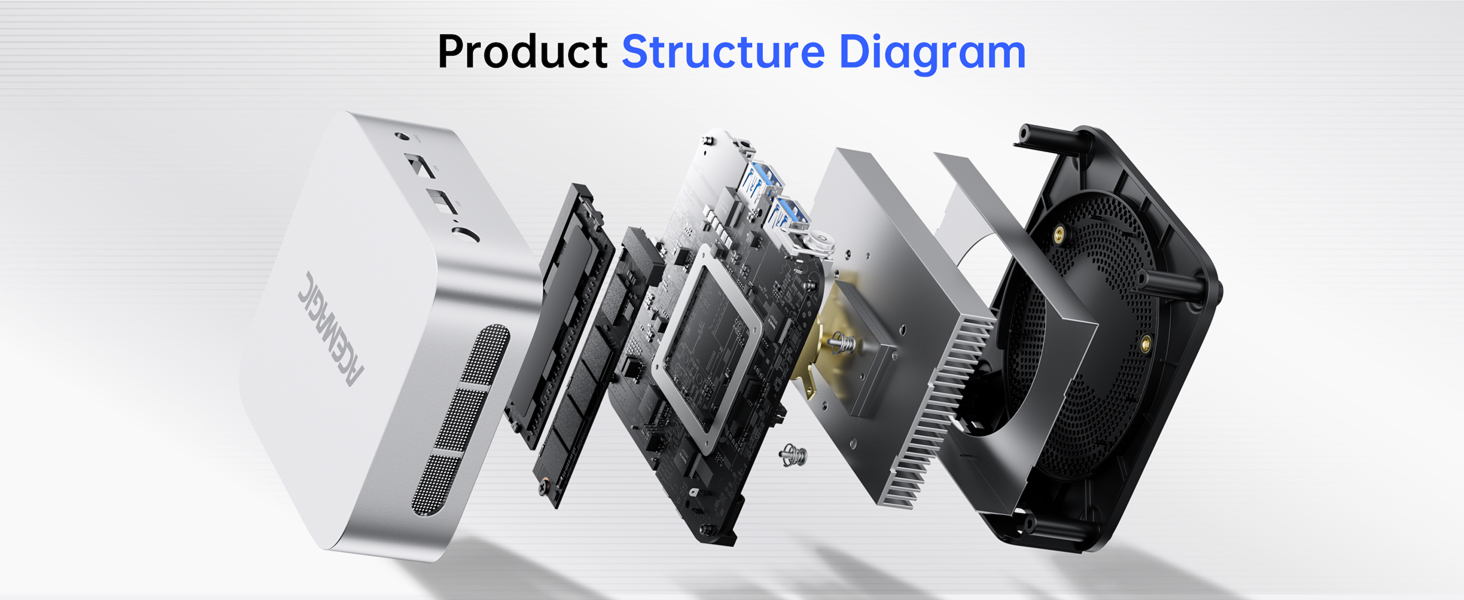
Image: Visual representation of the ACEMAGICIAN Mini PC V1 and its included accessories: power adapter, HDMI cable, and user manual.
3. Продукт бүтүп калдыview
The ACEMAGICIAN Mini PC V1 is equipped with a range of ports and features for versatile connectivity and performance.
3.1. Алдыңкы панель
- Кубат баскычы: Аппаратты күйгүзүү же өчүрүү үчүн.
- Күч жарыгы: Кубаттын абалын көрсөтөт.
- USB 3.2 порттору (x2): шайкеш түзмөктөр менен жогорку ылдамдыктагы маалыматтарды берүү үчүн.
- 3.5 мм аудио уячасы: Наушниктерди же тышкы динамиктерди туташтыруу үчүн.
3.2. Арткы панель
- LAN порту: Gigabit Ethernet for wired network connection.
- HDMI 2.0 порту: Supports 4K video output at 60Hz.
- DP 1.4 порту: DisplayPort, also supporting 4K video output.
- USB 2.0 порттору (x2): Чычкандар жана клавиатуралар сыяктуу перифериялык түзүлүштөрдү туташтыруу үчүн.
- DC Power Interface: Кубат адаптерин туташтыруу үчүн.

Image: Detailed diagram illustrating the location and function of all ports on the front and rear panels of the Mini PC.
4. Орнотуу колдонмосу
- Дисплейге туташуу: Use the provided HDMI cable to connect the Mini PC to your monitor or TV. You can also use the DP port for a second display.
- Перифериялык түзүлүштөрдү туташтыруу: Plug in your USB keyboard, mouse, and any other USB devices into the available USB ports.
- Тармакка туташуу: Зымдуу туташуу үчүн, Ethernet кабелин LAN портуна туташтырыңыз. Зымсыз туташуу үчүн, баштапкы орнотуу учурунда Wi-Fi тармагыңыз жеткиликтүү экенин текшериңиз.
- Туташуу кубаты: Plug the power adapter into the DC power interface on the Mini PC, then plug the adapter into a power outlet.
- Күйгүзүү: Press the power button on the front panel. The power light will illuminate.
- Алгачкы Windows орнотуулары: Windows 11 Pro орнотуусун аяктоо үчүн экрандагы нускамаларды аткарыңыз, анын ичинде тил, аймак, тармак туташуусу жана колдонуучу каттоо эсебин түзүү.
5. Иштөө нускамалары
5.1. Күйгүзүү/өчүрүү
- Күйгүзүү үчүн: Кубат баскычын бир жолу басыңыз.
- Жабуу: Click the Windows Start button, then select Power > Shut down. Alternatively, press and hold the power button for 5 seconds to force a shutdown (not recommended for regular use).
- Кайра баштоо үчүн: Windows Start баскычын чыкылдатып, андан кийин Кубат > Кайра баштоону тандаңыз.
- Уктоо үчүн: Windows Start баскычын чыкылдатып, андан кийин Кубат > Уйку режимин тандаңыз.
5.2. BIOS орнотуулары
The ACEMAGICIAN Mini PC V1 allows access to BIOS settings for advanced configurations such as Auto Power On and Wake on LAN. To enter BIOS, press the Жок кылуу key repeatedly during startup after pressing the power button.
5.3. Зымсыз байланыш
The Mini PC supports WiFi 5 and Bluetooth 4.2 for wireless connections. Ensure drivers are installed (usually pre-installed with Windows 11 Pro) and connect to your desired network or pair Bluetooth devices through the Windows settings.
6. Сактагычты кеңейтүү
The Mini PC comes with 16GB DDR4 RAM and a 256GB M.2 2280 SSD. For additional storage, the device supports expansion up to 2TB by adding an extra M.2 NVMe PCIe 3.0 or M.2 SATA SSD.
Note: Opening the device to install additional components may require technical expertise. Refer to the detailed instructions provided with your expansion drive or consult professional assistance.

Сүрөт: Ички view of the Mini PC highlighting the 16GB DDR4 RAM and 256GB M.2 SSD, with space for additional storage expansion.
7. Кош дисплейди орнотуу
The ACEMAGICIAN Mini PC V1 supports dual 4K display output via its HDMI 2.0 and DP 1.4 interfaces. This allows for an expanded workspace and enhanced multimedia experience.
- Connect your primary monitor to the HDMI 2.0 port.
- Connect your secondary monitor to the DP 1.4 port.
- Once both monitors are connected and the PC is powered on, Windows 11 Pro should automatically detect and configure the displays.
- To adjust display settings (e.g., extend, duplicate, resolution), right-click on the desktop and select "Display settings".

Image: The Mini PC connected to two monitors, demonstrating its dual 4K display capability for an extended desktop environment.
8. Муздатуу системасы
The Mini PC V1 incorporates an upgraded high-efficiency cooling system with an advanced axial fan and internal cooling technology. This design ensures quiet operation under light loads and maintains low noise levels even during intensive use, preventing overheating and ensuring stable performance.

Image: Diagram illustrating the internal cooling system of the Mini PC, showing airflow and fan placement for efficient heat dissipation.
9. Техникалык тейлөө
- Тазалоо: Regularly clean the exterior of the Mini PC with a soft, dry cloth. Use compressed air to gently clear dust from ventilation openings. Do not use liquid cleaners directly on the device.
- Программалык камсыздоо жаңыртуулары: Keep your Windows 11 Pro operating system and drivers updated to ensure security and optimal performance.
- Вентиляция: Ensure the Mini PC is placed in a well-ventilated area and that its air vents are not obstructed.
- Маалыматтын камдык көчүрмөсү: Дайыма маалыматтын жоголушун алдын алуу үчүн тышкы дискке же булут сактагычка маанилүү маалыматтардын камдык көчүрмөсүн сактоо.
10. Кыйынчылыктарды
| Көйгөй | Мүмкүн чечим |
|---|---|
| No power/device does not turn on. |
|
| Монитордо дисплей жок. |
|
| Жай аткаруу. |
|
| Wi-Fi же Bluetooth байланышындагы көйгөйлөр. |
|
Көбүрөөк жардам алуу үчүн, Кепилдик жана колдоо бөлүмүн караңыз.
11. Техникалык шарттар
| Өзгөчөлүк | Деталь |
|---|---|
| Процессор | Intel Twin Lake N150 (4 Cores/4 Threads, up to 3.6 GHz, 6MB Cache) |
| Графика | Intel UHD Graphics (up to 1.0 GHz, 24 Execution Units) |
| RAM | 16GB DDR4 (Built with 1 DDR4 SO-DIMM slot, 3200MHz) |
| Сактагыч | 256GB M.2 2280 SSD (Expandable up to 2TB via M.2 NVMe PCIe 3.0 or M.2 SATA SSD) |
| Операция системасы | Windows 11 Pro |
| Video Output | 1x HDMI 2.0 (4K@60Hz), 1x DP 1.4 (4K@60Hz) - Dual Display Support |
| USB порттору | 2x USB 3.2, 2x USB 2.0 |
| Network | Gigabit Ethernet, WiFi 5 |
| Bluetooth | Bluetooth 4.2 |
| Аудио | 3.5 мм аудио джек |
| Өлчөмдөр | Approximately 3.9 x 3.9 x 1.3 inches (Compact metal body) |
| Салмагы | Болжол менен 1.32 фунт |
| Муздатуу системасы | Upgraded Axial Fan & Internal Cooling Technology |
12. Кепилдик жана колдоо
ACEMAGICIAN offers a 2-Year quality assurance for the Mini PC V1. For any product-related questions or technical assistance, please utilize the following support channels:
- Amazon колдоо: Amazon сатып алуучу эсебиңизге кирип, буйрутмаңызды таап, "Жардам алуу" баскычын басыңыз.
- Колдоо электрондук почтасы: service@acemagicians.com
- Telephone Support (US): +1 800 908 1980
- 24-hour technical support is available.

Image: Contact details for ACEMAGICIAN customer support, including Amazon help, email, and phone number.
13. Маанилүү эскертүүлөр
- Always use the original power adapter provided with the Mini PC.
- Аппаратты экстремалдык температурага, нымдуулукка же тике күн нуруна тийгизүүдөн сактаңыз.
- Do not attempt to disassemble the Mini PC unless performing a supported upgrade (e.g., SSD expansion) and are comfortable with the procedure. Unauthorized disassembly may void your warranty.


