Introduction
Welcome to the user manual for your SJCAM C400 Vlogging Combo 4K Pocket Handheld Camera. This manual provides essential information for setting up, operating, maintaining, and troubleshooting your device. Please read it thoroughly to ensure optimal performance and longevity of your camera.
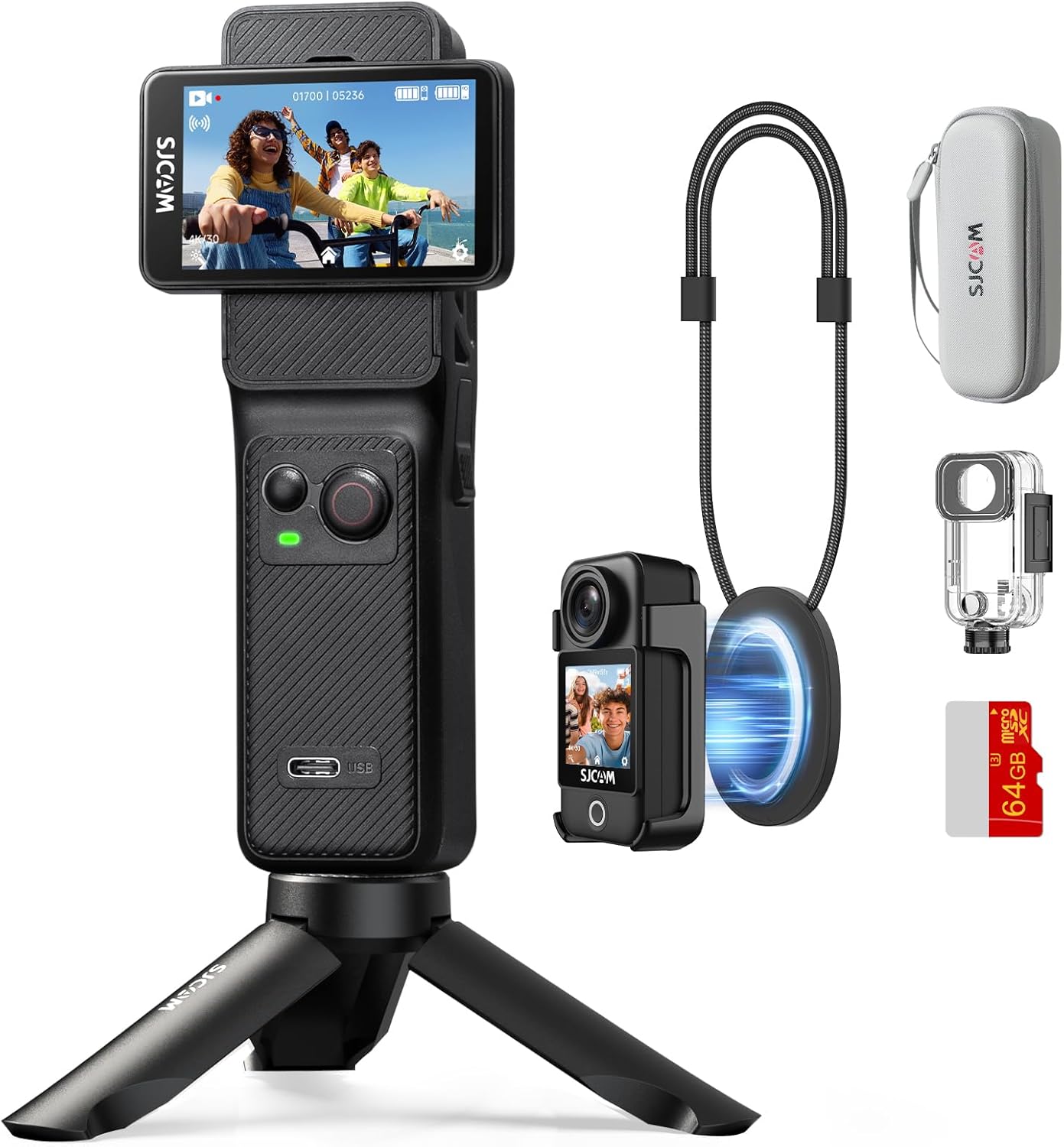
Figure 1: The SJCAM C400 Vlogging Combo 4K Pocket Handheld Camera and included accessories.
Жайгашуу
1. Кутуда эмне бар
Your SJCAM C400 package includes the following items:
- Колдук контроллер
- Камера модулу
- Суу өткөрбөйт
- Frame Mount
- Артка клип
- Lanyard
- Сактоочу баштык
- Магниттик боо
- Негизги Тоо
- Бурама
- microSD Card (64GB)
- Curved and Flat Mount
- Адаптер
- USB кабели
- 3m Adhesive Sticker
- Чүпүрөктү аарчыңыз

Figure 2: Contents of the SJCAM C400 Vlogging Combo package.
2. Аппаратты заряддоо
Before first use, fully charge the camera and handheld controller using the provided USB cable. Connect the USB cable to the charging port on the handheld controller and a compatible USB power adapter (not included). The camera module charges automatically when attached to the handheld controller.
3. MicroSD картасын салуу
Locate the microSD card slot on the camera module. Gently insert the provided 64GB microSD card until it clicks into place. Ensure the card is inserted correctly to avoid damage. The camera supports microSD cards for storing footage.
4. Assembling the Camera
The SJCAM C400 features a detachable design. To assemble, align the camera module with the slot on the handheld controller and slide it into place until it securely locks. To detach, press the release button and slide the camera module off.

Figure 3: Attaching the camera module to the handheld controller.
5. Күйгүзүү / Өчүрүү
To power on the device, rotate the screen on the handheld controller. The camera will automatically activate. To power off, rotate the screen back to its closed position, and the camera will automatically fold and lock.

Figure 4: Rotating the screen to power on the camera.
Иштөө нускамалары
1. Basic Controls and Touch Screen
The C400 features a 2.29-inch touch screen for intuitive navigation and settings adjustment. Use the physical buttons on the handheld controller for quick access to common functions like recording and mode switching. The screen can be rotated to switch between horizontal and vertical shooting modes.

Figure 5: The rotating screen allows for flexible shooting orientations.
2. Атуу режимдери
The camera offers various shooting modes to suit different scenarios:
- 4K Ultra HD видео: Captures high-resolution video at 30 frames per second.
- Цикл жаздыруу: Эң эски азык-түлүктөрдү тынымсыз жазып, үстүнөн жазып туратtagд эстутум картасы толгондо.
- Slow-Motion Video: Records at a higher frame rate for slow-motion playback.
- Убактылуу сүрөткө тартуу: Captures a series of still images at set intervals to create a time-lapse video.
- Шаттангыла атуу: Бир нече сүрөттү тез арада тартат.
- Убактылуу атуу: Sets a timer before capturing a photo.
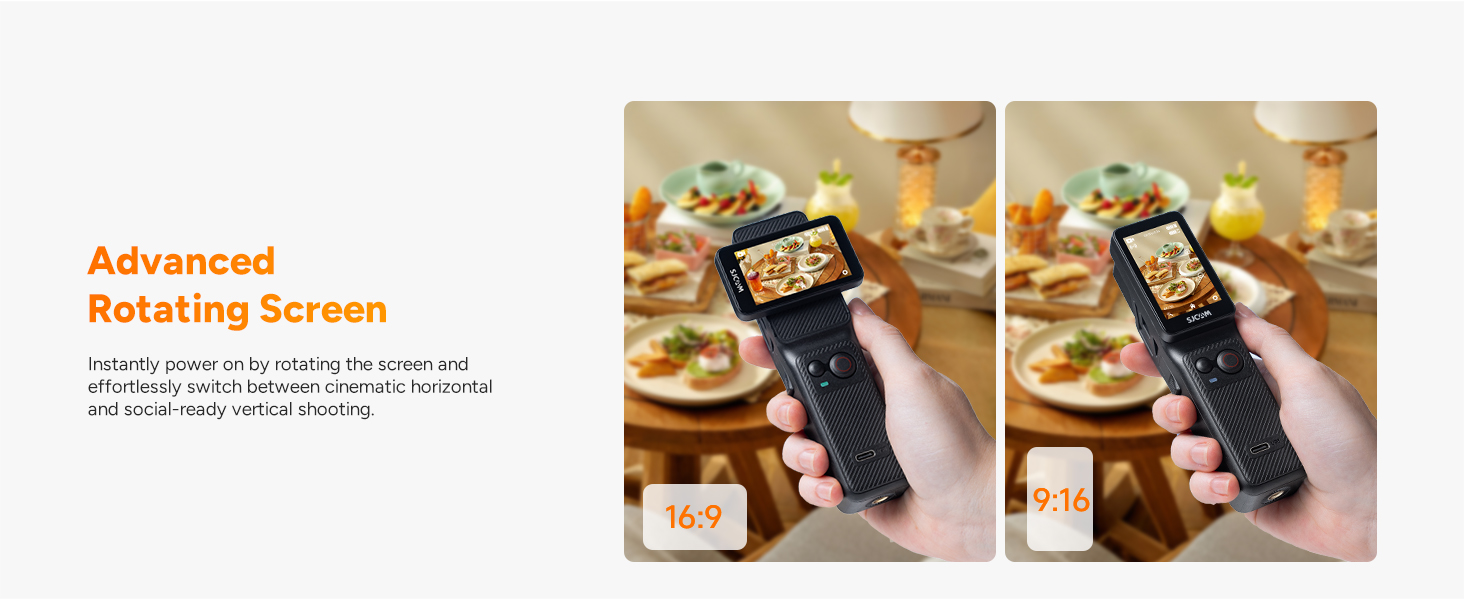
Figure 6: The camera supports various creative shooting modes like Time-Lapse and Slow Motion.
3. Сүрөттү турукташтыруу
The C400 is equipped with a 6-axis Electronic Image Stabilization (EIS) system and horizon correction. This technology helps to ensure smooth and stable video footage, even during dynamic activities or in shaky environments.

Figure 7: Demonstrating the effectiveness of 6-Axis Gyro Stabilization and Horizon Steady.
4. Wireless Handheld Controller and App Connectivity
The handheld controller allows for remote operation of the camera module. With 5G WiFi connectivity, you can use the dedicated SJCAM app for remote control, precise parameter settings, real-time footage preview, and live sharing. This enhances shooting freedom and flexibility.

Figure 8: The wireless handheld controller allows for remote operation up to 8 meters.
5. Waterproof Functionality
When enclosed in its professional waterproof case, the SJCAM C400 can be used in water up to 30 meters (98 feet) deep, making it suitable for activities like snorkeling, surfing, or cycling in the rain.

Figure 9: The SJCAM C400 is waterproof up to 30 meters with the included case.
6. Hands-Free POV and Portability
The camera module can be detached and used with accessories like the magnetic lanyard or back clip for hands-free, first-person view (POV) recording. Its compact size makes it highly portable for any adventure.

Figure 10: The detachable camera module enables effortless hands-free POV recording.
7. Түз эфир жана Webкамера режими
The C400 supports direct live streaming to compatible platforms without complex equipment. It can also function as a plug-and-play webcam when connected to a computer, offering convenient use for video calls or content creation.

Figure 11: The C400 can be used for live streaming and as a webкамера
8. Батареянын иштөө мөөнөтү
The camera is designed for extended use, offering up to 7 hours (460 minutes) of continuous 4K shooting on a single charge, suitable for all-day recording needs.

Figure 12: The SJCAM C400 provides up to 7 hours of battery life for 4K shooting.
9. Расмий продукт Video
Видео 1: Продукциянын расмий көргөзмөсүasing the features and use cases of the SJCAM C400 Pocket Vlogging Camera.
Техникалык тейлөө
1. Камераны тазалоо
Use the provided wipe cloth or a soft, lint-free cloth to clean the camera lens and touch screen. For stubborn smudges, a small amount of lens cleaning solution can be applied to the cloth, not directly to the lens. Ensure the camera is powered off before cleaning.
2. Батареяга кам көрүү
To prolong battery life, avoid fully discharging the battery frequently. Store the camera in a cool, dry place when not in use for extended periods. Charge the battery periodically if stored for a long time to prevent deep discharge.
3. Сактоо
Store the camera and its accessories in the provided storage bag to protect them from dust, scratches, and impacts. Keep the device away from extreme temperatures and humidity.
Проблемаларды чечүү
1. Камера күйбөй жатат
- Ensure the battery is charged. Connect the handheld controller to a power source.
- Verify the camera module is correctly attached to the handheld controller.
- Confirm the screen is rotated to the 'on' position.
2. Connectivity Issues with App
- Check if the camera's 5G WiFi is enabled.
- Ensure your smartphone or tablet is within range and connected to the camera's WiFi network.
- Камераны да, мобилдик түзмөгүңүздү да өчүрүп күйгүзүңүз.
- Update the SJCAM app to the latest version.
3. Blurry or Unstable Footage
- Камера линзасын тазалаңыз.
- Ensure the 6-axis EIS and Horizon Correction features are enabled in the settings.
- Check for sufficient lighting conditions.
4. MicroSD Card Errors
- microSD картасы туура салынганын текшериңиз.
- Format the microSD card using the camera's settings (this will erase all data).
- Try a different compatible microSD card.
Техникалык шарттар
| Бренд аты | SJCAM |
| Модель аты | C400 Combo |
| Элемент Салмагы | 1.72 фунт |
| Пакеттин өлчөмдөрү | 7.17 x 6.77 x 2.95 дюйм |
| Батареялар | 1 9V батарейка талап кылынат (кошулган) |
| Фото сенсор технологиясы | CMOS |
| Видео тартуунун резолюциясы | 4K |
| Максималдуу фокус узундугу | 20 |
| Flash эс тутум түрү | Микро SD |
| Видео тартуу форматы | MP4 |
| Screen Size | 2.29 дюйм |
| Байланыш технологиясы | Wi-Fi |
| Өзгөчөлүктөр | 7H long power supply, Horizon Steady, Lightweight Portable fashion pocket handheld, Portrait and Landscape Switching, Built-in Microphone, Shock-resistant Dual Touch Screen, Anti Shake, Slow Motion, Time Lapse, 8X Zoom, Low light Vision |
Кепилдик жана колдоо
For warranty information and customer support, please refer to the official SJCAM webсайтка же сатуучуга кайрылыңыз. Ар кандай кепилдик дооматтары үчүн сатып алганыңыздын далилин сактаңыз.


