1. Киришүү
This manual provides essential information for the installation, operation, and maintenance of your Rosewill VSB 650W 80+ Bronze Semi-Modular ATX 3.1 Power Supply (Model VSB650). Please read this manual thoroughly before installation and retain it for future reference.
The Rosewill VSB 650W power supply is designed to deliver stable and efficient power to your computer system. Key features include:
- Intel ATX 3.0 & 3.1 Ready for broad compatibility.
- 80 PLUS Bronze Certified for energy efficiency.
- Semi-Modular design for improved cable management.
- Native PCIe 5.1 / Gen 5 12V-2x6 Connector for next-generation GPUs.
- Optimized Thermal Control with a 120mm ICB Silent Fan.
- Compact chassis (140x150x86mm) for flexible integration.
- Advanced six-protection suite (OCP/OPP/OTP/OVP/SCP/UCP) for system safety.
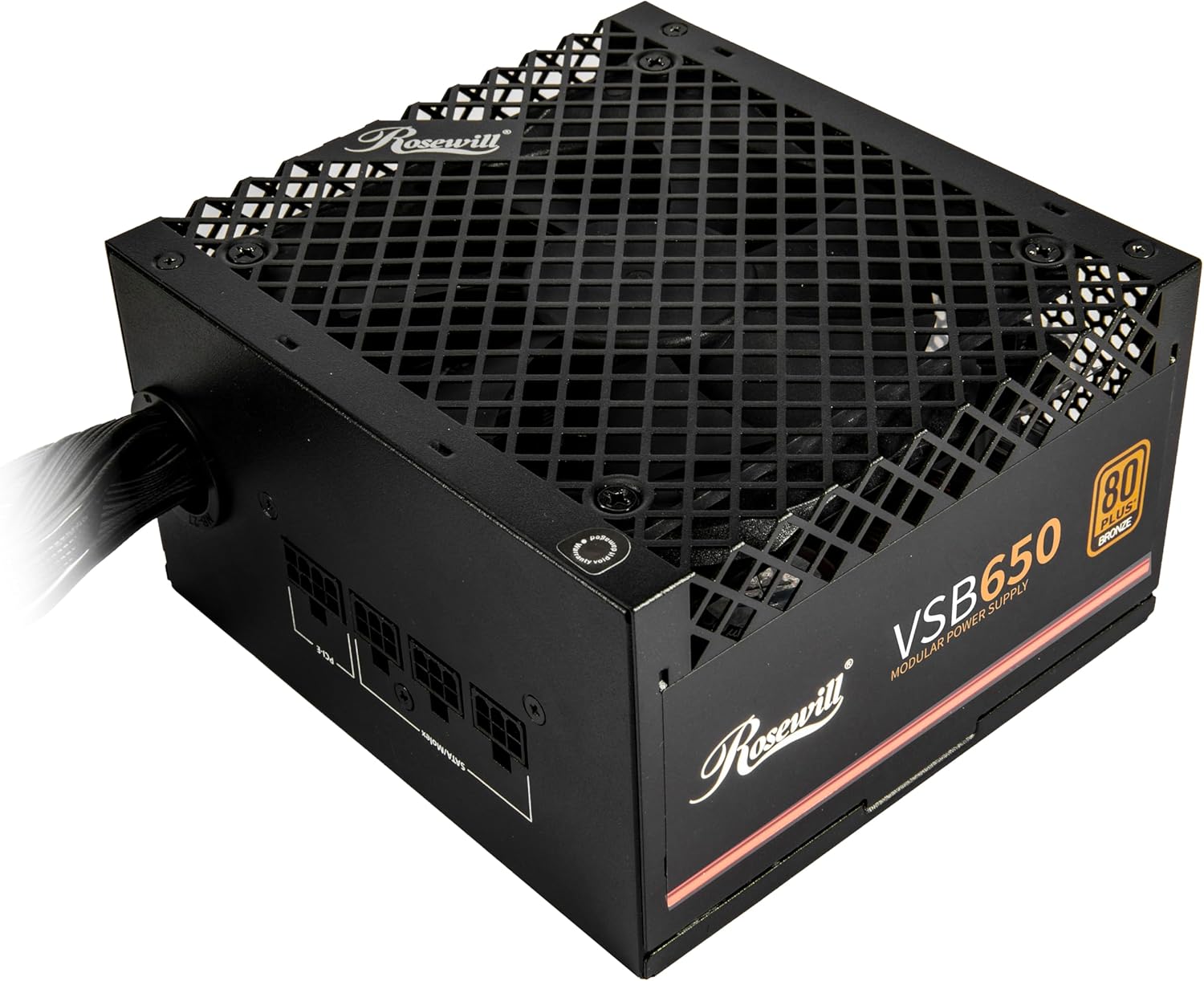
Сүрөт: Алдыңкы бети view of the Rosewill VSB 650W Power Supply, showcasing its black finish and fan grille.
2. Коопсуздук маалыматы
Please observe the following safety guidelines to prevent injury and damage to your equipment:
- Жок open the power supply unit. High voltages бирдик розеткадан ажыратылганда да ичинде болот.
- Жок insert any objects into the fan grille or ventilation openings.
- Ensure the power supply is installed in a well-ventilated area, free from excessive heat, humidity, or dust.
- Use only the cables provided with the power supply. Using incompatible cables may cause damage.
- Электр булагын жерге туташтырылган розеткага туташтырыңыз.
- Before installing or removing the power supply, ensure the system is powered off and the AC power cord is disconnected from the wall outlet.
The Rosewill VSB 650W power supply incorporates an Advanced Protection Suite to safeguard your system:
- OCP (Ашыкча ток коргоо): Токтун кескин көтөрүлүшүнөн келип чыккан зыяндын алдын алат.
- Ашыкча кубаттуулуктан коргоо (OPP): Ашыкча жүктөөлөр учурунда кубаттуулукту автоматтык түрдө тууралайт.
- OTP (Ашыкча температурадан коргоо): Критикалык ысып кетүүдөн коргойт.
- OVP (Ашыкча томtage Коргоо): Көлөмдү турукташтыратtage заматта титирейт.
- SCP (Кыска туташуудан коргоо): Кыска туташуу коркунучтарын нейтралдаштырат.
- UCP (Учурдагы коргоо астында): Төмөнкү вольтто иштегенде да натыйжалуулукту сактайтtage шарттары.

Image: Visual representation of the advanced protection features integrated into the power supply.
3. Орнотуу жана орнотуу
Follow these steps to properly install your Rosewill VSB 650W power supply into your computer system.
3.1 Таңгактан чыгаруу жана текшерүү
- Кубат булагын таңгагынан этияттык менен чыгарыңыз.
- Inspect the unit for any signs of physical damage. If damage is present, contact your retailer.
- Verify that all included cables and accessories are present.
3.2 Физикалык орнотуу
- Ensure your computer system is powered off and unplugged from the wall outlet.
- Компьютериңиздин корпусун өндүрүүчүнүн көрсөтмөлөрүнө ылайык ачыңыз.
- Кубат булагын орнотуучу жерди, адатта, корпустун арткы бетинин үстүнкү же астыңкы бөлүгүнөн табыңыз.
- Gently slide the power supply into the designated bay.
- Secure the power supply to the case using the provided screws.

Image: Rear panel of the power supply with the AC power inlet and on/off switch.
3.3 Кабелдик байланыштар
The Rosewill VSB 650W is a semi-modular power supply, meaning some essential cables are permanently attached, while others can be connected as needed.

Сүрөт: бүттүview of the power supply's modular cable connections and included cables.
- 24-Pin ATX Motherboard Cable: Connect the main 24-pin cable to your motherboard's ATX power connector.
- 4+4 Pin CPU (EPS) Cable: Connect the 4+4 pin CPU cable to your motherboard's CPU power connector. Some motherboards may require only 4 pins, while others require all 8.
- PCIe 5.1 12V-2x6 Connector: For compatible graphics cards, connect the dedicated 12V-2x6 cable directly to the GPU. This cable delivers up to 450W.
- 6+2 Pin PCIe Cables: For graphics cards requiring standard PCIe power, connect the 6+2 pin cables to the modular ports labeled "PCI-E" on the power supply, then to your graphics card.
- SATA кабелдери: SATA кубат кабелдерин сактоо дисктериңизге (HDDs, SSDs) жана башка SATA менен иштеген түзмөктөргө туташтырыңыз.
- 4-Pin Molex Cables: Connect Molex cables to peripherals that require this type of power connector.

Image: Close-up of the 12V-2x6 PCIe 5.1 connector, designed for direct power delivery to modern GPUs.
Ensure all connections are firm and correctly seated. Route cables neatly to improve airflow and aesthetics within your case.
4. Иштөө нускамалары
4.1 Баштапкы күйгүзүү
- After all internal components are connected and the power supply is secured, close your computer case.
- AC кубат шнурун кубат булагынын киргизүү тешигине, андан кийин жерге туташтырылган розеткага туташтырыңыз.
- Flip the power switch on the rear of the power supply to the "I" (On) position.
- Системаны баштоо үчүн компьютериңиздин корпусундагы кубат баскычын басыңыз.
4.2 Желдетүүчүнүн иштеши
The Rosewill VSB 650W features a 120mm ICB Silent Fan with optimized thermal control. The fan speed will automatically adjust based on the power supply's temperature and load to maintain optimal cooling while minimizing noise.
4.3 Power Excursion Capabilities
This power supply is designed to handle temporary power spikes, supporting up to 235% power excursion and 300% GPU power excursion, ensuring stability during demanding workloads and transient power demands from modern components.
5. Техникалык тейлөө
To ensure the longevity and optimal performance of your power supply, periodic maintenance is recommended.
- Чаңды тазалоо: Regularly clean the exterior of the power supply and the fan grille to prevent dust buildup, which can impede airflow and cooling. Use compressed air or a soft brush. Ensure the system is powered off and unplugged before cleaning.
- Экологиялык шарттар: Operate the power supply within recommended environmental conditions (temperature and humidity) as specified in the technical specifications.
- Кабелдик текшерүү: Кабелдик туташуулар коопсуз жана бузулбашы үчүн мезгил-мезгили менен текшерип туруңуз.
6. Кыйынчылыктарды
Эгерде сиз электр менен камсыздоодо көйгөйлөргө туш болсоңуз, төмөнкү жалпы көйгөйлөрдү чечүү кадамдарын караңыз.
6.1 Кубат жок / Система иштебей жатат
- Check AC Power: Ensure the AC power cord is securely connected to both the power supply and a working wall outlet.
- Кубат которгучу: Verify that the power switch on the rear of the power supply is in the "I" (On) position.
- Ички байланыштар: Double-check all internal power connections, especially the 24-pin motherboard cable and the 4+4 pin CPU cable, to ensure they are fully seated.
- Кыска туташуу: Disconnect all modular cables except the essential motherboard and CPU power. If the system powers on, reconnect other components one by one to identify a potential short circuit.
6.2 Системанын туруксуздугу / кокусунан өчүрүлүшү
- Ашыкча жүктөө: Ensure your system's total power consumption does not exceed the power supply's 650W capacity. Use a power calculator if unsure.
- Ашыкча ысып кетүү: Check for proper airflow within your computer case. Ensure the power supply's fan is not obstructed and is spinning.
- Компоненттик маселелер: Instability can also be caused by other faulty components (RAM, GPU, CPU). Test components individually if possible.
6.3 Өзгөчө ызы-чуу
- Желдетүүчү ызы-чуу: A slight fan noise is normal. If the noise is excessive or grinding, ensure no cables are obstructing the fan blades.
- Катушка ызылдаганы: Some power supplies may exhibit a faint "coil whine" under certain loads. This is generally harmless and does not indicate a defect.
If troubleshooting steps do not resolve the issue, please contact Rosewill customer support.
7. Техникалык шарттар
Detailed technical specifications for the Rosewill VSB 650W 80+ Bronze Semi-Modular ATX 3.1 Power Supply (Model VSB650).
| Өзгөчөлүк | Спецификация |
|---|---|
| Модель аты | VSB650 |
| Чыгуу Wattage | 650 Ватт |
| 80 PLUS сертификаты | Бронза |
| Форма фактору | ATX |
| Энергия менен жабдуунун дизайны | Жарым модулдук |
| ATX стандарты | ATX 3.0 жана 3.1 менен шайкеш келет |
| PCIe туташтыргычы | Native PCIe 5.1 / Gen 5 12V-2x6 |
| Муздатуу ыкмасы | Air (120mm ICB Silent Fan) |
| Продукциянын өлчөмдөрү (L x W x Y) | 5.51 x 5.9 x 3.38 дюйм (140 x 150 x 86 мм) |
| Элемент Салмагы | 4.59 фунт |
| Конденсаторлор | 105°C/221°F Japanese Capacitor |
| Коргоо өзгөчөлүктөрү | OCP, OPP, OTP, OVP, SCP, UCP |

Image: Detailed electrical specifications label for the VSB650 power supply.
8. Кепилдик жана колдоо
8.1 Кепилдик маалыматы
The Rosewill VSB 650W Power Supply comes with a 5 жылдык кепилдик сатып алынган күндөн тартып. Бул кепилдик нормалдуу колдонуудагы материалдардагы жана жасалгадагы кемчиликтерди камтыйт. Кепилдик дооматтары үчүн сатып алганыңыздын далилин сактап коюңуз.
Кепилдик төмөнкүлөрдөн келип чыккан зыянды камтыбайт:
- Туура эмес орнотуу же иштетүү.
- Accidental damage, abuse, or misuse.
- Уруксатсыз оңдоолор же өзгөртүүлөр.
- Natural disasters or power surges outside of the unit's protection capabilities.
8.2 Кардарларды колдоо
For technical assistance, warranty claims, or further inquiries, please visit the official Rosewill webсайтка же кардарларды колдоо тобуна кайрылыңыз.
Роузвиллдин расмий өкүлү Webсайт: www.rosewill.com


