1. Киришүү
This manual provides essential information for the installation, operation, and maintenance of your GIGABYTE GeForce RTX 5060 WINDFORCE MAX OC 8G Graphics Card. This high-performance graphics card is powered by the NVIDIA Blackwell architecture and DLSS 4, featuring 8GB of 128-bit GDDR7 memory and a PCIe 5.0 interface. It incorporates the WINDFORCE cooling system, a Hawk fan, server-grade thermal conductive gel, and a reinforced structure for optimal performance and durability. Please read this manual thoroughly before installation and use.
2. Коопсуздук маалыматы
- Аппараттык компоненттерди орнотуудан же алып салуудан мурун ар дайым компьютериңизден кубат менен камсыздоону ажыратыңыз.
- Wear an anti-static wrist strap or frequently touch a grounded metal object to prevent electrostatic discharge (ESD) damage to the graphics card and other components.
- Сезимтал компоненттерге тийбеш үчүн графикалык картаны четинен кармаңыз.
- Ашыкча ысып кетүүнүн алдын алуу үчүн компьютериңиздин корпусунун ичинде туура желдетүүнү камсыз кылыңыз.
- Do not attempt to repair the graphics card yourself. Refer to qualified service personnel for assistance.
3. Пакеттин мазмуну
Пакетиңизде бардык буюмдар бар экенин текшериңиз:
- GIGABYTE GeForce RTX 5060 WINDFORCE MAX OC 8G Graphics Card
- Instruction Manual
Note: Additional accessories may vary by region or retailer.
4. Орнотуу (Орнотуу)
4.1 Аппараттык камсыздоону орнотуу
Before proceeding, ensure your system meets the minimum requirements, including a 450W power supply and a compatible PCI Express graphics slot.
- Системаңызды даярдаңыз: Turn off your computer and disconnect the power cable from the wall outlet. Open your computer case.
- PCI Express уячасын табыңыз: Сиздин энелик платада жеткиликтүү PCI Express 5.0 x8 уячасын аныктаңыз.
- Slot капкактарын алып салуу: Remove the metal slot covers from the back of your computer case corresponding to the graphics card's size.
- Графикалык картаны орнотуу: Графикалык картаны PCI Express уячасы менен кылдаттык менен тегиздеп, ал бекем орнотулганга чейин бекем басыңыз. Энелик платадагы бекитүүчү клипса ордуна чыкылдаганын текшериңиз.
- Secure Graphics Card: Графикалык картаны компьютердин корпусуна бурамалар менен бекитиңиз.
- Туташуу кубаты: Connect the required 1x 8-pin PCIe power connector from your power supply to the graphics card.
- Ишти жабуу: Компьютериңиздин корпусун жаап, электр кабелин кайра туташтырыңыз.

Сүрөт 1: Алдыңкы view of the GIGABYTE GeForce RTX 5060 WINDFORCE MAX OC 8G Graphics Card.

2-сүрөт: Каптал view of the GIGABYTE GeForce RTX 5060 WINDFORCE MAX OC 8G Graphics Card, showing the heatsink and power connector.
4.2 Драйверди орнотуу
After hardware installation, you need to install the latest drivers for optimal performance.
- Күйгүзүү: Компьютериңизди күйгүзүңүз.
- Драйверлерди жүктөп алыңыз: Расмий GIGABYTE сайтына баш багыңыз webсайт (www.gigabyte.com) же NVIDIA webсайт (www.nvidia.com) GeForce RTX 5060 графикалык картаңыз үчүн эң акыркы драйверлерди жүктөп алуу үчүн.
- Драйверлерди орнотуу: Follow the on-screen instructions to install the drivers. Restart your computer if prompted.
4.3 Визуалдык кошумчаview and Unboxing
Watch this official GIGABYTE video for a visual overview of the RTX 50 Series graphics cards and an unboxing experience.
Video 1: GIGABYTE GeForce RTX 50 Series - Official Trailer. This video provides a general overview of the RTX 50 series, highlighting key features and design elements.
Video 2: Gigabyte RTX 5060 8gb OC unboxing review by 'Remember This Tech'. This video demonstrates the unboxing process and initial impressions of the Gigabyte RTX 5060 graphics card, including its physical appearance and included accessories.
5. Иштөө
5.1 Дисплейлерди туташтыруу
The GIGABYTE GeForce RTX 5060 graphics card supports multiple display outputs for a versatile setup.
- DisplayPort: Connect up to three DisplayPort 2.1 compatible monitors using DisplayPort cables.
- HDMI: Connect one HDMI 2.1 compatible monitor or TV using an HDMI cable.
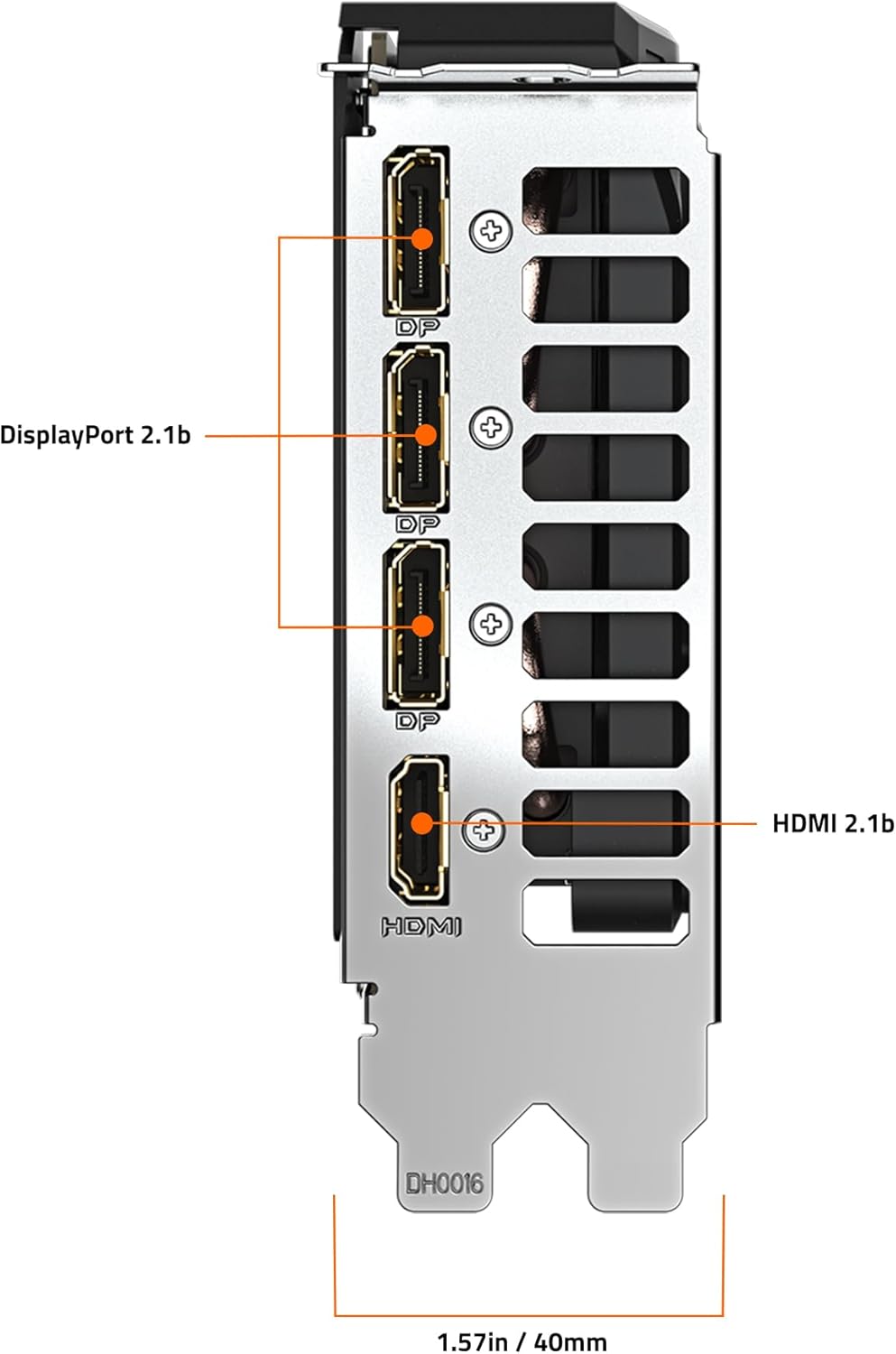
3-сүрөт: Арткы view of the GIGABYTE GeForce RTX 5060 WINDFORCE MAX OC 8G Graphics Card, highlighting the DisplayPort and HDMI output connectors.
5.2 Программалык камсыздоонун утилиталары
Utilize GIGABYTE and NVIDIA software for enhanced control and customization:
- GIGABYTE башкаруу борбору: Download from the GIGABYTE website to monitor GPU status, adjust fan speeds, and customize RGB lighting (if applicable).
- NVIDIA Башкаруу панели: Access advanced display settings, manage 3D settings, and configure features like DLSS and Ray Tracing.
6. Техникалык тейлөө
6.1 Тазалоо
Regular cleaning helps maintain optimal performance and extends the lifespan of your graphics card.
- Өчүрүү: Always power off your computer and disconnect it from the power source before cleaning.
- Чаңды тазалоо: Use compressed air to gently blow dust from the fans, heatsink fins, and other components. Hold the fans in place to prevent over-spinning.
- Бетти тазалоо: Жумшак, түксүз кездемени жеңил колдонуңуз dampened with isopropyl alcohol to clean the exterior surfaces of the card. Avoid harsh chemicals.
6.2 Драйвер жаңыртуулары
Keep your graphics drivers updated to ensure compatibility with the latest games and applications, and to benefit from performance improvements and bug fixes.
- Periodically check the GIGABYTE or NVIDIA website for new driver releases.
- Follow the provided instructions for driver installation.
7. Кыйынчылыктарды
Эгер графикалык картаңыз менен көйгөйлөргө туш болсоңуз, төмөнкү жалпы көйгөйлөрдү жана чечимдерди караңыз:
| Көйгөй | Мүмкүн себеп | Чечим |
|---|---|---|
| Монитордо дисплей жок | Incorrect cable connection, loose card, power issue, driver problem. | Ensure display cables are securely connected. Re-seat the graphics card. Verify power connectors are attached. Reinstall or update drivers. |
| Оюндарда/тиркемелерде төмөн иштөө | Outdated drivers, incorrect settings, insufficient power. | Update graphics drivers. Adjust in-game graphics settings. Ensure adequate power supply. Check for background applications consuming resources. |
| Overheating or loud fan noise | Dust accumulation, poor case airflow, high load. | Clean fans and heatsink. Improve case airflow. Monitor temperatures with GIGABYTE Control Center. Adjust fan curves if necessary. |
| Системанын туруксуздугу же бузулушу | Driver conflicts, overheating, faulty hardware. | Perform a clean driver installation. Monitor temperatures. Check other system components. |
8. Техникалык шарттар
| Өзгөчөлүк | Деталь |
|---|---|
| Графикалык иштетүү бирдиги | NVIDIA GeForce RTX 5060 (Blackwell architecture) |
| Video Memory | 8 ГБ GDDR7 |
| Memory Interface | 128-бит |
| Memory Speed | 28000 МГц |
| GPU саат ылдамдыгы | 2512 MHz (Boost Clock) |
| PCI Express | PCIe 5.0 x8 |
| Муздатуу системасы | WINDFORCE cooling system with Hawk fan |
| Видео чыгаруу интерфейси | 3x DisplayPort 2.1, 1x HDMI 2.1 |
| Max Screen Resolution | 3840x2160 |
| Power Connector | 1x 8-пин |
| Сунушталган PSU | 450W or higher |
| Өлчөмдөрү (LxWxH) | 7.83 x 4.57 x 1.57 дюйм (199 x 116 x 40 мм) |
| Элемент Салмагы | 1.1 фунт |
| Негизги өзгөчөлүктөрү | DLSS 4, AI Cores, 4th Gen Ray Tracing Cores, Reinforced structure, Server-grade Thermal conductive gel |
9. Кепилдик жана колдоо
GIGABYTE products are covered by a limited warranty. For detailed warranty information, technical support, and service inquiries, please visit the official GIGABYTE support webсайт:
GIGABYTE колдоо: https://www.gigabyte.com/Support
Кепилдик дооматтары үчүн сатып алганыңыздын далилин сактап коюңуз.


