Introduction
This manual provides detailed instructions for the installation, operation, and maintenance of your Vetroo M06 Micro-ATX/Mini-ITX Gaming PC Case. Please read this manual thoroughly before beginning assembly to ensure proper setup and optimal performance.

Image: The Vetroo M06 Micro-ATX/Mini-ITX Gaming PC Case in black, showcasing its mesh front panel and side window, viewбурчтан.
Негизги өзгөчөлүктөрү
- Компакт дизайн: Micro-ATX / Mini-ITX form factor with a high-airflow mesh front panel, designed for space-efficient builds.
- Оптималдуу муздатуу: Supports up to five 120mm fans and a 240mm top-mounted liquid radiator for efficient thermal management.
- GPU Compatibility: Узундугу 355 мм чейинки графикалык карталарды колдойт.
- Flexible PSU Mounting: Features an adjustable power supply installation area with a maximum length of 160mm.
- Заманбап байланыш: Front panel includes USB Type-C and USB 3.0 ports for convenient peripheral access.
Пакеттин мазмуну
Орнотууну улантуудан мурун бардык компоненттер бар экенин текшериңиз:
- Vetroo M06 PC Case
- Accessory Box (screws, standoffs, cable ties)
- SFX PSU Bracket (1x)
- Колдонуучунун Колдонмосу (бул документ)
Техникалык шарттар
| Өзгөчөлүк | Деталь |
|---|---|
| Модель аты | M06 |
| Иштин түрү | Мини-Мунара |
| Motherboard шайкештиги | Micro ATX, Mini ITX |
| Продукциянын өлчөмдөрү (L x W x Y) | 15.55" x 7.87" x 13.07" (395 мм x 200 мм x 332 мм) |
| Элемент Салмагы | 13.37 фунт (6.06 кг) |
| Материал | Acrylonitrile Butadiene Styrene (ABS), SPCC (0.8mm metal plate) |
| Максималдуу GPU узундугу | 355мм |
| CPU муздаткычтын максималдуу бийиктиги | 165мм |
| Максималдуу PSU узундугу | 160mm (Adjustable mounting) |
| Күйөрмандардын колдоосу | 5 x 120 мм желдеткичтерге чейин |
| Радиатор колдоо | 1 x 240mm (Top) |
| Алдыңкы I / O порттору | 1 x USB Type-C, 1 x USB 3.0, HD Audio, Power Button, Reset Button |

Image: Diagram illustrating the compact dimensions of the Vetroo M06 PC case, measuring 15.5 inches in depth, 7.8 inches in width, and 13.0 inches in height.

Image: A detailed diagram outlining the compatibility specifications for the Vetroo M06 PC case, including maximum CPU cooler height (165mm), GPU length (355mm), PSU length (160mm), and supported motherboard form factors (M-ATX/ITX).
Орнотуу жана орнотуу
Before starting, ensure you have a clean, static-free workspace. Refer to your component manuals for specific installation details.
1. Motherboard орнотуу
- Remove the side panel(s) of the case.
- Install the necessary motherboard standoffs into the case tray according to your motherboard's form factor (Micro-ATX or Mini-ITX).
- Этияттык менен энелик платаңызды буроо тешикчелерин тегиздеп, стендтерге жайгаштырыңыз.
- Аналык платаны бурамалар менен бекитиңиз.
2. GPU орнотуу
- Remove the appropriate PCIe slot covers from the rear of the case.
- Графикалык картаңызды энелик платадагы негизги PCIe уячасына салыңыз.
- Графикалык картаны бурамалар менен корпуска бекитиңиз.
- Connect any required PCIe power cables from your power supply to the GPU.
3. PSU орнотуу
- Determine the desired mounting position for your power supply. The Vetroo M06 supports adjustable PSU mounting.
- If using an SFX power supply, attach the included SFX bracket to the PSU.
- Slide the power supply into its designated bay and secure it with screws from the rear of the case.
- Route the necessary power cables to your components.

Сүрөт: ички view of the Vetroo M06 PC case highlighting the three adjustable mounting positions for ATX/SFX power supplies, along with an illustration of the included SFX bracket.
4. Storage Installation (HDD/SSD)
- Locate the designated mounting points for 3.5" HDDs and 2.5" SSDs.
- Secure your storage drives using the provided screws.
- Connect SATA data and power cables to each drive.
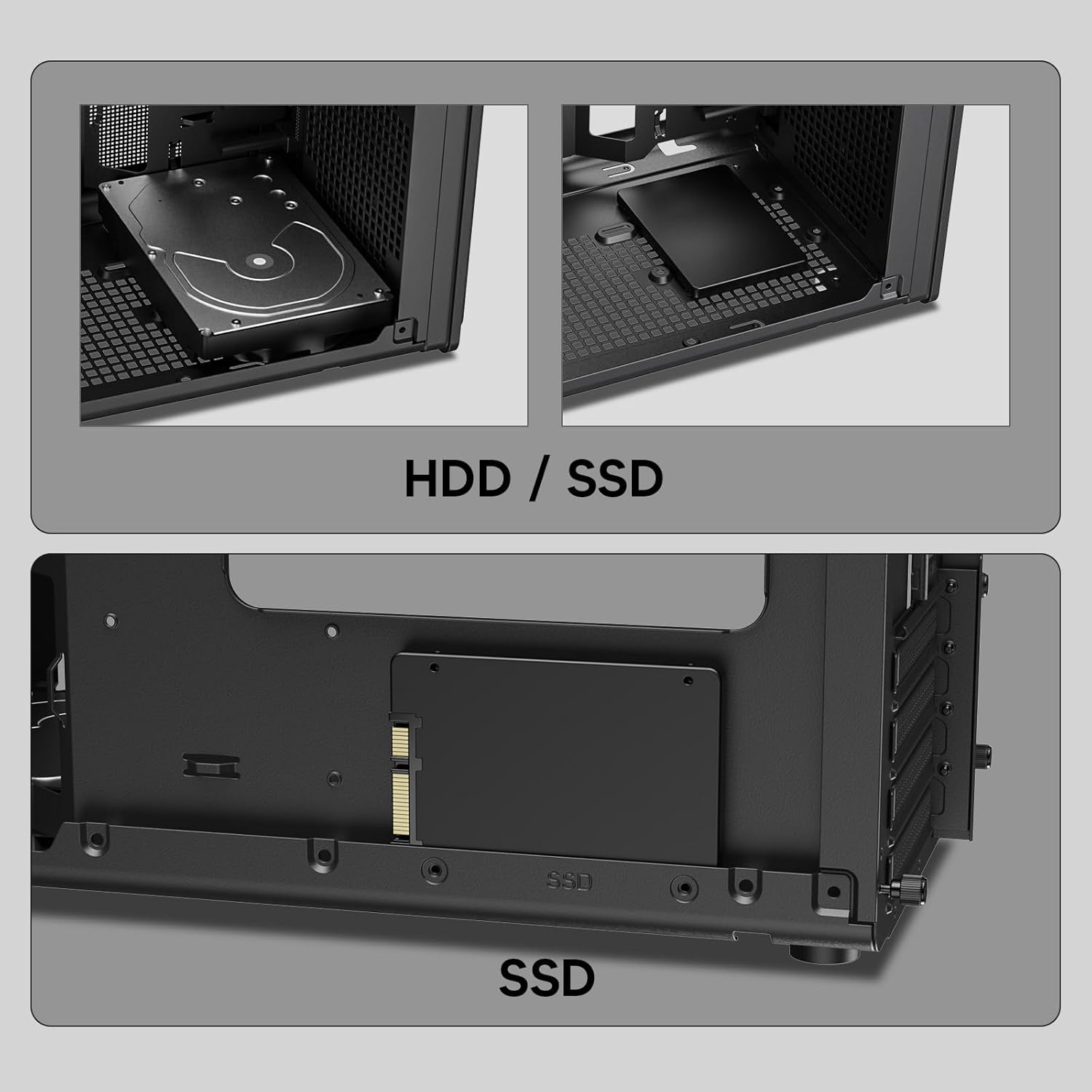
Сүрөт: Жакын план views of the Vetroo M06 PC case interior, demonstrating the mounting options for both 3.5-inch Hard Disk Drives (HDDs) and 2.5-inch Solid State Drives (SSDs).
5. Муздатуу системасын орнотуу (вентиляторлор/радиатор)
- Identify the fan mounting locations (up to five 120mm fans).
- Mount fans using appropriate screws, ensuring correct airflow direction.
- For liquid cooling, install a 240mm radiator at the top mounting position, securing it with screws.
- Connect fan and pump cables to your motherboard or fan controller.
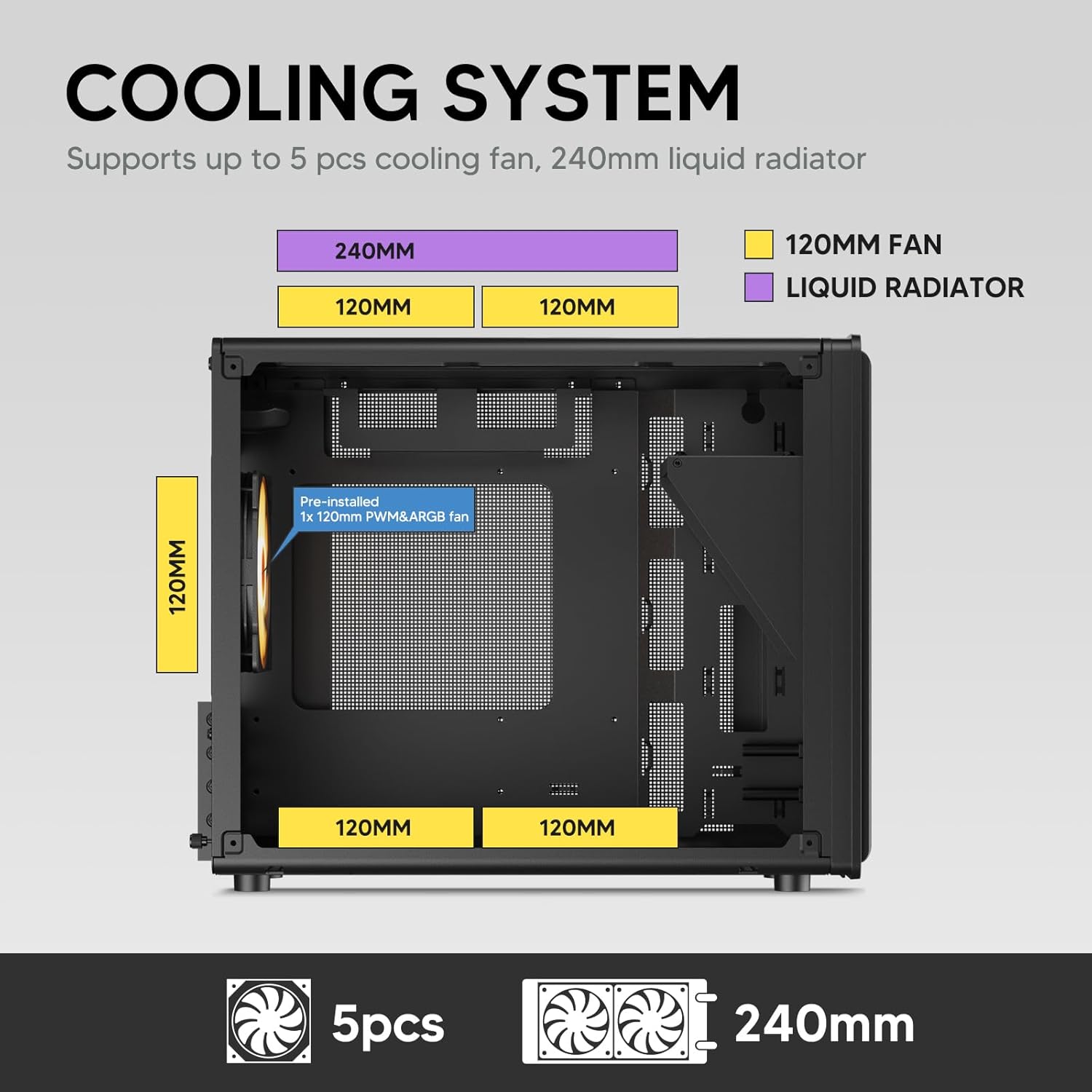
Image: A diagram illustrating the cooling system layout within the Vetroo M06 PC case, detailing the positions for up to five 120mm fans and a 240mm liquid radiator at the top.
6. Киргизүү/чыгаруу панелинин туташуулары
- Connect the front panel cables (Power, Reset, USB 3.0, USB Type-C, HD Audio) to the corresponding headers on your motherboard. Refer to your motherboard manual for header locations.

Image: A close-up of the Vetroo M06 PC case's front I/O panel, clearly labeling the Power button, Reset button, USB 3.0 port, HD Audio jack, and USB Type-C port.
Иштөө нускамалары
Once all components are installed and cables are connected, replace the side panels. Connect your peripherals (monitor, keyboard, mouse) and power cable to the PSU. Press the power button on the front panel to start your system.
Аба агымын башкаруу
The Vetroo M06 case features an excellent airflow design with mesh panels to facilitate optimal cooling. Ensure fans are installed to create a balanced airflow, typically with intake fans at the front/bottom and exhaust fans at the rear/top.

Image: An exploded diagram of the Vetroo M06 PC case, illustrating the intended airflow patterns with blue arrows indicating cool air intake and red arrows showing warm air exhaust through its mesh panels.
Техникалык тейлөө
Үзгүлтүксүз тейлөө сиздин PC компоненттеринин иштөө мөөнөтүн узартууга жардам берет жана оптималдуу иштешин камсыз кылат.
- Чаңды тазалоо: Чаң чыпкаларын жана ички компоненттерди кысылган аба менен мезгил-мезгили менен тазалап туруңуз. Тазалоодон мурун системанын өчүрүлгөнүн жана розеткадан суурулганын текшериңиз.
- Кабелдик башкаруу: Verify that internal cables are neatly routed and do not obstruct airflow.
- Компонентти текшерүү: Ensure all screws are tight and components are securely seated.

Image: A close-up shot of the Vetroo M06 PC case, featuring a digital caliper measuring the thickness of the metal plate, which is specified as 0.8mm, highlighting the case's robust construction.
Проблемаларды чечүү
Көйгөйгө туш болсоңуз, төмөнкү жалпы көйгөйлөрдү чечүү кадамдарын караңыз:
- Система күйбөй жатат:
- Check all power connections, including the PSU to wall outlet, PSU to motherboard (24-pin and CPU 8-pin), and front panel power switch cable to motherboard.
- PSU которгучу 'ON' абалында экенин текшериңиз.
- Дисплей чыгышы жок:
- Verify that your monitor is connected to the graphics card (not the motherboard's integrated graphics ports, unless you are using integrated graphics).
- Графикалык картаны жана RAM модулдарын кайра орнотуңуз.
- Ашыкча ысып кетүү маселелери:
- Оптималдуу аба агымы үчүн бардык корпус желдеткичтери туура айланып, багытталып турганын текшериңиз.
- Check CPU cooler installation and thermal paste application.
- Clean any dust buildup from fans and filters.
- USB порттору иштебейт:
- Verify that the front panel USB 3.0 and USB Type-C cables are correctly connected to the motherboard headers.
Кепилдик жана колдоо
Vetroo products are designed for quality and reliability. For warranty information and technical support, please visit the official Vetroo webсайтка же кардарларды тейлөөгө кайрылыңыз. Кепилдик дооматтар үчүн сатып алганыңыздын далилин сактаңыз.
Vetroo Official Webсайт: Vetroo Store on Amazon
For further assistance, please refer to the contact information provided with your product packaging or on the official Vetroo support channels.


