1. Киришүү
This manual provides detailed instructions for the proper use and maintenance of your HIDIZS AP80 Pro-X MP3 Player. Please read this manual thoroughly before operating the device to ensure optimal performance and longevity. Keep this manual for future reference.
2. Продукт бүтүп калдыview
The HIDIZS AP80 Pro-X is a high-resolution portable music player designed for exceptional audio quality and versatile functionality.
Негизги өзгөчөлүктөрү:
- Dual ESS9219C DACs: Delivers pristine sound with high dynamic range and low distortion.
- FPGA-driven Native DSD256 Decoding: Ensures bit-perfect audio accuracy.
- MQA Final 8X Unfolding: Provides studio-grade lossless audio.
- Bi-directional Bluetooth 4.2: Supports UAT, LDAC, and CSR aptX for high-quality wireless audio transmission and reception.
- Multi-functional Capabilities: Includes a step counter and e-book function.
- USB DAC функциялары: Enhances audio quality for computers and mobile devices.
- CNC-milled Aluminum Unibody: Durable and compact design with a Japanese ALPS volume wheel.
- Батареянын узак иштөө мөөнөтү: Up to 40-day standby and 8-11 hours playback.
Камтылган компоненттер:
- HIDIZS AP80 Pro-X MP3 Player
- Screen Protector (x2)
- Type-C кабели
- Type-C to Type-C OTG Cable
- User Manual
- Кепилдик картасы

Сүрөт 2.1: Алдыңкы жана арткы view of the HIDIZS AP80 Pro-X MP3 Player.

Figure 2.2: Aluminum Alloy CNC Integration Design of the AP80 Pro-X, highlighting its compact size and robust build.

Figure 2.3: All items included in the HIDIZS AP80 Pro-X retail package.
3. Орнотуу
3.1 Алгачкы заряддоо
Before first use, fully charge the device using the provided Type-C cable and a compatible USB power adapter (not included). The battery indicator on the screen will show charging status.
3.2 Микро SD картаны салуу
The AP80 Pro-X supports Micro SD cards up to 512GB (and potentially 1TB as per user reviews). Locate the Micro SD card slot on the side of the device. Gently insert the card until it clicks into place. To remove, push the card in slightly until it springs out.

Figure 3.1: The Micro SD card slot on the AP80 Pro-X, illustrating expandable storage for music.
3.3 Күйгүзүү/өчүрүү
Press and hold the power button (usually located on the side) for a few seconds to turn the device on or off. A short press will toggle the screen on/off.
4. Иштөө нускамалары
4.1 Негизги навигация жана башкаруу элементтери
The AP80 Pro-X features a Samsung 2.45" IPS HD touchscreen and physical buttons for navigation and control.
- Сенсордук экран: Navigate menus and select options by tapping and swiping.
- ALPS Volume Wheel: Үнүн жөндөө үчүн бураңыз.
- Физикалык баскычтар: Dedicated buttons for Play/Pause, Next/Fast-forward, and Previous/Rewind.
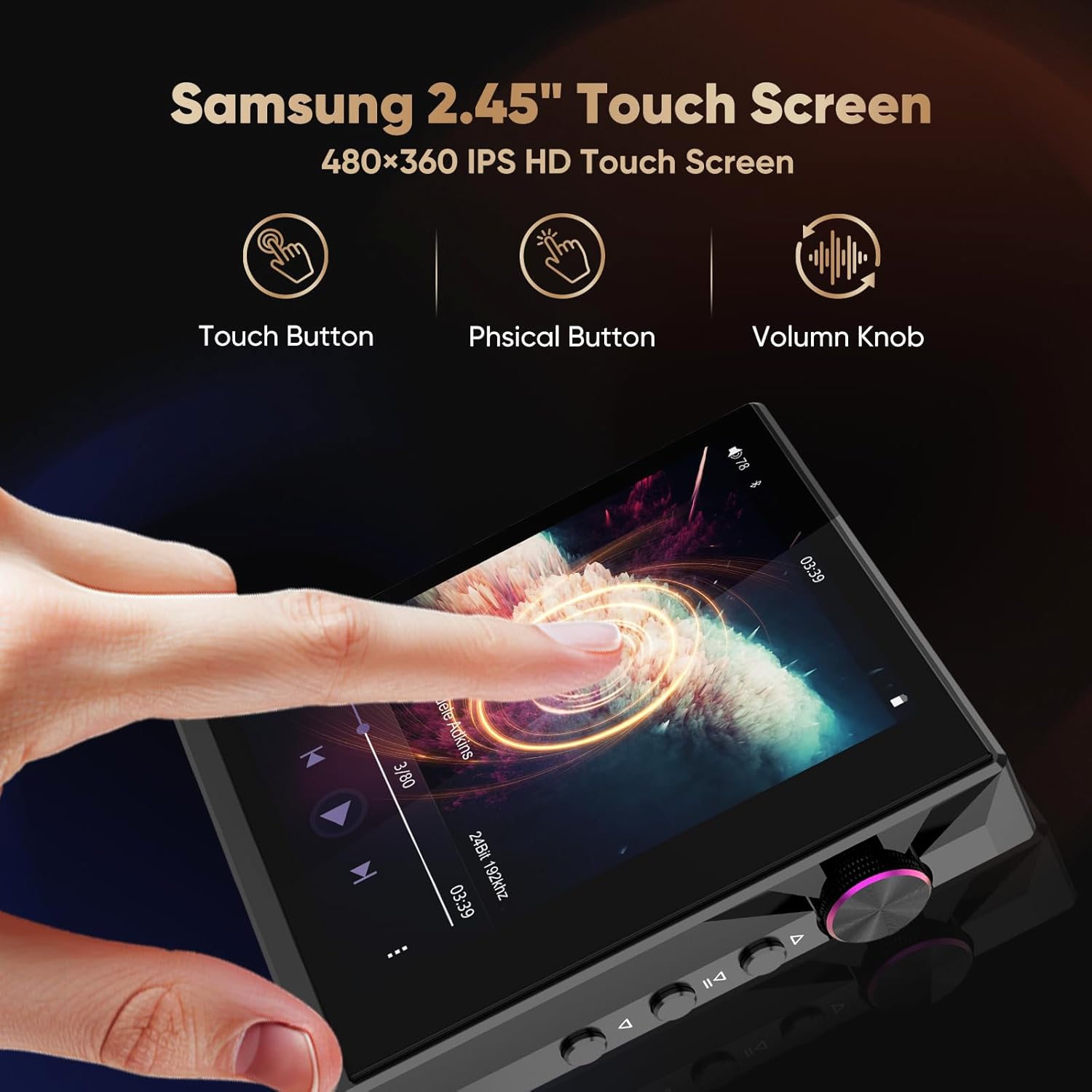
Figure 4.1: The 2.45-inch IPS HD touchscreen and physical control buttons on the AP80 Pro-X.

Figure 4.2: Detail of the ALPS volume wheel and playback control buttons.
4.2 Аудио ойнотуу
The AP80 Pro-X supports a wide range of audio formats, including MQA 8X, LDAC, apt-X, AAC, USB DAC, DSD256, WAV (84kHz/32bit), APE (96kHz/24bit), FLAC (384kHz/32bit), MP3 (384kHz/320kbps), WMA (384kHz/32bit), AIFF (384kHz/32bit), and OGG (48kHz/16bit).

Figure 4.3: Visual representation of the various audio file formats supported by the AP80 Pro-X.
4.3 Bluetooth байланышы
The device features bi-directional Bluetooth 4.2, allowing it to act as both a Bluetooth audio source and a Bluetooth DAC ampөмүрлүү.
- Connecting to Bluetooth Headphones/Speakers: Navigate to the Bluetooth settings, enable Bluetooth, and pair with your desired device.
- Bluetooth DAC катары колдонуу: Connect your smartphone to the AP80 Pro-X via Bluetooth to use the player's DAC for enhanced audio output.

Figure 4.4: The AP80 Pro-X's two-way Bluetooth 4.2 functionality, connecting to various devices.

Figure 4.5: Illustration of streaming lossless audio from a smartphone to the AP80 Pro-X, and playing downloaded audio from the AP80 Pro-X via Bluetooth.
4.4 USB ЦАТ функциясы
Connect the AP80 Pro-X to your computer (macOS 10.7+, iPadOS, Windows XP/7/8/10 and newer systems) or mobile phone using the provided Type-C cable to use it as an external DAC for improved audio quality.

Figure 4.6: The AP80 Pro-X functioning as a bidirectional USB DAC, enhancing audio for mobile and PC devices.

Figure 4.7: The AP80 Pro-X connected as a powerful external DAC AMP to a phone and PC, compatible with various operating systems.
4.5 HiBy Link and MSEB Tuning
Utilize the HiBy Link feature for remote control, playlist management, cover synchronization, and advanced MSEB (Mage Sound 8-Ball) sound tuning directly from your smartphone.

Figure 4.8: HiBy Link allows remote control and management of the AP80 Pro-X from a smartphone.

Figure 4.9: The MSEB tuning interface for customizing sound profiles.
4.6 Special Features: Step Counter & E-book
The AP80 Pro-X includes a built-in step counter for tracking workouts and an e-book reader for convenient reading.

Figure 4.10: The AP80 Pro-X's integrated step counter and e-book reader.
5. Техникалык тейлөө
- Тазалоо: Аппаратты тазалоо үчүн жумшак, кургак чүпүрөктү колдонуңуз. Суюк тазалагычтардан же абразивдүү материалдардан алыс болуңуз.
- Батареяга кам көрүү: To prolong battery life, avoid fully discharging the device frequently. Store in a cool, dry place when not in use for extended periods.
- Screen коргоо: Apply the provided screen protectors to prevent scratches.
- Сактагыч: Аппаратты экстремалдык температурадан, тике күн нурунан жана нымдуулуктан алыс кармаңыз.
6. Кыйынчылыктарды
| Көйгөй | Мүмкүн себеп | Чечим |
|---|---|---|
| Түзмөк күйбөйт | Батареясы аз; түзмөк иштебей калды | Charge the device; perform a hard reset (refer to manufacturer's webконкреттүү көрсөтмөлөр үчүн сайт). |
| Үн чыгышы жок | Volume too low; headphones not connected properly; incorrect output mode selected | Increase volume; re-insert headphones; check output settings (e.g., balanced vs. single-ended). |
| Bluetooth туташуу көйгөйлөрү | Bluetooth disabled; device out of range; interference | Ensure Bluetooth is enabled; move closer to the paired device; restart both devices. |
| Музыка fileтаанылган жок | Колдоого алынбайт file форматтоо; бузулган file; Micro SD card issue | Check supported formats; re-transfer files; reformat or replace Micro SD card. |
If you encounter issues not listed here or if the suggested solutions do not resolve the problem, please contact HIDIZS customer support.
7. Техникалык шарттар
| Өзгөчөлүк | Деталь |
|---|---|
| Модель аты | AP80 PRO-X |
| ЦАП чиптери | Dual ESS9219C |
| DSD декоддоосу | DSD256 Native Decoding |
| MQA колдоосу | MQA Final 8X Unfolding |
| Bluetooth версиясы | 4.2 (Bi-Directional) |
| Bluetooth кодектери | UAT, LDAC, CSR aptX |
| Screen Size | 2.45 Inches IPS HD Touchscreen |
| Эстутум сактоо сыйымдуулугу | Expandable via Micro SD (up to 512 GB officially, 1TB reported) |
| Батарея | 1 Литий Полимер (кошулган) |
| Ойнотуу убактысы | 8-11 саат |
| Күтүү убактысы | 40 күн |
| Байланыш технологиясы | Bluetooth, USB Port, Mobile Phone USB Decode |
| Шайкеш түзмөктөр | Computers, cars, cellphones, tablets, IEMs |
| Элемент Салмагы | 2.54 унция |
| Пакеттин өлчөмдөрү | 5 x 3.74 x 1.85 дюйм |
8. Кепилдик жана колдоо
Your HIDIZS AP80 Pro-X MP3 Player comes with a warranty. Please refer to the included Warranty Card for details on coverage and terms. For technical support, product inquiries, or service, please visit the official HIDIZS webсайтка же кардарларды тейлөөгө кайрылыңыз.
Official HIDIZS Store: Visit the Hidizs Store
9. Окшош видеолор
HIDIZS AP80 PRO-X Music Player Appearance Display
Бул видео визуалдык көрүнүштү камсыз кылатview of the HIDIZS AP80 Pro-X music player, showcasing its design and physical features.
HiFi MP3 Player
This video demonstrates general features and capabilities of a HiFi MP3 player, which may be applicable to the AP80 Pro-X.
Oilsky Hi-Res Audio Player G88
This video showcases features of another Hi-Res audio player, providing context for similar functionalities found in the AP80 Pro-X.


