1. Киришүү
This manual provides detailed instructions for the setup, operation, and maintenance of your CRUA 34-inch Curved UWQHD 120Hz IPS Gaming Monitor, Model CR340E. Please read this manual thoroughly before using the product to ensure proper functionality and to prevent damage.
2. Продукциянын өзгөчөлүктөрү
- 34-inch IPS Curved Panel: Experience enhanced immersion and a wide viewing angle with the 34-inch 21:9 ultrawide 1900R IPS curved panel. A 178° wide viewing angle ensures no color distortion at the edges, ideal for both movie watching and multitasking.

Сүрөт: алдыңкы view of the CRUA 34-inch Curved UWQHD 120Hz IPS Gaming Monitor, showcasing its curved design.
- Professional-Grade Color: Achieve cinema-standard color reproduction with 98% DCI-P3 coverage. High brightness of 350 cd/m² and a 2000:1 contrast ratio vividly display HDR content. The 8-bit (16.7 million colors) panel ensures smooth color gradations.

Image: Visual representation of the monitor's DCI-P3 98% color gamut, 130% sRGB, 2000:1 contrast ratio, 8-bit color depth, and 350 cd/m² brightness.
- Өндүрүмдүүлүктү жогорулатуу: The expansive 3440x1440 UWQHD resolution screen allows for simultaneous viewing of document comparisons and video editing timelines. The 21:9 aspect ratio significantly boosts work efficiency for remote work and professional tasks.

Image: A comparison demonstrating the superior detail and clarity of UWQHD (3440x1440) resolution compared to FHD.
- Оюндун натыйжалуулугу: Eliminates screen tearing and stuttering with a 120Hz high refresh rate and AMD FreeSync technology. Leveraging the curved IPS panel, it provides an immersive experience for the vast worlds of RPGs and simulation games.

Image: A dynamic scene of a motorcycle race, illustrating the smooth motion provided by the 120Hz refresh rate and AMD FreeSync technology.
- Excellent Expandability: Connect gaming consoles (e.g., PS5) and PCs simultaneously with 2x HDMI 2.0 and 2x DP 1.4 ports. A 3.5mm earphone jack and 100x100mm VESA mount compatibility offer complete flexibility for audio setup and installation.

Image: A diagram showing the monitor's dimensions and the location of its various ports, including HDMI 2.0, DP 1.4, audio output, and DC power input.
3. Орнотуу нускамалары
3.1 Пакеттин мазмуну
Пакетте бардык компоненттер бар экенин текшериңиз:
- CRUA 34-inch Curved Monitor
- Монитор стенд (негизги жана моюн)
- Кубаттуу адаптер жана кабель
- HDMI кабели
- DisplayPort (DP) кабели
- USB-C Cable (if applicable, check your specific model)
- Колдонуучунун Колдонмосу (бул документ)
- Mounting Screws (for VESA mount)
3.2 Стендди чогултуу
- Мониторду таңгагынан кылдаттык менен алып чыгып, чийилбеш үчүн аны жумшак, таза бетке ылдый каратып коюңуз.
- Берилген бурамалар аркылуу стенд мойнуна монитор панелине бекитиңиз.
- Attach the stand base to the stand neck, securing it with the designated screw.
- Ensure all connections are firm before placing the monitor upright.
3.3 VESA дубалга орнотулган жабдууну орнотуу (милдеттүү эмес)
The monitor supports a 100x100mm VESA mount. If using a VESA mount, remove the stand and attach the VESA bracket to the monitor's rear panel using the provided screws. Follow the instructions included with your VESA mount for proper installation.
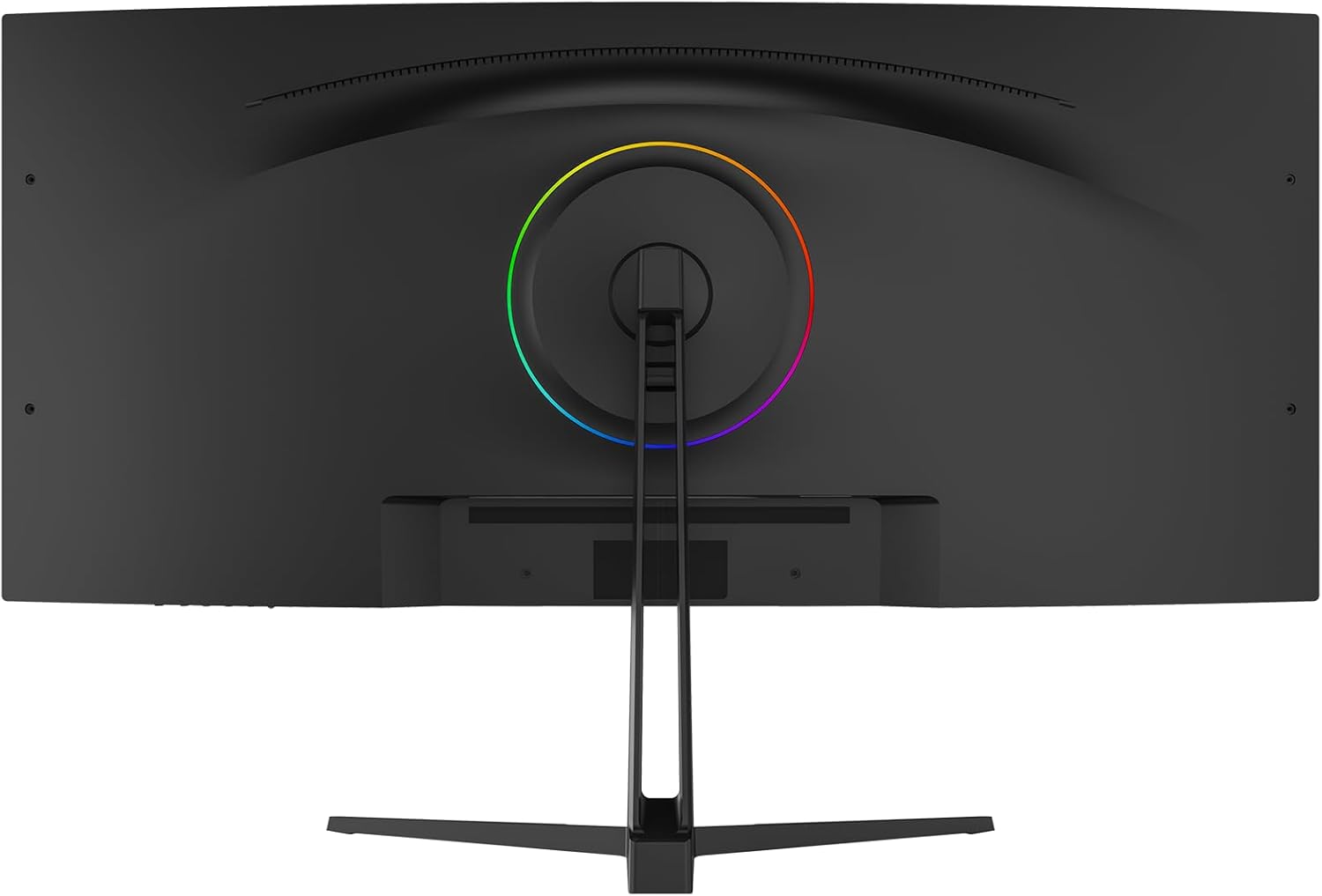
Сүрөт: Арткы view of the monitor, highlighting the VESA mount compatibility and the RGB lighting ring.
3.4 Түзмөккө туташуу
- Connect one end of the HDMI or DisplayPort cable to the corresponding port on your computer or gaming console.
- Connect the other end of the cable to an available HDMI (HDMI 1 or HDMI 2) or DisplayPort (DP 1 or DP 2) input on the monitor.
- Connect the power adapter to the monitor's DC input, then plug the power cable into a power outlet.
- For audio output, connect headphones or external speakers to the 3.5mm audio jack on the monitor.
4. Иштөө нускамалары
4.1 Күйгүзүү/өчүрүү
Мониторду күйгүзүү же өчүрүү үчүн көбүнчө монитордун арткы же асты жагында жайгашкан кубат баскычын басыңыз. Монитор күйүп турганда кубат индикаторунун жарыгы күйөт.
4.2 Экрандык менюнун навигациясы
The On-Screen Display (OSD) menu is controlled via a joystick or buttons, typically located on the back or bottom of the monitor. Use the joystick/buttons to navigate through the menu options and adjust settings.
- Пресс: Enter/Confirm selection.
- Өйдө/төмөн: Меню параметрлерин чабыттоо.
- Сол оң: Adjust values or navigate sub-menus.
4.3 Киргизүү булагын тандоо
Access the OSD menu and navigate to the 'Input' or 'Source' section to select between HDMI 1, HDMI 2, DP 1, or DP 2 inputs.
4.4 Сүрөт орнотуулары
Adjust display settings through the OSD menu:
- Жарыктык: Экрандын жалпы жарыктыгын тууралайт.
- Контраст: Жарык жана караңгы аймактардын ортосундагы айырманы көзөмөлдөйт.
- Түс температурасы: Selects preset color temperatures (e.g., Warm, Cool, User) or allows manual adjustment of RGB values.
- HDR режими: Enables or disables High Dynamic Range display for compatible content.
- Көк жарыкты азайтуу: Reduces blue light emission to minimize eye strain.
4.5 Оюн функциялары
- Жаңыртуу ылдамдыгы: The monitor supports up to 120Hz. Ensure your connected device is configured to output at the desired refresh rate.
- AMD FreeSync: Enable FreeSync in the OSD menu and on your AMD graphics card settings to synchronize the monitor's refresh rate with your GPU's frame rate, eliminating screen tearing and stuttering.
4.6 Эңкейүүнү тууралоо
The monitor stand allows for tilt adjustment. Gently hold the top and bottom edges of the monitor and tilt it to your preferred viewбурч.
5. Техникалык тейлөө
5.1 Экранды тазалоо
Мониторду өчүрүп, электр зымдарын сууруп алыңыз. Жумшак, түксүз кездемени жеңил колдонуңуз dampсуу же атайын экран тазалагыч менен эритип алыңыз. Тазалоочу каражатты түз эле экранга чачпаңыз.
5.2 Жалпы кам көрүү
- Монитор же анын кабелдерине оор нерселерди коюудан алыс болуңуз.
- Мониторду күн нурунан, жылуулук булактарынан жана ашыкча нымдуулуктан алыс кармаңыз.
- Монитордогу желдетүү тешиктерин жаап албаңыз.
- Чагылган түшкөн учурда же узак убакыт бою колдонулбаган учурда мониторду розеткадан сууруп коюңуз.
6. Кыйынчылыктарды
If you encounter issues with your monitor, please refer to the following common problems and solutions:
| Көйгөй | Мүмкүн себеп | Чечим |
|---|---|---|
| Экранда сүрөт жок | Кубат кабели ажыратылды, киргизүү булагы туура эмес, түзмөк күйгөн эмес. | Check power connections, select correct input source via OSD, ensure connected device is on. |
| Сүрөт бүлбүлдөгөн же туруксуз | Loose video cable, incompatible refresh rate, FreeSync issue. | Ensure video cables are securely connected. Adjust refresh rate on your device. Check FreeSync settings. |
| Dead pixels or abnormal display | Өндүрүштүк кемчилик. | Жардам алуу үчүн кардарларды колдоо бөлүмүнө кайрылыңыз. |
| Аудио жок | Audio cable disconnected, volume too low, incorrect audio output selected on device. | Check 3.5mm audio jack connection. Adjust monitor and device volume. Ensure monitor is selected as audio output on your device. |
If the problem persists after attempting these solutions, please contact CRUA customer support.
7. Техникалык шарттар
| Өзгөчөлүк | Спецификация |
|---|---|
| Бренд | CRUA |
| Моделдер сериясы | CR340E |
| Продукт моделинин номери | CR340E |
| Түс | Кара |
| Өнүмдүн Өлчөмдөрү (Ж x Y x D) | 81.4 x 51.1 x 22.4 см |
| Продукт Салмагы | 8.46 кг |
| Screen Size | 34 дюйм |
| Панел түрү | IPS Curved |
| Ийрилик | 1900R |
| Резолюция | 3440 x 1440 Pixels (UWQHD) |
| Аспект катышы | 21:9 |
| Жаңыртуу ылдамдыгы | 120Hz |
| Түс гаммасы | DCI-P3 98% |
| Жарыктык | 350 кд/м² |
| Контраст катышы | 2000:1 |
| Түс тереңдиги | 8-bit (16.7M colors) |
| Screen Surface | Жарыксыз |
| HDMI порттору | 2 2.0 (HDMI XNUMX) |
| DisplayPort (DP) Ports | 2 (DP 1.4) |
| Аудио чыгаруу | 3.5 мм гарнитура уясы |
| VESA тоосунун шайкештиги | 100 x 100 мм |
8. Кепилдик жана колдоо
8.1 Кепилдик маалыматы
CRUA products typically come with a warranty period of 1 to 3 years. Please refer to your purchase documentation or contact CRUA customer support for specific warranty terms applicable to your region and product.
8.2 Кардарларды колдоо
For technical assistance, troubleshooting, or warranty claims, please contact CRUA customer support. Support is available 24 hours a day. You can typically find contact information (email, phone, or online chat) on the official CRUA webсайт же сатуучу аркылуу.
Көбүрөөк маалымат алуу үчүн, киргиле CRUA Brand Store.


