Introduction
This manual provides detailed instructions for the Mcezdy Ebike Display UART Protocol Recognizer & Programmer Set, Model PG. It covers product components, setup procedures, operational guidelines for protocol recognition and programming, troubleshooting common issues, and product specifications. Please read this manual thoroughly before using the device to ensure proper operation and to prevent damage.
Продукт компоненттери
The Mcezdy Ebike Display UART Protocol Recognizer & Programmer Set includes the following items:
- Recognizer Unit
- Программист бирдиги
- Three-in-one adapter cable: SM6PIN, 5PIN, 6PIN
- Instrument pair wiring (SM-5PIN)
- USB cable (for power supply)
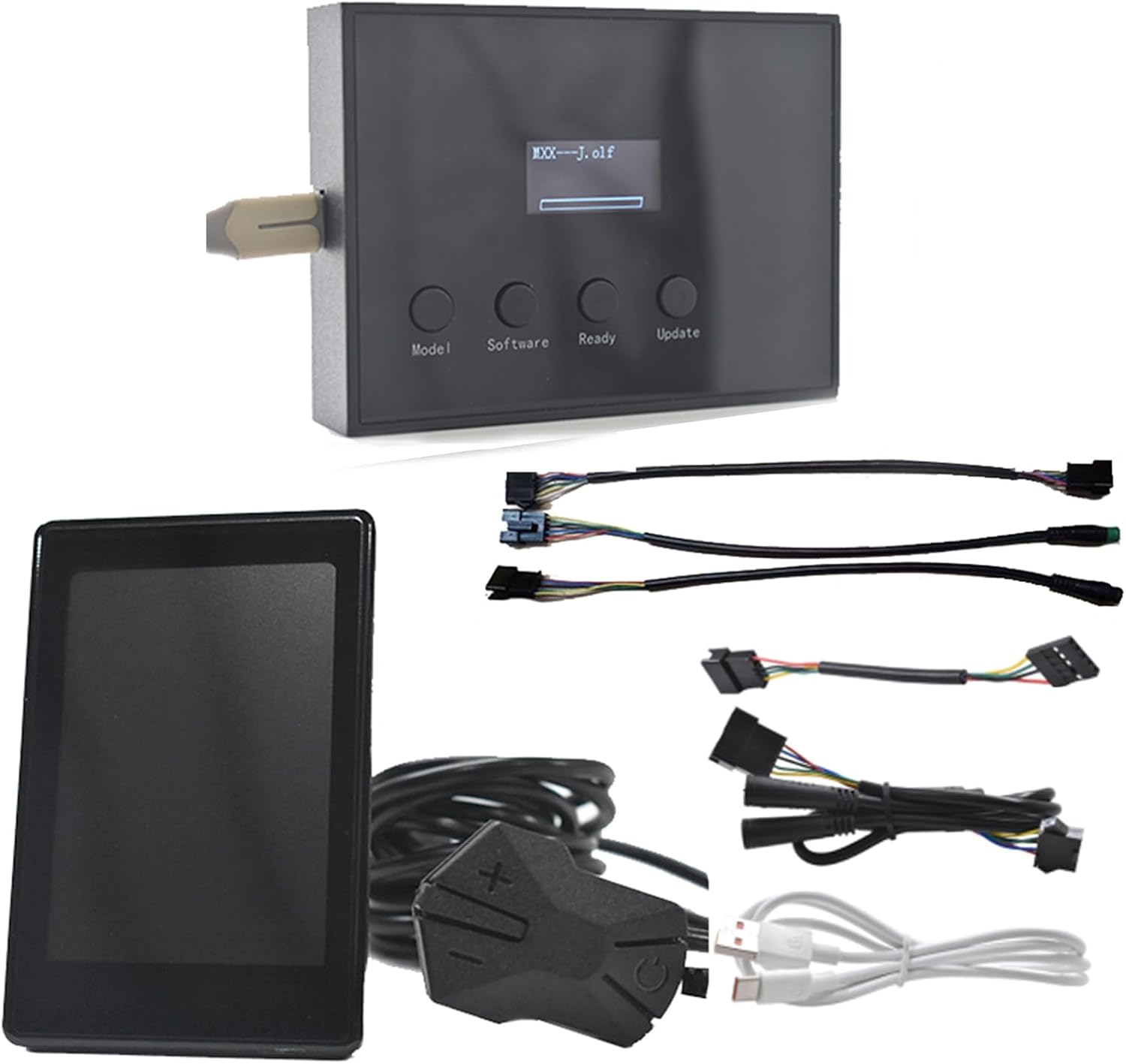
Сүрөт: бүттүview of the Mcezdy Ebike Display UART Protocol Recognizer & Programmer Set, showing the recognizer, programmer, various adapter cables, and USB power cable.

Image: A visual representation of the kit's contents, highlighting the recognizer, programmer, three-in-one adapter cable, instrument pair wiring, and USB cable.
Орнотуу жана баштапкы колдонуу
1. Protocol Recognition
The recognizer unit is used to identify the UART communication protocol of your e-bike display. It supports Protocol 2, 5s protocol, J protocol, and KDS protocol.
- Connect the identifier (recognizer unit) to the instrument interface of your e-bike.
- Tap the power switch on your e-bike.
- The display on the recognizer will show the identified protocol information.

Image: Diagram illustrating the connection of the recognizer to an e-bike display for protocol identification, showing the steps and supported UART protocols.
2. Programmer Setup
The programmer unit is used to change or update the communication protocol of compatible e-bike displays. It supports Protocol 2, 5s protocol, J protocol, and KDS protocol.
Applicable instruments include H6C-2, H6C, M5C-2, M5, M6C, M6H, M7C-2, P3C, P3H, P5C.

Image: Visual guide for connecting the programmer unit and adapter cables to an e-bike display for protocol programming, listing compatible display models.
Operating Instructions for the Programmer
- Connect the plug wires of the instrument (e-bike display) to the programmer.
- Connect the USB cable to the programmer for power supply.
- басыңыз Модел key on the programmer to select the corresponding instrument model.
- басыңыз Программалык камсыздоо key to select the required updated protocol software.
- басып, кармап туруңуз плюс ачкычы жана кубат ачкычы on the instrument simultaneously. Then, click the power key of the instrument once to enter the flashing mode. The display will show a flashing indicator.
- While the instrument is in flashing mode, press the Даяр key on the programmer within 10 seconds to bind the programmer to the instrument in the upgrade state. If the Ready key is not pressed within 10 seconds, the instrument will automatically exit flashing mode.
- басыңыз Жаңыртуу key to update the internal software of the instrument. The update process will take approximately 35 seconds. During this time, do not disconnect the device.
- After the update is completed, the instrument will automatically shut down.
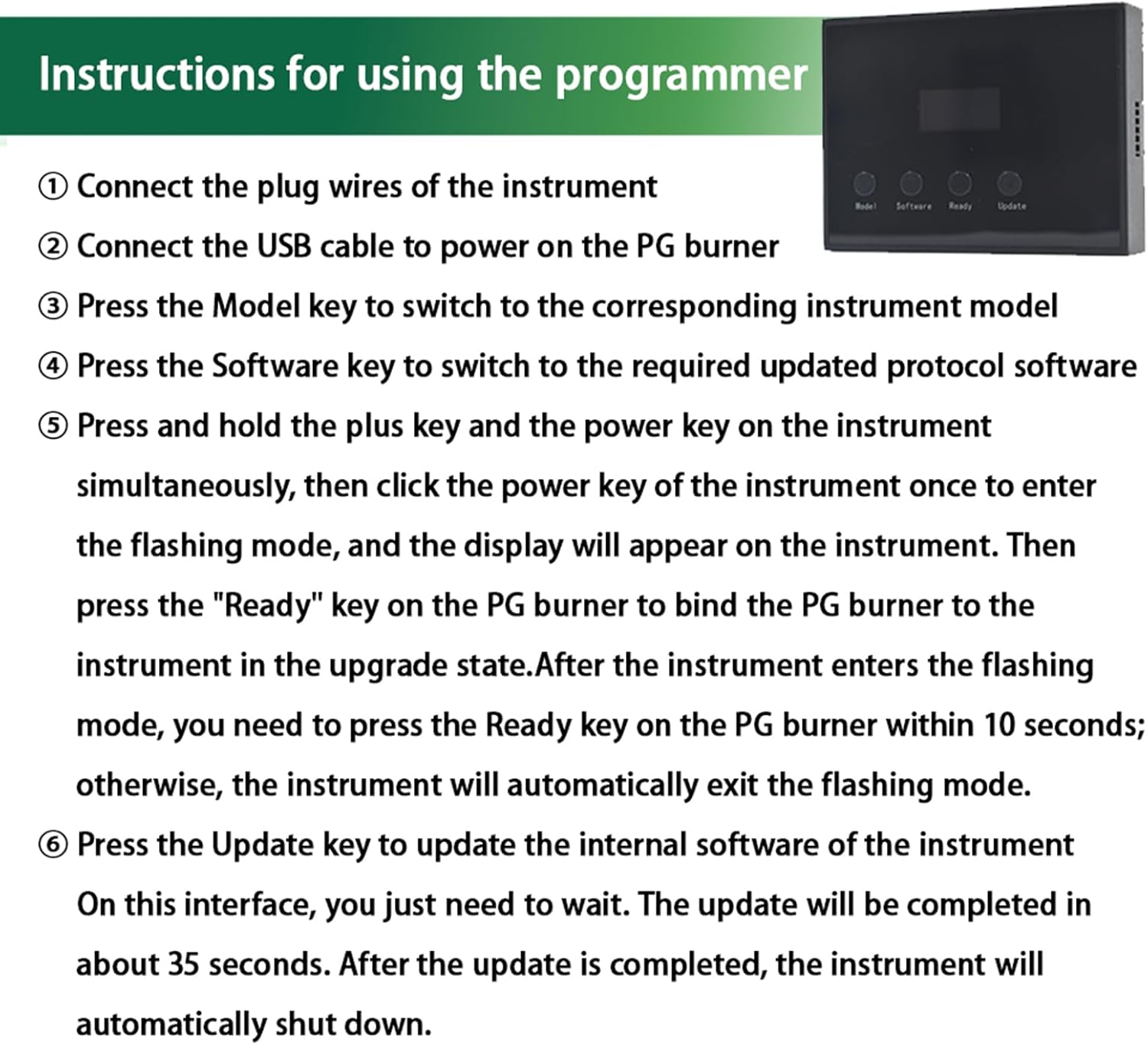
Image: Step-by-step guide on the programmer's display, detailing the sequence of button presses and actions required for successful protocol programming.

Image: Flowchart illustrating the programmer operation process, from selecting the model and software to the update success or failure outcomes.
Техникалык тейлөө
- Түзмөктү таза жана кургак кармаңыз. Нымдуулукка же өтө жогорку температурага дуушар кылбаңыз.
- Store the components in a safe place to prevent physical damage.
- Аппаратты өз алдынча бөлүүгө же оңдоого аракет кылбаңыз. Тейлөө үчүн квалификациялуу кызматкерлерге кайрылыңыз.
- Берилген кабелдерди жана аксессуарларды гана колдонуңуз.
Проблемаларды чечүү
Жалпы маселелер жана чечимдер:
- Маселе: Protocol not recognized by the identifier.
Чечим: Ensure the identifier is correctly connected to the e-bike instrument interface and the e-bike is powered on. Verify that the e-bike's protocol is one of the supported types (Protocol 2, 5s protocol, J protocol, KDS protocol).
- Маселе: Programmer fails to bind or update.
Чечим:
- Бардык кабелдер коопсуз туташтырылганын текшериңиз.
- Confirm the e-bike instrument is in flashing mode (step 5 of operating instructions).
- басыңыз Даяр key on the programmer within the 10-second window after the instrument enters flashing mode.
- Verify that the instrument model is compatible with the programmer (H6C-2, H6C, M5C-2, M5, M6C, M6H, M7C-2, P3C, P3H, P5C).
- Ensure the correct software protocol is selected on the programmer.
- Маселе: Error Code E10 (PG).
Чечим: While the manual mentions troubleshooting Error Code E10, specific details for this error are not provided in the product description. Generally, error codes indicate a communication issue or an unsupported configuration. Recheck all connections, ensure compatibility, and retry the process. If the issue persists, contact customer support.
Техникалык шарттар
| Өзгөчөлүк | Деталь |
|---|---|
| Бренд | Mcezdy |
| Модель аты | PG |
| Түс | Кара |
| Материал | Пластик |
| Дисплей түрү | LCD |
| Recognizer Supported UART Protocols | Protocol 2, 5s protocol, J protocol, KDS protocol |
| Programmer Supported UART Protocols | Protocol 2, 5s protocol, J protocol, KDS protocol |
| Applicable Instruments (Programmer) | H6C-2, H6C, M5C-2, M5, M6C, M6H, M7C-2, P3C, P3H, P5C |
| Камтылган компоненттер | Recognizer, Programmer, 3-in-1 adapter cable (SM6PIN, 5PIN, 6PIN), Instrument pair wiring (SM-5PIN), USB cable (power supply) |
| Элементтин пакетинин өлчөмдөрү | 1 x 1 x 1 дюйм |
| Пакет Салмагы | 1.6 унция |
Кепилдик жана колдоо
Кепилдик маалыматы:
The Mcezdy Ebike Display UART Protocol Recognizer & Programmer Set comes with a 1 жылдык Өндүрүүчүнүн Кепилдиги сатып алынган күндөн тартып. Бул кепилдик нормалдуу колдонуудагы материалдардагы жана жасалгадагы кемчиликтерди камтыйт. Бул туура эмес колдонуудан, кырсыктан, уруксатсыз өзгөртүүдөн же туура эмес орнотуудан келип чыккан зыянды камтыбайт.
Кардарларды колдоо:
For technical assistance, troubleshooting beyond this manual, or warranty claims, please contact Mcezdy customer support. Refer to the product packaging or the official Mcezdy webакыркы байланыш маалыматы үчүн сайт.
Сиз да зыярат кылсаңыз болот Mcezdy Store on Amazon кошумча продукт маалымат жана колдоо ресурстар үчүн.


