1. Киришүү
Welcome to the Alphawolf LPad3A Android 15 Tablet user manual. This guide provides essential information for setting up, operating, maintaining, and troubleshooting your device. Please read it thoroughly to ensure optimal performance and longevity of your tablet.

Image: Alphawolf LPad3A Tablet highlighting its 11-inch display, Android 15 OS, 20GB RAM, 128GB storage, UNISOC T615 CPU, 8000mAh battery, 5MP+13MP cameras, 2.4G/5G WiFi, Widevine L1, Face Recognition, and GPS support.

Image: Visual representation of Android 15 features including enhanced privacy, optimized performance, upgraded user interface, improved multitasking, AI enhancements, and optimized battery life.
2. Пакеттин мазмуну
Пакетти ачканда, төмөндө көрсөтүлгөн бардык буюмдардын бар экендигин жана жакшы абалда экендигин текшериңиз.
- Alphawolf LPad3A Tablet (x1)
- С тибиндеги USB кабели (x1)
- Charging Adapter (x1)
- Колдонуучунун колдонмосу (x1)

Image: Diagram showing the Alphawolf LPad3A tablet, Type-C cable, charging adapter, and user manual included in the package.
3. Түзмөктүн жайгашуусу
Familiarize yourself with the physical components and ports of your Alphawolf LPad3A tablet.
- Дисплей: 11-inch FHD IPS screen.
- Арткы камера: Located on the back panel.
- Алдыңкы камера: Located on the front bezel above the display.
- Кубат баскычы: Used to turn the device on/off or wake/sleep the screen.
- Үн баскычтары: Түзмөктүн үнүн тууралаңыз.
- Type-C заряддоо порту: Планшетті кубаттоо жана маалыматтарды өткөрүп берүү үчүн.
- 3.5 мм гарнитура уячасы: Зымдуу кулакчындарды туташтыруу үчүн.
- Карта уячасы: Сактоо көлөмүн кеңейтүү үчүн MicroSD картаны салуу үчүн.
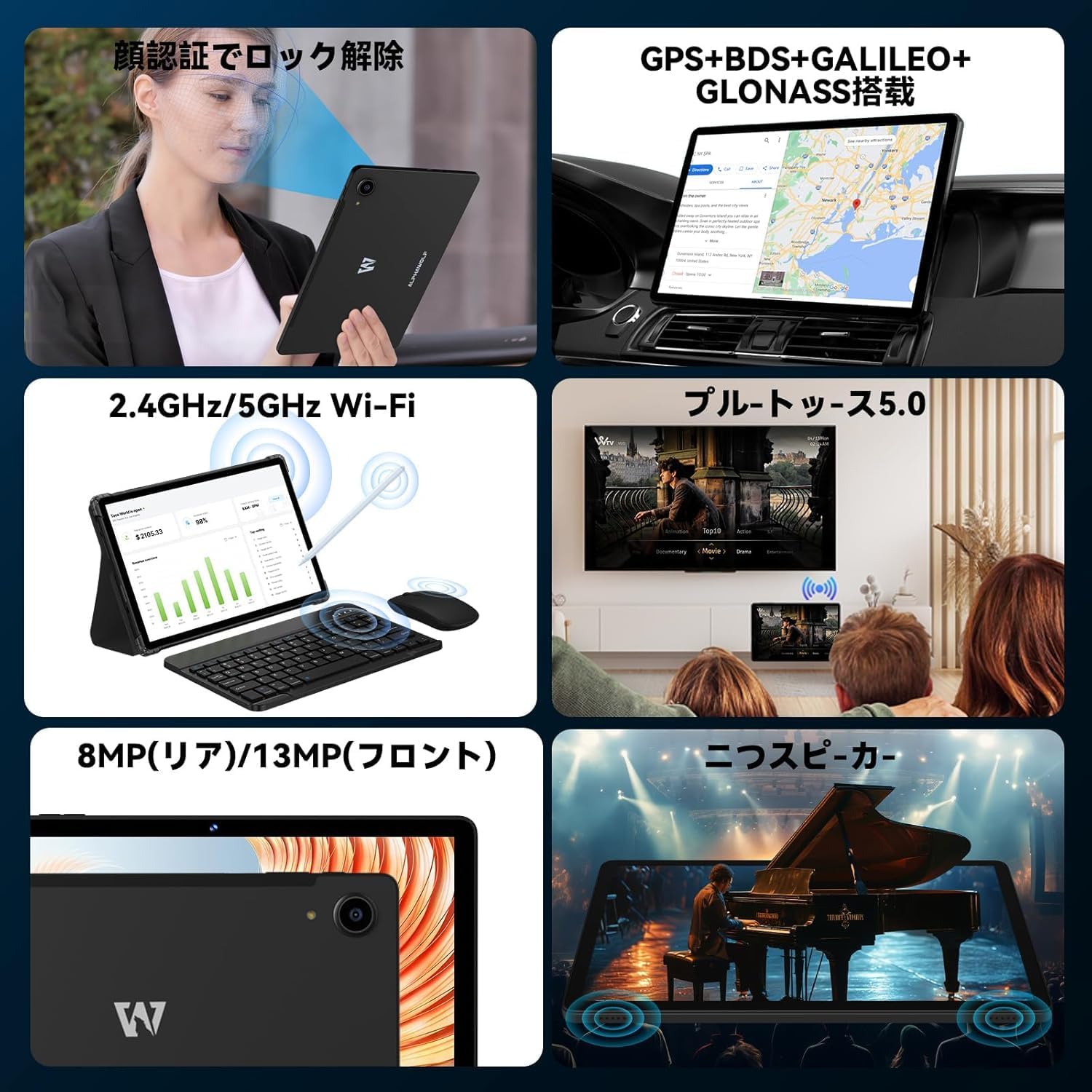
Image: A collage showing the tablet's features including face recognition, GPS, 2.4G/5G WiFi, Bluetooth 5.0, 8MP rear/13MP front cameras, and dual speakers.
4. Орнотуу
4.1 Initial System Update
Upon receiving your LPad3A tablet, it is highly recommended to perform a system update. This ensures you have the latest software and optimal performance.
- Current Build Number: L3A_V1.0_20250612
- Жаңыртуу процедурасы: барыңыз Орнотуулар → Планшет жөнүндө → Системаны жаңыртуу → Жаңыртууну текшериңиз.
Маанилүү эскертүү: Performing this update will automatically restore factory settings. If you do not manually update, the tablet may automatically update when connected to the internet, leading to initialization. This automatic initialization occurs only once after the first update.

Image: A notice in Japanese regarding the recommended system update upon product arrival, specifying the build number and update steps.
4.2 Күйгүзүү/өчүрүү
- Күйгүзүү үчүн: Press and hold the Power button until the Alphawolf logo appears.
- Өчүрүү үчүн: Күйгүзүү/өчүрүү баскычын басып, кармап туруңуз, андан кийин параметрлерден "Өчүрүүнү" тандаңыз.
- Кайра баштоо үчүн: Кубат баскычын басып, кармап туруңуз, андан кийин параметрлерден "Кайра баштоо" тандаңыз.
4.3 Тармакка туташуу (Wi-Fi)
Connect your tablet to a Wi-Fi network for internet access.
- барыңыз Орнотуулар → Тармак жана интернет → Wi-Fi.
- Wi-Fi которуштуруу On.
- Тизмеден каалаган тармакты тандаңыз.
- Эгер суралса, сырсөздү киргизиңиз, андан кийин таптаңыз Туташуу.
4.4 Face Recognition Setup
Set up face recognition for convenient and secure unlocking.
- барыңыз Орнотуулар → Коопсуздук жана купуялык → Жүзүнөн ачуу.
- Жүзүңүздү каттоо үчүн экрандагы нускамаларды аткарыңыз.
5. Иштөө нускамалары
5.1 Дисплейдин өзгөчөлүктөрү
The LPad3A features an 11-inch FHD incell display with a resolution of 1920x1200 pixels, offering a wide viewing angle and vibrant colors. It supports Widevine L1 for high-definition streaming on platforms like Netflix, Amazon Prime Video, Disney+, and Hulu.

Image: The tablet display showing vibrant colors and high resolution, emphasizing its 10.95-inch FHD incell screen, 300+ Nits brightness, 1920x1200 resolution, and 16:10 aspect ratio.

Image: A visual demonstrating the 11-inch IPS wide viewing angle, 16:10 aspect ratio, and 1920x1200 high resolution of the tablet's display.
5.2 Аткаруу жана сактоо
The LPad3A is equipped with a high-performance UNISOC T615 octa-core processor, featuring two A75 cores and six A55 cores for efficient multitasking. It comes with 8GB of physical RAM, expandable virtually by an additional 12GB, totaling 20GB for smooth operation. Internal storage is 128GB, which can be expanded up to 2TB using a MicroSD card (sold separately).

Image: A graphic illustrating the UNISOC T615 octa-core processor, highlighting its A75 and A55 cores, 12nm process, and suitability for gaming.

Image: A visual showing the 20GB (8GB + 12GB virtual) RAM and 128GB internal storage, with an arrow indicating 2TB expandable storage via MicroSD card.

Image: A graphic demonstrating the storage capacity, indicating approximately 249,300 photos, 29,700 short videos, and 450,000 music files can be stored with 128GB ROM and 2TB expansion.
5.3 Камераны колдонуу
The tablet features a 13MP rear camera and a 5MP front camera, suitable for capturing moments and video calls.
- Арткы камера: 13 Megapixels for general photography.
- Алдыңкы камера: 5 Megapixels for selfies and video conferencing.

Image: A close-up of the tablet's rear camera and examples of photos taken with the front camera, indicating 13MP back camera and 5MP front camera.
5.4 Батареяны башкаруу
The LPad3A is equipped with an 8000mAh large-capacity battery, providing extended usage time. It supports Type-C charging.
- Заряддоо: Use the provided Type-C cable and charging adapter.
- Батареянын иштөө мөөнөтү: Offers up to 700-800 hours of standby time.

Image: A visual emphasizing the 8000mAh battery capacity and Type-C charging port, with a tablet displaying a charging animation.

Image: A graphic detailing the 8000mAh large capacity battery, Type-C charging, 5V/2A power, and 3.5mm audio jack.
5.5 Байланыш
The tablet supports various connectivity options for versatile use.
- Wi-Fi: Supports 2.4G and 5G Wi-Fi for fast and stable internet connections.
- Bluetooth 5.0: For connecting wireless accessories like headphones and keyboards.
- GPS: Integrated GPS, BDS, GALILEO, and GLONASS for accurate navigation.
- Зымсыз проекция: Allows mirroring your tablet screen to compatible displays.
- OTG (On-The-Go): Supports connecting USB devices such as flash drives or external keyboards.

Image: A collage illustrating split-screen functionality, 2.4G/5G WiFi connectivity, face recognition, and wireless projection to a TV.
5.6 Parental Controls (Google Kids Space)
The tablet is compatible with Google Kids Space, allowing parents to manage screen time, monitor app usage, remotely lock the device, and track its location for a safe digital environment for children.

Image: A child using the tablet with Google Kids Space interface, demonstrating parental control features for healthy child development.
6. Техникалык тейлөө
6.1 Тазалоо
To keep your tablet clean and functional:
- Экранды жана корпусту сүртүү үчүн жумшак, түксүз чүпүрөктү колдонуңуз.
- Катуу химиялык заттарды, абразивдүү тазалагычтарды же аэрозолдук спрейлерди колдонуудан алыс болуңуз.
- Тазалоодон мурун аппараттын өчүрүлгөнүн жана розеткадан ажыратылганын текшериңиз.
6.2 Сактоо
When not in use, store your tablet in a cool, dry place away from direct sunlight and extreme temperatures. Avoid placing heavy objects on the tablet.
7. Кыйынчылыктарды
7.1 Жалпы маселелер
- Планшет күйбөй жатат: Батарея заряддалганын текшериңиз. Заряддагычты туташтырыңыз жана кайра күйгүзүү аракетинен мурун бир нече мүнөт күтүңүз.
- Экран жооп бербейт: Try restarting the tablet. If the issue persists, perform a factory reset (note: this will erase all data).
- Wi-Fi туташуу көйгөйлөрү: Check if other devices can connect to the Wi-Fi network. Restart your router and the tablet. Ensure the Wi-Fi password is correct.
- Жай аткаруу: Керексиз фон колдонмолорун жабуу. Кэшти жана убактылуу тазалоо fileс. Колдонулбаган колдонмолорду чыгарып салууну карап көрүңүз.
7.2 Колдоо кызматы менен байланышуу
If you encounter issues that cannot be resolved with the troubleshooting steps, please contact Alphawolf customer support.
- Байланыш ыкмасы: Via your Amazon account.
- Кадамдар: Go to "Your Amazon Account" → "Your Orders" → "Select the relevant order" → "Order Details" → "Seller" → "Ask a question".
8. Техникалык шарттар
| Бренд | Альфвольф |
| Модель аты | LPad3A |
| Операция системасы | Android 15 |
| Дисплей өлчөмү | 11 дюйм |
| Display Resolution | 1920 x 1200 пиксел (FHD IPS) |
| Процессор | UNISOC T615 Octa-core |
| RAM | 20 ГБ (8 ГБ физикалык + 12 ГБ виртуалдык) |
| Ички сактагыч | 128 ГБ |
| Кеңейтүүчү сактагыч | Up to 2TB via MicroSD card (sold separately) |
| Батарея сыйымдуулугу | 8000mAh |
| Алдыңкы камера | 5MP |
| Арткы камера | 13MP |
| Байланыш | Wi-Fi (2.4G/5G), Bluetooth 5.0, GPS (GPS+BDS+GALILEO+GLONASS) |
| Порттар | C түрү, 3.5 мм кулакчын уячасы |
| Өлчөмдөр | 29.3 x 20 x 5.3 см |
| Салмагы | 950 г |
9. Кепилдик жана колдоо
Your Alphawolf LPad3A tablet comes with a 1-year quality warranty from the date of purchase. In case of initial defects or any issues during use, please contact our customer support.
- Кепилдик камтуу: Free repair or exchange for product defects within one year.
- Оңдоо борбору: A dedicated repair center is available in Tokyo for prompt after-sales service.


Image: Icons representing 24-hour support, Amazon FBA shipping, Japanese repair center with free repair, and 365-day free warranty.
