1. Киришүү
Thank you for choosing the Cecotec Conga Y50 Robot Vacuum and Mop. This device is designed to provide efficient and autonomous cleaning for your home, combining powerful vacuuming with effective mopping. Featuring advanced laser navigation and a convenient self-draining base, the Conga Y50 simplifies your cleaning routine. Please read this manual thoroughly before operating the robot to ensure proper use, maintenance, and optimal performance.
2. Коопсуздук нускамалары
To reduce the risk of injury or damage, always observe basic safety precautions when operating your robot vacuum cleaner. Keep this manual for future reference.
- Бул шайманды 8 жаштан жогорку балдар жана физикалык, сезүү же акыл-эс жөндөмү начар же тажрыйбасы жана билими жок адамдар колдонсо болот, эгерде алар көзөмөлгө алынган же шайманды коопсуз колдонуу боюнча нускама алган болсо жана келтирилген коркунучтарды түшүнсө. .
- Балдар шайман менен ойнобошу үчүн аларды көзөмөлгө алуу керек.
- Тазалоо жана колдонуучу тейлөөнү балдар көзөмөлсүз жасабашы керек.
- Роботтун туруктуу, тегиз жерге коюлганын текшериңиз.
- Do not expose the robot or its base to water or other liquids.
- Чачты, кенен кийимдерди, манжаларды жана дененин бардык бөлүктөрүн тешиктерден жана кыймылдуу бөлүктөрдөн алыс кармаңыз.
- Роботту ачык жалын же жарылуучу материалдар бар жерлерде иштетпеңиз.
- Only use the original power adapter and charging base provided by the manufacturer.
- Тазалоодон мурун полдон бош калган кабелдерди, майда нерселерди же морт буюмдарды алып салыңыз.
3. Пакеттин мазмуну
Carefully unpack the box and ensure all components are present and in good condition. If any items are missing or damaged, contact customer support.
- Conga Y50 Robot Vacuum Cleaner
- Моп тиркеме
- Өзүн-өзү бошотуу базасы
- Dust bag (pre-installed in base)
- Кубаттуу адаптер
- Side brushes (spare set)
- Тазалоо куралы
- Instruction Manual
4. Продукт бүтүп калдыview
Familiarize yourself with the main components and features of your Conga Y50 robot vacuum.
Робот компоненттери

4.1-сүрөт: Жогорку view of the Conga Y50 robot, highlighting the power, home, and Wi-Fi indicator buttons.

4.2-сүрөт: астыңкы жагы view of the robot, illustrating the main multifunctional brush, side brushes, and driving wheels.
Self-Draining Base

Figure 4.3: The Conga Y50 robot next to its self-draining base, ready for automatic dust collection.
Негизги өзгөчөлүктөрү
- Өркүндөтүлгөн лазердик навигация: The robot uses advanced laser technology to create an interactive map of your home, ensuring precise and personalized cleaning regardless of ambient light. This system provides fast and accurate tracking, reducing navigation errors and ensuring comprehensive coverage.
- 5000Pa High Suction Power: Equipped with a powerful 5000Pa motor, the robot effectively removes dust, hair, and various types of dirt, leaving surfaces thoroughly clean.
- Self-Draining Base: The self-draining base automatically empties the robot's dustbin into a 3-liter dust bag, providing up to 12 weeks of autonomous cleaning. This feature is ideal for allergy sufferers as it keeps dust and allergens contained.
- Көп функциялуу щетка: The robot includes an all-round brush with bristles and rubber silicone, making it suitable for cleaning all types of surfaces, including hard floors and carpets.
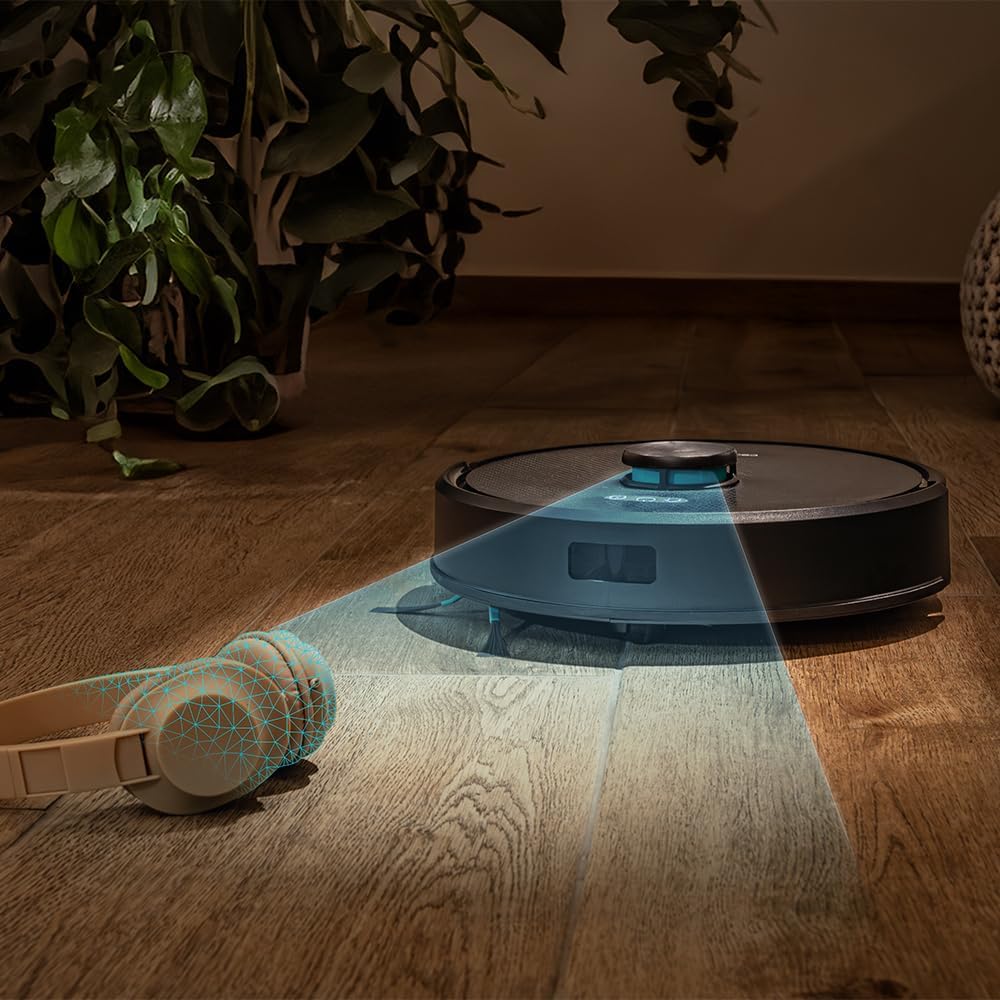
Figure 4.4: The robot's laser navigation system actively mapping its surroundings for efficient cleaning.

Figure 4.5: The robot actively vacuuming a floor, effectively collecting debris.

Figure 4.6: Visual representation of the robot emptying its dustbin into the self-draining base.

Figure 4.7: The robot cleaning a carpet, highlighting the effectiveness of its multifunctional brush.
5. Орнотуу
Follow these steps to prepare your Conga Y50 for its first cleaning session.
5.1 Пакеттен чыгаруу жана жайгаштыруу
- Remove all packaging materials and protective films from the robot and the self-draining base.
- Place the self-draining base against a wall in an open area, ensuring there is at least 0.5 meters of clear space on both sides and 1.5 meters in front of the base. Avoid placing it near stairs or obstacles that could block the robot's return path.
- Connect the power adapter to the self-draining base and plug it into a wall outlet. Ensure the power cable is neatly tucked away to prevent entanglement.

Figure 5.1: The robot correctly docked at its self-draining base.
5.2 Алгачкы заряддоо
- Place the robot onto the charging contacts of the self-draining base. Ensure the charging indicators on the robot illuminate.
- Allow the robot to charge completely before its first use. This typically takes 4-6 hours. The indicator lights will change to show a full charge.
5.3 Колдонмону орнотуу жана жупташтыруу
The Conga Y50 can be controlled via a smartphone app.
- Download the official Cecotec Conga app from your smartphone's app store (iOS or Android).
- Колдонмону ачып, каттоо эсебин түзүңүз же кириңиз.
- Follow the in-app instructions to add your Conga Y50 robot. This usually involves connecting the robot to your home Wi-Fi network.
- Once paired, you can access all smart features, including mapping, scheduling, and cleaning mode selection.

Figure 5.2: Controlling the robot through the dedicated smartphone application.
6. Роботту иштетүү
Learn how to start, stop, and manage your robot's cleaning tasks.
6.1 Тазалоо циклин баштоо
- Кол менен баштоо: Роботтогу Күйгүзүү баскычын бир жолу басыңыз. Робот тазалоону автоматтык режимде баштайт.
- Колдонмону баштоо: Open the Cecotec Conga app, select your robot, and tap the 'Start Cleaning' button. You can also choose specific cleaning modes or areas from the app.
6.2 Тыныгуу жана улантуу
- To pause cleaning, press the Power button on the robot or the 'Pause' button in the app.
- To resume cleaning, press the Power button again or the 'Resume' button in the app.
6.3 Returning to Base
- Press the Home button on the robot or the 'Return to Base' button in the app. The robot will navigate back to its self-draining base to charge and empty its dustbin.

Figure 6.1: The robot intelligently returning to its charging and self-draining station.
6.4 Cleaning Modes and Scheduling
The app allows for advanced control over cleaning modes (e.g., Auto, Edge, Spot, Restricted Areas) and scheduling cleaning times. Refer to the in-app guide for detailed instructions on these features.

Figure 6.2: The robot following a planned path to clean the floor.

Figure 6.3: The robot demonstrating its versatility across various floor surfaces.
7. Техникалык тейлөө
Regular maintenance ensures optimal performance and extends the lifespan of your Conga Y50.
7.1 Emptying the Self-Draining Base Dust Bag
The 3-liter dust bag in the self-draining base typically needs replacement every 12 weeks, depending on usage. The app will notify you when it's full.
- Open the lid of the self-draining base.
- Толук чаң баштыгын кылдаттык менен алып чыгып, жок кылыңыз.
- Insert a new dust bag, ensuring it is properly seated.
- Close the lid of the self-draining base.
7.2 тазалоо щеткасы
The multifunctional brush and side brushes should be cleaned regularly to prevent hair and debris buildup.
- Негизги щетка: Turn the robot over. Remove the main brush cover and lift out the brush. Use the provided cleaning tool to cut and remove tangled hair. Reinstall the brush and cover.
- Каптал щеткалар: Gently pull the side brushes off. Remove any hair or debris. If damaged, replace with new ones. Push them back into place.
7.3 Сенсорлорду жана заряддоо контакттарын тазалоо
Wipe the anti-drop sensors, wall sensors, and charging contacts on both the robot and the base with a clean, dry cloth. This prevents navigation errors and ensures proper charging.
7.4 Mop Maintenance
If using the mopping function, remove the mop cloth after each use, wash it, and allow it to air dry. Replace mop cloths periodically for best results.
8. Кыйынчылыктарды
If you encounter issues with your Conga Y50, refer to the following common problems and solutions.
| Көйгөй | Мүмкүн себеп | Чечим |
|---|---|---|
| Робот күйбөйт | Батареянын аздыгы; Кубат баскычы туура басылган жок | Роботту кубаттоочу базага коюңуз; Кубат баскычын 3 секунд басып туруңуз |
| Робот заряддоочу базаны таба албай жатат | Base obstructed; Robot too far from base | Ensure base has clear space; Manually place robot closer to base |
| Начар тазалоо көрсөткүчү | Brushes tangled; Dust bag full; Filters clogged | Clean main and side brushes; Replace dust bag; Clean or replace filters |
| Робот бат-баттан тыгылып калат | полдо тоскоолдуктар; Сенсорлор кир | Clear floor of clutter; Clean all sensors |
| Колдонмого туташуу маселелери | Incorrect Wi-Fi password; Robot out of Wi-Fi range; Router issues | Verify Wi-Fi credentials; Move robot closer to router; Restart router and robot |
For further assistance, consult the FAQ section in the Cecotec Conga app or contact customer support.
9. Техникалык шарттар
| Өзгөчөлүк | Деталь |
|---|---|
| Бренд | Cecotec |
| Модель аты | Conga Y50 |
| Модель номери | A01_EU01_114519 |
| Продукциянын өлчөмдөрү (L x W x Y) | 32L x 32W x 10H сантиметр |
| Элемент Салмагы | 3.81 килограмм |
| Соруу басымы | 5000 Па |
| Self-Emptying Base Capacity | 3 литр (чаң баштыкчасы) |
| Навигация түрү | Лазердик навигация |
| Батарея түрү | Литий ион |
| Power Source | Батарея менен иштейт |
| Башкаруу ыкмасы | Колдонмо |
| Шайкеш түзмөктөр | Смартфондор |
| Камтылган компоненттер | Robot vacuum cleaner, mop, self-emptying base, dust bag |
| Өндүрүш жылы | 2025 |
10. Кепилдик жана колдоо
Cecotec products are manufactured to high-quality standards. This product comes with a standard manufacturer's warranty. Please refer to the warranty card included in your package or visit the official Cecotec webдеталдуу кепилдик шарттары жана шарттары үчүн сайт.
For spare parts, Cecotec ensures EU spare part availability for a duration of 10 years from the date of manufacture (2025).
For technical support, troubleshooting assistance, or to inquire about spare parts, please contact Cecotec customer service through their official webсайт же продукт документациясында көрсөтүлгөн байланыш маалыматы.


