1. Киришүү
Welcome to the user manual for your BIGASUO Mini Projector BGP7. This guide provides essential information for setting up, operating, maintaining, and troubleshooting your projector. Please read this manual thoroughly before using the product to ensure optimal performance and safety.
Коопсуздук нускамалары
- l болгондо проектордун объективине тике карабаamp күйүк.
- Ашыкча ысып кетүүнүн алдын алуу үчүн проектордун айланасында туура желдетүүнү камсыз кылыңыз.
- Проекторду суудан, нымдуулуктан жана тез күйүүчү материалдардан алыс кармаңыз.
- Проектор менен келген кубат адаптерин гана колдонуңуз.
- Проекторду туруксуз беттерге коюудан алыс болуңуз.
- Проекторду өз алдынча бөлүктөргө бөлүүгө же оңдоого аракет кылбаңыз. Квалификациялуу тейлөө кызматкерлерине кайрылыңыз.
2. Пакеттин мазмуну
Пакетиңизде бардык буюмдар бар экенин текшериңиз:
- BIGASUO Mini Projector BGP7
- Алыстан башкаруу
- Кубаттуу адаптер
- HDMI кабели
- Мини штатив
- Колдонуучунун Колдонмосу (бул документ)
3. Продукт бүтүп калдыview
The BIGASUO BGP7 is a portable mini projector featuring Android 11.0 OS, WiFi 6, Bluetooth 5.0, 270° rotatable stand, automatic keystone correction, and support for Full HD 1080P resolution. It offers a projection size from 40 to 130 inches.

Сүрөт 3.1: Алдыңкы view of the BIGASUO BGP7 Mini Projector highlighting its key features including 1080P support, Air Remote, WiFi 6, HDMI/USB connectivity, and Bluetooth 5.0. Various streaming service logos are also displayed.
Негизги өзгөчөлүктөрү
- Жогорку чечим колдоо: Supports Full HD 1080P with a native resolution of 1280 x 720.
- Кеңири проекция диапазону: Projects screen sizes from 40 to 130 inches at distances from 4 to 15 feet.
- Integrated Android TV System: Runs on Android 11.0, allowing direct app downloads and streaming.
- 270° айлануучу стенд: Provides flexible projection angles, including ceiling projection.
- Автоматтык негизги ташты оңдоо: Automatically adjusts image distortion for a rectangular display.
- Кол менен Фокус: Allows precise image sharpness adjustment.
- Өркүндөтүлгөн байланыш: Features WiFi 6 for fast wireless streaming and Bluetooth 5.0 for audio output.
- Көздү коргоо: Equipped with three optical glass lenses to filter harmful blue light.

Image 3.2: The BIGASUO BGP7 Mini Projector showcasing its 180° built-in adjustable stand, emphasizing its small size and portability.
Порттор жана башкаруу элементтери
Familiarize yourself with the various ports and controls on your projector:
- Электр порту: Кубат адаптерин туташтыруу үчүн.
- HDMI порту: Ноутбуктар, оюн консолдору же телевизорлор сыяктуу тышкы түзмөктөрдү туташтыруу үчүн.
- USB порт: Медиа ойнотуу үчүн USB дисктерди туташтыруу үчүн files.
- Фокус шакеги: Manual adjustment for image sharpness.
- Башкаруу баскычтары: On-device buttons for basic navigation and power.
4. Орнотуу
4.1 Орнотуу
- Проекторду туруктуу, тегиз бетке коюңуз.
- Adjust the 270° rotatable stand to achieve the desired projection angle on a wall or ceiling.
- Оптималдуу үчүн viewing, position the projector between 4 to 15 feet from the projection surface. An ideal viewing distance is approximately 5 feet for a clear image.

Image 4.1: Illustration of the BIGASUO BGP7 Mini Projector demonstrating how different projection distances (1.6m, 2m, 2.6m) result in various screen sizes (80", 100", 130").
4.2 Кубат туташтыруу
- Connect the power adapter to the projector's power port.
- Кубат адаптерин ылайыктуу электр розеткасына сайыңыз.
- Аны күйгүзүү үчүн проектордун же пульттун кубат баскычын басыңыз.
4.3 Фокусту тууралоо
After powering on, adjust the focus ring located on the projector until the projected image appears sharp and clear.
4.4 Негизги таштарды оңдоо
The projector features automatic vertical keystone correction. It will automatically adjust the image to be rectangular. If further adjustment is needed, manual options may be available in the settings menu.

Image 4.2: The BIGASUO BGP7 Mini Projector demonstrating its auto vertical keystone correction feature, ensuring a perfectly rectangular image, and highlighting manual focus adjustment.
4.5 Тармакка туташуу (WiFi 6)
- Navigate to the 'Settings' menu on the projector's home screen.
- "Тармак жана Интернет" бөлүмүн тандаңыз.
- Wi-Fi күйгүзүңүз жана тизмеден каалаган тармакты тандаңыз.
- Enter the Wi-Fi password using the on-screen keyboard and connect.
4.6 Bluetooth жупташтыруу
- Go to 'Settings' and select 'Connected Devices' or 'Bluetooth'.
- Проектордо Bluetooth'ду күйгүзүңүз.
- Put your Bluetooth audio device (e.g., speaker, headphones) into pairing mode.
- Select your device from the list of available devices on the projector to pair.
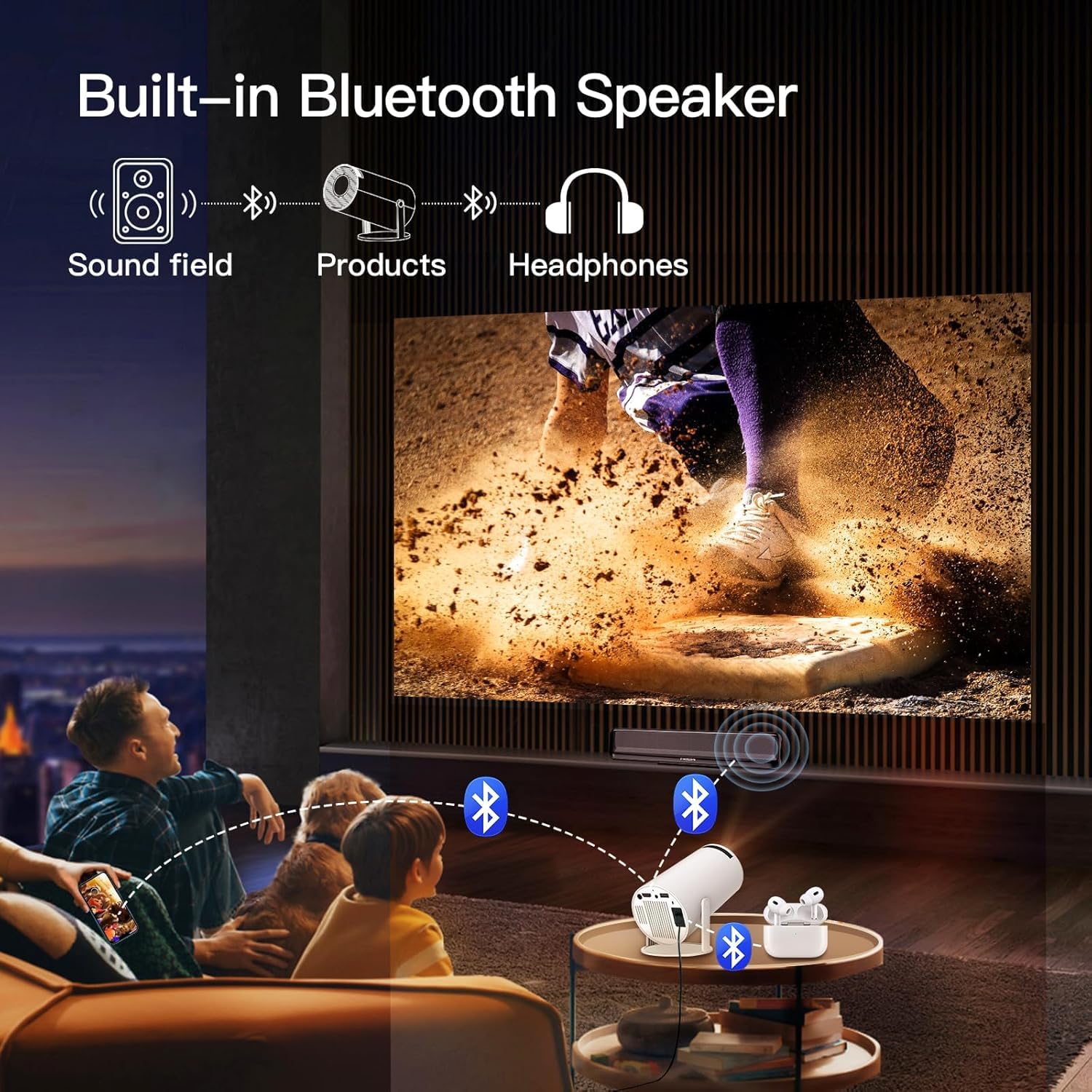
Image 4.3: The BIGASUO BGP7 Mini Projector demonstrating its built-in Bluetooth speaker functionality, allowing connection to external Bluetooth headphones or speakers for enhanced audio.
5. Иштөө
5.1 Navigating the Android TV System
Use the remote control to navigate the Android 11.0 interface. The directional buttons allow movement, the 'OK' button confirms selections, and the 'Back' button returns to the previous screen. You can download and install various applications from the pre-installed app store.
5.2 Тышкы түзмөктөрдү туташтыруу
- HDMI: Connect an HDMI cable from your external device (e.g., TV stick, game console, laptop) to the projector's HDMI port. The projector should automatically detect the input or allow manual selection from the input source menu.
- USB: Insert a USB drive into the USB port. The projector's media player will typically prompt you to browse fileдискте.

Image 5.1: The BIGASUO BGP7 Mini Projector demonstrating its 2.4G/5G WiFi and Bluetooth connectivity, allowing seamless connection to iOS, Android, and Windows devices for screen mirroring or content playback.
5.3 Проекциянын өлчөмүн жөндөө (Масштабдоо функциясы)
The projector includes a zoom function to adjust the screen size without moving the projector. This can be accessed via the remote control or the projector's on-screen menu. This feature is particularly useful for optimizing the image to fit your projection surface.

Image 5.2: The BIGASUO BGP7 Mini Projector illustrating its zoom function, which allows users to adjust the screen size (e.g., to 80%) to perfectly fit small spaces without physically moving the projector.
5.4 Үн орнотуулары
You can adjust the volume using the remote control. For enhanced audio, connect external Bluetooth speakers or headphones as described in Section 4.6.
6. Техникалык тейлөө
6.1 Линзаны тазалоо
Use a soft, lint-free cloth specifically designed for optical lenses. Gently wipe the lens in a circular motion. Avoid using abrasive cleaners or excessive force.
6.2 Желдетүүчү тешиктерди тазалоо
Regularly check and clean the projector's ventilation openings to prevent dust buildup, which can lead to overheating. Use a soft brush or compressed air to remove dust.
6.3 Сактоо
Колдонулбаган учурда проекторду салкын, кургак жерде, тике күн нурунан жана өтө температурадан алыс сактаңыз. Мүмкүн болсо, чаңдын жана зыяндын алдын алуу үчүн оригиналдуу таңгагын же коргоочу капты колдонуңуз.
7. Кыйынчылыктарды
If you encounter issues with your BIGASUO BGP7 Mini Projector, refer to the following common problems and solutions:
| Көйгөй | Мүмкүн болгон себеп / Чечим |
|---|---|
| Күч жок | Ensure the power adapter is securely connected to both the projector and a working power outlet. Check if the power button is pressed. |
| Сүрөт чагылдырылган жок | Check the input source selection (HDMI, USB). Ensure the lens cap is removed. Verify the projector is powered on. |
| Сүрөт бүдөмүк | Adjust the manual focus ring until the image is sharp. Ensure the projection distance is within the recommended range. |
| Сүрөт бурмаланган (тик бурчтуу эмес) | The projector has automatic keystone correction. If distortion persists, check for any manual keystone settings in the menu. Ensure the projector is placed as perpendicular to the screen as possible. |
| Үн жок | Check the volume level on the projector and any connected external devices. Ensure external Bluetooth speakers are properly paired and connected. |
| Remote control is unresponsive or lags | Ensure there are no obstructions between the remote and the projector's IR sensor. Replace the remote control batteries. |
| Wi-Fi туташуу маселелери | Ensure your Wi-Fi network is active and the password is correct. Try restarting your router and the projector. |
| Dark spots or artifacts on the screen | Clean the projector lens. If the issue persists, it may indicate an internal component issue. Contact customer support. |
| Төмөн жарыктык | камсыз кылуу viewing environment is sufficiently dark. Adjust brightness settings in the projector menu. |
8. Техникалык шарттар
| Өзгөчөлүк | Деталь |
|---|---|
| Бренд | BIGASUO |
| Модел | BGP7 |
| Дисплей түрү | LCD |
| Native Resolution | 1280 x 720 пиксел |
| Колдоого алынган резолюция | 1920 x 1080 (Full HD 1080P) |
| Аспект катышы | 16:9 |
| Проекциялык экрандын өлчөмү | 40-130 дюйм |
| Операция системасы | Android 11.0 |
| Зымсыз байланыш | WiFi 6 (2.4G/5G), Bluetooth 5.0 |
| Аппараттык интерфейс | HDMI, USB, Bluetooth |
| Өзгөчөлүктөр | 270° Rotatable Stand, Automatic Keystone, Manual Focus, Eye Protection |
| Тtage | 220 вольт |
| Ватtage | 50 Ватт |
| Жаңыртуу ылдамдыгы | 60 Гц |
| Продукциянын өлчөмдөрү | 10 x 25 x 10 см |
| Элемент Салмагы | 2.5 кг |
9. Кепилдик жана колдоо
9.1 Product Reliability
The BIGASUO Mini Projector BGP7 comes with a 2-year reliability period, ensuring support for manufacturing defects and performance issues under normal use.
9.2 Кардарларды колдоо
For technical assistance, warranty claims, or any questions regarding your BIGASUO Mini Projector BGP7, please contact BIGASUO customer support. Refer to the contact information provided with your purchase or visit the official BIGASUO webколдоо чоо-жайы үчүн сайт.


