1. Киришүү
Thank you for choosing the BIGASUO BGP23 Portable Projector. This device integrates an Android 9.0 operating system, offering a versatile entertainment and presentation solution. It supports HD resolution (1280x720P) and features multiple connectivity options including HDMI, USB, VGA, and AV. This manual provides essential information for setting up, operating, maintaining, and troubleshooting your projector to ensure optimal performance.
2. Коопсуздук маалыматы
- Электр камсыздоо: Белгиленген кубат адаптерин гана колдонуңуз. Voltage жергиликтүү электр менен камсыздооңузга дал келет (220 вольт).
- Вентиляция: Желдетүүчү тешиктерди жаппаңыз. Ашыкча ысып кетүүнүн алдын алуу үчүн проектордун айланасында абанын туура айланышы үчүн жетиштүү орун бар экенин текшериңиз.
- Жайгашкан жери: Проекторду туруктуу, тегиз жерге коюңуз. Аны күн нуру түз тийген жерге, жылуулук булактарынын жанына же нымдуулугу жогору же чаңдуу чөйрөгө койбоңуз.
- Көздү коргоо: l болгондо проектордун объективине тике карабаamp күйүп турат, анткени жаркыраган жарык көзгө зыян келтириши мүмкүн.
- Тазалоо: Disconnect the power before cleaning. Use a soft, dry cloth for the exterior and a lens cleaning kit for the lens.
- Демонтаж: Проекторду өз алдынча бөлүүгө же оңдоого аракет кылбаңыз. Бардык тейлөөлөрдү квалификациялуу кызматкерлерге тапшырыңыз.
3. Пакеттин мазмуну
Пакетиңизде бардык буюмдар бар экенин текшериңиз:
- BIGASUO BGP23 Projector
- Remote Controller
- Кубаттуу адаптер
- HDMI кабели
- AV Cable
- User Manual
- Tripod (may vary by package)
4. Продукт бүтүп калдыview
Проектордун компоненттери жана интерфейстери менен таанышыңыз.
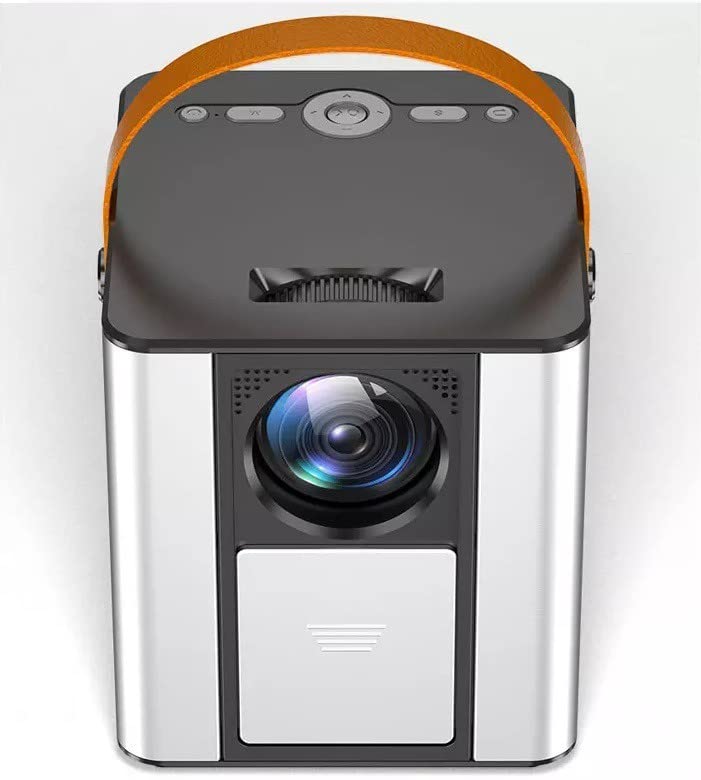
Сүрөт 4.1: Алдыңкы view of the BIGASUO BGP23 Portable Projector with its lens and carrying handle.
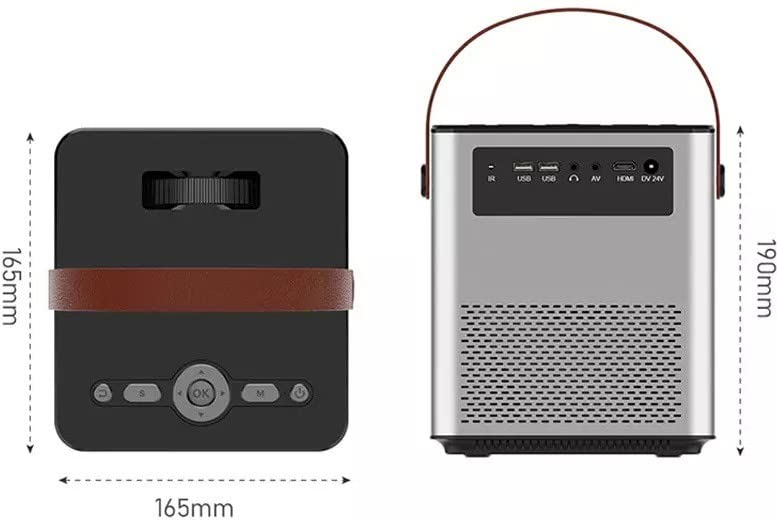
Figure 4.2: Dimensions of the BIGASUO BGP23 Projector and a view of its rear panel, showing various input/output ports.
4.1. Interfaces and Controls
- Объектив: Сүрөттү экранга проекциялайт.
- Фокус шакеги: Сүрөттүн тунуктугун тууралайт.
- Keystone Correction Knob: Трапеция сымал сүрөттүн бурмаланышын оңдойт.
- IR алуучу: Алыстан башкаруу сигналдары үчүн.
- USB порттору: For connecting USB storage devices (e.g., flash drives) for media playback.
- HDMI порту: For connecting external devices like laptops, gaming consoles, or media players.
- VGA порту: Эски компьютерлерди же түзмөктөрдү туташтыруу үчүн.
- AV порт: For connecting legacy audio/video devices.
- Аудио чыгышы (3.5 мм): Тышкы динамиктерди же наушниктерди туташтыруу үчүн.
- Кубат киргизүү: Кубат адаптерине туташат.
- Башкаруу панели: On-device buttons for basic navigation and settings.
5. Орнотуу
5.1. Алгачкы жайгаштыруу
- Проекторду туруктуу жерге коюңуз же аны бекем орнотуңуз.
- Position the projector at an appropriate distance from the projection surface (wall or screen) to achieve the desired image size.
5.2. Power Connection
- Кубат адаптерин проектордун кубат киргизүү портуна туташтырыңыз.
- Кубат адаптерин ылайыктуу электр розеткасына сайыңыз.
- Аппаратты күйгүзүү үчүн проектордун же пульттун кубат баскычын басыңыз.
5.3. Сүрөттү тууралоо
- Фокус: Проекцияланган сүрөт так жана даана көрүнгөнгө чейин проектордун линзасындагы фокустук шакекчени айландырыңыз.
- Негизги ташты оңдоо: If the image appears trapezoidal (wider at the top or bottom), adjust the keystone correction knob until the image is rectangular.
6. Иштөө нускамалары
6.1. Алыстан башкаруу
The included remote control allows for convenient operation of the projector. Ensure AAA batteries are installed (not included).
6.2. Android операциялык системасы
The projector runs on Android 9.0, providing access to various applications and features.
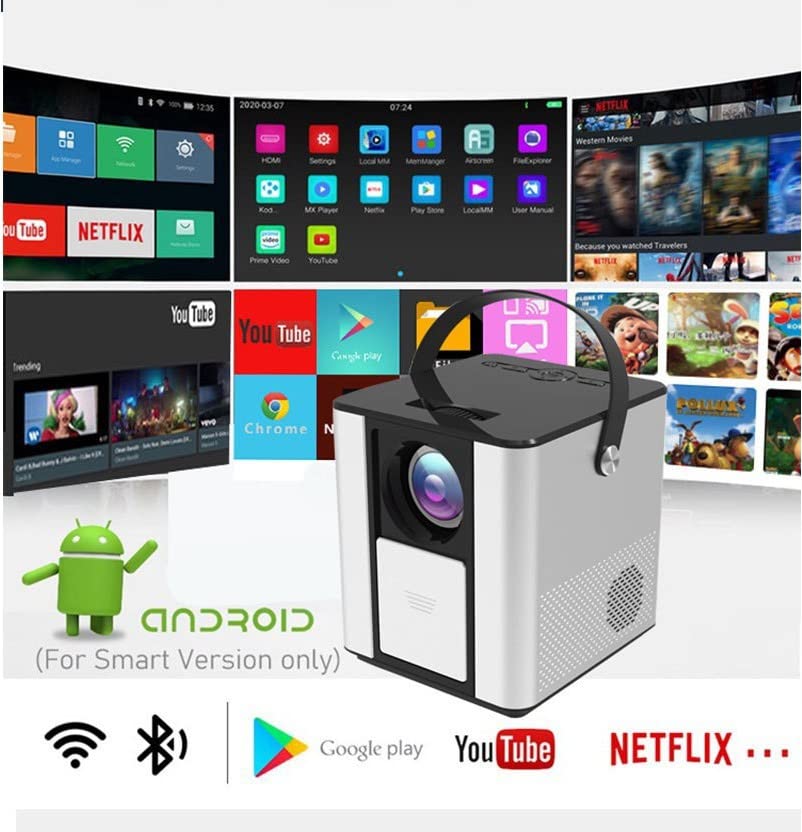
Figure 6.1: The Android interface of the BIGASUO BGP23 Projector, showing various pre-installed application icons.
- Навигация: Use the arrow keys on the remote to navigate through the Android interface. The 'OK' button selects items.
- Башкы экран: Access pre-installed apps like YouTube, Netflix, and the Google Play Store.
- Орнотуулар: Access system settings for Wi-Fi, Bluetooth, display, sound, and more.
- Колдонмо орнотуу: Download and install additional applications from the Google Play Store.
6.3. Системанын жаңыртуулары
To ensure compatibility and optimal performance, regularly check for and install system updates. Navigate to the system settings to find the update option. If you encounter software incompatibility issues, updating the system is recommended.
7. Байланыш
7.1. HDMI туташуу
Connect external devices such as laptops, Blu-ray players, or gaming consoles using an HDMI cable. Select the HDMI input source from the projector's input menu.
7.2. USB медиа ойнотуу
Insert a USB flash drive into one of the USB ports. The projector's file manager will typically detect the drive, allowing you to browse and play supported media files (видеолор, сүрөттөр, музыка).
7.3. Зымсыз проекция (Экранды чагылдыруу)
The projector supports wireless screen mirroring from compatible smartphones and tablets. Refer to the projector's on-screen instructions for specific steps to connect your device via Wi-Fi.
7.4. Bluetooth аудио
Connect external Bluetooth speakers or headphones to the projector for enhanced audio. Navigate to the Bluetooth settings in the Android OS, enable Bluetooth, and pair with your desired audio device.
8. Техникалык тейлөө
- Линзаны тазалоо: Use a professional lens cleaning cloth and solution to gently clean the projector lens. Avoid touching the lens with bare hands.
- Тышкы тазалоо: Wipe the projector's exterior with a soft, dry cloth. Do not use abrasive cleaners or solvents.
- Вентиляцияны тейлөө: Periodically check and clean the ventilation grilles to prevent dust buildup, which can impede airflow and cause overheating.
- Сактагыч: When not in use for extended periods, store the projector in a cool, dry, dust-free environment, preferably in its original packaging or a protective case.
9. Кыйынчылыктарды
Проекторуңузда көйгөйлөргө туш болсоңуз, төмөнкү жалпы көйгөйлөрдү жана чечимдерди караңыз:
| Көйгөй | Мүмкүн чечим |
|---|---|
| Күч жок | Ensure the power adapter is securely connected to both the projector and a working power outlet. Check the power button. |
| Сүрөт жок / Сигнал жок | Verify the input source is correctly selected (e.g., HDMI 1, USB). Check cable connections (HDMI, VGA, AV) for looseness or damage. Try a different cable or device. |
| бүдөмүк сүрөт | Adjust the focus ring on the lens. Ensure the projection distance is within the recommended range. Clean the lens if it is dirty. |
| Trapezoidal Image | Adjust the keystone correction knob until the image is rectangular. Ensure the projector is placed perpendicular to the screen. |
| Алыстан башкаруу жооп бербейт | Check and replace the batteries in the remote control. Ensure there are no obstructions between the remote and the projector's IR receiver. |
| Applications Not Working / Software Issues | Check for and install any available system updates. Clear the cache of the problematic application. If the issue persists, consider a factory reset (backup data first) or contact customer support. |
| Аудио жок | Check the volume settings on both the projector and the connected source device. If using external speakers, ensure they are properly connected and powered on. Verify Bluetooth pairing if using wireless audio. |
10. Техникалык шарттар
The following are the technical specifications for the BIGASUO BGP23 Projector:
- Бренд: BIGASUO
- Модел: BGP23
- Операция системасы: Android 9.0
- Дисплей түрү: LCD
- Түпкү резолюция: 1280 x 720 пиксел
- Колдоого алынган чечим: 1920 Pixels (Full HD)
- Аспект катышы: 16:9
- Байланыш технологиясы: Bluetooth, HDMI, USB, VGA, AV
- Bluetooth версиясы: 5.0
- Тtage: 220 вольт
- Ватtage: 50 Ватт
- Жаңыртуу ылдамдыгы: 60 Гц
- Продукциянын өлчөмдөрү: 10 x 25 x 10 см
- Элемент Салмагы: 2.5 кг
- Форма фактору: Portable
- Монтаж түрү: Столдун үстү
11. Кепилдик жана колдоо
For warranty information and technical support, please refer to the warranty card included with your product or visit the official BIGASUO support website. Contact information for Bigasuo Support Team is typically provided with the product documentation.


