1. Киришүү
Welcome to your new Kaidi KD-7019 TWS Bluetooth Earbuds. This manual provides instructions for the setup, operation, and maintenance of your device. Please read it carefully to ensure proper use and to maximize your listening experience.
Пакеттин мазмуну
- 1 Pair of Kaidi KD-7019 Earbuds
- 1 Charging Case with Touch Screen
- 1 USB-C заряддоо кабели
- 1 Колдонуучунун колдонмосу
- Multiple pairs of silicone ear tips (Small, Medium, Large)
2. Продукт бүтүп калдыview
Earbud Components
The Kaidi KD-7019 earbuds feature an ergonomic in-ear design for a comfortable and secure fit. Each earbud includes a touch-sensitive area for control functions.
Сенсордук экран менен кубаттоочу куту
The charging case not only protects and charges your earbuds but also features an integrated touch screen display for advanced control and information.

Figure 2.1: The product packaging for the Kaidi KD-7019 TWS Bluetooth Earbuds, displaying the brand 'KRIDI' (Kaidi) and 'ANC TWS Tela Touch' (ANC TWS Touch Screen) along with the model number KD-7019.

Figure 2.2: An illustration of the Kaidi KD-7019 charging case's LCD touch screen, detailing various functions such as music control, volume control, sound equalizer, 'Find My Buds' locator, ambient sound modes (ANC), spatial sound, flashlight, and lock screen wallpaper.
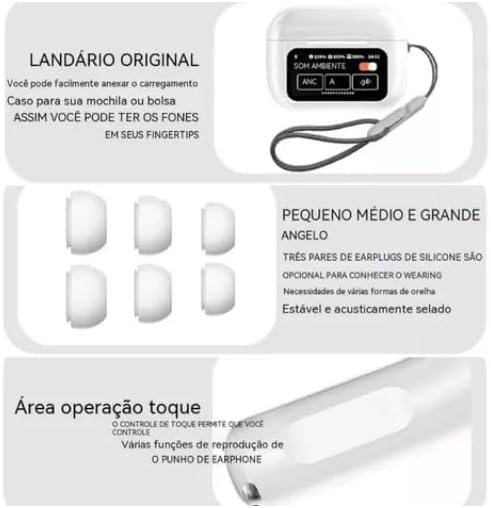
Figure 2.3: This image highlights key features: a lanyard attachment point on the charging case for portability, three pairs of silicone ear tips (small, medium, large) for a comfortable and secure fit, and the touch operation area on the earbuds for controlling playback and other functions.
3. Орнотуу
3.1 Кулакчындарды жана кутучаны заряддоо
- Connect the provided USB-C cable to the charging case and a compatible power source (e.g., USB wall adapter, computer USB port).
- The touch screen on the charging case will display the current charging status.
- Ensure both earbuds are correctly placed inside the charging case to charge them simultaneously.
- A full charge for both the earbuds and the case typically takes approximately 2 hours.
3.2 Bluetooth түзмөгү менен жупташтыруу
- Open the lid of the charging case. The earbuds will automatically power on and enter Bluetooth pairing mode.
- On your desired device (e.g., smartphone, tablet, laptop), navigate to the Bluetooth settings.
- Bluetooth'ду иштетиңиз жана жеткиликтүү түзмөктөрдү издеңиз.
- Select "Kaidi KD-7019" from the list of detected devices to initiate the connection.
- A voice prompt from the earbuds will confirm successful pairing.
4. Иштөө нускамалары
4.1 Basic Earbud Controls (Touch)
Кулакчындар аудио ойнотууну жана чалууларды ыңгайлуу башкаруу үчүн сенсордук сезгич аймактарга ээ.
- Ойнотуу/тындыруу: Кулакчындарды бир жолу таптаңыз.
- Кийинки трек: Оң кулакчынды эки жолу таптаңыз.
- Мурунку трек: Сол кулакчынды эки жолу таптаңыз.
- Чалууга жооп берүү/аяктоо: Кулакчындарды бир жолу таптаңыз.
- Чакырууну четке кагуу: Press and hold either earbud for approximately 2 seconds.
- Үн Жардамчысын жандыруу: Кулакчындарды үч жолу таптаңыз.
4.2 Кубаттоочу кутучанын сенсордук экран функциялары
The integrated touch screen on the charging case provides additional control and information without needing to access your paired device.
- Музыкалык башкаруу: Navigate through tracks, play, and pause directly from the screen.
- Үндү көзөмөлдөө: Adjust the audio playback volume.
- Sound Equalizer: Select from various preset equalizer modes to customize your audio experience (e.g., Acid Rock, Pop, Classical).
- Айланадагы үн режимдери: Toggle between Active Noise Cancellation (ANC), Transparency Mode, and Normal mode to suit your environment.
- "Find My Buds" Locator: Activate this function to emit a sound from misplaced earbuds, aiding in their retrieval.
- Мейкиндик үн: Enable or disable spatial audio features for an immersive sound experience.
- Кол чырак: Activate a small light feature on the charging case for convenience.
- Кулпуланган экрандын обоису: Customize the display background of the touch screen.
- Дата жана убакыт дисплей: View the current date and time directly on the case screen.
5. Техникалык тейлөө
5.1 Тазалоо
- Use a soft, dry, lint-free cloth to clean the earbuds and the charging case.
- Do not use abrasive cleaners, alcohol, or chemical solvents, as these can damage the device.
- If necessary, gently clean the silicone ear tips with a damp cloth and mild soap, then ensure they are completely dry before reattaching them to the earbuds.
5.2 Сактоо
- Always store the earbuds in their charging case when not in use. This protects them from damage and keeps them charged.
- Аппаратты экстремалдык температурага, тике күн нуруна же жогорку нымдуулукка дуушар кылуудан алыс болуңуз.
6. Кыйынчылыктарды
Жалпы маселелер жана чечимдер
- Үн жок:
- Кулакчындардын жетиштүү кубатталганын текшериңиз.
- Verify that the Bluetooth connection is active and stable.
- Adjust the volume on both your connected device and via the charging case touch screen.
- Жупташуу мүмкүн эмес:
- Confirm that the earbuds are in pairing mode (open case lid).
- Өчүрүп, анан түзмөгүңүздө Bluetooth'ду күйгүзүңүз.
- If previously paired, try forgetting "Kaidi KD-7019" from your device's Bluetooth list and attempt pairing again.
- Ensure no other devices are currently connected to the earbuds.
- кубаттоо маселелери:
- Check the USB-C cable and power adapter for damage and proper connection.
- Ensure both earbuds are correctly seated in their charging slots within the case.
- Clean the charging contacts on both the earbuds and the case if they appear dirty.
- Тийүү башкаруулары жооп бербейт:
- Ensure the touch areas on the earbuds are clean and dry.
- Place the earbuds back into the charging case, close the lid, and then reopen it to reset them.
7. Техникалык шарттар
Техникалык маалыматтар
| Өзгөчөлүк | Деталь |
|---|---|
| Бренд | Кайди |
| Модел | KD-7019 (also referred to as 3041) |
| Bluetooth версиясы | 5.3 |
| Колдоого алынган протоколдор | HFP, HSP, A2DP, AVRCP |
| Айдоочу бирдиги | 13 мм |
| Өткөрмө аралык | >10 метр |
| Кулакчындын батареянын кубаттуулугу | 30 мАч |
| Батареянын сыйымдуулугу | 360 мАч |
| Музыканы ойнотуу убактысы | 5 саатка чейин (80% көлөмдө) |
| Заряддоо убактысы (наушник жана кутуча) | Болжол менен 2 саат |
| Башкаруу ыкмасы | тийүү |
| Шайкеш түзмөктөр | Уюлдук телефондор, планшеттер, ноутбуктар |
| Noise Control | Экологиялык ызы -чууну жокко чыгаруу (ENC) |
| ANTEL сертификаты | 10545-23-12308 |
| Продукт Салмагы | 190 г |
| Пакеттин өлчөмдөрү | 23 x 13 x 4 см |
8. Кепилдик жана колдоо
8.1 Кепилдик маалыматы
Based on the available product information, this product does not come with a manufacturer's warranty. Please refer to the return and warranty policies provided by your retailer or point of purchase for any potential coverage.
8.2 Кардарларды колдоо
For further assistance, technical support, or inquiries regarding your Kaidi KD-7019 TWS Bluetooth Earbuds, please contact the retailer or seller from whom you purchased the product.


