1. Киришүү
Thank you for choosing the HTC GT-288 Electric Shaver. This manual provides essential information for the safe and effective operation, maintenance, and care of your new shaver. Please read these instructions thoroughly before first use and retain them for future reference.
2. Коопсуздук маалыматы
Электр тогуна урунуу, жаракат алуу же бузулуу коркунучун азайтуу үчүн ар дайым төмөнкү негизги коопсуздук чараларын сактаңыз:
- Do not immerse the charging cable or power adapter in water or other liquids.
- Шайманды балдардан алыс кармаңыз.
- Ensure the shaver is fully dry before connecting it to the charging cable.
- Do not use the shaver if the blade or foil is damaged, as this may cause injury.
- Берилген USB кубаттоо кабелин гана колдонуңуз.
- This appliance is designed for personal use only.
3. Пакеттин мазмуну
Сураныч, пакетте төмөнкү нерселерди текшериңиз:
- 1 x HTC GT-288 Electric Shaver
- 1 x USB заряддоо кабели
- 3 x Precision Combs (1mm, 3mm, 5mm)
- 1 x тазалоочу щетка
- 1 x Майлоочу май
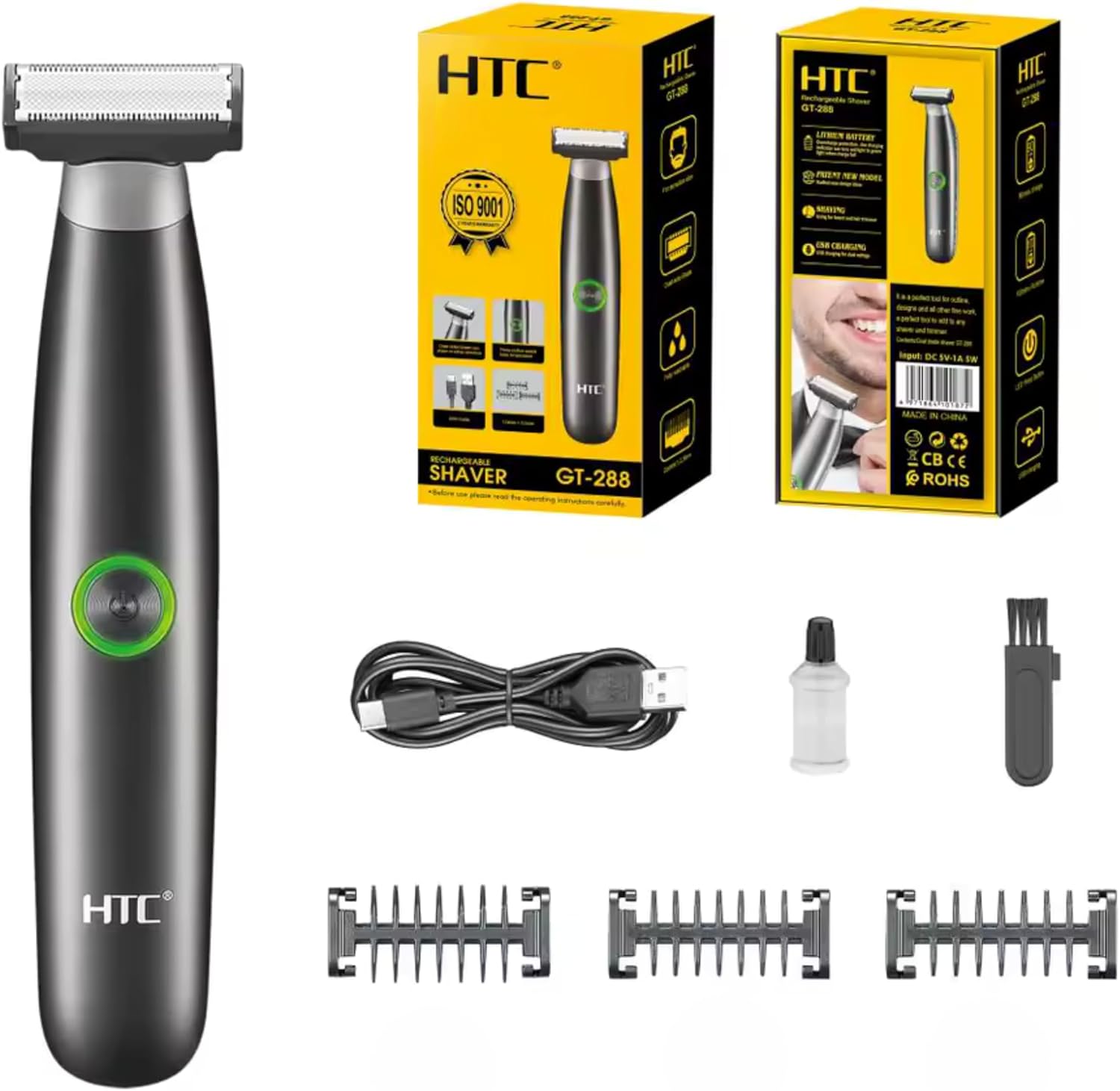
Image 3.1: Contents of the HTC GT-288 Electric Shaver package, including the shaver, USB cable, three precision combs, cleaning brush, and lubricating oil.
4. Продукт бүтүп калдыview
The HTC GT-288 Electric Shaver features a sleek design with a dual-sided blade for efficient trimming and shaving. It includes an easy-to-operate press-button switch and is fully washable for convenient cleaning.
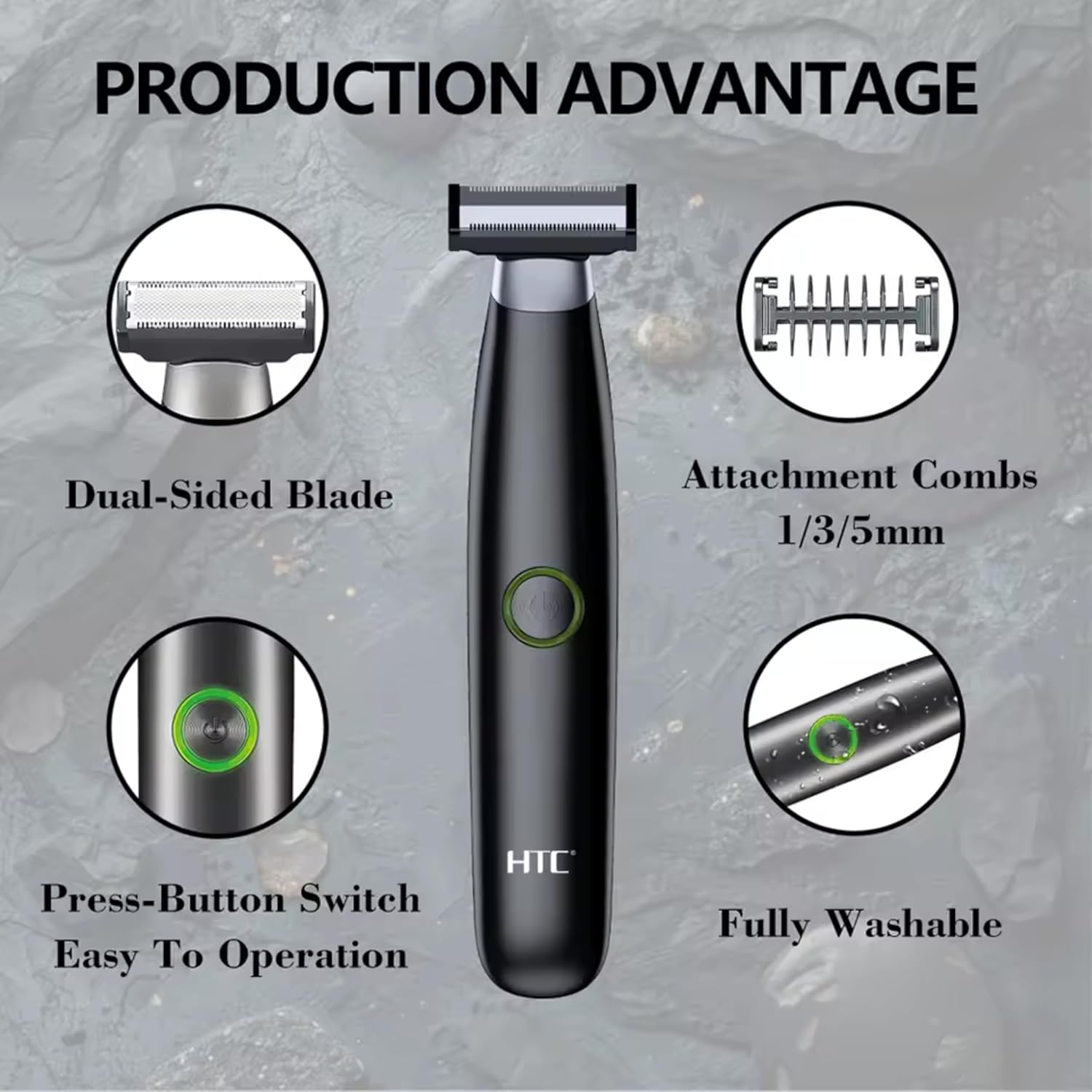
Сүрөт 4.1: Бүттүview of the HTC GT-288 Electric Shaver's key features, highlighting the dual-sided blade, attachment combs (1/3/5mm), press-button switch, and fully washable design.

Image 4.2: Detail of the LED press button, which serves as the on/off switch for easy operation.
5. Орнотуу
- Таңылганын ачуу: Бардык компоненттерди таңгактан кылдаттык менен алып салыңыз.
- Баштапкы төлөм: Before first use, fully charge the shaver. Refer to Section 6 for charging instructions.
- Attach Comb (Optional): If desired, select one of the three precision combs (1mm, 3mm, or 5mm) and slide it onto the shaver head until it clicks into place. Ensure it is securely attached.
6. Заряддоо
The HTC GT-288 Electric Shaver is equipped with a rechargeable battery for cordless operation.
- Устанын өчүрүлгөнүн текшериңиз.
- Connect the small end of the USB charging cable to the charging port on the shaver.
- Connect the larger end of the USB cable to a compatible USB power source (e.g., computer, USB wall adapter).
- The LED indicator on the shaver will illuminate to show that it is charging.
- Allow the shaver to charge completely before its first use. A full charge typically takes several hours.
- Толук заряддалгандан кийин, USB кабелин ажыратыңыз.
7. Иштөө нускамалары
The HTC GT-288 shaver can be used for both wet and dry shaving.
- Күйгүзүү: Press the LED button to turn on the shaver.
- Кургак кыруу: For dry shaving, ensure your skin is clean and dry. Gently press the shaver against your skin and move it in slow, even strokes against the direction of hair growth.
- Нымдуу кыруу: For wet shaving, apply shaving foam or gel to your skin. The shaver is waterproof, allowing for use in the shower or with water. Move the shaver in gentle, even strokes.
- Using Precision Combs: Attach the desired 1mm, 3mm, or 5mm comb for trimming beards, sideburns, or other facial hair to a specific length. Move the shaver with the comb attached against the direction of hair growth for an even trim.
- Өчүрүү: Press the LED button again to turn off the shaver after use.
8. Техникалык тейлөө жана тазалоо
Үзгүлтүксүз тазалоо оптималдуу иштешин камсыз кылат жана устараңыздын иштөө мөөнөтүн узартат.
- Өчүрүү: Тазалоодон мурун дайыма устараны өчүрүңүз.
- Башты жуу: The shaver is fully washable (IPX6 rated). You can rinse the shaver head directly under running water to remove hair clippings.
- Тазалоочу щетка колдонуңуз: For more thorough cleaning, use the provided cleaning brush to remove stubborn hair particles from the blade and comb attachments.
- Бычактарды майлоо: After cleaning and drying, apply a small drop of the provided lubricating oil to the blades. Turn on the shaver for a few seconds to distribute the oil evenly. This helps maintain blade performance.
- Кургак: Сактоодон же кайра заряддоодон мурун, устараны толугу менен кургатыңыз.

Image 8.1: The HTC GT-288 Electric Shaver being rinsed under a faucet, illustrating its IPX6 fully washable design for easy cleaning.
9. Кыйынчылыктарды
| Көйгөй | Мүмкүн себеп | Чечим |
|---|---|---|
| Устра иштетилбейт. | Батарея түгөнүп калды. | Устаны толук заряддаңыз. |
| Shaver does not cut effectively. | Бышактар чач менен бүтөлүп же кызыксыз. | Clean the shaver head thoroughly. Apply lubricating oil. If problem persists, blades may need replacement. |
| Устра чачты тартат. | Battery is low or blades are clogged. | Charge the shaver. Clean the shaver head. |
| Колдонуу учурунда устара токтойт. | Батарея түгөнүп калды. | Устаны кайра заряддаңыз. |
10. Техникалык шарттар
- Бренд: HTC
- Модель аты: GT-288
- Кубат булагы: USB кайра заряддоого болот
- Өзгөчөлүктөр: USB Cable, Adjustable Combs, Rechargeable, Water Resistant, Wet & Dry Use
- Сунушталган колдонуулар: Facial Shaving, Beard Trimming, Daily Use, Travel
- Камтылган компоненттер: Electric Shaver, USB Cable, 3 Precision Combs, Cleaning Brush, Lubricating Oil
- Продукт Салмагы: 250 грамм
- Түсү: Кара
- Бышактын материалы: Дат баспаган болот
- Баштын түрү: Precision Trimmer
11. Кепилдик жана колдоо
This product is manufactured by HTC. For any questions, technical support, or warranty claims, please contact the seller or manufacturer directly through your purchase platform. Please retain your proof of purchase for warranty purposes.


