Introduction
This manual provides detailed instructions for the setup, operation, and maintenance of your Pyle PA Speaker System, Model PPHP1569UT.5. This high-powered, versatile audio system is designed for various entertainment needs, including karaoke, parties, and stage performances. It features a 15-inch Bluetooth active PA speaker and a 15-inch passive PA speaker, offering 500W max output with deep bass and clear highs. Please read this manual thoroughly before using the system to ensure proper function and longevity.
Кутуда эмне бар

Сүрөт: бүттүview of the Pyle PA Speaker System components included in the package.
Таңгактан чыгаргандан кийин, төмөндө көрсөтүлгөн нерселердин бардыгы бар экенин жана жакшы абалда экендигин текшериңиз:
- 15'' Bluetooth Active PA Speaker
- 15'' Passive PA Speaker
- (2) Спикер стенддери
- Электр кабели
- Audio Cable 5M (Both sides are speakON)
- Микрофон
- Алыстан башкаруу
Продукт өзгөчөлүктөрү
- 500 Watts Max Power: The PA combo speaker system features a 2x15” woofer and 2x1” tweeter, providing a 500W max power output for full-range surround stereo sound with deep bass and clear highs.
- Combo PA Speaker System: Includes a 15” Bluetooth active PA speaker with a built-in amplifier and a 15” passive PA speaker for a complete audio setup.
- Зымсыз Bluetooth агымы: Stream audio wirelessly from any Bluetooth-enabled device such as smartphones, tablets, or PCs.
- Multiple Auxiliary Input Options: MP3 колдойт files via USB/SD ports, FM radio, and a ¼” microphone jack for versatile connectivity.
- Портативдик дизайн: Lightweight design with integrated carry handles and roller caster wheels for easy transport.
- LED жарыктары: Integrated LED lights for visual enhancement.

Image: Illustration of the speaker's internal components, highlighting the 15-inch subwoofer and 1-inch tweeter for powerful audio output.

Image: The speaker's design featuring a retractable handle and caster wheels for enhanced portability.
Бөлүктөр жана функциялар
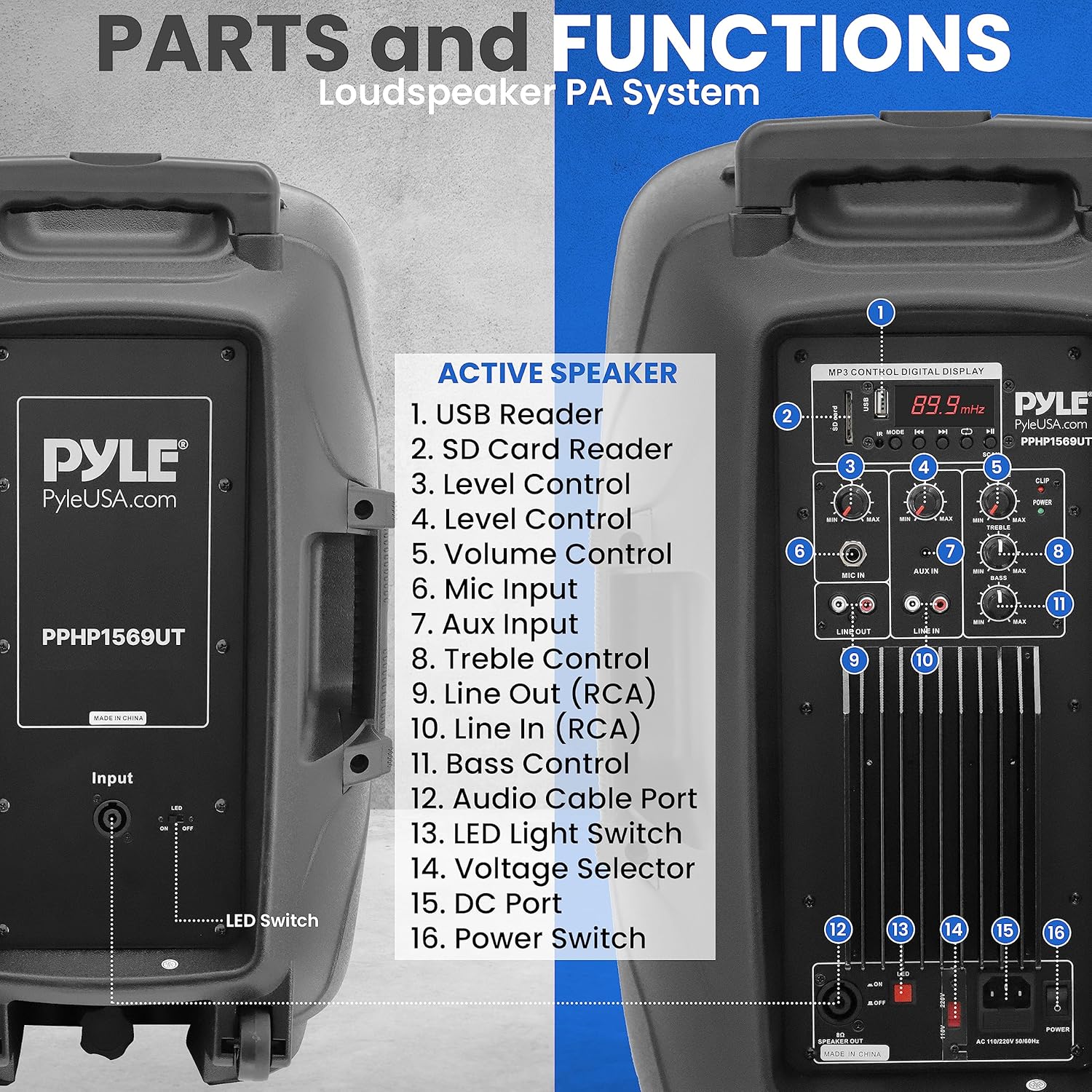
Image: Rear panel of the active speaker, detailing the various ports and controls.
Active Speaker Control Panel:
- USB Reader: Аудио ойнотуу үчүн fileUSB флешкасынан.
- SD картаны окугуч: Аудио ойнотуу үчүн files from an SD memory card.
- Level Control (Input 1): Adjusts the input level for a specific channel.
- Level Control (Input 2): Adjusts the input level for a specific channel.
- Үндү көзөмөлдөө: Master volume adjustment for the overall output.
- Микрофон киргизүү: ¼” jack for connecting a microphone.
- Aux Киргизүү: RCA input for connecting external audio devices.
- Үч ыргак башкаруу: Жогорку жыштыктагы жоопту тууралайт.
- Line Out (RCA): RCA output for connecting to another ampкөтөргүч же кубаттуу динамик.
- Line In (RCA): RCA input for connecting external audio devices.
- Басс башкаруу: Төмөн жыштыктагы жоопту тууралайт.
- Аудио кабелдин порту: SpeakON port for connecting the passive speaker.
- LED жарык өчүргүч: Toggles the integrated LED lights on/off.
- Тtage Тандоочу: Switch to select between 110V and 220V power input.
- DC Порт: Not applicable for this model (typically for DC power input).
- Кубат которгучу: Агрегатты күйгүзөт же өчүрөт.
Пассивдүү баяндамачы:
The passive speaker connects to the active speaker via the provided SpeakON audio cable. It does not have its own controls or power input.
Жайгашуу
1. Спикердин жайгашуусу:
- Place the active and passive speakers in desired locations. For optimal sound dispersion, consider using the included speaker stands.
- To mount on stands, align the speaker's bottom pole mount with the stand's top pole and gently lower the speaker onto the stand. Ensure it is stable.
2. Connecting the Speakers:
- Locate the "Audio Cable Port" (12) on the active speaker's control panel.
- Connect one end of the provided 5M SpeakON audio cable to this port.
- Connect the other end of the SpeakON audio cable to the input port on the passive speaker.
- Эки байланыш тең коопсуз экенин текшериңиз.
3. Кубат туташуу:
- Before connecting power, ensure the "Voltage Selector" (14) on the active speaker is set to the correct voltagсиздин аймагыңыз үчүн (110V же 220V).
- Connect the power cable to the active speaker's power input.
- Электр кабелинин экинчи учун ылайыктуу электр розеткасына сайыңыз.
Иштөө нускамалары
1. Күйгүзүү/өчүрүү:
- To turn on the system, press the "Power Switch" (16) located on the active speaker's control panel. The digital display will illuminate.
- To turn off the system, press the "Power Switch" (16) again.
2. Bluetooth зымсыз агымы:

Image: Visual representation of the speaker's built-in Bluetooth capability for wireless audio streaming.
- Динамик күйгүзүлгөнүн текшериңиз.
- Press the "Mode" button on the digital display panel until "Bluetooth" or "BT" is displayed. The unit will enter pairing mode.
- Bluetooth иштетилген түзмөгүңүздө (смартфон, планшет, компьютер) жеткиликтүү Bluetooth түзмөктөрүн издеңиз.
- Select "Pyle Audio" or a similar name from the list.
- Once paired, you will hear a confirmation tone, and you can begin streaming audio wirelessly.
3. USB/SD Card Playback:

Image: The speaker system's versatility in connecting and streaming audio from external devices, including USB, AUX, Microphone, and SD Card inputs.
- Insert a USB flash drive into the "USB Reader" (1) or an SD card into the "SD Card Reader" (2).
- Система автоматтык түрдө USB/SD режимине өтүп, туура келген аудиону ойното баштайт files. If not, press the "Mode" button to select the correct input.
- Use the playback controls (Play/Pause, Next, Previous) on the digital display or remote control to manage your music.
4. AUX киргизүү:
- Connect your external audio device (e.g., MP3 player, CD player) to the "Aux Input" (7) or "Line In (RCA)" (10) using appropriate cables.
- Press the "Mode" button until "AUX" or "Line In" is displayed.
- Adjust the volume on both your external device and the speaker system.
5. Microphone Use:
- Connect the provided microphone to the "Mic Input" (6).
- Adjust the "Level Control" (3 or 4, depending on which input is used for mic) for the microphone to achieve desired volume.
- Ensure the master "Volume Control" (5) is set appropriately.
6. FM радиосу:
- "FM" көрсөтүлгөнгө чейин "Режим" баскычын басыңыз.
- Use the scan buttons on the digital display or remote control to search for available radio stations.
7. Үндү тууралоо:
- Use the "Bass Control" (11) to adjust the low-frequency output.
- Use the "Treble Control" (8) to adjust the high-frequency output.
- The "Volume Control" (5) adjusts the overall output volume of the system.
8. LED жарыктары:
- Toggle the "LED Light Switch" (13) to turn the integrated LED lights on or off.
Техникалык тейлөө
- Тазалоо: Динамиктердин сыртын тазалоо үчүн жумшак, кургак чүпүрөктү колдонуңуз. Суюк тазалагычтарды же абразивдүү материалдарды колдонбоңуз.
- Сактагыч: Эгерде система көпкө колдонулбаса, аны салкын, кургак жерде, күндүн түз нурунан жана өтө жогорку температурадан алыс сактаңыз.
- Колдонуу: Always use the integrated carry handles and roller caster wheels for transport. Avoid dropping or subjecting the speakers to strong impacts.
- Вентиляция: Ensure proper ventilation around the active speaker to prevent overheating. Do not block any ventilation openings.
Проблемаларды чечүү
| Көйгөй | Мүмкүн себеп | Чечим |
|---|---|---|
| Күч жок | Электр кабели туташкан эмес; Электр өчүрүү; Туура эмес томtage тандалган. | Ensure power cable is securely plugged in. Turn on the power switch. Verify voltage селектору туура коюлган. |
| Динамиктерден үн жок | Volume too low; Incorrect input selected; Cables not connected properly; Passive speaker cable loose. | Increase master volume. Select the correct input mode (Bluetooth, USB, AUX). Check all audio cable connections, especially the SpeakON cable to the passive speaker. |
| Bluetooth жупташкан жок | Speaker not in pairing mode; Device too far; Bluetooth disabled on device. | Ensure speaker is in Bluetooth mode and "BT" is flashing. Move device closer to speaker. Enable Bluetooth on your device. |
| Бурмаланган үн | Volume too high (clipping); Input source distortion; Incorrect EQ settings. | Reduce volume on both speaker and source device. Check source audio quality. Adjust Bass and Treble controls. |
| Микрофон иштебей жатат | Microphone not plugged in; Microphone volume too low; Faulty microphone. | Ensure microphone is securely plugged into the Mic Input. Increase the microphone's level control. Test with another microphone if available. |
Техникалык шарттар
| Өзгөчөлүк | Деталь |
|---|---|
| Модель номери | PPHP1569UT.5 |
| Power Output | Максимум 500 ватт |
| Вуфердин өлчөмү | 15 inches (x2) |
| Tweeter өлчөмү | 1 inch (x2) |
| Импеданс | 8 Ом |
| Frequency Response | 3.3 KHz (Crossover) |
| Байланыш технологиясы | Bluetooth, AUX, USB, SD Card |
| Аудио киргизүү | Microphone (¼"), Aux (RCA), Line In (RCA), USB, SD |
| Аудио чыгуулар | Line Out (RCA), SpeakON (to passive speaker) |
| Power Source | Corded Electric (110V/220V selectable) |
| Элемент Салмагы | 81.7 фунт |
| Пакеттин өлчөмдөрү | 36 x 31 x 20 дюйм |
| Шайкеш түзмөктөр | PC, Smartphone, Android, Tablet, iPad, iPhone |
| Монтаж түрү | Тоо |
Кепилдик жана колдоо
Pyle products are designed for reliability and performance. For information regarding warranty coverage, product support, or to purchase replacement parts, please visit the official Pyle webсайтка же кардарларды тейлөө бөлүмүнө кайрылыңыз.
Көбүрөөк маалымат жана байланыш маалыматын төмөнкү дарекке кирип таба аласыз Амазонкадагы Pyle дүкөнү or the official Pyle USA webсайт.
For returns, please refer to Amazon's 30-day easy returns policy.


