1. Киришүү
Thank you for choosing the LEOTEC Portable AM FM Radio. This compact and lightweight radio is designed for convenient listening on the go, offering clear AM and FM reception. This manual provides essential information for safe and effective use of your device. Please read it thoroughly before operation and retain it for future reference.
2. Коопсуздук маалыматы
- Аппаратты экстремалдык температурага, түз күндүн нуруна же жогорку нымдуулукка дуушар кылбаңыз.
- Радиону түшүрүп алуудан же катуу соккуга кабылтуудан алыс болуңуз.
- Аппаратты суудан жана башка суюктуктардан алыс кармаңыз.
- Көрсөтүлгөн батареянын түрүн гана колдонуңуз (2 AAA батарейка).
- Радиону бөлүктөргө бөлүүгө же өзгөртүүгө аракет кылбаңыз. Бул кепилдикти жокко чыгарат.
- Аппаратты жумшак, кургак чүпүрөк менен тазалаңыз. Абразивдүү тазалагычтарды же эриткичтерди колдонбоңуз.
- Узак убакыт бою жогорку үн деңгээлинде угуу угуунун туруктуу бузулушуна алып келиши мүмкүн.
3. Пакеттин мазмуну
- LEOTEC Portable AM FM Radio
- Wired Earphones (3.5mm jack)
- User Manual
4. Продукт бүтүп калдыview
The LEOTEC Portable AM FM Radio is designed for simplicity and portability. It features an intuitive interface and a compact form factor, making it ideal for various activities.

Сүрөт: алдыңкы view of the LEOTEC Portable AM FM Radio, showing the display, controls, and connected earphones.

Image: Diagram illustrating the AM (530-1700KHz) and FM (88-108MHz) frequency ranges supported by the radio, with radio waves emanating from the device.

Сүрөт: Жакын план view highlighting the radio's controls: Function Switch (OFF/AM/FM), Volume Control, and Tuning Control. A belt clip is also visible on the side.

Image: A size comparison of the LEOTEC Portable AM FM Radio next to a smartphone, illustrating its compact dimensions (1.85 x 0.63 x 3.54 inches).
5. Орнотуу
5.1 Батареяны орнотуу
The radio requires 2 AAA batteries (not included) for operation.
- Радионун артындагы батарея бөлүкчөсүнүн капкагын табыңыз.
- Капкакты жылдырыңыз.
- Туура полярдуулукту (+ жана -) камсыз кылып, 2 AAA батарейкасын салыңыз.
- Батарея уясынын капкагын бекем жабыңыз.
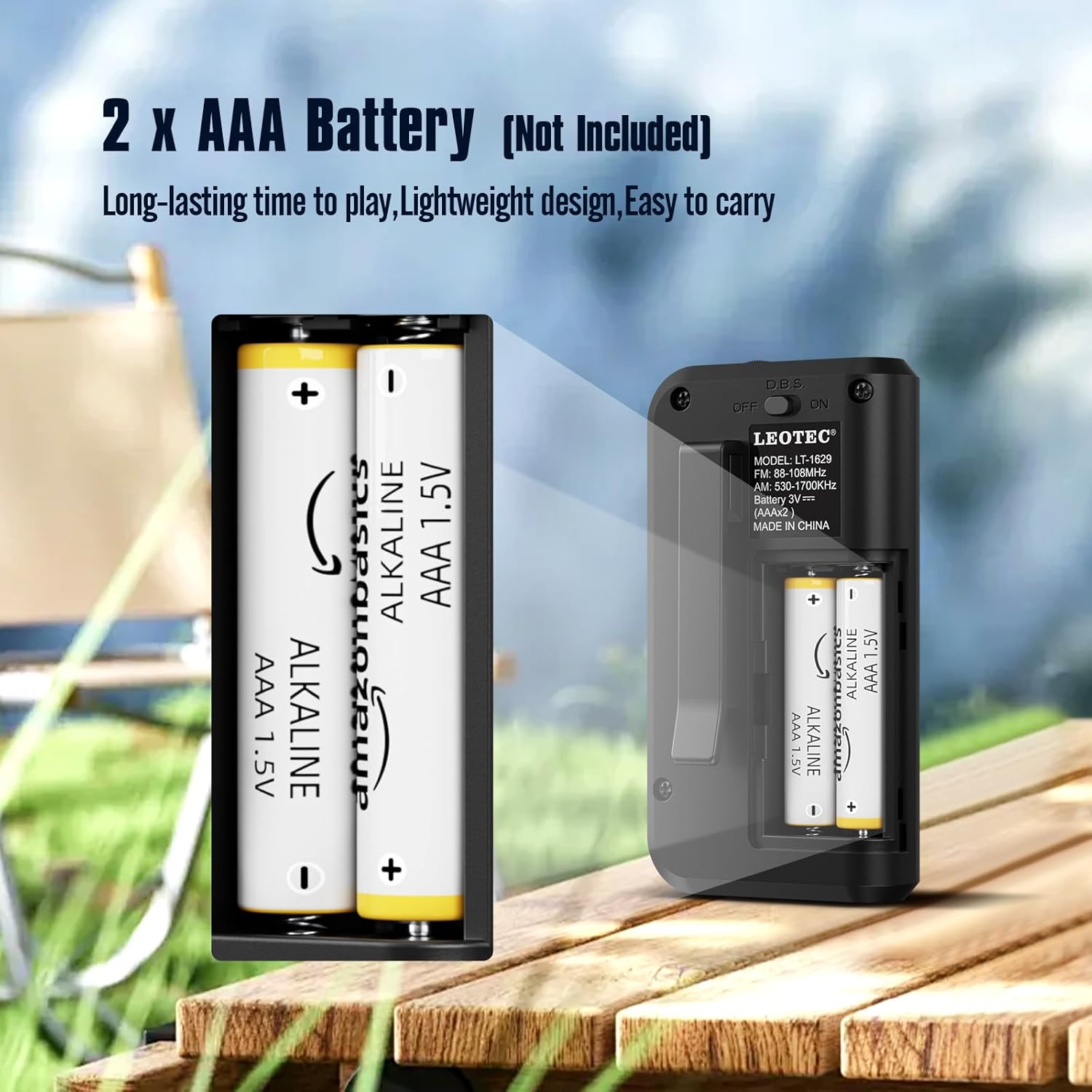
Image: The open battery compartment of the radio, clearly showing the slots for two AAA batteries and their polarity markings.
5.2 Кулакчындын туташуусу
The radio operates with earphones, which also function as the antenna for optimal reception.
- Locate the 3.5mm earphone jack on the top of the radio.
- Insert the earphones firmly into the jack.

Сүрөт: жакын план view of the radio's top, showing the 3.5mm earphone jack where headphones are to be connected. The earphones serve as the antenna.
6. Иштөө нускамалары
6.1 Күйгүзүү/өчүрүү
To power on the radio, long press the 'Power' button. The display will show the time and enter standby status. Short press the 'Power' button again to enter radio mode.
Video: This video demonstrates how to long press the power button to turn on the radio and enter standby mode, then short press it again to activate radio mode. It also shows switching between FM, AM, and MP3 modes.
6.2 Switching AM/FM/MP3 Modes
In radio mode, short press the 'MODE' button to cycle through FM, AM, and MP3 modes. Ensure earphones are plugged in for FM reception.
6.3 Тюнинг станциялары
Кол менен жөндөө: In FM or AM mode, short press the 'TUNER' key to adjust frequencies by 0.1 stepping.
Автоматтык сканерлөө: Long press the 'M+/SCAN' button to automatically search for and store available stations.
6.4 Үндү башкаруу
Use the 'VOLUME +/-' buttons to adjust the listening volume. The volume level ranges from U00 to U32.
6.5 Уйку таймерин орнотуу
The radio features a sleep timer function. Press the 'SLEEP' button to set the radio to turn off automatically after a set period (e.g., 60, 30 minutes, or OFF).
Video: This video demonstrates various functions including inserting a TF card to use the radio as an MP3 player, setting the sleep timer, adjusting the time, and using the button lock function.
6.6 Убакытты орнотуу
To set the time, long press the 'TIME' button. Use the 'TUNER' buttons to adjust hours and minutes, and the 'MODE' button to switch between 12H and 24H format.
6.7 Button Lock Function
To prevent accidental button presses, long press the 'LOCK' button to activate or deactivate the button lock function.
6.8 Using as MP3 Player
Insert a TF (MicroSD) card (not included) into the designated slot. The radio can then be switched to MP3 mode to play audio fileкартадан.
7. Техникалык тейлөө
- Тазалоо: Wipe the radio with a soft, lint-free cloth. Do not use liquid or aerosol cleaners.
- Сактагыч: When not in use for extended periods, remove the batteries to prevent leakage and store the radio in a cool, dry place.
8. Кыйынчылыктарды
| Көйгөй | Мүмкүн себеп | Чечим |
|---|---|---|
| Күч жок | Батареялар өлүп калган же туура эмес салынган. | Батареяларды алмаштырыңыз же полярдуулукту текшериңиз. |
| Начар кабыл алуу | Earphones not fully plugged in or weak signal. | Ensure earphones are securely connected. Try adjusting your position or the earphone cable. |
| Үн жок | Volume is too low or earphones are faulty. | Increase volume. Try different earphones. |
| Баскычтар жооп бербейт | Button lock function is active. | Long press the 'LOCK' button to deactivate. |
9. Техникалык шарттар
| Өзгөчөлүк | Деталь |
|---|---|
| Бренд | LEOTEC |
| Модель номери | ccb5cd8d-9570-4ebc-83c2-baec0349bbd0 |
| Продукциянын өлчөмдөрү | 2.02 x 1.02 x 3.66 дюйм |
| Элемент Салмагы | 1.6 унция |
| Power Source | 2 AAA батарейка (киргизилген эмес) |
| Радио топтору колдоого алынат | AM/FM |
| AM жыштык диапазону | 530-1700KHz |
| FM жыштык диапазону | 88-108 МГц |
| Байланыш технологиясы | Көмөкчү (3.5 мм кулакчын уячасы) |
| Өзгөчө өзгөчөлүк | Жеңил, компакт |
10. Кепилдик жана колдоо
For warranty information or technical support, please refer to the contact details provided with your purchase or visit the official LEOTEC webсайт. Сатып алуу квитанциясын кепилдик дооматтары үчүн сатып алуунун далили катары сактаңыз.


