1. Киришүү
Thank you for choosing the HONOR Choice X7e True Wireless Semi-Open Stereo Earbuds. These earbuds are designed to provide a superior audio experience with advanced features such as Semi-Open Active Noise Cancellation, extended battery life, and immersive spatial audio. This manual will guide you through the setup, operation, maintenance, and troubleshooting of your new earbuds.
Негизги өзгөчөлүктөрү:
- Semi-Open Active Noise Cancellation: Intelligently reduces ambient noise while maintaining situational awareness.
- Up to 40 Hours Total Playtime: Enjoy extended listening with the charging case.
- Dual-Magnet Driver & Spatial Audio: Delivers deep bass, clear highs, and an immersive 3D-like sound experience.
- Clear Calls with Triple Microphone Setup: Ensures excellent voice clarity even in noisy environments.
- IP54 Суу жана чаңга туруктуулугу: Protects against sweat, splashes, and dust for active use.
- Smart Touch Controls: Intuitive controls for media playback and call management.
2. Пакеттин мазмуну
Сураныч, пакеттин мазмунун текшерип, бардык буюмдар бар экенин текшериңиз:
- HONOR Choice X7e Earbuds (Left and Right)
- Заряддоо кутусу
- USB Type-C Charging Cable (may vary by region)
- User Manual
3. Орнотуу
3.1 Алгачкы заряддоо
Биринчи колдонуудан мурун, кулакчындарды жана заряддоо кутучасын толук заряддаңыз.
- Кулакчындардын экөөнү тең зарядкага салыңыз.
- Connect the USB Type-C charging cable to the charging port on the case and to a power adapter (not included) or a computer's USB port.
- The indicator light on the charging case will show the charging status. Once fully charged, the indicator will typically turn solid or off.
A full charge provides up to 6 hours of listening time for the earbuds, and the charging case extends this to a total of 40 hours.
3.2 Түзмөк менен жупташтыруу
To pair your HONOR Choice X7e earbuds with a new device:
- Кулакчындардын заряддоо кутучасында жана корпустун капкагы ачык экенин текшериңиз.
- Түзмөгүңүздө (смартфон, планшет ж.б.) Bluetooth иштетиңиз.
- Bluetooth жөндөөлөрүнөн жеткиликтүү түзмөктөрдү издеңиз.
- Select "HONOR Choice X7e" from the list of found devices.
- Once connected, a confirmation message will appear on your device, and the earbuds will be ready for use.
Эгер түзмөктө Bluetooth иштетилген болсо, кулакчындар кутудан чыгарылганда, алар акыркы жупташтырылган түзмөккө автоматтык түрдө туташат.
3.3 Кулакчындарды тагынуу
For optimal sound quality and comfort, ensure the earbuds are properly fitted.
- Сол (L) жана оң (R) кулакчындарды аныктаңыз.
- Ар бир кулакчынды кулак каналыңызга акырын киргизиңиз.
- Кулакчын коопсуз жана ыңгайлуу сезилгенге чейин аны бир аз буруңуз.
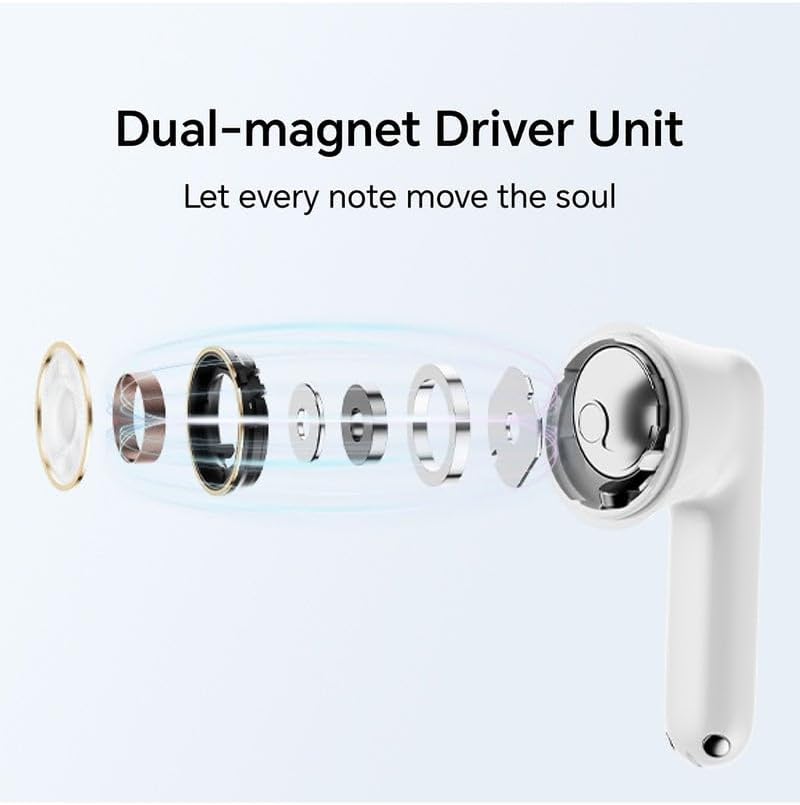
Image: HONOR Choice X7e Earbuds in their open charging case, showing the sleek white design.
4. Иштөө нускамалары
4.1 Күйгүзүү/өчүрүү
- Күйгүзүү: Заряддоо кутучасын ачсаңыз, кулакчындар автоматтык түрдө күйөт.
- Өчүрүү: Кулакчындарды кайра заряддоо кутусуна салып, капкагын жабыңыз. Алар автоматтык түрдө ажыратылып, өчүрүлөт.
4.2 Сенсордук башкаруу
The HONOR Choice X7e earbuds feature intuitive touch controls on each earbud. The specific functions may vary slightly depending on your device and app settings.
| Акция | Функция |
|---|---|
| Бир таптоо (Сол/Оң) | Музыка ойнотуу/тындыруу, Чалууга жооп берүү/аяктоо |
| Эки жолу таптаңыз (Сол/Оң) | Next Track (Right), Previous Track (Left) |
| Узун басуу (Сол/Оң) | Switch Noise Cancellation Modes (ANC On/Awareness/Off), Reject Call |
| Үч жолу таптап (Сол/Оң) | Үн жардамчысын жандырыңыз |
4.3 Ызы-чууну жокко чыгаруу режимдери
The earbuds support Semi-Open Active Noise Cancellation (ANC) and Awareness Mode. Long press on either earbud to cycle through the modes:
- ANC күйүк: Имерсивдүү угуу тажрыйбасы үчүн айланадагы ызы-чууларды азайтат.
- Маалымдоо режими: Аудиоңуздан ырахат алып, айланаңызды угууга мүмкүнчүлүк берет.
- Өчүк: Disables both ANC and Awareness Mode.
