1. Продукт бүтүп калдыview
The Razer BlackShark V3 is a wireless esports gaming headset designed for competitive play. It features advanced audio technology and versatile connectivity options for various platforms.

Image: The Razer BlackShark V3 Wireless Gaming Headset, showcasing өзүнүн дизайны жана ажыратылуучу микрофоны менен айырмаланат.
Негизги өзгөчөлүктөрү:
- Razer HyperSpeed Wireless Gen-2: Provides ultra-low latency wireless audio.
- Razer TriForce Titanium 50mm Drivers Gen-2: Delivers clear, powerful, and precise audio.
- Detachable Razer HyperClear Super Wideband 9.9mm Mic: Ensures high-definition voice clarity.
- Үч режимдик байланыш: Supports 2.4 GHz wireless, Bluetooth, and wired USB-C.
- THX мейкиндик аудио: Offers immersive 7.1.4 surround sound (PC only).
- Батареянын узак иштөө мөөнөтү: Бир кубаттоо менен 70 саатка чейин.
2. Кутуда эмне бар
Сиздин пакетте бардык компоненттер бар экенин текшериңиз:
- Razer BlackShark V3 Wireless Gaming Headset
- Razer HyperSpeed Wireless Gen-2 Dongle
- Detachable Razer HyperClear Super Wideband 9.9mm Microphone
- USB Type-A - Type-C заряддоо кабели
- Колдонуучунун Колдонмосу (бул документ)

Image: The Razer BlackShark V3 headset, HyperSpeed Wireless dongle, and USB-C charging cable.
3. Орнотуу
3.1 Гарнитураны заряддоо
Before first use, fully charge the headset using the provided USB Type-A to Type-C cable. Connect the USB-C end to the headset's charging port and the USB-A end to a powered USB port (e.g., computer, wall adapter).
- Гарнитурадагы LED индикатору кубаттоо абалын көрсөтөт.
- A full charge provides up to 70 hours of battery life (up to 35 hours in dual audio mode).
3.2 Микрофонду орнотуу
Insert the detachable Razer HyperClear Super Wideband Microphone into the microphone port located on the left earcup. Ensure it is securely connected.

Image: The Razer BlackShark V3 headset with the detachable microphone attached.
3.3 Connecting via Razer HyperSpeed Wireless (2.4 GHz)
This mode offers the lowest latency for gaming on PC, PlayStation, and Nintendo Switch (docked mode).
- Plug the Razer HyperSpeed Wireless Gen-2 Dongle into an available USB port on your device.
- Гарнитураңызды күйгүзүңүз. Ал автоматтык түрдө донглге туташып турушу керек.
- On your device, ensure the Razer BlackShark V3 is selected as the audio input and output device.
3.4 Bluetooth аркылуу туташуу
This mode is suitable for mobile devices, Mac, and Nintendo Switch (handheld mode).
- Гарнитураңызды күйгүзүңүз.
- Press and hold the Bluetooth button on the headset until the LED indicator blinks blue, indicating pairing mode.
- On your device, go to Bluetooth settings and select "Razer BlackShark V3" from the list of available devices.
- The LED will turn solid blue when connected.
3.5 Connecting via USB-C (Wired Mode)
For a direct wired connection, use the USB Type-A to Type-C cable.
- Кабелдин USB-C учун гарнитурага туташтырыңыз.
- Connect the USB-A end to an available USB port on your device.
- Гарнитура зымдуу аудио түзмөгү катары иштейт.
4. Гарнитураны иштетүү
4.1 Күйгүзүү/өчүрүү
Press and hold the Power button on the headset for approximately 3 seconds to power it on or off.
4.2 Үндү башкаруу
Rotate the volume wheel on the left earcup to adjust the audio output level.
4.3 Микрофонду үнсүз кылуу
Press the microphone mute button on the left earcup to toggle the microphone on or off. An LED indicator on the microphone will show its status.
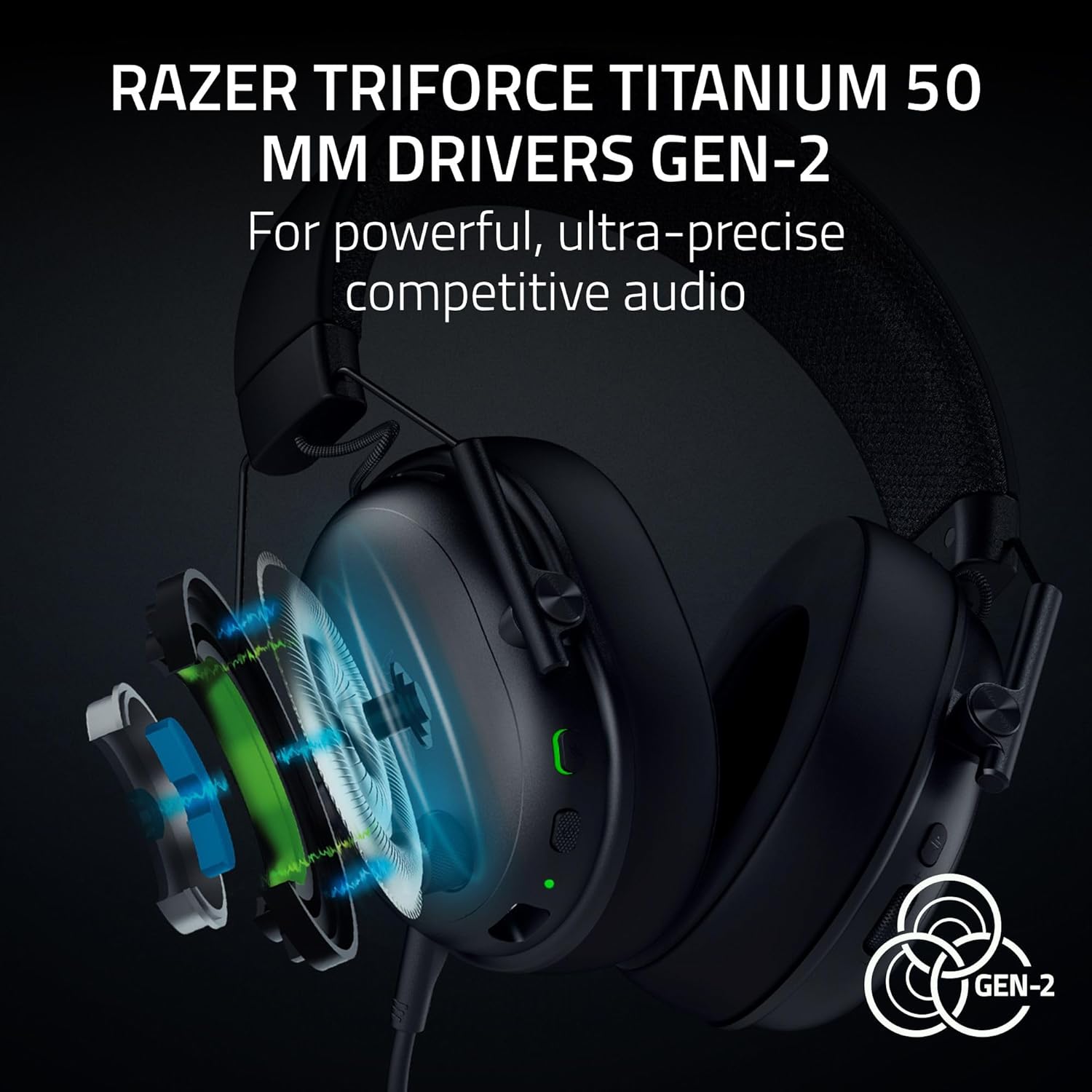
Image: Close-up of the headset's left earcup showing the volume wheel, power button, and microphone mute button.
4.4 Которуу туташуу режимдери
The headset supports simultaneous 2.4 GHz and Bluetooth audio. Use the dedicated mode button to switch between or combine these modes.
4.5 Razer Synapse Software (PC Only)
For advanced customization, download and install Razer Synapse on your PC. This software allows you to:
- Customize audio equalizer (EQ) settings.
- Enable and configure THX Spatial Audio for immersive sound.
- Adjust microphone settings, including noise reduction.
- Create and save pro-tuned FPS profiles.

Image: A screenshot of the Razer Synapse mobile application interface, showing equalizer and microphone settings for the BlackShark V3 headset.
5. Техникалык тейлөө
5.1 Гарнитураны тазалоо
Regularly clean your headset to maintain its condition and hygiene.
- Кулакка таккан кулакчындарды жана баш боону сүртүү үчүн жумшак, кургак чүпүрөктү колдонуңуз.
- өжөр кир үчүн, жеңил гampчүпүрөктү суу менен. Катуу химиялык заттардан алыс болуңуз.
- Ensure the microphone port and charging port are free of dust and debris.
5.2 Батареяга кам көрүү
Батареянын иштөө мөөнөтүн узартуу үчүн:
- Батареяны бат-баттан толук кубаттап калуудан алыс болуңуз.
- Колдонбогондо гарнитураны салкын, кургак жерде сактаңыз.
- Charge the headset periodically if it will not be used for an extended period.
5.3 Storing the Headset
When not in use, store the headset on a stand or in a protective case to prevent damage. Detach the microphone if preferred for storage.

Image: The Razer BlackShark V3 headset resting on a headset stand.
6. Кыйынчылыктарды
6.1 Аудио чыгышы жок
- Гарнитура күйгүзүлгөнүн жана кубатталганын текшериңиз.
- Verify the correct audio output device is selected in your system settings.
- Гарнитурадагы үн дөңгөлөктөрүн жана түзмөгүңүздүн башкы үнүн текшериңиз.
- If using HyperSpeed Wireless, ensure the dongle is securely plugged in and the headset is connected.
- If using Bluetooth, ensure the headset is paired and connected to your device.
6.2 Микрофон иштебейт
- Микрофон гарнитурага бекем туташтырылганын текшериңиз.
- Check if the microphone mute button is disengaged (LED off).
- Verify the correct microphone input device is selected in your system settings and communication applications.
- Мүмкүн болсо, микрофонду башка түзмөк менен текшерип көрүңүз.
6.3 Байланыш маселелери
- HyperSpeed Wireless: Try plugging the dongle into a different USB port. Ensure no strong interference sources are nearby.
- Bluetooth: Try unpairing and re-pairing the headset with your device. Ensure the headset is within range.
- Жалпы: Гарнитураны да, туташкан түзмөгүңүздү да өчүрүп-күйгүзүңүз.
7. Техникалык шарттар
| Өзгөчөлүк | Деталь |
|---|---|
| Модель аты | BlackShark V3 |
| Элемент моделинин номери | RZ04-05410100-R3U1 |
| Байланыш технологиясы | 2.4 GHz Wireless (HyperSpeed), Bluetooth 5.3, USB Type-A (Wired) |
| Шайкеш түзмөктөр | PC, Mac, PlayStation, Nintendo Switch, Smartphone, Steam Deck |
| Аудио драйверинин өлчөмү | 50 mm Razer TriForce Titanium Drivers Gen-2 |
| Frequency Response | 28 KHz (Headphones) |
| Сезимталдуулук | 106 дБ |
| Микрофон | Detachable Razer HyperClear Super Wideband 9.9mm Mic |
| Батареянын иштөө мөөнөтү | Up to 70 hours (wireless), 35 hours (dual audio mode) |
| Салмагы | Approximately 270g (without mic) |
| Noise Control | Үн изоляциясы |
| Материал | Metal (frame), Hybrid Fabric-Leatherette (ear cushions) |
| UPC | 840272919606 |
8. Кепилдик жана колдоо
8.1 Кепилдик маалыматы
Razer products typically come with a limited manufacturer's warranty. Please refer to the warranty card included in your product packaging or visit the official Razer webсиздин аймакка жана продуктуга тиешелүү деталдуу кепилдик шарттарын жана шарттарын алуу үчүн сайт.
8.2 Техникалык колдоо
For technical assistance, troubleshooting beyond this manual, or to report issues, please contact Razer Support through their official website. You may need your product's serial number (found on the packaging or headset) for support inquiries.
- зыярат кылыңыз Razer колдоо Webсайт Көп берилүүчү суроолор, айдоочулар жана байланыш параметрлери үчүн.


