1. Киришүү
Thank you for choosing the Lumary Smart Landscape Lights Pro. This manual provides detailed instructions for the installation, operation, and maintenance of your new smart outdoor lighting system. Please read this manual thoroughly before use to ensure proper functionality and safety.
The Lumary Smart Landscape Lights Pro system offers advanced features including RGBAICW color changing capabilities, app control, voice control, and remote control, designed to enhance your outdoor living spaces.
2. Негизги өзгөчөлүктөрү
- Upgrade Pro Version: Total 3000lm brightness and 36W output. RGBAICW 2200K-6500K, 1-100% adjustable brightness.
- Көп түстүү дисплей: RGBAI technology for 16 million color options and various preset/custom scenes.
- Жеке жарык башкаруу: Each spotlight can be controlled independently via the APP for color, on/off, and brightness.
- Көптөгөн башкаруу ыкмалары: Lumary APP (2.4 GHz Wi-Fi only), Amazon Alexa, Google Assistant, SmartThings, RF remote controller, and control box.
- Туруктуу жана суу өткөрбөйт: IP65 waterproof rating with an upgraded metal body and 22AWG sturdy cable. ETL-certified adapter.
3. Пакеттин мазмуну
Сураныч, пакетте төмөнкү нерселерди текшериңиз:
- Lumary Smart Landscape Spotlights (6 units)
- Кубаттуу адаптер
- Control Box
- RF Remote Controller (AAA Batteries not included)
- Жер казыктары
- User Manual
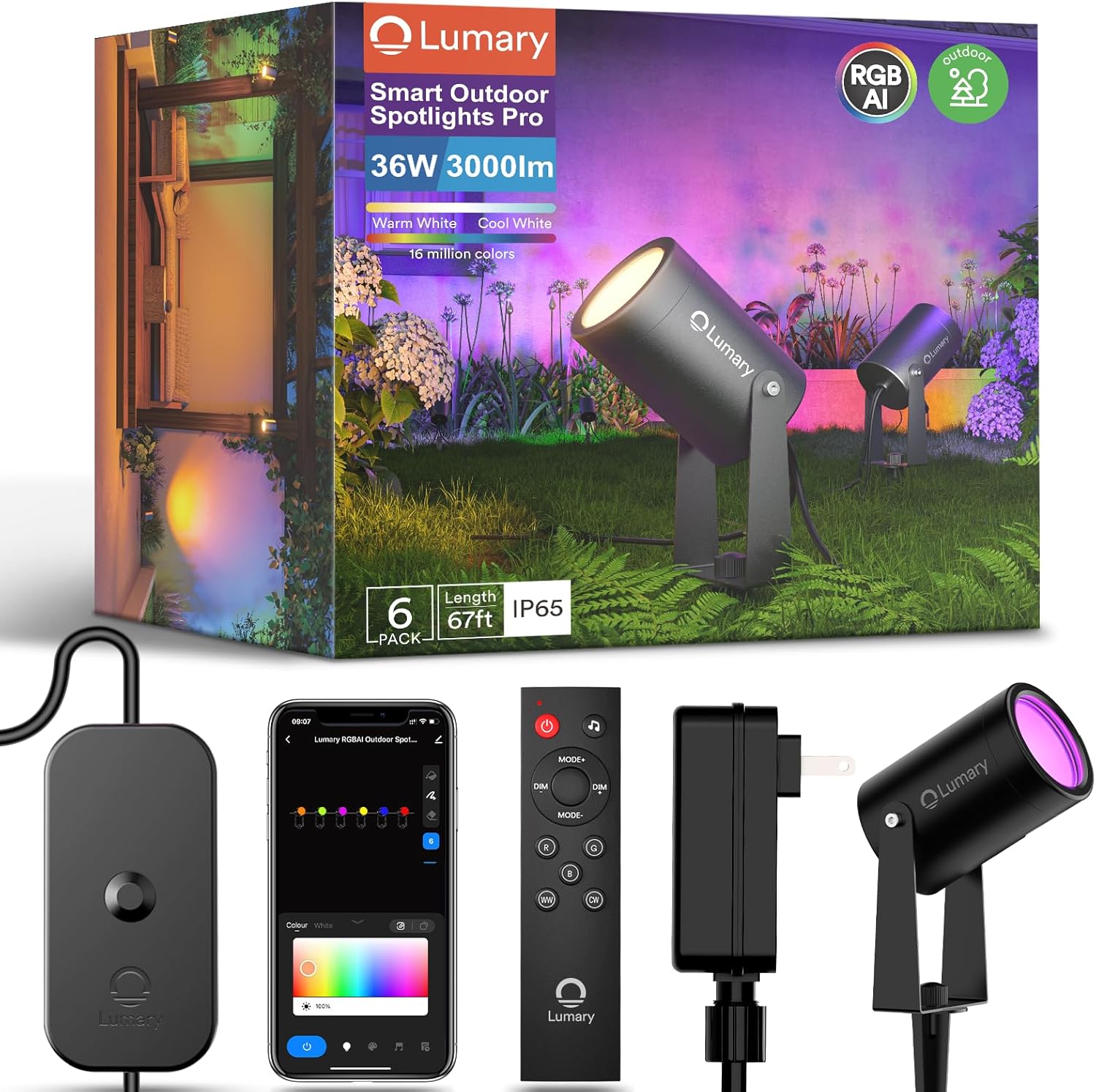
Сүрөт: бүттүview of the Lumary Smart Landscape Lights Pro package contents, showing the spotlights, control unit, remote control, and power supply.
4. Коопсуздук маалыматы
- Орнотуудан же техникалык тейлөөдөн мурун электр кубаты өчүрүлгөнүн текшериңиз.
- Do not immerse the control box or power adapter in water. The spotlights are IP65 rated for outdoor use, but the power components require protection from direct water exposure.
- Use only the provided power adapter. Using unauthorized adapters may damage the product and void the warranty.
- Орнотуу учурунда балдарды жана үй жаныбарларын электр тетиктеринен алыс кармаңыз.
- Продукцияны өз алдынча бөлүүгө же оңдоого аракет кылбаңыз. Жардам алуу үчүн кардарларды колдоо бөлүмүнө кайрылыңыз.
- Электрдик коркунучтарды алдын алуу үчүн бардык туташуулардын коопсуз экенин текшериңиз.
5. Орнотуу жана орнотуу
- Компоненттерди таңгактан чыгаруу: Таңгактан бардык буюмдарды кылдаттык менен алып чыгып, таңгактын ичиндегилердин тизмеси менен салыштырып текшериңиз.
- Assemble Spotlights: Attach the ground stakes to the bottom of each spotlight. Ensure they are securely fastened.
- Позиция жарыктары: Place the spotlights in your desired outdoor locations. Ensure the cable length is sufficient to reach the control box and power outlet.
- Connect Lights to Control Box: Connect each spotlight's cable to the corresponding ports on the control box. Ensure a firm connection.
- Кубат адаптерин туташтыруу: Plug the power adapter into the control box, then plug the adapter into a suitable outdoor power outlet. Ensure the outlet is protected from weather elements.
- Күйгүзүү: Once all connections are secure, plug the power adapter into the main power supply. The lights should illuminate.

Image: Lumary Smart Landscape Lights Pro installed in an outdoor setting, demonstrating their ability to illuminate different areas with various colors.
6. Иштөө нускамалары
6.1 Lumary тиркемесин башкаруу
- Колдонмону жүктөп алуу: Издөө "Lumary" in your smartphone's app store (iOS or Android) and download the application.
- Катталуу/Кирүү: Колдонмону ачып, каттоо эсебин түзүңүз же сизде мурунтан эле бар болсо, кириңиз.
- Түзмөк кошуу: Follow the in-app instructions to add your Smart Landscape Lights Pro. Ensure your phone is connected to a 2.4 GHz Wi-Fi network.
- Башкаруу өзгөчөлүктөрү:
- Түс тандоо: Choose from 16 million colors using the color wheel.
- Жарыктыкты жөндөө: Жарыктыкты 1%дан 100%ке чейин тууралаңыз.
- Сахна режимдери: Select from various preset scenes or create custom lighting effects.
- Жеке жарык башкаруу: Tap on individual light icons within the app to control each spotlight independently.
- Пландаштыруу: Set timers and schedules for automatic on/off and scene changes.
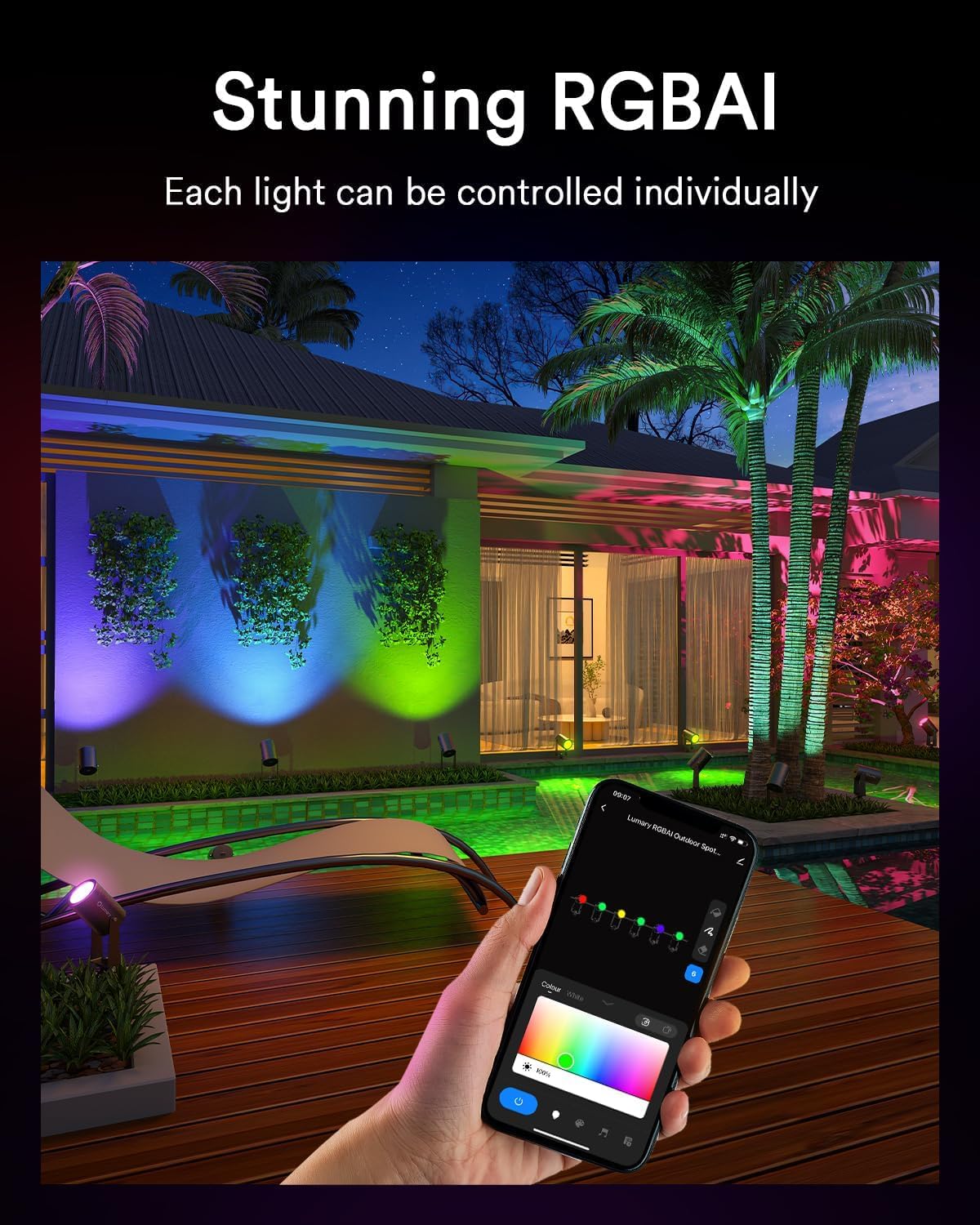
Image: A smartphone displaying the Lumary application, illustrating the interface for individual light control and color selection.
6.2 Үн менен башкаруу (Alexa/Google Assistant)
- Каттоо эсебин байланыштыруу: In your Alexa or Google Home app, enable the "Lumary" skill/service and link your Lumary account.
- Түзмөктөрдү табуу: Ask your voice assistant to "Discover devices" or manually add them through the app.
- Үн буйруктары: Мындай буйруктарды колдонуңуз:
- "Alexa, turn on the garden lights."
- "Hey Google, set the patio lights to blue."
- "Alexa, dim the landscape lights to 50%."
6.3 Алыстан башкаруу
Insert 2x AAA batteries (not included) into the RF remote controller. The remote can be used to control basic functions such as:
- Күйгүзүү/өчүрүү
- Жарыктыкты жөндөө
- Color Cycling/Selection
- Режим тандоо
Image: The RF remote controller and the control box for the Lumary Smart Landscape Lights Pro, showing various buttons for light control.
7. Техникалык тейлөө
- Тазалоо: Прожекторлорду мезгил-мезгили менен жумшак, d менен сүртүп туруңузamp кирди жана калдыктарды тазалоо үчүн кездеме. Катуу химиялык заттарды же абразивдүү тазалагычтарды колдонбоңуз.
- Кабелдик текшерүү: Regularly inspect the cables for any signs of damage, fraying, or wear. Replace damaged cables immediately.
- Байланыштары: Ensure all connections remain tight and free from corrosion.
- Программалык камсыздоонун жаңыртуулары: Check the Lumary app periodically for firmware updates to ensure optimal performance and access to new features.
8. Кыйынчылыктарды
| Көйгөй | Мүмкүн себеп | Чечим |
|---|---|---|
| Жарыктар күйбөйт. | Электр кубаты жок, туташуу бош, адаптер бузулган. | Check power outlet, ensure all cables are securely connected, test with another outlet if possible. |
| Wi-Fi'га туташпай жатат. | Туура эмес Wi-Fi диапазону, алсыз сигнал, туура эмес сырсөз. | Ensure your router is 2.4 GHz, move closer to the router, re-enter Wi-Fi password carefully. |
| Пульт иштебей жатат. | Өлгөн батареялар, диапазондон тышкары, интерференция. | Replace AAA batteries, ensure line of sight to the control box, reduce interference. |
| Lights flickering or inconsistent. | Loose connection, power fluctuations, faulty unit. | Check all cable connections, ensure stable power supply. If problem persists, contact support. |
9. Техникалык шарттар
- Модел: B0FH669H6K
- Бренд: Lumary
- Жарыктык: 3000lm (total)
- Чыгуу: 36 Вт
- Түс температурасы: RGBAICW 2200K-6500K
- Жарыктыкты жөндөө: 1-100%
- Суу өткөрбөйт рейтинги: IP65
- Кабель өлчөгүч: 22AWG
- Адаптер: ETL тастыкталган
- Өмүрүнүн узактыгы: 15,000 саатка чейин
- Байланыш: 2.4 ГГц Wi-Fi
10. Кепилдик жана колдоо
Lumary products come with a standard manufacturer's warranty. Please refer to the warranty card included in your package or visit the official Lumary webдеталдуу кепилдик шарттары жана шарттары үчүн сайт.
For technical support, troubleshooting assistance, or warranty claims, please contact Lumary customer service:
- Webсайт: Amazon'догу Lumary дүкөнүнө баш багыңыз
- Электрондук почта: [Эгер бар болсо, Кардарларды колдоо кызматынын электрондук почтасын бул жерге киргизиңиз]
- Телефон: [Эгер бар болсо, Кардарларды колдоо кызматынын телефон номерин бул жерге киргизиңиз]
When contacting support, please have your product model (B0FH669H6K) and purchase date ready.


