1. Киришүү
This manual provides comprehensive instructions for the installation, setup, operation, and maintenance of your Ctronics 4K Outdoor Security Camera, model CTIPC-870. This camera is designed for outdoor surveillance, offering high-resolution video, advanced night vision capabilities, intelligent detection features, and flexible connectivity options.
2. Коопсуздук маалыматы
- Ensure the power supply used is compatible with the camera's voltagталаптар (12 вольт).
- Камераны анын иштөө диапазонунан тышкаркы экстремалдык температурага дуушар кылбаңыз.
- Линзаны күчтүү жарык булактарына узак убакытка түз тийгизүүдөн алыс болуңуз.
- Installation should be performed by qualified personnel if working at heights or with electrical connections.
- Камераны жана анын компоненттерин балдардан алыс кармаңыз.
- Камераны бөлүктөргө бөлүүгө же өзгөртүүгө аракет кылбаңыз, анткени бул кепилдикти жокко чыгарат.
3. Пакеттин мазмуну
Пакетте бардык буюмдар бар экенин текшериңиз:
- Ctronics 4K Security Camera (CTIPC-870)
- Кубаттуу адаптер
- Монтаждоо бурамалар жана дубал сайгычтар
- Тармак кабели үчүн суу өткөрбөй турган комплект
- Колдонуучунун Колдонмосу (бул документ)
4. Продукт бүтүп калдыview
The Ctronics CTIPC-870 is a robust outdoor security camera featuring a dome shape and metal construction. It includes a high-resolution lens, infrared LEDs, and spotlights for enhanced night vision. An antenna is present for wireless connectivity.

Сүрөт 4.1: Алдыңкы view of the Ctronics CTIPC-870 camera, showing the lens, IR LEDs, and spotlights.
5. Орнотуу
The CTIPC-870 camera is designed for easy wall or ceiling mounting. Follow these general steps for installation:
- Жайгашкан жерди тандаңыз: Каалаганды камсыз кылган ылайыктуу сырткы жерди тандаңыз viewбурчта жайгашкан жана Wi-Fi тармагыңыздын жана кубат булагынын диапазонунда.
- Монтаждоо: Secure the metal mounting plate to the chosen surface using the provided screws and wall plugs. Ensure the surface is strong enough to support the camera's weight (approximately 5.06 pounds).
- Камераны тиркөө: Hang the camera onto the secured mounting plate.
- Кубат туташуу: Кубат адаптерин камерага жана розеткага туташтырыңыз.
- Тармак кабели (милдеттүү эмес): If using a wired connection, connect an Ethernet cable and use the waterproof kit to protect the connection.
6. Орнотуу
Setting up your Ctronics camera involves connecting it to your network and configuring it via the mobile application.
6.1. Колдонмону жүктөп алуу жана орнотуу
Download the official "Ctronics Pro" app from your device's app store (iOS App Store or Google Play Store).

Image 6.1: Screenshots of the Ctronics Pro App and HIP2P Client interfaces on mobile and desktop devices.
6.2. Bluetooth Pairing (Quick Setup)
The camera supports quick setup via Bluetooth for initial network configuration.
- Смартфонуңузда Bluetooth иштетилгенин текшериңиз.
- Open the "Ctronics Pro" app and follow the on-screen prompts to add a new device.
- The app will detect the camera via Bluetooth, allowing for a streamlined Wi-Fi connection process.

Image 6.2: Visual representation of the Bluetooth networking process for quick camera setup.
6.3. Wi-Fi байланышы
The camera supports dual-band Wi-Fi (2.4GHz and 5GHz) for flexible and stable connections.
- 2.4 ГГц Wi-Fi: Provides better coverage for larger spaces.
- 5 ГГц Wi-Fi: Offers higher speed connectivity for smooth performance.

Image 6.3: Diagram illustrating the camera's dual-band Wi-Fi capability (2.4GHz and 5GHz).
7. Иштөө нускамалары
7.1. 4K UHD Resolution and 30x Optical Zoom
The camera captures video in true 4K Ultra HD (3840x2160) resolution. The 30x optical zoom allows for clear magnification of distant objects without loss of detail.

Image 7.1: Comparison showing the clarity of 4K HD surveillance versus 5MP resolution.

Сүрөт 7.2: Мисample of 30x optical zoom, showing a distant car brought into clear focus.

Image 7.3: Visual demonstration of 30x zoom capabilities, showing progressive magnification from 1x to 30x.
7.2. Панорамалоо, эңкейтүү жана масштабдоо (PTZ)
The camera offers 355° pan and 90° tilt functionality, providing 360° visual coverage. Control these movements via the Ctronics Pro app.
7.3. Түнкү көрүү режимдери
The CTIPC-870 features advanced night vision with two modes:
- Инфракызыл (ИК) түнкү көрүү: Up to 180 meters in black and white.
- Толук түстүү түнкү көрүнүш: Up to 80 meters, providing vivid color footage even in low light conditions, enhanced by 4 convex lenses.

Image 7.4: Close-up of the camera's advanced 5° convex lens design, enhancing night vision performance.

Image 7.5: Visual comparison of 180 meters IR night vision (black and white) and 80 meters full-color night vision.

Image 7.6: Comparison of night vision quality with the Sony IMX415 sensor versus other cameras.
7.4. AI Smart Detection and Auto Tracking
The camera utilizes AI to accurately identify humans, vehicles, and pets, reducing false alarms. When a person is detected, the camera can automatically track the subject with intelligent zoom.
- Аныктоо: Receive real-time alerts for specific events.
- Автоматтык көз салуу: The camera follows detected subjects. After tracking, it can return to its original guard position.
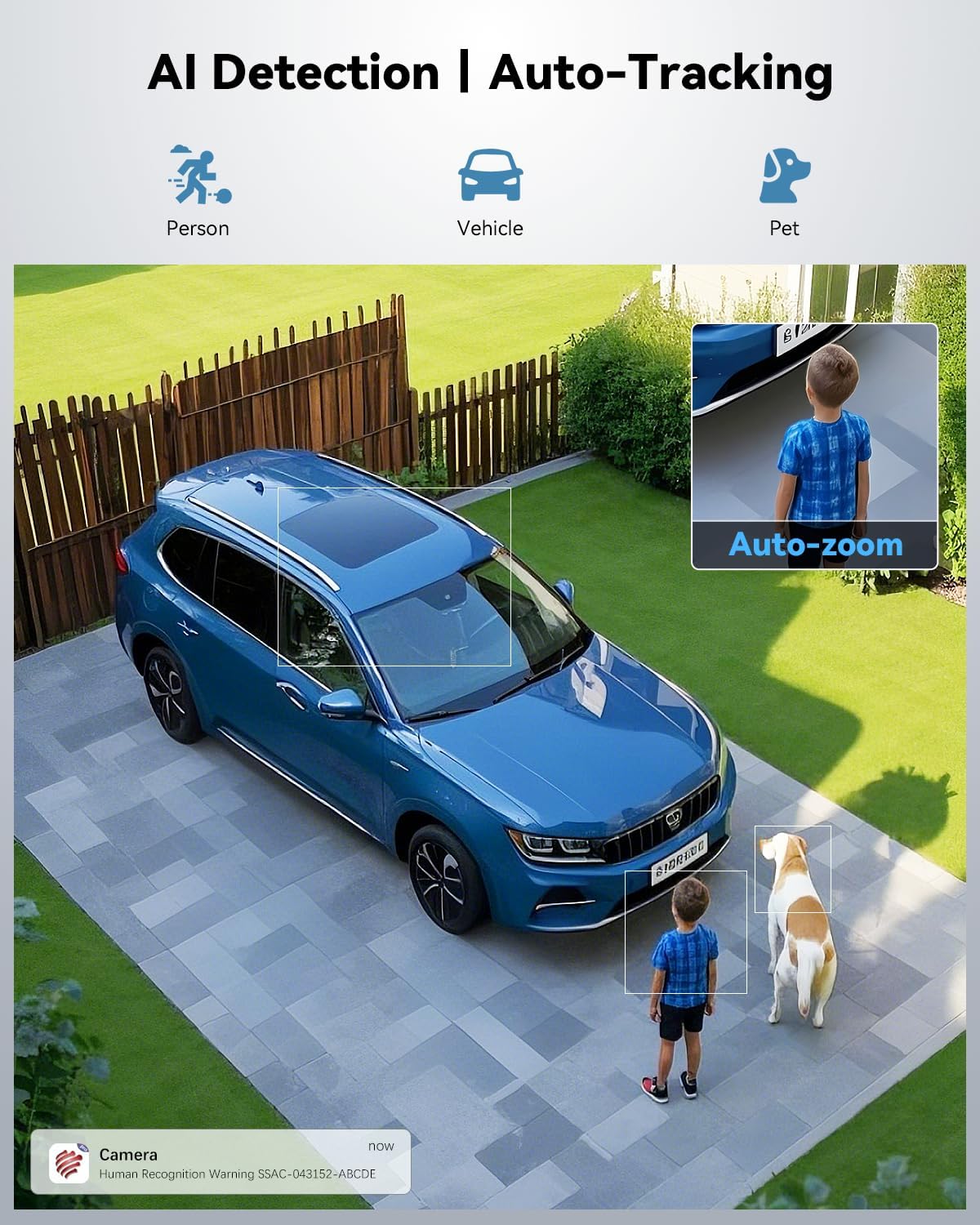
Image 7.7: Illustration of AI detection identifying a person, vehicle, and pet, with an auto-zoom feature on the detected person.

Image 7.8: Demonstration of the camera's auto-tracking capability with automatic zoom on a moving subject.
7.5. Presets and Patrol Lines
Configure up to 60 preset points and 2 patrol lines for automated surveillance of specific areas.

Image 7.9: Diagram showing 60 preset points and 2 patrol lines configured for 360-degree coverage of a property.

Image 7.10: Illustration highlighting the availability of 60 preset points and 2 patrol lines for surveillance.
7.6. Sound and Light Alerts
When an event is detected, the camera can trigger a custom voice alert, activate a spotlight, and send instant notifications to your app.

Image 7.11: Depiction of the camera's powerful sound and light alert system, including siren, custom alarm sounds, and spotlight activation.

Сүрөт 7.12: Бүттүview of the camera's warning system, featuring siren, spotlight, and customizable alarm sounds.
7.7. Купуялык маскасы
Utilize the privacy masking feature to block out sensitive areas from recording, ensuring privacy in specific zones.

Сүрөт 7.13: Мисamples of user-defined video masks applied to different areas for effective privacy protection.
7.8. Сактоо параметрлери
Камера жаздырууларыңыз үчүн ийкемдүү сактоо чечимдерин сунуштайт:
- MicroSD картасы: Supports up to 256GB (not included).
- Булуттагы сактагыч: Secure cloud storage with a 7-day free trial available.
- FTP/NVR: Compatible with FTP servers and Network Video Recorders for continuous 24/7 recording.

Сүрөт 7.14: Бүттүview of connectivity and storage options, including dual-band WiFi, NVR, TF card slot, and cloud storage.

Сүрөт 7.15: Детальдуу view of cloud storage options (with 7-day trial) and the camera's support for up to 256GB TF card storage.
8. Техникалык тейлөө
- Тазалоо: Сүрөттүн сапатын так сактоо үчүн камеранын линзасын жумшак, кургак чүпүрөк менен үзгүлтүксүз тазалап туруңуз. Күчтүү химиялык заттарды колдонбоңуз.
- Программалык камсыздоонун жаңыртуулары: Оптималдуу иштөөнү жана коопсуздукту камсыз кылуу үчүн Ctronics Pro колдонмосун мезгил-мезгили менен микропрограмманын жаңыртууларын текшерип туруңуз.
- Кабелдик текшерүү: Periodically inspect power and network cables for any signs of wear or damage, especially for outdoor installations.
9. Кыйынчылыктарды
Камераңыз менен көйгөйлөргө туш болсоңуз, төмөнкү жалпы чечимдерди караңыз:
- Кубат жок: Кубат адаптери камерага да, иштеген электр розеткасына да бекем туташып турганын текшериңиз.
- Wi-Fi туташуусу жок: Verify your Wi-Fi network is active and the camera is within range. Re-attempt Bluetooth pairing or manual Wi-Fi setup via the app. Ensure you are connecting to the correct 2.4GHz or 5GHz network.
- Сүрөттүн сапаты начар: Камера линзасын тазалаңыз. Камеранын линза талаасындагы тоскоолдуктарды текшериңиз. view. Ensure sufficient lighting for optimal night vision performance.
- Көп кездешүүчү жалган сигналдар: Adjust the AI detection sensitivity settings in the app. Define specific detection zones or privacy masks to exclude irrelevant areas.
- Auto Tracking Issues: Ensure the camera's PTZ mechanism is not obstructed. Verify that auto-tracking is enabled in the app settings.
- Колдонмо туташуу көйгөйлөрү: Ensure your smartphone has a stable internet connection. Restart the app or your phone.
10. Техникалык шарттар
| Өзгөчөлүк | Спецификация |
|---|---|
| Модель аты | CTIPC-870 |
| Ички/тышкы колдонуу | Сыртта |
| Видео тартуунун резолюциясы | 3840x2160 (4K UHD) |
| Натыйжалуу дагы эле чечим | 8 депутат |
| Оптикалык масштаб | 30x |
| Пан / жантайтуу бурчу | 355° Пан, 90° Тилт |
| IR түнкү көрүнүш диапазону | 180 метр |
| Түнкү көрүү түсү | 80 метр |
| Connectivity Protocol | Wi-Fi (Dual-Band 2.4GHz/5GHz), Bluetooth |
| Сактагыч параметрлери | MicroSD (up to 256GB), Cloud, FTP, NVR |
| AI аныктоо | Human, Vehicle, Pet |
| Материал | Металл |
| Сууга туруктуулук деңгээли | IP66 |
| Power Source | Электр зымдары (12 вольт, 12 ватт) |
| Элементтин өлчөмдөрү (L x W x Y) | 7.48 x 5.51 x 11.02 дюйм |
| Элемент Салмагы | 5.06 фунт |
| UPC | 798394955586 |
11. Кепилдик жана колдоо
Ctronics products are covered by a manufacturer's warranty. For specific warranty details, technical support, or service inquiries, please refer to the official Ctronics webсайтка же түздөн-түз кардарларды колдоо менен байланышыңыз. Сатып алганыңыздын далили катары сатып алуу дүмүрчөгүңүздү сактаңыз.


