Introduction
This manual provides detailed instructions for the installation, operation, and maintenance of your COUGAR OmnyX Mid-Tower ATX Panoramic PC Case. Please read this manual thoroughly before beginning assembly to ensure proper setup and optimal performance. The OmnyX case is designed for maximum airflow and features a panoramic tempered glass design, pre-installed 160mm fans, and advanced cable management solutions.
Негизги өзгөчөлүктөрү
- Симметриялык дизайн: Allows for omnidirectional placement, offering flexibility in setup.
- Quad 160mm PWM Fans: Includes four pre-installed 160mm PWM fans for efficient cooling and flexible intake modes.
- Zero-Visibility Cable Management: Integrated base compartment and quick-release covers for organized cable routing.
- Sliding IO Module: Allows for relocation of the I/O module and expanded port array.
- Vertical GPU Alignment: Natural alignment of vertically mounted GPUs reduces the risk of damage from displacement.
- GPU Compatibility: GPU максималдуу узундугу 380 мм.
- Reverse Connector Motherboard Compatibility: Designed to support motherboards with reverse connectors.
- Оңой тейлөө: Features magnetic dust filter panels and quick-release cable management compartment covers.
Продукт бүттүview
Familiarize yourself with the various components and design aspects of your COUGAR OmnyX PC case.
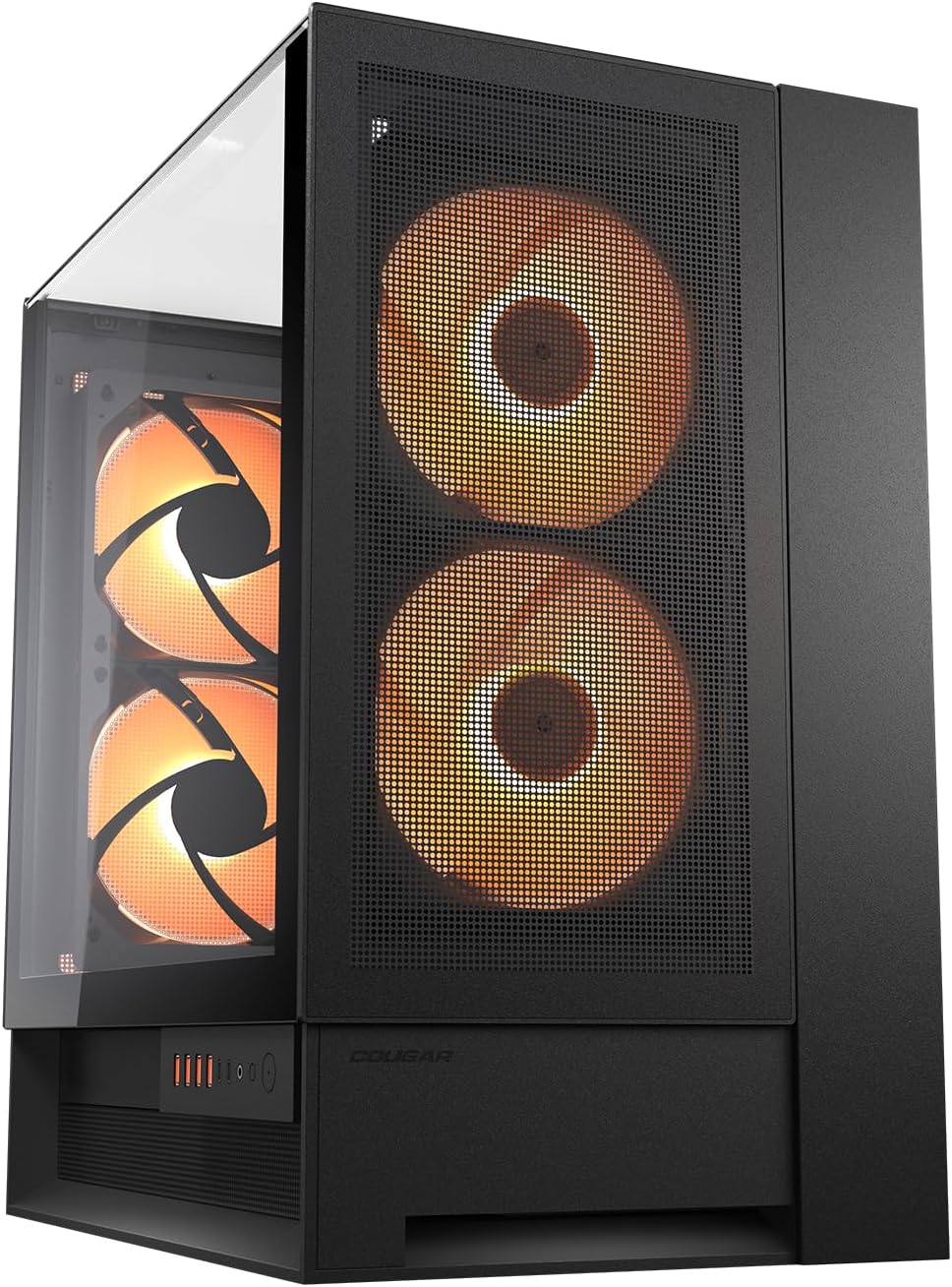
1-сүрөт: Алдыңкы жана каптал view of the COUGAR OmnyX PC case, showcasing the panoramic tempered glass and pre-installed 160mm fans.

2-сүрөт: Internal layout of the COUGAR OmnyX PC case, highlighting the spacious motherboard tray and component mounting areas.

3-сүрөт: жарылды view of the COUGAR OmnyX PC case, illustrating the modular design and removable panels for easy assembly.

4-сүрөт: Бөлүнгөн view of the COUGAR OmnyX PC case, showing the various components and access points for installation and maintenance.
Орнотуу жана компоненттерди орнотуу
Follow these general steps for installing components into your COUGAR OmnyX PC case. Always refer to your individual component manuals for specific installation details.
- Ишти даярдоо: Carefully remove the tempered glass panels and any other removable panels to gain access to the interior.
- Install the Power Supply (PSU): Mount your power supply in the designated compartment at the bottom of the case. Utilize the integrated base compartment for routing PSU cables.
- Motherboard орнотуу: Secure your ATX motherboard to the standoffs on the motherboard tray. The OmnyX supports reverse connector motherboards for alternative cable routing.
- Сактагыч дисктерди орнотуу: Mount your SSDs and HDDs in the available drive bays.
- Install the Graphics Card (GPU): Insert your graphics card into the appropriate PCIe slot. The case supports vertical GPU mounting, which naturally aligns the GPU with gravity.
- Кабелдерди туташтыруу: Route all power and data cables through the cable management channels. The zero-visibility cable management system helps keep cables tidy and out of sight.
- Алдыңкы киргизүү/чыгарууну туташтыруу: Connect the front panel connectors (USB, audio, power button) to your motherboard. The sliding rail system allows for flexible positioning of the I/O module.
- Панелдерди кайра чогултуу: Once all components are installed and cables are managed, reattach the tempered glass panels and other removable covers.
Операция
The COUGAR OmnyX PC case is designed for straightforward operation once components are installed.
- Күйгүзүү/өчүрүү: Use the power button located on the front I/O panel to turn your system on or off.
- USB порттору: Utilize the USB ports on the front I/O panel for connecting peripherals and external devices.
- Аудио уячалары: Connect your headphones or microphone to the dedicated audio jacks on the front I/O panel.
- Желдетүүчү башкаруу: The pre-installed 160mm PWM fans can be controlled via your motherboard's fan headers and software, allowing you to adjust fan speeds for optimal cooling and noise levels.
Техникалык тейлөө
Regular maintenance ensures the longevity and optimal performance of your PC case.
- Чаң чыпкалары: The OmnyX case features magnetic dust filter panels. Regularly remove and clean these filters to prevent dust buildup and maintain efficient airflow.
- Ички тазалоо: Periodically open the case and use compressed air to remove dust from internal components and fan blades. Ensure the system is powered off and unplugged before cleaning.
- Тышкы тазалоо: Wipe down the exterior surfaces, including the tempered glass panels, with a soft, damp кездеме. Беттерди тырмап алышы мүмкүн болгон абразивдүү тазалоочу каражаттардан алыс болуңуз.
Проблемаларды чечүү
If you encounter issues with your PC case, consider the following common solutions:
- Кубат жок: Ensure all power cables are securely connected to the power supply, motherboard, and components. Verify the power supply switch is in the 'On' position.
- Айланбаган күйөрмандар: Check that fan cables are correctly connected to the motherboard or fan controller. Ensure fan control software settings are configured properly.
- Ашыкча ысып кетүү: Verify that all fans are operating correctly and are not obstructed. Clean dust filters and ensure proper airflow within the case. Check component temperatures using monitoring software.
- Компонентти тууралоо маселелери: Double-check that all components are installed according to their respective manuals and the case's specifications (e.g., GPU length, radiator size).
- Алдыңкы киргизүү/чыгаруу иштебей жатат: Ensure the front panel connectors are correctly plugged into the motherboard headers.
Техникалык шарттар
| Атрибут | Нарк |
|---|---|
| Бренд | Cougar |
| Сериялар | OmnyX |
| Модель номери | CGR-2WA3W-RGB |
| Иштин түрү | Ара Tower |
| Motherboard шайкештиги | ATX |
| Элемент Салмагы | 12.6 килограмм (27.7 фунт) |
| Продукциянын өлчөмдөрү (LxWxH) | 18.5 x 11.81 x 20.47 дюйм |
| Түс | Кара |
| Материал | Эритме болот |
| Кубат менен камсыздоону орнотуу түрү | Төмөнкү тоо |
| Муздатуу ыкмасы | Аба |
| Продукт үчүн сунушталган колдонуу | Оюндар |
Кепилдик жана колдоо
For warranty information, technical support, or further assistance, please visit the official COUGAR webсайтка же кардарларды тейлөөгө кайрылыңыз.
- Официалдуу Webсайт: https://cougargaming.com/
- Кызматтын байланышы: https://cougargaming.com/contact2/


