1. Киришүү
Thank you for choosing the LIGE FV21-D Women's Smartwatch. This device combines elegant design with advanced fitness and communication features to enhance your daily life. This manual provides detailed instructions for setup, operation, and maintenance to ensure optimal use of your smartwatch.
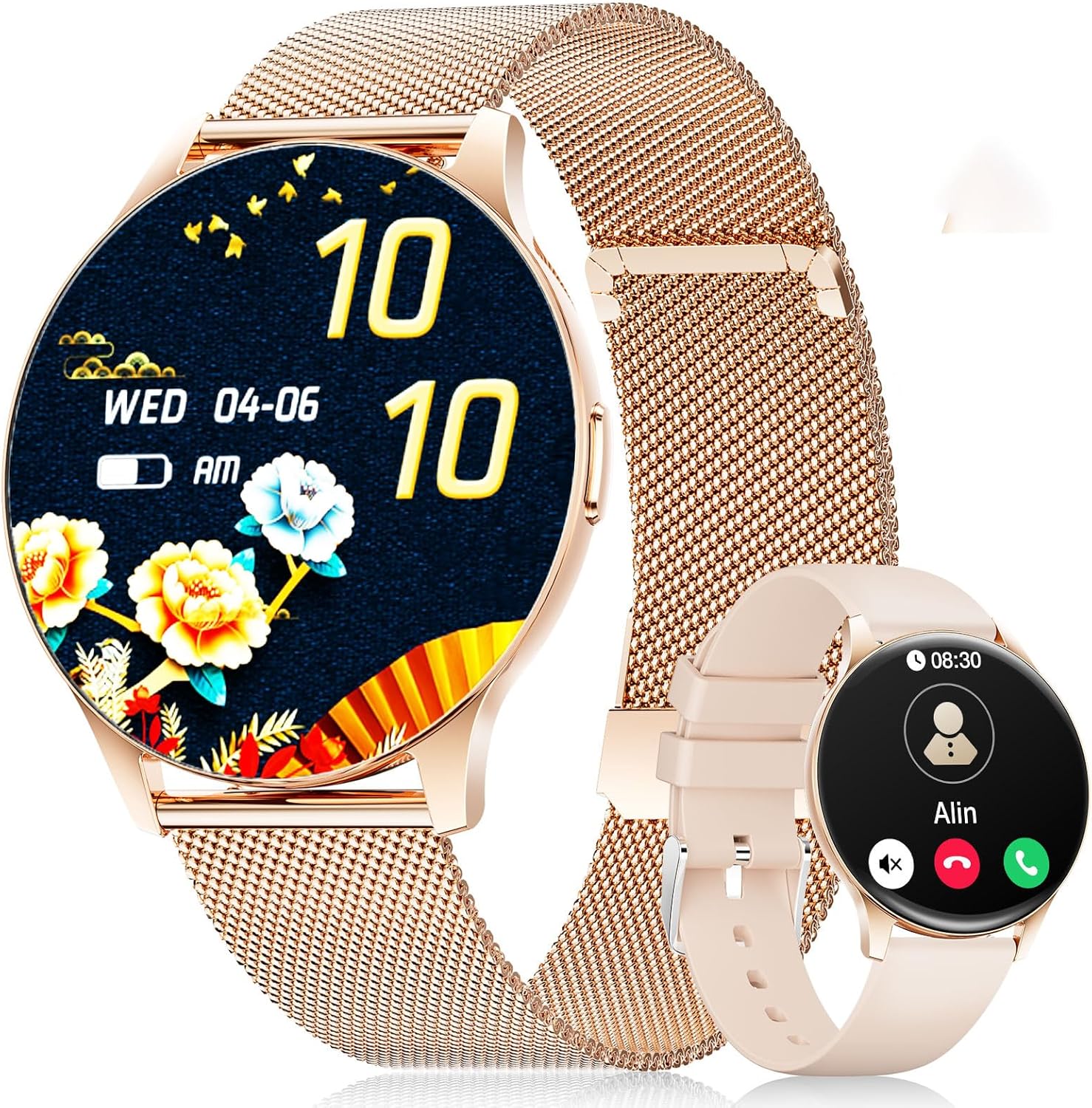
Image: The LIGE FV21-D Smartwatch, showcasing its rose gold casing with a mesh strap and an alternative beige silicone strap. The main display shows a floral watch face, while the smaller inset shows a call interface.
2. Пакеттин мазмуну
Пакетиңизде бардык буюмдар бар экенин текшериңиз:
- LIGE FV21-D Smartwatch
- Metal Mesh Strap (Rose Gold)
- Silicone Strap (Beige)
- Заряддоо кабели
- Колдонуучунун Колдонмосу (бул документ)
3. Орнотуу
3.1 Акылдуу саатты кубаттоо
- Кубаттоочу кабелди акылдуу сааттын арткы бетиндеги кубаттоо портуна туташтырыңыз.
- Кубаттоочу кабелдин USB учун стандарттуу USB кубат адаптерине (кошулмага кирбейт) же компьютердин USB портуна сайыңыз.
- The watch display will indicate charging status. Ensure the watch is fully charged before first use. A full charge typically takes approximately 2 hours.
3.2 Күйгүзүү/өчүрүү
- Күйгүзүү: Press and hold the side button for a few seconds until the LIGE logo appears.
- Өчүрүү: Капталдагы баскычты басып, кармап туруңуз, андан кийин экрандагы "Өчүрүү" опциясын тандаңыз.
3.3 Колдонмону орнотуу жана жупташтыруу
To unlock the full functionality of your smartwatch, you need to pair it with your smartphone using the dedicated application.
- Колдонмону жүктөп алыңыз: Издөө "FitCloudPro" in your smartphone's app store (Apple App Store for iOS or Google Play Store for Android) and install it.
- Bluetooth иштетүү: Смартфонуңузда Bluetooth иштетилгенин текшериңиз.
- Колдонмону ачуу: FitCloudPro колдонмосун ишке киргизип, каттоо эсебин түзүү же кирүү үчүн экрандагы нускамаларды аткарыңыз.
- Түзмөк кошуу: In the app, navigate to the "Device" or "Add Device" section. The app will search for available smartwatches.
- Саатыңызды тандаңыз: Select "FV21-D" or the corresponding device name from the list.
- Жупташтыруу ырастоо: Жупташтыруу өтүнүчү телефонуңузда да, акылдуу саатыңызда да пайда болушу мүмкүн. Эки түзмөктө тең жупташууну ырастаңыз.
- Уруксаттарды берүү: Grant necessary permissions (e.g., notifications, location, contacts) to the app for full functionality.
Note: The smartwatch supports Android 4.4+ and iOS 9.0+ operating systems.
4. Иштөө нускамалары
4.1 Негизги навигация
- Сенсордук экран: The 1.43-inch HD AMOLED touch display allows for intuitive interaction.
- Өйдө/ылдый сүрүү: Менюларды жана эскертмелерди сыдырыңыз.
- Солго/Оңго сүрүү: Access quick functions or different widgets.
- таптаңыз: Бир нерсени тандаңыз же аракетти ырастаңыз.
- Каптал баскычы: Башкы экранга кайтуу же дисплейди ойготуу үчүн басыңыз. Кубат параметрлери үчүн көпкө басыңыз.
4.2 Сааттын жүзүн ыңгайлаштыруу
Your smartwatch offers over 200 customizable watch faces. You can change them directly on the watch or through the FitCloudPro app.
- Саат боюнча: Long-press the home screen, then swipe left or right to browse available watch faces. Tap to select.
- Колдонмо аркылуу: Open the FitCloudPro app, go to the "Watch Faces" section, and choose from the gallery. You can also upload your own photos to create custom watch faces.
4.3 Phone Function (Bluetooth Call)
Once paired, you can make and receive calls directly from your smartwatch.
- Чалууларды жасоо: Access the "Dialer" or "Contacts" function on the watch to initiate a call.
- Чалууларды кабыл алуу: Чалуу келгенде, саат чалуучунун ID'син көрсөтөт. Чалууга түз саат экранынан жооп берип же четке кагсаңыз болот.
4.4 Спорт режимдери
The smartwatch supports over 120 sports modes, including yoga, cycling, running, and more. To start a workout:
- Navigate to the "Sports" or "Workout" menu on your watch.
- Каалаган ишиңизди тандаңыз.
- Tap to start tracking. The watch will record data such as duration, calories burned, and heart rate.
- To end a workout, swipe or tap the screen and select the "End" option.
4.5 Ден соолуктун мониторинги
The FV21-D smartwatch provides comprehensive health tracking features:
- Жүрөктүн кагышын көзөмөлдөөчү: Күн бою жүрөктүн кагышын үзгүлтүксүз көзөмөлдөйт. View саат боюнча реалдуу убакыт дайындары же колдонмодогу деталдуу тренддер.
- Уйкуну көзөмөлдөөчү: Automatically monitors your sleep patterns, including deep sleep, light sleep, and wake times. Access sleep analysis in the FitCloudPro app.
- жөө: Tracks your daily steps taken.
- Calorie Measurement: Estimates calories burned based on activity and personal data.
- SpO2 (Blood Oxygen) Monitor: Сиздин кандын кычкылтек менен каныккандыгын өлчөйт.
- Менструалдык циклге көз салуу: For female users, the app can track and predict menstrual cycles.
Эскертүү: Бул түзмөк медициналык шайман эмес. Ден соолук маалыматтары маалымат үчүн гана берилген жана медициналык диагноз коюу же дарылоо үчүн колдонулбашы керек.
4.6 Notifications and Reminders
Receive notifications directly on your wrist:
- Чалуулар жана билдирүүлөр: Get alerts for incoming calls, SMS, and messages from various apps (e.g., WhatsApp, Facebook). Configure app notifications in the FitCloudPro app.
- Ойготкуч саат: Set alarms through the app to vibrate on your wrist.
- Отуруучу эстеткич: Саат сизге кыймылсыз бир нече убакыттан кийин кыймылдоону эскертип турат.
- Аба ырайы тууралуу маалымат: View current weather conditions and forecasts (requires app synchronization).
- Үн жардамчысы: Смартфонуңуздун үн жардамчысына түз сааттан кириңиз.
4.7 Сууга туруктуулук (IP68)
The FV21-D smartwatch is IP68 waterproof, meaning it is resistant to dust and can withstand immersion in water up to 1.5 meters for 30 minutes. It is suitable for daily use, such as washing hands, rain, and sweating during exercise. However, it is not recommended for hot showers, saunas, or diving, as steam and hot water can damage the seals.
5. Техникалык тейлөө
5.1 Акылдуу саатты тазалоо
- Сааттын экранын жана корпусун жумшак, түксүз чүпүрөк менен сүртүңүз.
- Зарыл болсо, бир аз гampчүпүрөктү суу менен. Катуу химиялык заттарды же абразивдүү материалдарды колдонуудан алыс болуңуз.
- Заряддоодон мурун саат толугу менен кургак экенин текшериңиз.
5.2 Боону алмаштыруу
Your smartwatch comes with two interchangeable straps: a metal mesh strap and a silicone strap. To replace them:
- Боонун астыңкы бетиндеги сааттын корпусуна туташкан жеринен тез бошотулуучу төөнөгүчтөрдү табыңыз.
- Боону ажыратуу үчүн төөнөгүчтү ичкери жылдырыңыз.
- Align the new strap with the watch lugs and insert one end of the pin into the hole.
- Slide the quick-release pin inwards, position the strap, and release the pin to secure it. Ensure both ends of the pin are properly seated.
5.3 Батареяга кам көрүү
- Батареяны бат-баттан толук кубаттап калуудан алыс болуңуз.
- Батареянын иштөө мөөнөтүн сактоо үчүн, колдонулбаса да, саатты үзгүлтүксүз кубаттап туруңуз.
- Саатты узак убакытка колдонбогондо салкын, кургак жерде сактаңыз.
6. Кыйынчылыктарды
| Маселе | Мүмкүн чечим |
|---|---|
| Саат күйбөйт. | Саат толук заряддалганын текшериңиз. Аны заряддагычка кеминде 30 мүнөт туташтырыңыз. |
| Смартфон менен жупташтыруу мүмкүн эмес. |
|
| Билдирмелер алынган жок. |
|
| Туура эмес ден соолук маалыматы. |
|
| Батареянын иштөө мөөнөтү кыска. |
|
Эгер сиз бул жерде көрсөтүлбөгөн көйгөйлөргө туш болсоңуз же кошумча жардамга муктаж болсоңуз, колдоо бөлүмүнө кайрылыңыз.
7. Техникалык шарттар
| Өзгөчөлүк | Деталь |
|---|---|
| Модель номери | FV21-D |
| Дисплей | 1.43 Inch HD AMOLED (466 x 466) |
| Өлчөмдөр | 1.81 x 1.81 x 0.87 дюйм |
| Элемент Салмагы | 6.7 унция |
| Байланыш | Bluetooth |
| Операциялык системанын шайкештиги | Android 4.4+ жана iOS 9.0+ |
| Суу каршылык | IP68 |
| Батарея түрү | Литий Полимер (1 керек, камтылган) |
| Өзгөчөлүктөр | Pedometer, Fitness Tracker, Multi-Sport Tracker, Heart Rate Monitor, Oximeter (SpO2), Sleep Tracker, Bluetooth Call, Music Player, Voice Assistant, Reminders, Alarm Clock, Text Messages, Notifications, Sedentary Reminder, Cycle Tracking. |
| Эстутум сактоо сыйымдуулугу | 256 MB |
| GPS | Смартфон аркылуу GPS |
8. Кепилдик жана колдоо
LIGE is committed to ensuring your satisfaction with the FV21-D Smartwatch. Should you have any questions, require technical support, or encounter any issues with your device, please do not hesitate to contact our customer service team.
Please refer to the contact information provided with your purchase documentation or visit the official LIGE webколдоо чоо-жайы үчүн сайт.


