1. Киришүү
This manual provides essential information for the proper setup, operation, and maintenance of your SANSUI ES-22X3AH 22-inch FHD 120Hz Monitor. This monitor is designed to deliver clear visuals for professional work, home use, and entertainment, featuring a 1920x1080 resolution, 120Hz refresh rate, and Adaptive Sync technology.
Негизги өзгөчөлүктөр төмөнкүлөрдү камтыйт:
- Full HD Тунук: 1920x1080 resolution with 100% sRGB color accuracy and HDR mode for detailed visuals.
- Smooth Visual Performance: 120Hz refresh rate and Adaptive Sync technology for reduced motion blur.
- Көздүн жайлуулугу: Anti-flicker technology, low blue light emission, and anti-glare coating to minimize eye strain.
- Ийкемдүү туташуу: Dual HDMI 1.4 ports and VESA mount compatibility.
2. Пакеттин мазмуну
Пакетте бардык буюмдар бар экенин текшериңиз:
- SANSUI ES-22X3AH 22-inch Monitor
- Монитор стенд (негизги жана моюн)
- Кубаттуу адаптер
- Электр кабели
- HDMI кабели
- Колдонуучунун Колдонмосу (бул документ)
Note: Contents may vary slightly depending on region or retailer.
3. Орнотуу нускамалары
3.1 Стендди чогултуу
- Мониторду жана стенд компоненттерин таңгактан этияттык менен алып салыңыз.
- Монитор панелине стенд мойнуна бекитиңиз. Анын ордуна бекем чыкылдаганын же камтылган болсо, бурамалар менен бекемделгенин текшериңиз.
- Connect the stand base to the stand neck, securing it with the thumb screw or other fasteners.
- Чогулган мониторду туруктуу, жалпак бетке коюңуз.
Image: Monitor with Stand Assembly

The SANSUI ES-22X3AH monitor fully assembled with its stand, ready for use.
3.2 VESA орнотуу (милдеттүү эмес)
The monitor supports a 75x75 mm VESA mount for wall or arm installation. To use a VESA mount:
- Remove the pre-assembled stand from the monitor.
- VESA менен шайкеш келген бекиткичиңизди монитордун арткы жагындагы төрт бурама тешиктерине бекитиңиз.
- Ensure the mount is securely fastened according to the mount manufacturer's instructions.
Image: Monitor Rear with VESA Mount Points and Dimensions

Деталдаштырылган view of the monitor's rear panel, highlighting the VESA mounting pattern and tilt capabilities.
3.3 Түзмөккө туташуу
The monitor features dual HDMI 1.4 ports and a DC power input.
- Connect the power adapter to the DC input port on the monitor, then plug the power cord into an electrical outlet.
- Connect one end of the included HDMI cable to an HDMI port on your computer or other video source.
- Connect the other end of the HDMI cable to one of the HDMI input ports on the monitor.
- Power on your computer and the monitor. The monitor should automatically detect the input signal.
Image: Monitor Connectivity Ports
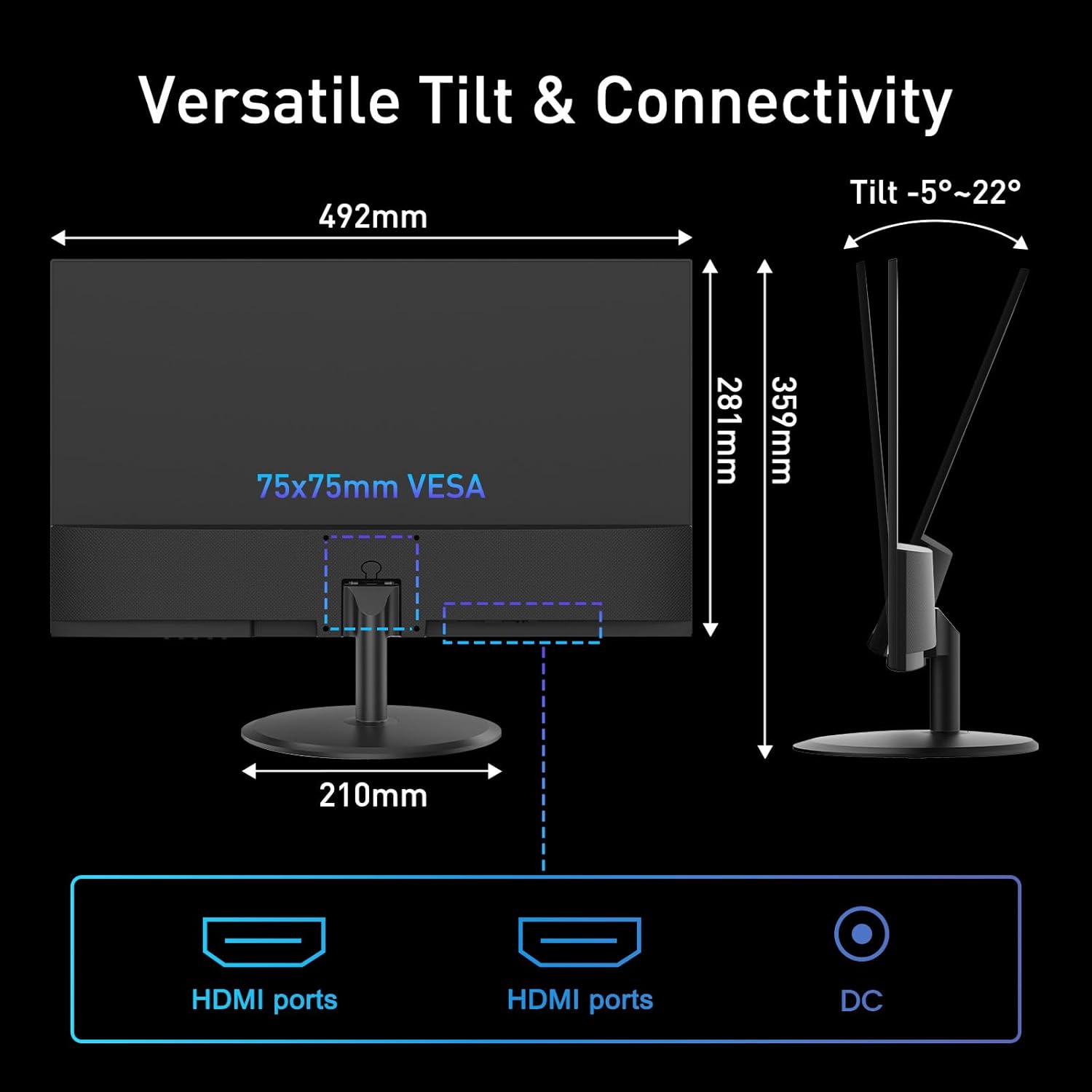
Illustration of the monitor's connectivity options, including HDMI and DC power ports.
4. Иштөө нускамалары
4.1 Күйгүзүү/өчүрүү
Press the power button, usually located on the bottom right or rear of the monitor, to turn the monitor on or off. The power indicator light will illuminate when the monitor is on.
4.2 Экрандагы дисплей (OSD) менюсу
The OSD menu allows you to adjust various monitor settings. Use the control buttons (joystick or individual buttons) typically found on the back or bottom of the monitor to navigate the menu.
- Жарыктык/Контраст: Adjust image luminance and distinction.
- Түс жөндөөлөрү: Түс температурасын, өңүн жана каныккандыгын өзгөртүү.
- Киргизүүнү тандоо: Manually switch between HDMI inputs.
- Сүрөт режими: Алдын ала коюлган дисплей режимдерин тандаңыз (мисалы, Стандарттык, Оюн, Кино).
- Адаптивдүү синхрондоштуруу: Enable or disable Adaptive Sync for smoother visuals.
- HDR режими: Activate High Dynamic Range for enhanced contrast and color.
4.3 Негизги өзгөчөлүктөрү
4.3.1 120Hz Refresh Rate
The 120Hz refresh rate provides smoother motion and reduced input lag, beneficial for fast-paced content and general desktop use. Ensure your connected device is configured to output at 120Hz for optimal performance.
Image: High Refresh Rate Visual

Visual representation of the monitor's 120Hz refresh rate, ensuring ultra-fluid visuals.
4.3.2 Adaptive Sync
Adaptive Sync technology synchronizes the monitor's refresh rate with your graphics card's frame rate, eliminating screen tearing and stuttering for a more fluid visual experience. This feature is automatically enabled when supported by your graphics card and enabled in the OSD.
Image: Adaptive Sync vs. Conventional Display

Demonstration of Adaptive Sync technology providing tear-free and smooth visuals compared to a conventional display.
4.3.3 HDR (Жогорку динамикалык диапазон)
HDR mode enhances the contrast and color accuracy of compatible content, providing deeper blacks, brighter whites, and a wider range of colors. Enable HDR through the OSD menu or your operating system settings for supported media.
Image: HDR Clarity Comparison
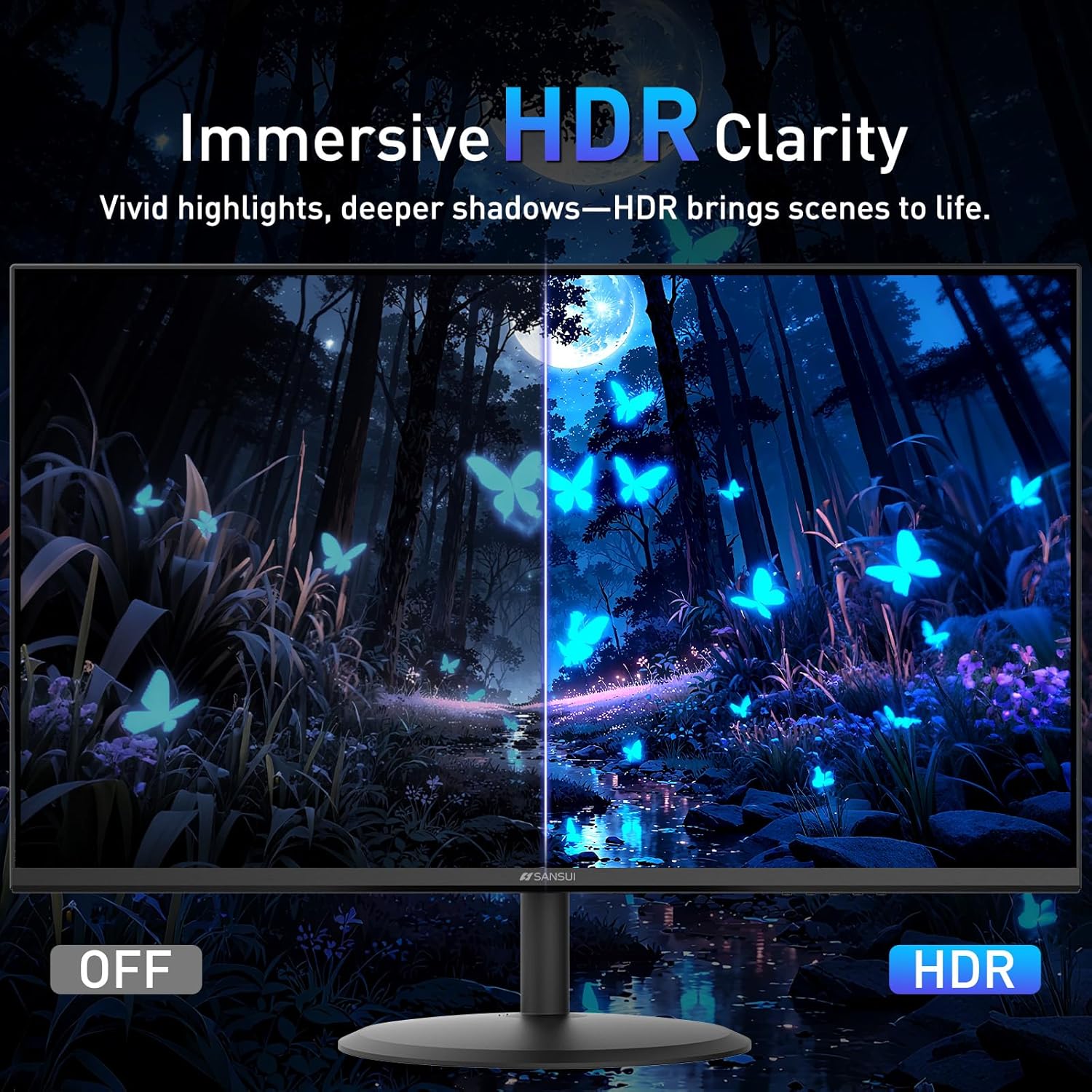
Visual comparison demonstrating the enhanced clarity and color depth provided by HDR mode.
4.3.4 Көзгө кам көрүүнүн өзгөчөлүктөрү
Монитор узак убакыт колдонууда көздүн чарчоосун азайтуу үчүн бир нече функцияларды камтыйт:
- Анти-Фликер: Көздүн чарчоосуна алып келиши мүмкүн болгон экрандын жымыңдашын азайтат.
- Төмөн көк жарык: Зыяндуу көк жарыктын чыгышын чыпкалайт.
- Жарыкка каршы каптоо: Minimizes reflections on the screen surface.
Image: Eye Care & Comfort Viewing
Depiction of the monitor's eye care features contributing to comfortable viewузак мөөнөттүү колдонуу учурунда күйгүзүү.
5. Техникалык тейлөө
5.1 Мониторду тазалоо
Мониторуңуздун узак мөөнөттүү иштешин жана оптималдуу иштешин камсыз кылуу үчүн, төмөнкү тазалоо көрсөтмөлөрүн аткарыңыз:
- Тазалоодон мурун ар дайым мониторду өчүрүп, розеткадан сууруп коюңуз.
- Бир аз жумшак, түксүз кездемени колдонуңуз dampened with water or a specialized screen cleaning solution.
- Gently wipe the screen surface and the monitor casing. Avoid applying excessive pressure.
- Do not use abrasive cleaners, alcohol, ammonia, or petroleum-based solvents, as these can damage the screen or casing.
- Never spray cleaning solution directly onto the screen.
5.2 Сактоо
If storing the monitor for an extended period, ensure it is powered off, unplugged, and stored in a cool, dry place away from direct sunlight and extreme temperatures. Use the original packaging if available for best protection.
6. Кыйынчылыктарды
If you encounter issues with your SANSUI ES-22X3AH monitor, refer to the following common problems and solutions:
| Көйгөй | Мүмкүн себеп | Чечим |
|---|---|---|
| Экранда сүрөт жок | Монитор күйгөн эмес; Туура эмес киргизүү тандалды; Видео кабель бошоп калган. | Ensure power cable is connected and monitor is on. Select correct input source via OSD. Check HDMI cable connection. |
| Сүрөт бүдөмүк же бурмаланган | Туура эмес чечилиш; Графикалык драйвердеги көйгөйлөр. | Set display resolution to 1920x1080. Update graphics drivers on your computer. |
| Экрандын бүлбүлдөөсү | Жаңыртуу ылдамдыгы дал келбейт; Бузулган кабель. | Ensure refresh rate is set to 120Hz in your computer's display settings. Try a different HDMI cable. |
| Үн жок (тышкы динамиктер туташкан болсо) | Монитордо орнотулган динамиктер жок; Аудио чыгыш конфигурацияланган эмес. | This monitor does not have built-in speakers. Ensure your external speakers are properly connected and selected as the audio output device on your computer. |
| Adaptive Sync not working | Feature not enabled; Incompatible graphics card. | Enable Adaptive Sync in the monitor's OSD menu and your graphics card control panel. Ensure your graphics card supports Adaptive Sync. |
If the problem persists after trying these solutions, please contact SANSUI customer support.
7. Техникалык шарттар
Below are the technical specifications for the SANSUI ES-22X3AH monitor:
- Модель номери: ES-22X3AH
- Экрандын өлчөмү: 22 дюйм
- Панелдин түрү: Not specified (typically VA or IPS for 4000:1 contrast)
- Чечим: 1920 x 1080 (FHD 1080p)
- Аспект катышы: 16:9
- Жаңыртуу ылдамдыгы: 120Hz
- Контраст катышы: 4000:1
- Сүрөттүн жарыктыгы: 250 Candela per Square Meter (nits)
- Түс гаммасы: 100% sRGB
- Байланыш: 2 x HDMI 1.4 ports (up to 120Hz), DC Power Input
- VESA тоосу: 75 x 75 мм
- Эңкейүүнү тууралоо: -5°тан 22°ка чейин
- Продукциянын өлчөмдөрү: 8.27 x 19.37 x 14.13 дюйм
- Элемент Салмагы: 6.64 фунт
- Eye Care Features: Anti-flicker, Low Blue Light, Anti-glare coating
- Адаптивдүү синхрондоштуруу: Колдоого алынган
- HDR: Колдоого алынган
- Өндүрүүчү: EXPRESS LUCK INDUSTRIAL(ZHONGSHAN)LIMITED
8. Кепилдик жана колдоо
8.1 Кепилдик маалыматы
SANSUI provides a money-back and free replacement warranty for your monitor within 30 days from the order date. Please retain your proof of purchase for warranty claims.
8.2 Техникалык колдоо
Lifetime technical support is available for your SANSUI monitor. For assistance with setup, troubleshooting, or any other inquiries, please contact SANSUI customer service. You can typically find contact information on the SANSUI official webсайт же сатуучу аркылуу.
Image: Lifetime Technical Support

Бүттүview of SANSUI's commitment to customer satisfaction, including warranty and support services.


