Introduction
This manual provides essential information for the safe and efficient operation of your ZeroKor Portable Power Stations. This bundle includes a 120W portable battery with a 22W solar panel and a 65W outlet power bank, designed for versatile power needs both indoors and outdoors, supporting laptops, smart devices, and more.
Коопсуздук маалыматы
Жаракат алуунун же зыяндын алдын алуу үчүн бул продуктуну колдонуудан мурун бардык коопсуздук эскертүүлөрүн жана көрсөтмөлөрүн окуп чыгыңыз. Келечекте колдонуу үчүн бул колдонмону сактап коюңуз.
- Бөлүктү бөлбөөгө, оңдоп же өзгөртпөңүз.
- Аппаратты отко же жогорку температурага чыгарбаңыз.
- Keep away from water, high humidity, and direct sunlight.
- Колдонуу жана кубаттоо учурунда туура желдетүүнү камсыз кылыңыз.
- Do not use if the unit is damaged or has been dropped.
- Балдар жетпеген жерде сактаңыз.
- Продукцияны жергиликтүү эрежелерге ылайык жок кылыңыз.
Пакеттин мазмуну
Баардык буюмдар пакетиңизге камтылганын текшериңиз:
- ZeroKor 120W көчмө электр станциясы
- ZeroKor 65W Portable Power Bank
- 22W Бүктөлүүчү Күн панели
- AC Wall Adapter (for 120W unit)
- 12V Car Charging Cable (for 120W unit)
- 9V/3A Max USB-C Adapter (for 65W unit)
- Колдонуучунун Колдонмосу (бул документ)

Image: The ZeroKor Portable Power Station bundle, showing the 120W power station, the 65W power bank, and the foldable solar panel.
Продукт бүттүview
ZeroKor 120W көчмө электр станциясы
This unit is designed for higher power demands and features multiple output options.

Сүрөт: Жогорку view of the 120W Portable Power Station, highlighting its various ports and digital display.
- AC чыгаруу: Two 110V/120W MAX AC outlets.
- DC чыгаруу: One 12V~16.8V/6A MAX DC output.
- USB-A чыгаруу: One USB1 (5V/2A) and one QC USB2 (5V/3A, 9V/2A MAX).
- USB-C чыгышы: One USB-C (5V/3A, 9V/2A MAX).
- Киргизүү: Dedicated input port for charging.
- LED фонарик: Features reading mode and SOS mode for emergencies.
- Дисплей: Digital display showing battery level and output status.
ZeroKor 65W Portable Power Bank
This compact unit is ideal for smaller devices and on-the-go power.
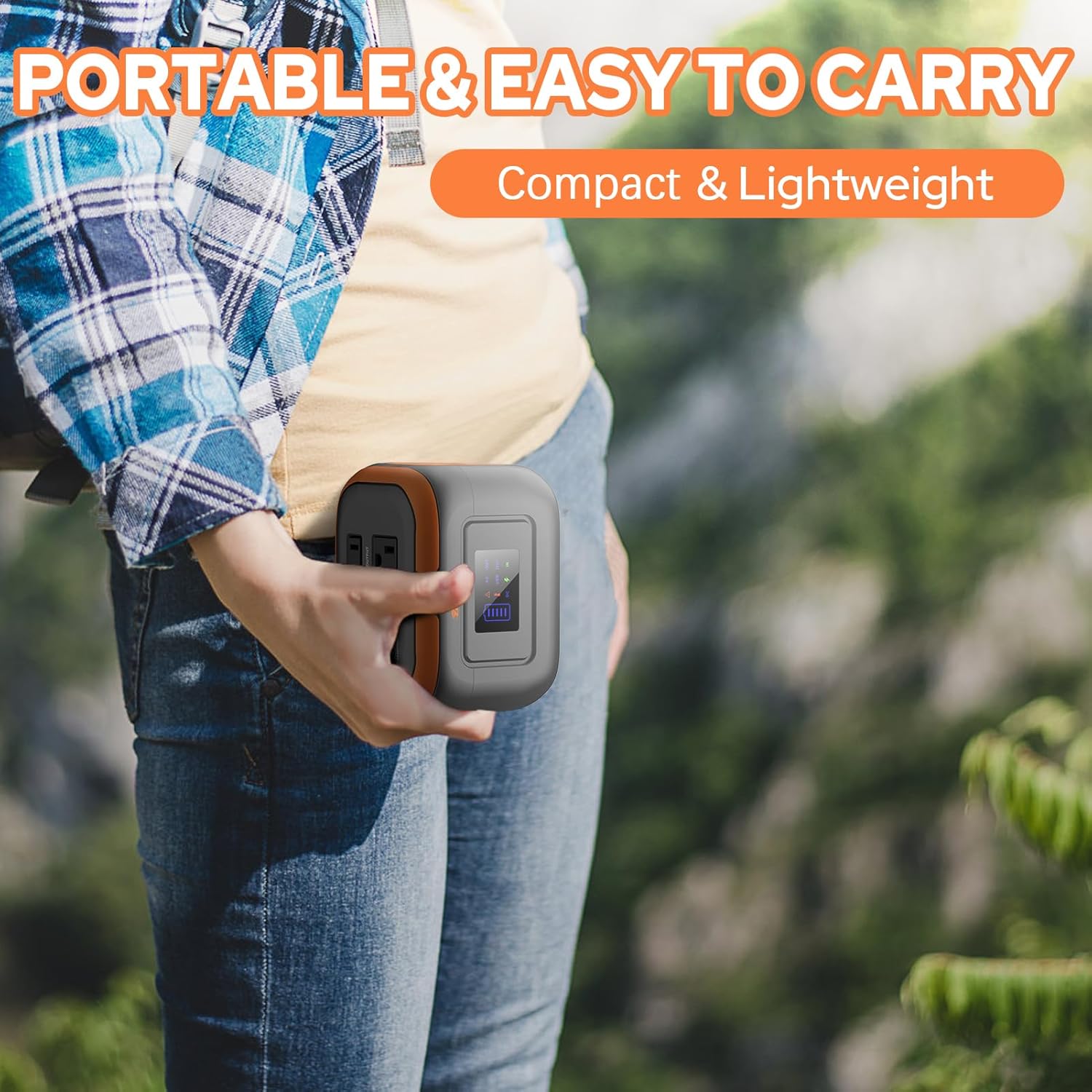
Image: A person holding the compact 65W Portable Power Bank, demonstrating its portability.
- AC чыгаруу: One 110V/65W MAX AC outlet.
- DC чыгаруу: One 9V~12.6V/10A MAX DC output.
- USB чыгышы: One USB-2 port (5V/2.1A Max) and one quick charge USB-1 port (5V/3A, 9V/2A MAX).
- Кол чырак: Features reading mode and SOS mode.
Орнотулган Батареяны Башкаруу Системасы (BMS)
Both ZeroKor portable power units feature an advanced BMS for enhanced safety and battery longevity.

Image: A diagram showing the Battery Management System (BMS) and its protective features, including short circuit, over-current, over-voltagд) ашыкча жүктөлүүдөн, ысып кетүүдөн жана ашыкча заряддан коргоо.
- Кыска туташуулардан коргоо
- Ашыкча ток коргоо
- Көлөмүtagд коргоо
- Ашыкча жүктөн коргоо
- Ашыкча ысып кетүүдөн коргоо
- Ашыкча заряддан коргоо
Жайгашуу
Баштапкы заряддоо
Before first use, fully charge your power station. There are three primary ways to recharge the 120W unit:
- AC дубал розетка: Connect the provided AC wall adapter to the input port of the 120W power station and plug it into a standard wall outlet.
- Күн панели: Connect the 22W foldable solar panel to the input port of the 120W power station. Place the solar panel in direct sunlight for optimal charging.
- Унаа порту: Use the included 12V car charging cable to charge the 120W power station from your vehicle's car port.
The 65W power bank can be recharged via its USB-C input using the provided 9V/3A Max USB-C adapter.

Image: Illustration of the three charging methods for the power station: solar panel, AC wall adapter, and 12V car charging cable.
Иштөө нускамалары
Күйгүзүү/өчүрүү
- To turn on the 120W power station, press and hold the main power button. The display will illuminate.
- To activate the AC output on the 120W unit, long press the DC button.
- To turn off, press and hold the main power button again.
Using Outputs
Connect your devices to the appropriate output ports (AC, DC, USB-A, USB-C). The power station is capable of powering various devices:

Image: A person charging a laptop with the 120W power station in an outdoor setting. Icons indicate the number of recharges for devices like laptops, cameras, smartphones, and drones.
Эскертүү: If your devices need an air compressor to work, it is recommended to purchase a more powerful power station.
Заряддоо
Both power stations support pass-through charging, allowing you to charge the power station while simultaneously powering your devices.

Image: A visual representation of pass-through charging, showing the power station being recharged from a wall outlet while simultaneously providing power to a connected mobile device.
Жарык диоддук чыракты колдонуу
The integrated LED flashlight on both units offers multiple modes:
- Окуу режими: Provides a steady light for illumination.
- SOS режими: Өзгөчө кырдаалдар үчүн жаркылдаган сигналды чыгарат.
Video: A demonstration of the ZeroKor Portable Power Station, showcasing its various ports, the functionality of the LED flashlight, and its ability to power a small fan. This video highlights the product's versatility for campжана сыртта колдонуу.
Техникалык тейлөө
- Тазалоо: Түзмөктүн сыртын тазалоо үчүн жумшак, кургак чүпүрөктү колдонуңуз. Абразивдүү тазалоочу каражаттарды же эриткичтерди колдонбоңуз.
- Сактагыч: Store the power station in a cool, dry place away from direct sunlight and extreme temperatures. For long-term storage, it is recommended to charge the unit to 50-80% every 3-6 months to maintain battery health.
- Батареяга кам көрүү: Батареянын иштөө мөөнөтүн узартуу үчүн бат-баттан толук зарядсыздануудан качыңыз.
Проблемаларды чечүү
| Көйгөй | Мүмкүн себеп | Чечим |
|---|---|---|
| Түзмөк күйбөй жатат | Батареянын аздыгы; Кубат баскычы жетишерлик көпкө басылган жок. | Charge the unit fully. Press and hold the power button for 3 seconds. |
| AC/DC/USB портторунан эч кандай маалымат жок | Output not activated; Device draws too much power; Overload protection triggered. | Ensure the specific output (e.g., AC) is activated (long press DC button for 120W unit). Check device power requirements. Disconnect device, restart unit, try a lower-power device. |
| Жай кубаттоо | Аз кубаттуулуктагы кубаттагычты колдонуу; Күн батареясын түз күн нуру тийбеген жерде сактаңыз. | Use the original AC adapter. Ensure solar panel is fully exposed to direct sunlight and clean. |
| Unit gets warm during use | Кадимки иштөө, айрыкча оор жүктөм астында. | Ensure adequate ventilation. If overheating protection triggers, the unit will shut down automatically. Allow it to cool before resuming use. |
Restricted Devices
The ZeroKor Portable Power Stations are designed for specific power outputs. Do not attempt to power devices that exceed the maximum wattage (120W for the larger unit, 65W for the smaller unit). Attempting to power high-wattage appliances can trigger overload protection or damage the unit.

Image: An illustration indicating types of high-power devices (e.g., coffee makers, induction cookers, hair dryers) that are restricted and should not be used with this power station due to their wattage exceeding 120W.
Техникалык шарттар
ZeroKor 120W көчмө электр станциясы
- Батарея сыйымдуулугу: 97Wh
- AC чыгаруу: 2 x 110V/120W MAX
- DC чыгаруу: 1 x 12V~16.8V/6A MAX
- USB-A чыгаруу: 1 x 5V/2A, 1 x QC (5V/3A, 9V/2A MAX)
- USB-C чыгышы: 1 x 5V/3A, 9V/2A MAX
- Заряддоо киргизүү: AC wall adapter, 22W solar panel, 12V car port
- Өзгөчөлүктөрү: LED Flashlight (reading, SOS modes), BMS protection
ZeroKor 65W Portable Power Bank
- AC чыгаруу: 1 x 110V/65W MAX
- DC чыгаруу: 1 x 9V~12.6V/10A MAX
- USB чыгышы: 1 x 5V/2.1A Max, 1 x QC (5V/3A, 9V/2A MAX)
- Заряддоо киргизүү: USB-C (9V/3A Max adapter)
- Өзгөчөлүктөрү: Flashlight (reading, SOS modes), BMS protection
Кепилдик жана колдоо
ZeroKor products are designed for reliability and performance. For detailed warranty information and customer support, please refer to the official ZeroKor webсайтка же түздөн-түз кардарларды тейлөөгө кайрылыңыз.
- Webсайт: Visit the ZeroKor Store on Amazon
- Кардарларды тейлөө: Refer to your purchase documentation or the ZeroKor webбайланыш маалыматы үчүн сайт.
Кепилдик дооматтары үчүн сатып алганыңыздын далилин сактап коюңуз.


