1. Киришүү
Thank you for choosing the ZAQE M505 MP3 Player. This device is designed to provide a versatile and enjoyable multimedia experience, featuring Bluetooth, Wi-Fi, and a full touch screen. This manual will guide you through the essential steps to get started and make the most of your player.
The ZAQE M505 is equipped with a 4-inch HD full-color screen, 80GB of storage (2GB RAM + 16GB ROM + 64GB card), and a 2000mAh battery for extended use. It supports a wide range of audio and video formats and comes with pre-installed media applications.
2. Пакеттин мазмуну
Пакетиңизде бардык буюмдар бар экенин текшериңиз:
- ZAQE M505 MP3 Player
- Коргоочу кап
- Screen Protector
- Кулакчындар
- USB-C заряддоо кабели
- Колдонуучунун Колдонмосу (бул документ)
Видео: Кутудан чыгаруу жана башталышы бүттүview of the ZAQE M505 MP3 Player and its accessories.
3. Түзмөк бүттүview
The ZAQE M505 features a sleek design with a 4-inch full touch screen. Familiarize yourself with the device's physical components:
- Алдыңкы: 4-inch HD Full Touch Screen, Home button.
- тарап: Power button, Volume Up/Down buttons, Micro SD card slot.
- Төмөнкү: USB-C port, 3.5mm headphone jack.
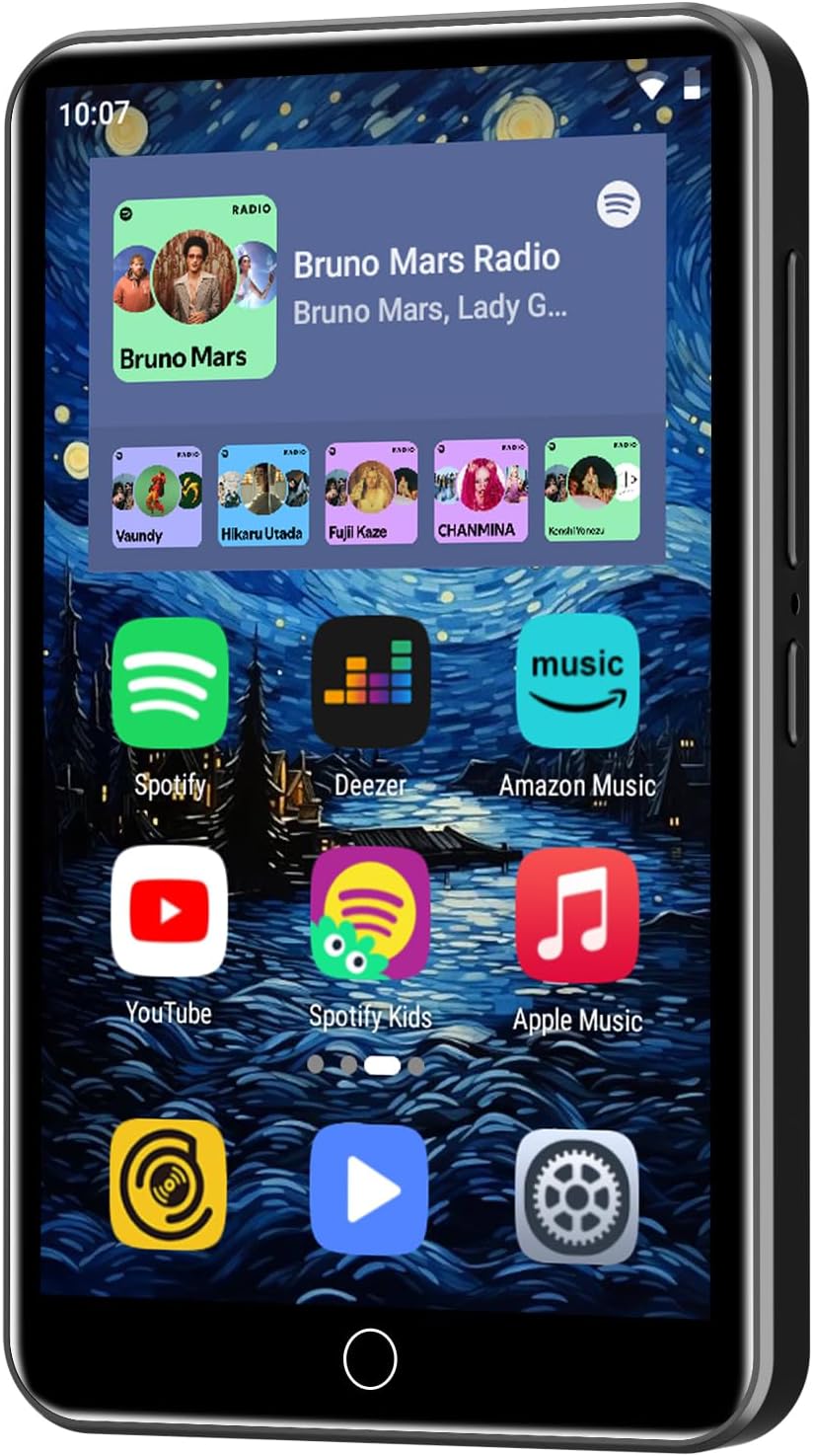
Сүрөт: Фронт view of the ZAQE M505 MP3 Player displaying its touch screen interface with various application icons.
4. Орнотуу
4.1 Күйгүзүү/өчүрүү
- Күйгүзүү үчүн: Press and hold the Power button (located on the side) until the ZAQE logo appears on the screen.
- Өчүрүү үчүн: Press and hold the Power button until a power-off menu appears. Select 'Power off'.
4.2 Initial Setup (Wi-Fi & Google Services)
Upon first power-on or after a factory reset, you will be guided through an initial setup process:
- Тил тандоо: Өзүңүзгө жаккан тилди тандаңыз.
- Wi-Fi туташуусу: Select your Wi-Fi network from the list and enter the password. A stable Wi-Fi connection is essential for downloading apps and streaming content.
- Google кызматтары: Review and accept Google's terms of service. You may be prompted to sign in with a Google account to access the Play Store and other Google services.
- Дата жана убакыт: Set the correct date and time, or allow the device to automatically set it via network.
4.3 Аппаратты заряддоо
Before first use, fully charge your MP3 player. Use the provided USB-C cable to connect the device to a power source (e.g., computer USB port, wall adapter).
- The battery icon on the status bar will indicate charging status.
- Толук кубаттоо музыканы 40 саатка чейин ойнотууга мүмкүндүк берет.

Сүрөт: The ZAQE M505 MP3 Player connected via its USB-C port for charging, emphasizing its 2000mAh battery capacity.
5. Иштөө нускамалары
5.1 Интерфейсте навигация
The device runs on an Android-based operating system with a user-friendly touch interface. Swipe left or right to access different home screens and app drawers. Tap icons to open applications.

Сүрөт: A hand demonstrating interaction with the responsive 4.0-inch full touch screen of the ZAQE M505 MP3 Player.
5.2 Музыканы ойнотуу
The ZAQE M505 supports various music formats including MP3, OGG, FLAC, AAC, WAV, WMA, and APE. It comes with pre-installed apps like Spotify, Amazon Music, Apple Music, and Deezer for streaming, and HiByMusic for offline playback.
- Using Pre-installed Apps: Connect to Wi-Fi, open your desired music app (e.g., Spotify), log in, and start streaming.
- Offline Playback (HiByMusic): Музыканы которуу files from your PC to the player's internal storage or inserted Micro SD card. Open the HiByMusic app to browse and play your local music library.
- Ойнотмо тизмелерди түзүү: Within the music player app, you can create custom playlists to organize your music.
Видео: Demonstration on how to create a playlist on the ZAQE M505 MP3 Player.
5.3 Видеону ойнотуу
The player supports 720P and 1080P video playback with support for RM, RMVB, FLV, MP4, DAT, MKV, MPG, MOV, TS formats.
- Агым: Use pre-installed apps like YouTube to stream videos online.
- Жергиликтүү Files: Видеону өткөрүү files to the device and use the built-in video player or a downloaded media player app to watch them.
5.4 Колдонмону орнотуу (Google Play Дүкөнүнөн)
Access the Google Play Store to download additional applications. Ensure you are connected to Wi-Fi and logged into your Google account.
- Tap the 'Play Store' icon on your home screen.
- Издөө your desired app.
- Tap 'Install' to download and install the app.
5.5 Bluetooth байланышы
Connect your ZAQE M505 to Bluetooth headphones, speakers, or car stereos for wireless audio.
- барыңыз Орнотуулар > Bluetooth.
- Bluetooth которуштуруу On.
- The device will scan for available Bluetooth devices.
- Жупташтыруу үчүн тизмеден каалаган түзмөктү тандаңыз.

Сүрөт: The ZAQE M505 MP3 Player demonstrating its Bluetooth connectivity with various external devices like earbuds and car audio systems.
5.6 Wi-Fi байланышы
Connect to Wi-Fi networks to access online content, download apps, and update software.
- барыңыз Орнотуулар > Wi-Fi.
- Wi-Fi которуштуруу On.
- Select your network and enter the password.
5.7 File Башкаруу
Өткөрүлүүдө files to and from your ZAQE M505:
- Connect the MP3 player to your computer using the USB-C cable.
- On the player, swipe down from the top of the screen to open the notification panel.
- Tap the USB connection notification and select 'File transfer' (MTP).
- Your computer will recognize the device as a portable media player. You can now drag and drop files to the internal storage or Micro SD card.

Сүрөт: The ZAQE M505 MP3 Player highlighting its Wi-Fi capability and the option to expand storage up to 1TB via a Micro SD card.
6. Техникалык шарттар
| Өзгөчөлүк | Деталь |
|---|---|
| Модель номери | M505 |
| Эстутум сактоо сыйымдуулугу | 80 GB (2GB RAM + 16GB ROM + 64GB card) |
| Screen Size | 4 дюйм |
| Дисплей технологиясы | LCD or IPS |
| Байланыш | Bluetooth, Wi-Fi, USB-C |
| Колдоого алынган аудио форматтары | MP3, OGG, FLAC, AAC, WAV, WMA, APE |
| Колдоого алынган видео форматтары | RM, RMVB, FLV, MP4, DAT, MKV, MPG, MOV, TS |
| Батареянын иштөө мөөнөтү | Up to 40 Hours (music playback) |
| Батарея сыйымдуулугу | 2000mAh |
| Операция системасы | Android 9.0 OS |
| Элемент Салмагы | 7.4 унция |
7. Техникалык тейлөө
7.1 Батареяга кам көрүү
- Батареянын иштешин начарлатышы мүмкүн болгон өтө жогорку температуралардан алыс болуңуз.
- Charge the device regularly, but avoid leaving it fully charged or fully depleted for extended periods.
7.2 Тазалоо
- Аппараттын экранын жана корпусун тазалоо үчүн жумшак, түксүз чүпүрөктү колдонуңуз.
- Катуу химиялык заттарды же абразивдүү материалдарды колдонуудан алыс болуңуз.
7.3 Программалык камсыздоо жаңыртуулары
Periodically check for software updates in Орнотуулар > Система > Системаны жаңыртуу to ensure optimal performance and access to the latest features.
8. Кыйынчылыктарды
- Түзмөк күйбөй жатат: Батареянын заряддалганын текшериңиз. Заряддоочу түзүлүшкө туташтырып, кайра аракет кылыңыз.
- Wi-Fi/Bluetooth туташуу көйгөйлөрү: Ensure Wi-Fi/Bluetooth is enabled in settings. Restart the device and try reconnecting. Check if other devices can connect to the network/Bluetooth accessory.
- Колдонмолор жүктөлүп алынбай/иштебей жатат: Check your Wi-Fi connection. Ensure you are logged into your Google account. Clear the cache of the Play Store app (Settings > Apps > Google Play Store > Storage > Clear cache).
- Жай аткаруу: Колдонулбаган тиркемелерди жабыңыз. Кэшти жана убактылууну тазалаңыз files. Consider a factory reset if issues persist (backup your data first).
9. Кепилдик жана колдоо
The ZAQE M505 MP3 Player comes with a standard manufacturer's warranty. For specific warranty terms and conditions, please refer to the warranty card included in your package or contact ZAQE customer support.
For technical assistance, troubleshooting, or further inquiries, please visit the official ZAQE webсайтына кириңиз же алардын кардарларды колдоо кызматына кайрылыңыз. Байланыш маалыматын, адатта, продуктунун таңгагынан же өндүрүүчүнүн маалыматынан тапса болот. webсайт.
Өндүрүүчү: ZAQE


