Introduction
The Beats Solo 4 are wireless Bluetooth on-ear headphones designed for a premium audio experience. They offer compatibility with both Apple and Android devices, extended battery life, and advanced audio features like Personalized Spatial Audio. This manual provides detailed instructions for setting up, operating, maintaining, and troubleshooting your Beats Solo 4 headphones.
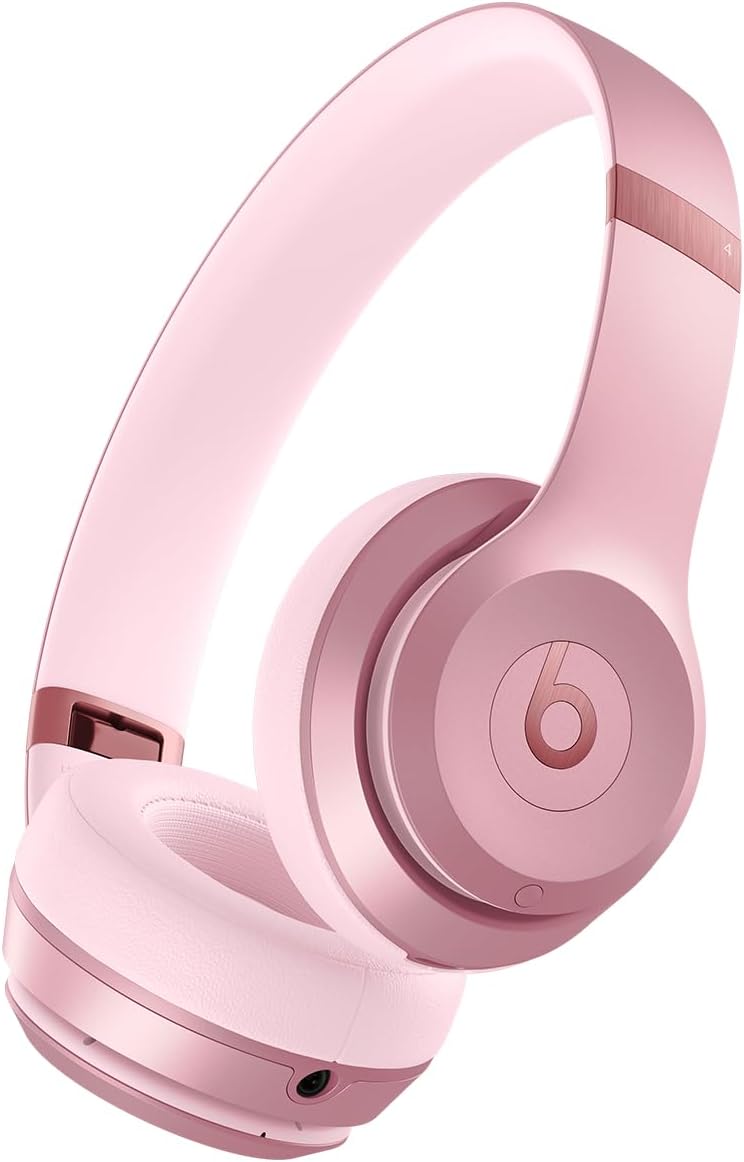
Сүрөт: алдыңкы view of the Beats Solo 4 Wireless Headphones in Metallic Pink.
Кутуда эмне бар
Upon unboxing your Beats Solo 4 headphones, verify that all the following components are included:
- Beats Solo 4 наушниктери
- Коргоочу кап
- Кубаттоо жана аудио үчүн USB-Cден USB-Cге кабели (USB-C кубат адаптери өзүнчө сатылат)
- 3.5 мм аналогдук аудио кабель
- Ыкчам баштоо колдонмосу жана кепилдик картасы
Жайгашуу
1. Наушниктерди заряддоо
Before initial use, ensure your Beats Solo 4 headphones are fully charged. Connect the provided USB-C to USB-C cable to the charging port on the headphones and to a compatible USB-C power adapter (sold separately) or a USB-C port on a computer.
- A 10-minute charge provides up to 5 hours of playback (Fast Fuel feature).
- Толук заряддоо батареянын 50 саатка чейин иштөө мөөнөтүн камсыз кылат.

Image: Visual representation of the 50-hour battery life capability of the Beats Solo 4 headphones.
2. Түзмөгүңүз менен жупташтыруу (Bluetooth)
The Beats Solo 4 headphones offer dual compatibility for one-touch pairing with both iOS and Android devices.
For iOS Devices (Apple):
- iOS түзмөгүңүздө Bluetooth иштетилгенин текшериңиз.
- Power on your Beats Solo 4 headphones.
- Hold your Beats Solo 4 near your unlocked iOS device.
- Follow the on-screen prompts to connect. This will automatically set up your headphones with all devices signed into your iCloud account.
Android түзмөктөрү үчүн:
- Download the Beats app from the Google Play Store (optional, but recommended for full features).
- Android түзмөгүңүздө Bluetooth иштетилгенин текшериңиз.
- Power on your Beats Solo 4 headphones.
- Open the Beats app or go to your device's Bluetooth settings.
- Select "Beats Solo 4" from the list of available devices to pair.

Image: The Beats Solo 4 headphones demonstrating Apple and Android compatibility with a smartphone.
Наушниктерди иштетүү
Controls
The Beats Solo 4 headphones feature intuitive on-ear controls for managing audio playback, calls, and voice assistant interaction.
- Үндү көзөмөлдөө: Use the dedicated volume buttons on the ear cup.
- Ойнотуу башкаруусу: Press the 'b' button for play/pause, double-press for next track, triple-press for previous track.
- Чалууларды башкаруу: Press the 'b' button to answer/end calls.
- Үн жардамчысы: Press and hold the 'b' button to activate Siri or your device's voice assistant.
Аудио өзгөчөлүктөрү
Жекелештирилген мейкиндик аудио
Experience immersive sound with dynamic head tracking. This feature creates a theater-like experience, making it sound as if audio is coming from all around you. Compatible hardware and software are required. For Apple devices, an iPhone with TrueDepth camera is needed to create a personal profile for Spatial Audio.

Image: Visual representation of Personalized Spatial Audio, showing sound emanating from multiple directions around the headphones.
Lossless Audio
The Beats Solo 4 supports lossless audio playback via the included USB-C or 3.5 mm audio cables. This allows for high-fidelity audio transmission without compression, providing a richer listening experience. Compatible lossless content from supported apps/services is required.

Image: A user wearing Beats Solo 4 headphones, highlighting the lossless audio capability via wired connection.
Техникалык тейлөө
Proper care and maintenance will extend the lifespan of your Beats Solo 4 headphones.
- Тазалоо: Кулакчындарды тазалоо үчүн жумшак, кургак, түксүз чүпүрөктү колдонуңуз. Абразивдүү тазалоочу каражаттарды же чачыраткычтарды колдонбоңуз.
- Сактагыч: When not in use, store the headphones in the provided protective case to prevent scratches and damage. The foldable design makes them compact for storage.
- Нымдуулук: The Beats Solo 4 are not water resistant. Avoid exposure to liquids, moisture, or extreme humidity.
- Температура: Наушниктерди экстремалдык температурага тийгизбеңиз.

Image: The Beats Solo 4 headphones in their folded, compact state, suitable for storage in the protective case.
Проблемаларды чечүү
If you encounter issues with your Beats Solo 4 headphones, try the following solutions:
| Көйгөй | Мүмкүн чечим |
|---|---|
| Наушник күйбөй жатат | Наушниктердин толук заряддалганын текшериңиз. USB-C кабели аркылуу кубат булагына туташуу. |
| Түзмөк менен жупташтыруу мүмкүн эмес |
|
| Үн жок же үнү төмөн |
|
| Чалуу сапаты начар |
|
| Наушник жооп бербей жатат | Perform a factory reset (refer to the Quick Start Guide for specific instructions on how to reset your Beats Solo 4). |
Техникалык шарттар
| Өзгөчөлүк | Деталь |
|---|---|
| Модель аты | Beats Solo 4 |
| Байланыш технологиясы | Зымсыз (Bluetooth 1-класс) |
| Bluetooth версиясы | 5.3 |
| Bluetooth диапазону | 100 метрге чейин |
| Батареянын иштөө мөөнөтү | 50 саатка чейин |
| Тез күйүүчү май кубаттоо | 10 мүнөттүк кубаттоо 5 саатка чейин ойнотууну камсыз кылат |
| Аудио киргизүү | USB-C audio, 3.5 mm analog input |
| Кулак жайгаштыруу | On Ear |
| Салмагы | 7.65 унция / 217 г |
| Өлчөмдөрү (L x W x Y) | 6.9 дюйм x 6.2 дюйм x 2.7 дюйм (17.7 см x 15.8 см x 6.8 см) |
| Башкаруу түрү | Үндү башкаруу, Колдонмону башкаруу, Баскычты башкаруу, Siri, Сенсордук башкаруу, Үн менен башкаруу |
| Сууга туруктуулук деңгээли | Сууга чыдамдуу эмес |
| Камтылган компоненттер | Headphones, Protective Case, USB-C to USB-C cable, 3.5 mm audio cable, Quick Start Guide, Warranty Card |
Кепилдик жана колдоо
Your Beats Solo 4 headphones come with a limited warranty. Please refer to the included Warranty Card for detailed terms and conditions, including coverage period and how to make a claim.
For additional support, frequently asked questions, or to contact customer service, please visit the official Beats support webсайт. Сиз ошондой эле жөнүндө көбүрөөк маалымат таба аласыз Amazon'догу Beats дүкөнү.
Note: This manual does not include information on AppleCare+ protection plans, which are separate service agreements.
Маанилүү коопсуздук маалыматы
Read all safety information before using your Beats Solo 4 headphones to avoid injury. Do not listen at high volume levels for long periods to prevent hearing damage. Do not use headphones while driving or cycling, or in situations where inability to hear ambient sounds could be dangerous.


