1. Киришүү
This manual provides detailed instructions for the safe and effective operation of the FNIRSI IPS3608 DC Power Supply. The IPS3608 is a programmable bench power supply designed to deliver stable and clean DC power for various electronic applications, featuring a 36V, 8A, 285W output, ultra-low ripple, and versatile connectivity options.
2. Коопсуздук маалыматы
Please read and understand all safety warnings and operating instructions before using the device. Failure to do so may result in injury or damage to the unit or connected equipment.
- Электр булагы жерге туташтырылган розеткага туташтырылганын текшериңиз.
- Аппаратты нымдуу жерде иштетпеңиз же damp шарттар.
- Максималдуу көлөмдөн ашып кетүүдөн алыс болуңузtage жана түзмөктүн учурдагы баалары же туташкан жүктөм.
- Always disconnect power before making or changing connections.
- в ачпагылаasing; ичинде колдонуучу тейлей турган тетиктер жок. Тейлөөнү квалификациялуу адистерге тапшырыңыз.
- Ашыкча ысып кетүүнүн алдын алуу үчүн желдетүү тешиктерин ачык кармаңыз.
3. Продукт бүтүп калдыview
The FNIRSI IPS3608 features a compact design with an IPS display, intuitive controls, and multiple output ports.

Сүрөт 3.1: Алдыңкы view of the FNIRSI IPS3608 DC Power Supply, showing the IPS display, control knob, navigation buttons, output terminals, and USB ports.
3.1. Front Panel Controls and Ports
- 2.8" TFT Display: Көрсөтөт томtage, current, power, and other operational data.
- Encoder баскычы: Used for navigation and value adjustment.
- Selection Area Buttons: For selecting parameters on the display.
- Setting Menu Button: Accesses device settings.
- Output Power Button: Toggles the main DC output.
- Оң чыгаруу терминалы: Red terminal for positive DC output.
- Терс чыгаруу терминалы: Black terminal for negative DC output.
- USB-A порту: Тез кубаттоо менен шайкеш келген түзмөктөр үчүн.
- USB-C порту: For fast charging compatible devices and PC connection.
- Күч көрсөткүчү: Кубаттын абалын көрсөтөт.
3.2. Арткы панелдин өзгөчөлүктөрү
- Cooling Fan Outlet: Жылуулуктун туура таркалышын камсыздайт.
- Кубат которгучу: Негизги күйгүзүү/өчүрүү баскычы.
- Электр шнурунун туташтыргычы: AC кубат кабелин туташтыруу үчүн.
- USB Port for Firmware Upgrade: Used for updating device firmware.

Figure 3.2: Detailed diagram of the FNIRSI IPS3608 showing labeled front and rear panel components.
4. Кутуда эмне бар
Таңгактан чыгарганда бардык буюмдар бар экенин текшериңиз:
- FNIRSI IPS3608 Host (1)
- Кубат кабели (1)
- Alligator Clip Wires (2)
- Колдонуучунун колдонмосу (1)
- Маалымат кабели (1)
- Packing Box (1)

Figure 4.1: Image showing the FNIRSI IPS3608 power supply and its included accessories: power cable, alligator clip wires, user manual, and data cable.
5. Орнотуу нускамалары
5.1. Power Connection
- Connect the provided power cable to the power cord connector on the rear panel of the IPS3608.
- Plug the other end of the power cable into a standard AC power outlet (100-240V AC, 50/60Hz).
- Ensure the rear power switch is in the OFF position before plugging into the outlet.
5.2. Connecting a Load
- With the power supply OFF, connect the red alligator clip wire to the positive output terminal and the black alligator clip wire to the negative output terminal.
- Connect the other ends of the alligator clip wires to your load, ensuring correct polarity.
- Verify that the load's voltage and current requirements are within the IPS3608's specifications (0-36V, 0-8A).
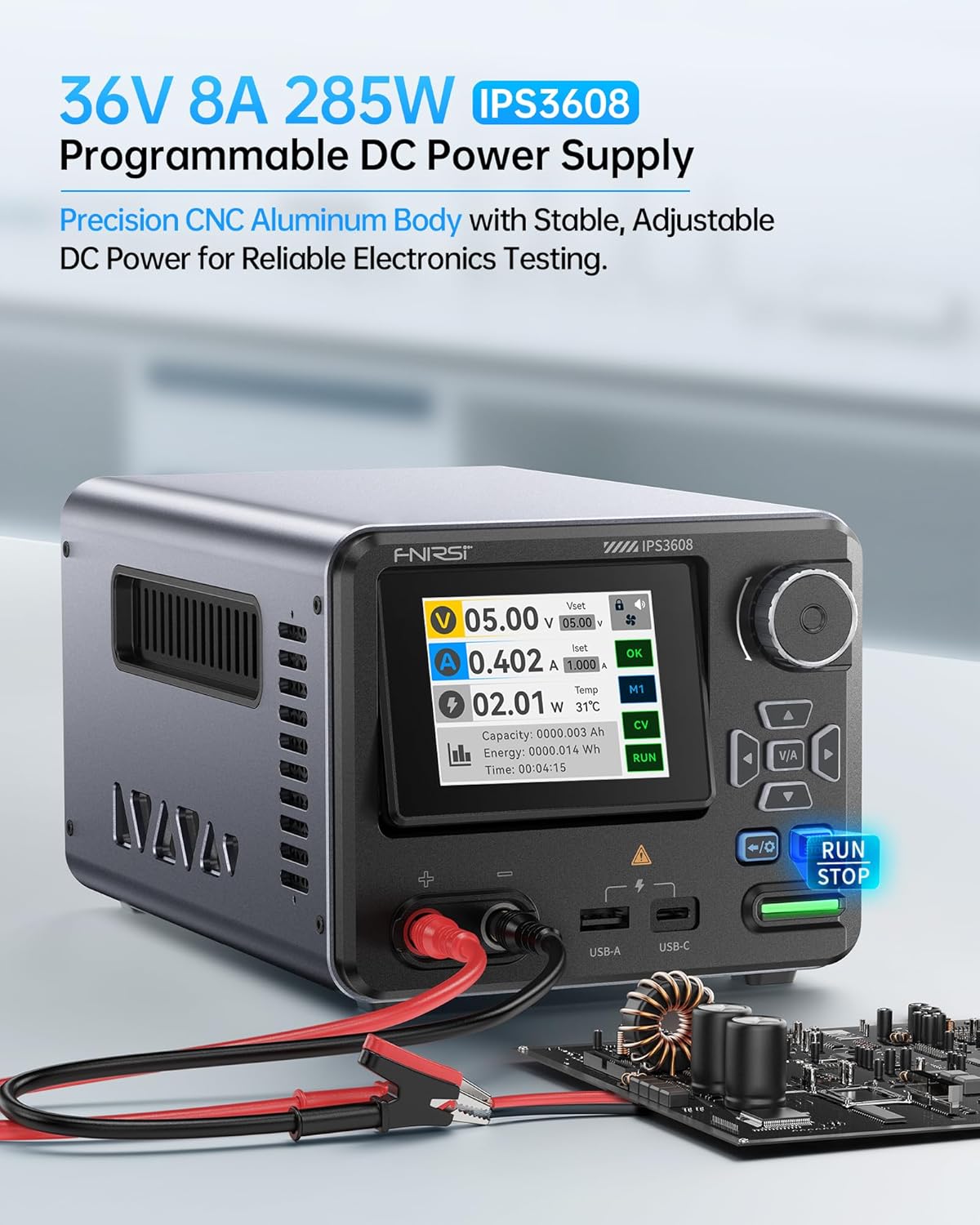
Figure 5.1: The FNIRSI IPS3608 connected to a circuit board using alligator clips, demonstrating a typical load connection.
6. Иштөө нускамалары
6.1. Күйгүзүү / Өчүрүү
- Flip the rear power switch to the ON position. The display will illuminate.
- To turn off, flip the rear power switch to the OFF position.
6.2. Setting Voltage жана Current
- After powering on, the display shows the current output and set values.
- Use the encoder button to navigate and select the voltage (Vset) or current (Iset) parameter you wish to adjust.
- Rotate the encoder button to change the value. Press the encoder button to confirm or move to the next digit.
- Press the Output Power button (RUN/STOP) to enable or disable the main DC output. The button will illuminate green when output is active.
6.3. Дисплей режимдери
The IPS3608 offers three display modes for monitoring output:
- Стандарттык режим: Чыныгы убактагы томду көрсөтөтtagд, ток, кубаттуулук жана температура.
- Curve Mode: Provides a graphical representation of voltage and current over time, including max/min values.
- USB Output Mode: Shows detailed information for the USB-A and USB-C fast charging ports.
Navigate between display modes using the appropriate navigation buttons on the front panel.

Figure 6.1: The IPS3608 display illustrating the Standard, V&I Curve, and USB-C/A Output modes.
6.4. Programmable Features and Presets
The IPS3608 supports PC programmable outputs and includes six preset data slots for quick recall of common voltage жана учурдагы орнотуулар.
- Алдын ала орнотууларды сактоо: Access the preset menu via the Setting Menu button. Adjust voltage, current, and protection parameters (OVP, OCP, OPP, OTP) for a desired preset. Save the configuration to one of the six data slots (Data Set 1-6).
- Алдын ала орнотууларды эстөө: Select the desired preset from the menu to instantly apply its saved settings.
- Компьютердик программалык камсыздоону башкаруу: Connect the IPS3608 to a computer via the USB-C port. The PC software allows for real-time display, curve recording, advanced preset management, sequential output, and voltage/current scanning. Refer to the separate PC software guide for detailed instructions.

Figure 6.2: The IPS3608 display showing preset data settings and an illustration of PC software control capabilities.
6.5. USB-A and USB-C Charging Ports
The integrated USB-A and USB-C ports support various fast charging protocols, including PD, FCP, SCP, AFC, and QC. These ports can be used to charge compatible devices while the main DC output is in use or independently.
- Connect your device to the USB-A or USB-C port using a compatible cable.
- Monitor the charging status and output parameters via the USB Output display mode.
7. Коопсуздуктун өзгөчөлүктөрү жана коргоо каражаттары
The IPS3608 incorporates multiple safety mechanisms to protect both the device and the connected load:
- Voltage Коргоо (OVP): Shuts off output if voltage exceeds a set limit.
- Ашыкча ток коргоо (OCP): Shuts off output if current exceeds a set limit.
- Ашыкча кубаттуулуктан коргоо (OPP): Shuts off output if power exceeds a set limit.
- Ашыкча температурадан коргоо (OTP): Shuts off output if internal temperature becomes too high.
- Томдун астындаtage Коргоо: Protects the load from insufficient voltage.
- Кыска туташуулардан коргоо: Кыска туташуулар болгон учурда зыяндын алдын алат.
- Полярдуулукту кайтаруу: Protects against incorrect connection of load polarity.
- Тескери ток коргоо: Prevents current from flowing back into the power supply.
Figure 7.1: Visual representation of the eight built-in safety protections of the FNIRSI IPS3608.
8. Техникалык тейлөө
8.1. Тазалоо
Оптималдуу иштешин жана көрүнүшүн сактоо үчүн, түзмөктү үзгүлтүксүз тазалап туруңуз:
- Ensure the device is powered off and disconnected from all power sources and loads.
- Сыртын сүртүү үчүн жумшак, кургак чүпүрөктү колдонуңуз.
- Абразивдүү тазалагычтарды же эриткичтерди колдонбоңуз.
- Periodically check the cooling fan outlet for dust accumulation and gently clean if necessary to ensure proper airflow.
8.2. Микропрограмманы жаңыртуу
Firmware updates may be released to improve performance or add new features. These can be performed by connecting the device to a PC via the rear USB-C port. Refer to the FNIRSI official website or contact customer support for the latest firmware and update instructions.
9. Кыйынчылыктарды
If you encounter issues with your FNIRSI IPS3608, refer to the following common problems and solutions:
- Кубат жок/Дисплей:
- Check if the power cable is securely connected to both the device and the AC outlet.
- Арткы кубат которгучу ON абалында экенин текшериңиз.
- Кондиционер розеткасы иштеп турганын текшериңиз.
- No Output Voltage/Current:
- Ensure the Output Power button (RUN/STOP) is pressed and illuminated green.
- Check if the set voltage and current values are above zero.
- Verify that no protection (OVP, OCP, OPP) has been triggered. Reset if necessary.
- Check load connections for proper contact and polarity.
- Туура эмес окуулар:
- Бардык туташуулардын коопсуз жана коррозия жок экендигин текшериңиз.
- If using PC software, ensure the latest version is installed and the data cable is properly connected.
- Ашыкча ысып кетүү:
- Ensure the cooling fan outlet is not obstructed.
- Reduce the load or operating time if the device consistently overheats.
For persistent issues, contact FNIRSI customer support.
10. Техникалык шарттар
Detailed technical specifications for the FNIRSI IPS3608 DC Power Supply:
| Категория | Параметрдин сүрөттөлүшү |
|---|---|
| Киргизүү көлөмүtage Диапазон | 100-240V AC (50/60Гц) |
| Output Voltage | 0-36В DC |
| Output Current | 0-8A |
| Чыгуу күчү | 0-285W |
| Чечилишин (Көлөм) орнотууtage) | 0.01V |
| Чечилишин орнотуу (Учурдагы) | 0.001A |
| Output Voltage Тактык | ± (0.3% + 5 bits) |
| Чыгуу токунун тактыгы | ± (0.15% + 5 bits) |
| Жүктүн жөнгө салуу ылдамдыгы | ± (0.2% + 2 bits) |
| Ripple | <10мВ |
| Иштөө чөйрөсү | -10°C ~ 40°C, 0% ~ 75% RH |
| Муздатуу ыкмасы | Air Cooling (Built-in fan) |
| Продукциянын өлчөмдөрү (L x W x Y) | 8.43 x 5.43 x 4.53 дюйм |
| Элемент Салмагы | 4.44 фунт |
10.1. Fast Charging Protocol Support
| Output Terminal Category | Тез заряддоо протоколу |
|---|---|
| USB-C | PD3.0, HUAWEI FCP, HUAWEI SCP |
| USB-A | AFC, QC2.0, QC3.0 |
Note: Accuracy calculation method: one byte is the minimum resolution, such as 5V, the error is ± (5x0.3% + 5x0.01), that is, 5 ± 0.045V.

Figure 10.1: Detailed table outlining the technical specifications and supported fast charging protocols.
11. Кепилдик жана колдоо
FNIRSI provides comprehensive customer support for the IPS3608 DC Power Supply. For warranty information, technical assistance, or to obtain PC software and operating instructions, please visit the official FNIRSI website or contact their customer service department directly. Contact details can typically be found on the product packaging or the FNIRSI official webсайт.


