1. Киришүү
Сатып алганыңыз үчүн рахматasing the Moukey MAMP3 2.0 каналдуу стерео Amplifier. This manual provides essential information for the safe and efficient operation of your device. Please read it thoroughly before use and retain it for future reference.
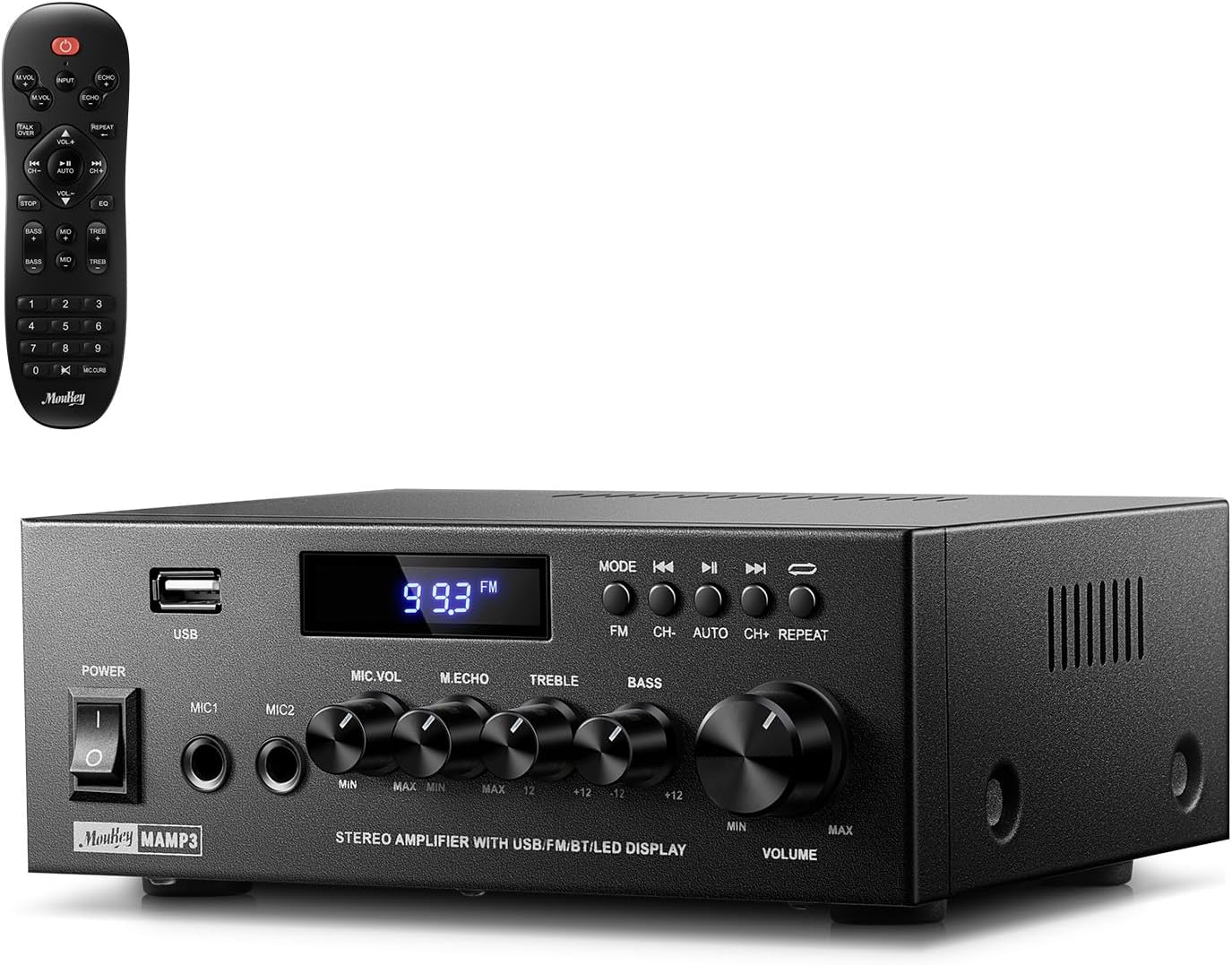
Image 1.1: The Moukey MAMP3 ampкөтөргүч жана анын алыстан башкаруу пульту.
2. Коопсуздук нускамалары
- иштетүү алдында бардык нускамаларды окуп чыгыңыз ampөмүрлүү.
- сактаңыз ampкөтөргүчтү суудан, нымдуулуктан жана өтө жогорку температурадан алыс кармаңыз.
- Do not block ventilation openings. Ensure proper airflow around the unit.
- Аппарат менен кошо берилген кубат адаптерин гана колдонуңуз.
- Агрегатты өзүңүз оңдоого же өзгөртүүгө аракет кылбаңыз. Бардык тейлөөлөрдү квалификациялуу кызматкерлерге тапшырыңыз.
- Disconnect the power cord from the outlet if the unit will be unused for extended periods.
3. Продукт бүтүп калдыview
3.1 Негизги өзгөчөлүктөрү
- 2.0 Channel Stereo Audio Output
- Bluetooth 5.3 for stable wireless connection
- Multiple Audio Inputs: RCA, USB, FM Radio, 2 Microphone Inputs
- Full-function Remote Control with EQ adjustments
- Customizable Treble, Midrange, and Bass controls
- Memory function for mode, volume, and EQ settings
- 300 Уоттс эң жогорку кубаттуулугу
3.2 Алдыңкы панелдин башкаруу элементтери жана көрсөткүчтөрү

Сүрөт 3.1: Алдыңкы панелдин жайгашуусу
- Кубат которгучу: Агрегатты күйгүзөт же өчүрөт.
- MIC1/2: 6.35 мм микрофон киргизүү уячалары.
- Микрофондун үнүнүн баскычы: Туташкан микрофондордун үнүн тууралайт.
- Эхо баскычы: Микрофондор үчүн жаңырык эффектин тууралайт.
- Үч ыргытуу баскычы: Жогорку жыштыктагы аудио чыгарууну тууралайт.
- Басс баскычы: Төмөн жыштыктагы аудио чыгарууну тууралайт.
- Музыканын үнүнүн баскычы: Бардык аудио булактары үчүн негизги үн көлөмүн башкаруу.
- USB слоту: For connecting USB storage devices for audio playback.
- LED дисплей: Учурдагы режимди, трек маалыматын же FM жыштыгын көрсөтөт.
- MODE баскычы: Switches between input sources (BT, Aux, CD, USB, FM).
- Мурунку баскыч: Skips to the previous track (USB/BT) or FM station.
- Ойнотуу/тындыруу баскычы: Plays or pauses audio (USB/BT).
- Кийинки баскыч: Skips to the next track (USB/BT) or FM station.
- Кайталоо баскычы: Repeats current track or all tracks (USB).
3.3 Арткы панелдин туташуулары

Сүрөт 3.2: Арткы панелдин туташуулары
- FM антенна киргизүү: Радио кабыл алуу үчүн комплекттеги FM антеннасын туташтырыңыз.
- АУДО КИРГИЗҮҮ (RCA): Connect external audio sources like CD/DVD players using RCA cables.
- AUDIO OUTPUT (Speaker Terminals): Пассивдүү динамиктерди туташтырыңыз. Туура полярдуулукту (+ дан + га жана - дан - га) текшериңиз.
- POWER AC INPUT: Кубат кабелин өзгөрүлмө розеткага туташтырыңыз.
4. Орнотуу
4.1 Пакеттен чыгаруу
Кылдаттык менен алып салуу amplifier and all accessories from the packaging. Verify that all items listed in the 'What's in the Box' section are present.
4.2 Динамиктерди бириктирүү
МAMP3 amplifier supports two passive speakers. Connect your speakers to the АУДИО ЧЫГУУ terminals on the rear panel. Ensure that the positive (+) terminal on the amplifier connects to the positive (+) terminal on your speaker, and the negative (-) terminal on the amplifier connects to the negative (-) terminal on your speaker. Incorrect polarity can affect sound quality.

Image 4.1: Speaker Connection Diagram
4.3 Аудио булактарын туташтыруу
The amplifier offers multiple input options:
- RCA киргизүү: Use RCA cables to connect devices such as CD players, DVD players, or other audio equipment to the АУДИО КИРГИЗҮҮ арткы панелдеги домкраттарды.
- USB киргизүү: USB флэш-дискти салыңыз USB уячасы on the front panel for direct audio playback.
- Bluetooth: Pair your Bluetooth-enabled device (smartphone, tablet, laptop) wirelessly.
- FM радиосу: Камтылган FM антеннасын туташтырыңыз FM антенна киргизүү on the rear panel for radio reception. Extend the antenna for optimal signal.
- Микрофон кириштери: Эки микрофонго чейин туташтырыңыз MIC1/2 jacks on the front panel for karaoke or public address.

Image 4.2: Available Signal Inputs
4.4 Кубат туташтыруу
Кубат кабелин POWER AC INPUT on the rear panel and then plug it into a standard AC power outlet.
5. Иштөө нускамалары
5.1 Күйгүзүү/өчүрүү
басыңыз Power Switch on the front panel to turn the amplifier on or off. The LED display will illuminate when the unit is powered on.
5.2 Киргизүүнү тандоо
басыңыз РЕЖИМ button on the front panel or the remote control to cycle through the available input sources: Bluetooth (BT), Auxiliary (Aux), CD, USB, and FM radio. The selected mode will be shown on the LED display.
5.3 Үндү башкаруу
Чоңду айлантыңыз Music Volume Knob on the front panel clockwise to increase volume and counter-clockwise to decrease it. Volume can also be adjusted using the remote control.
5.4 Эквалайзерди (EQ) жөндөө
Adjust the sound characteristics using the Үч ыргак баскычы жана Бас баскычы on the front panel. The remote control also provides dedicated buttons for Treble, Midrange, and Bass adjustments. The amplifier will automatically save your preferred EQ settings.
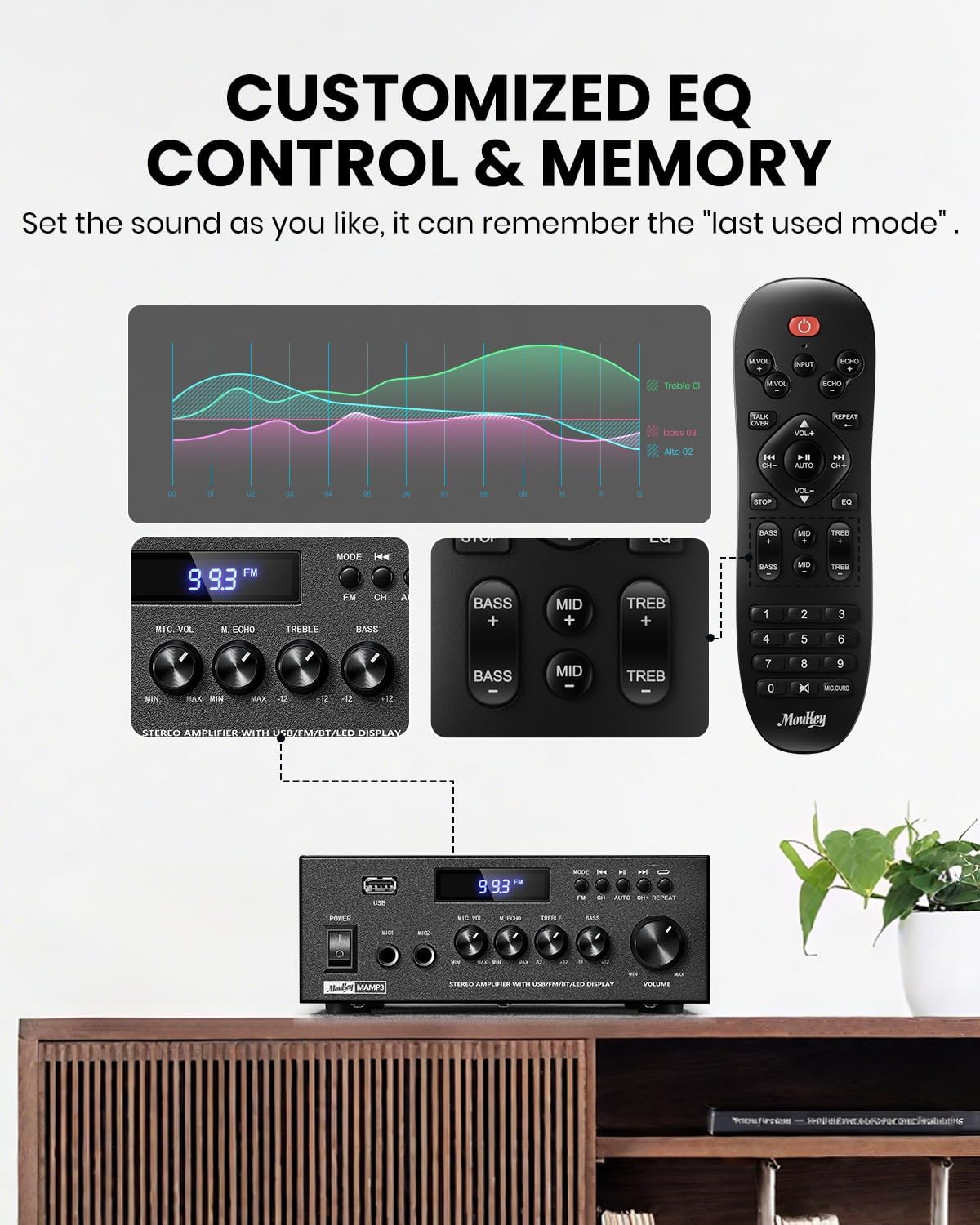
Image 5.1: Customizable EQ Control
5.5 Микрофонду башкаруу
Эгерде микрофондор туташкан болсо, колдонуңуз Микрофондун үн баскычы to adjust their output level and the Echo Knob to add an echo effect. The remote control also features a 'Talkover' function.
5.6 Bluetooth операциясы
- басыңыз РЕЖИМ button until "BT" appears on the LED display. The amplifier is now in Bluetooth pairing mode.
- On your mobile device, enable Bluetooth and search for "Moukey MAMP3".
- Select "Moukey MAMP3" to pair. Once connected, you will hear a confirmation tone.
- Эми сиз түзмөгүңүздөн аудиону ойното аласыз ampөмүрлүү.

Image 5.2: Bluetooth Pairing
5.7 FM радиосунун иштеши
- басыңыз РЕЖИМ button until "FM" appears on the LED display.
- Авто сканерлөө: Press the "AUTO" button on the remote to automatically scan and save available FM stations.
- Кол менен жөндөө: Use the number pad on the remote control to directly enter the desired FM frequency (e.g., for 101.1 MHz, enter 1011).
- колдонуу Мурунку жана Кийинки buttons to navigate between saved stations or fine-tune frequencies.
5.8 USB ойнотуу
MP3 же WAV аудиосу бар USB флэш-дискти салыңыз fileс ичине USB уячасы. The amplifier will automatically switch to USB mode and begin playback. Use the Мурунку, Ойнотуу/Тыныгуу, жана Кийинки buttons to control playback. The Кайталоо button allows you to repeat the current track or all tracks.
5.9 Алыстан башкаруу
The included full-function remote control allows for convenient operation from a distance. It provides control over input selection, volume, EQ settings (treble, midrange, bass), microphone echo, and talkover functions across all input modes.

Image 5.3: Upgraded Remote Control Functionality
6. Техникалык тейлөө
- Тазалоо: Сыртын тазалоо үчүн жумшак, кургак чүпүрөктү колдонуңуз ampкөтөргүч. Суюк тазалагычтарды же эриткичтерди колдонбоңуз.
- Вентиляция: Ensure that the ventilation openings are free from dust and debris to prevent overheating.
- Сактагыч: Узак мөөнөткө колдонулбаганда, сактаңыз ampliifier салкын, кургак жерде, тике күндүн нурунан жана экстремалдык температурадан алыс.
7. Кыйынчылыктарды
| Көйгөй | Мүмкүн себеп | Чечим |
|---|---|---|
| Күч жок | Электр шнуру туташтырылган эмес; Розетка бузук; Кубат өчүк. | Ensure power cord is securely connected; Test outlet with another device; Turn power switch on. |
| Үн чыгышы жок | Volume too low; Incorrect input selected; Speaker wires loose/incorrectly connected; Audio source issue. | Increase volume; Select correct input mode; Check speaker wire connections and polarity; Verify audio source is playing. |
| Bluetooth туташпай жатат | Amplifier not in BT mode; Device too far; Device already connected to another unit; Interference. | Которуу amplifier to BT mode; Move device closer; Disconnect from other devices; Reduce interference. |
| FM кабыл алуу начар | Антенна туташкан эмес же туура эмес жайгашкан; сигнал начар. | Connect and adjust FM antenna position; Try auto-scan or manual tuning for stronger stations. |
| USB ойнотуу көйгөйлөрү | Колдоого алынбайт file format; USB drive not formatted correctly; USB drive capacity too large. | камсыз кылуу files are MP3/WAV; Format USB drive to FAT32; Use USB drives 32GB or less. |
8. Техникалык шарттар
| Өзгөчөлүк | Спецификация |
|---|---|
| Модель номери | MAMP3 |
| Чыгуу күчү | 300 Ватт (чоку) |
| Каналдар | 2.0 Стерео |
| Байланыш технологиясы | Auxiliary, Bluetooth 5.3, FM, USB |
| Шайкеш түзмөктөр | Smartphone, Tablet, Laptop, Computer, Speakers, CD/DVD Player |
| Туташтыргыч түрү | RCA, USB, 2 Mic input |
| Аудио чыгаруу режими | Стерео |
| Продукциянын өлчөмдөрү | 6.1"D x 7.1"W x 2.8"H (15.5 x 18.0 x 7.1 см) |
| Элемент Салмагы | 2.14 фунт (0.97 кг) |
| Түс | Кара |
8.1 Кутуда эмне бар
- Муки МAMP3 Ampөмүрлүү
- Remote Controller
- FM антеннасы
- User Manual
- Кубаттуу адаптер
9. Кепилдик жана колдоо
9.1 Кепилдик маалыматы
Moukey products are designed and manufactured to the highest quality standards. This product is covered by a limited warranty against defects in materials and workmanship. Please refer to the warranty card included with your purchase for specific terms and conditions, or visit the official Moukey webтолук кепилдик маалымат алуу үчүн сайт.
9.2 Кардарларды колдоо
If you encounter any issues or have questions regarding your Moukey MAMP3 amplifier, please contact our customer support team. You can find contact information on the official Moukey webсайт же сатып алуу платформасы аркылуу.
Webсайт: www.moukey.com (Чыгampшилтеме, сураныч, чыныгы продукт документтерин караңыз)
Электрондук почта: support@moukey.com (Чыгampэлектрондук почта аркылуу кайрылсаңыз, продукттун чыныгы документтерин караңыз)


