1. Маанилүү коопсуздук нускамалары
Сураныч, бул шайманды колдонуудан мурун бардык нускамаларды кылдат окуп чыгыңыз. Бул колдонмону келечекте маалымат алуу үчүн сактаңыз.
- VoltagРейтинг энбелгисинде көрсөтүлгөн e сиздин негизги фонуңузга дал келетtage.
- Желдеткичти, сайгычты же шнурду сууга же башка суюктуктарга салбаңыз.
- Unplug the fan from the outlet when not in use, before cleaning, or before moving.
- Do not operate the fan with a damaged cord or plug. Contact authorized service personnel for repair.
- Keep fingers and other objects away from the fan blades and openings.
- Do not use the fan near windows, in bathrooms, or in wet environments.
- Бул шайман физикалык, сенсордук же акыл-эс жөндөмү начар же тажрыйбасы жана билими жок адамдар (анын ичинде балдар) тарабынан колдонууга арналбайт, эгерде алардын коопсуздугуна жооптуу адам тарабынан шайманды колдонуу боюнча көрсөтмө болбосо .
- Балдар шайман менен ойнобошу үчүн аларды көзөмөлгө алуу керек.
2. Продукт бүтүп калдыview
The Mistral MFD4389DRW is a 43-inch DC Turbo Tower Fan designed for efficient air circulation. It features a DC brushless motor, 12 speed settings, and multiple operating modes. Control options include a full touch screen, remote control, and Wi-Fi with online voice control capabilities. The fan also offers a unique height conversion feature and 60-degree left-right oscillation.

Сүрөт 2.1: Алдыңкы view of the Mistral MFD4389DRW DC Turbo Tower Fan, showcasinАнын кооз дизайны жана сенсордук башкаруу панели.

2.2-сүрөт: Каптал view of the Mistral MFD4389DRW DC Turbo Tower Fan, highlighting its slim profile.

2.3-сүрөт: Артка view of the Mistral MFD4389DRW DC Turbo Tower Fan, showing the air intake grille.
3. Пакеттин мазмуну
Таңгакта бардык компоненттер бар экенин текшериңиз:
- Mistral MFD4389DRW DC Turbo Tower Fan Unit
- Алыстан башкаруу
- Колдонуучунун Колдонмосу (бул документ)
- Base components (if not pre-assembled)
- Height extension component (for convertible height models)
4. Ассамблея
The Mistral MFD4389DRW fan features simple assembly. Typically, this involves attaching the base to the main fan unit. For models with height conversion, an additional extension piece may need to be secured.
- Бардык компоненттерди таңгактан кылдаттык менен алып салыңыз.
- Place the main fan unit upside down on a soft, flat surface to avoid scratching.
- Align the base with the bottom of the fan unit. Ensure the power cord passes through the designated opening in the base.
- Secure the base to the fan unit using the provided screws (if applicable).
- For height conversion, insert the extension component between the base and the main unit, ensuring it clicks securely into place or is fastened as per instructions.
- Вентиляторду тик абалда, туруктуу, тегиз жерге коюңуз.
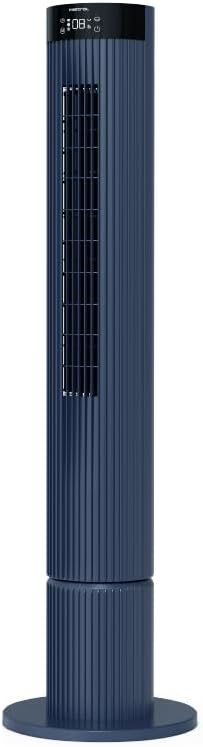
Figure 4.1: The fan demonstrating its convertible height feature, allowing adjustment between two different heights.
5. Орнотуу жана алгачкы колдонуу
After assembly, position the fan in your desired location. Ensure it is on a stable, flat surface and away from curtains or objects that could obstruct airflow.
- Plug the power cord into a suitable electrical outlet (220-240V~, 50-60Hz).
- The fan will enter standby mode. The touch screen display may illuminate briefly.
- To power on, touch the power icon on the control panel or press the power button on the remote control.
6. Иштөө нускамалары
The fan can be operated via the full touch screen control panel on the unit or the included remote control.
6.1 Башкаруу панелинин функциялары
The touch screen control panel provides access to all fan functions:
- Кубат баскычы: Желдеткичти күйгүзөт же өчүрөт.
- Ылдамдыкты жөндөө: 12 желдеткич ылдамдыгы аркылуу айлантат.
- Режим тандоо: Switches between Turbo, One-key Cycle, and Baby modes.
- Термелүү: Activates or deactivates 60-degree left-right oscillation.
- Таймер: Sets the pre-set On/Off timer for up to 12 hours.
- Wi-Fi көрсөткүчү: Wi-Fi байланыш абалын көрсөтөт.
6.2 Алыстан башкаруу
The remote control duplicates all functions available on the touch screen panel for convenient operation from a distance.
- Алыстан башкаруу пультунда иштеген батарейкалар бар экенин текшериңиз.
- Point the remote control towards the fan's control panel for optimal signal reception.
6.3 Иштөө режимдери
- Турбо режими: Provides maximum airflow for rapid cooling.
- One-key Cycle Mode: Automatically cycles through different fan speeds to simulate natural breeze.
- Ымыркай режими: Operates at a gentle, quiet speed suitable for nurseries or light sleeping.
7. Wi-Fi and Online Voice Control
The Mistral MFD4389DRW fan can be connected to your home Wi-Fi network for smart control via a mobile application and online voice commands.
7.1 Wi-Fi туташуусу
- Download the official Mistral smart home application from your device's app store.
- Колдонмонун ичинде каттоо эсебиңизге катталыңыз же кириңиз.
- Мобилдик түзмөгүңүз 2.4 ГГц Wi-Fi тармагына туташып турганын текшериңиз.
- Follow the in-app instructions to add a new device. This typically involves putting the fan into pairing mode (refer to the app or fan display for specific instructions, often by holding a Wi-Fi button).
- Once connected, the Wi-Fi indicator on the fan's control panel will illuminate steadily.
7.2 Online Voice Control
After successful Wi-Fi connection, you can link your fan to compatible smart home voice assistants (e.g., Google Assistant, Amazon Alexa) through the Mistral app settings.
- Open the Mistral app and navigate to the 'Integrations' or 'Voice Control' section.
- Select your preferred voice assistant and follow the prompts to link your Mistral account.
- Байланышкандан кийин, сиз төмөнкү сыяктуу үн буйруктарын колдоно аласыз:
- "Turn on the fan."
- "Set fan speed to 5."
- "Turn off oscillation."
- "Change fan mode to Baby."
8. Техникалык тейлөө
Үзгүлтүксүз тазалоо желдеткичтин иштешин сактап, анын иштөө мөөнөтүн узартууга жардам берет.
8.1 Тазалоо
- Тазалоодон мурун ар дайым желдеткичти розеткадан сууруп алыңыз.
- жумшак колдонуу, damp вентилятордун сырткы беттерин сүртүүчү чүпүрөк. Абразивдүү тазалагычтарды же эриткичтерди колдонбоңуз.
- Аба кирүүчү жана чыгуучу торчолордон чаңды кетирүү үчүн щетка тиркемеси бар чаң соргучту колдонуңуз.
- Желдеткичти кайра туташтыруудан жана иштетүүдөн мурда толугу менен кургак экенин текшериңиз.
8.2 Сактоо
If storing the fan for an extended period, unplug it, clean it thoroughly, and store it in its original packaging or a dust-free environment.
9. Кыйынчылыктарды
Эгер күйөрманыңызда көйгөйлөргө туш болсоңуз, төмөнкү жалпы көйгөйлөрдү жана чечимдерди караңыз:
| Көйгөй | Мүмкүн себеп | Чечим |
|---|---|---|
| Желдеткич күйбөйт. | Электр энергиясы жок. | Электр шнурунун иштеген розеткага бекем сайылганын текшериңиз. |
| Алсыз аба агымы. | Air intake/outlet blocked; Fan speed too low. | Clean grilles to remove dust. Increase fan speed. |
| Желдетүүчү адаттан тыш үн чыгарат. | Obstruction; Loose parts. | Unplug and check for any foreign objects. Ensure base is securely attached. |
| Пульт иштебей жатат. | Батареялар түгөнүп калган; тоскоолдук. | Алыстан башкаруу пультунун батареяларын алмаштырыңыз. Сигналдын жолун эч кандай нерсе тосуп калбаганын текшериңиз. |
| Wi-Fi туташуусу ишке ашпай калды. | Incorrect Wi-Fi password; Router issues; Fan too far from router. | Verify Wi-Fi password. Ensure fan is within range of a 2.4GHz Wi-Fi network. Restart router and fan. |
Бул чечимдерди колдонуу аракетинен кийин көйгөй чечилбесе, кардарларды колдоо кызматына кайрылыңыз.
10. Техникалык шарттар
| Өзгөчөлүк | Спецификация |
|---|---|
| Модел | MFD4389DRW |
| Тtage | 220-240V~, 50-60Hz 1.3A |
| Ватtage | 40 Вт |
| Аба көлөмү | 29.54 м³ / мин |
| Макс аба агымы | 4.26 м/с |
| Noise Level (Lowest Speed) | 33.2дБ |
| Noise Level (Highest Speed) | 68.3дБ |
| Продукциянын өлчөмдөрү (L*W*H) | 168 * 300 * 900 OR 1104 mm |
| Таза Салмак | 4.46 сом |
| Коопсуздук белгиси | 250467-11 |
| Өзгөчөлүктөр | Remote Controlled, Timer, Wi-Fi Enabled |
| Ылдамдыктын саны | 12 |
11. Кепилдик жана колдоо
This Mistral MFD4389DRW DC Turbo Tower Fan comes with a comprehensive warranty:
- Жалпы кепилдик: Сатып алынган күндөн тартып 1 жыл.
- Мотор Кепилдиги: An additional 3 Years for the motor only, totaling 4 years for the motor.
For warranty claims, technical support, or service inquiries, please contact your local Mistral authorized service center or refer to the contact information provided on the official Mistral webсайт.


