Introduction
This manual provides detailed instructions for the installation, operation, and maintenance of your VIOFO A329S 3-Channel Dash Cam. Please read this manual thoroughly before using the device to ensure proper functionality and safety.
Пакеттин мазмуну
Төмөндө тизмеленген нерселердин баары пакетиңизде бар экенин текшериңиз:
- A329S 3CH Dash Cam
- CPL-600 Filter (Included in this bundle)
- HK4/HK6 Hardwire Kit (Note: This kit is required for advanced parking modes and may be included in specific bundles or sold separately.)
- Type-C SSD Cable (Note: This cable is for connecting an external SSD, which is sold separately. The cable itself may be included in specific bundles or sold separately.)
- Арткы камера
- Fisheye Cabin Camera
- Унаа заряддагыч
- Арткы камеранын кабели (6 м)
- Fisheye Cabin Camera Cable (1m)
- Spare Mount Sticky Pads (Set) x 1
- Windshield Static Stickers x 3
- Кыркынды алып салуу куралы
- Эскертүү чаптамасы
- Сатуудан кийинки тейлөө картасы
- Quick Start Guide
- User Manual

An image displaying all components included in the VIOFO A329S 3-Channel Dash Cam package, such as the main dash cam unit, front, cabin, and rear cameras, cables, CPL filter, and mounting accessories.
Продукт бүттүview
The VIOFO A329S is a high-performance 3-channel dash camera system designed to record video from the front, interior cabin, and rear of your vehicle. It features advanced STARVIS 2 sensors for superior image quality, Wi-Fi 6 connectivity for fast file transfers, and various parking modes for continuous surveillance.

An overview image of the VIOFO A329S dash cam system, showing the front camera unit, cabin camera, and rear camera, highlighting key features like 4K+2K+2K recording, STARVIS 2, Wi-Fi 6, and SSD storage support.
Негизги өзгөчөлүктөрү
- 4K Front + 2K Interior Fisheye + 2K Rear Recording: Captures comprehensive video coverage with high resolution.
- 3 Channel with STARVIS 2 Sensors: Utilizes advanced Sony STARVIS 2 sensors (IMX678 for front, IMX675 for rear and cabin) for enhanced low-light performance and dynamic range.
- Impact Detection Power Saving Parking Mode: Minimizes battery drain while providing instant recording upon impact detection. Requires optional hardwire kit.
- Next-Gen Wi-Fi 6 Technology: Offers faster data transfer speeds (up to 30MB/s) for quick video downloads and app control.
- Support Up to 4TB SSD or 512GB microSD: Flexible storage options for extended recording times.
- Accurate GPS Logger: Records location, speed, and time data.
- Акылдуу үн башкаруу: Allows hands-free operation for common functions.
- Circular Polarizing Lens (CPL): Reduces reflections on the windshield for clearer video.
- Dual Ultra-Slim Coaxial Cables: Facilitates easier and cleaner installation with reduced interference.
- Loop Recording & Auto Emergency Lock: Ensures continuous recording and protects critical footage from overwriting.

An image summarizing the key features of the VIOFO A329S dash cam, including 4K+2K+2K recording, 210-degree ultra-wide cabin camera, Wi-Fi 6, impact detection parking mode, hybrid parking recording, 3 Sony STARVIS 2 sensors, 3-channel HDR, voice control, external SSD storage, and ultra-precise GPS.
Орнотуу жана орнотуу
Proper installation is crucial for optimal performance of your VIOFO A329S dash cam. Follow these steps carefully.
1. Prepare the Windshield
Clean the area on your windshield where the dash cam will be mounted. Apply the provided static stickers to the windshield first, then attach the dash cam mount to the static sticker. This allows for easier removal without leaving residue.
2. Install the Front Camera
- Attach the front camera to its mount.
- Peel off the protective film from the adhesive pad on the mount.
- Firmly press the mount onto the static sticker on your windshield, ensuring a clear view жолдун.
- Adjust the lens angle to capture the road ahead, with the horizon line in the middle of the frame.

А деталдуу view of the VIOFO A329S front dash camera unit, showing its compact design and lens, ready for windshield mounting.
3. Install the Cabin Camera
- Connect the cabin camera to the main front unit using the provided 1m coaxial cable.
- Mount the cabin camera on the windshield or dashboard, ensuring it has a clear view of the vehicle's interior.
- Route the cable neatly along the headliner and A-pillar using the trim removal tool.
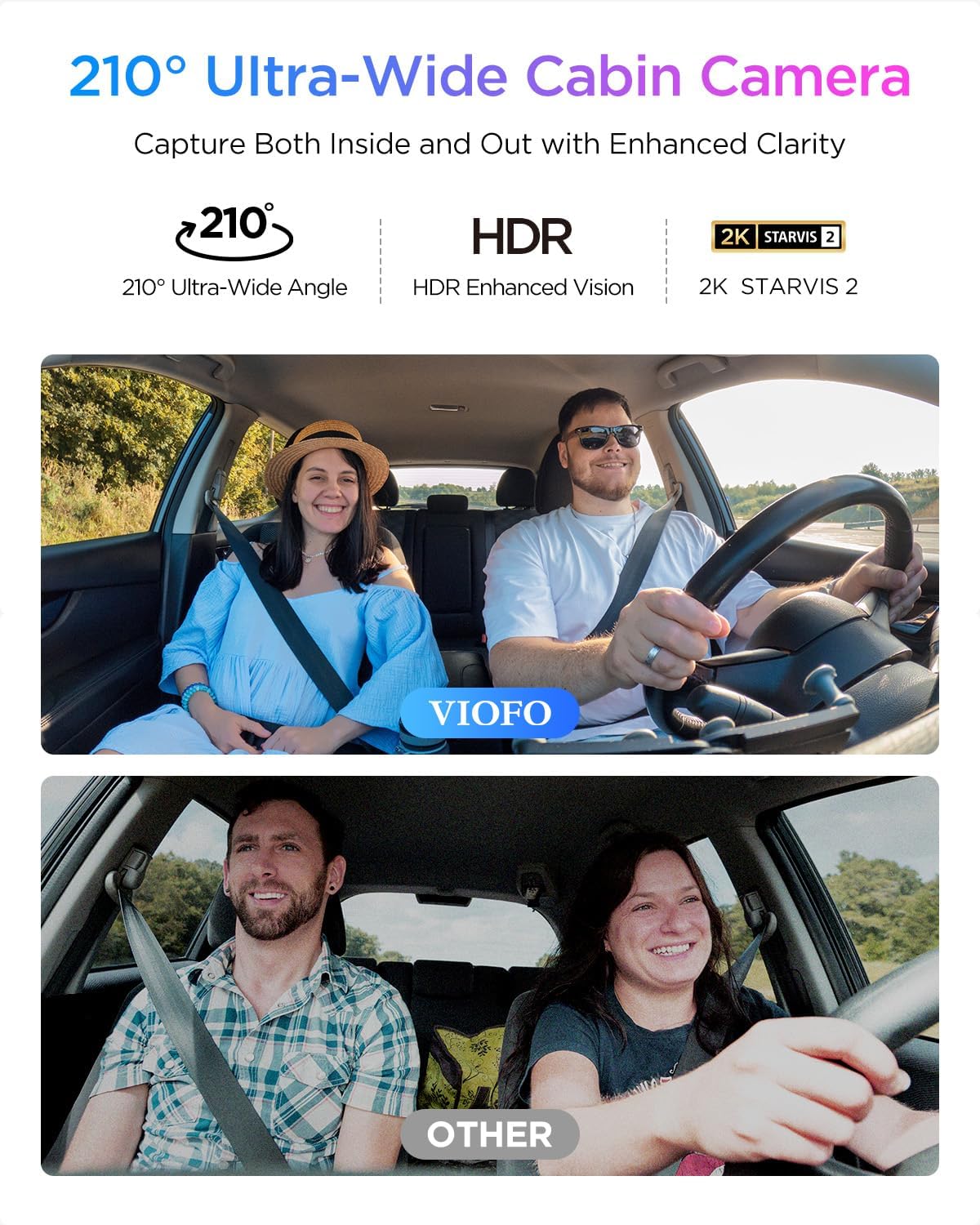
An image showing the VIOFO A329S cabin camera capturing the interior of a vehicle, demonstrating its 210-degree ultra-wide angle view.
4. Арткы камераны орнотуңуз
- Connect the rear camera to the main front unit using the provided 6m coaxial cable.
- Арткы камераны арткы маңдайкы айнекке орнотуп, тазалыгын камсыз кылыңыз view артындагы жолдун.
- Route the cable neatly along the headliner, C-pillar, and trim.

A diagram illustrating the optimal placement of the front, cabin, and rear cameras for the VIOFO A329S 3-channel dash cam system, showing their respective fields of view.
5. Power Connection
- Plug the car charger into your vehicle's 12V/24V power outlet.
- Connect the Type-C end of the power cable to the main dash cam unit.
- Электр кабелин тосуп калбоо үчүн тыкан жайгаштырыңыз view же айдоого тоскоолдук кылуу.
- Маанилүү: Do not use a mobile phone charger or cable to power the dash cam, as this may cause damage or malfunction.

A diagram showing the correct cable connections for the VIOFO A329S dash cam system, including power input from the car charger, and connections for the front, cabin, and rear cameras.
6. Эстутум картасын салыңыз
Ensure the dash cam is powered off. Insert a high-endurance microSD card (up to 512GB) into the designated slot. Alternatively, an external SSD (up to 4TB) can be connected via the Type-C SSD cable. Эскертүү: A microSD card and external SSD storage are not included and must be purchased separately. For optimal performance, VIOFO industrial high endurance microSD cards are recommended.

An image showing the microSD card slot on the side of the VIOFO A329S dash cam, with a VIOFO 512GB microSD card being inserted.

An image illustrating the VIOFO A329S dash cam connected to an external SSD via a Type-C cable, demonstrating its support for high-capacity SSD storage up to 4TB.
7. CPL Filter Installation
The included CPL (Circular Polarizing Lens) filter can be attached to the front camera lens to reduce reflections and glare from the windshield, improving video clarity.

A comparison image showing video footage with and without a CPL filter, demonstrating how the Circular Polarizing Lens effectively reduces reflections on the windshield for clearer recordings. The image also shows how the CPL filter attaches to the front camera.
Операция
1. Негизги жаздыруу
Once powered on, the dash cam will automatically begin recording. The recording indicator light will flash. Videos are saved in segments to the memory card.
- Цикл жаздыруу: The dash cam records continuously, overwriting the oldest fileэстутум картасы толгондо.
- G-сенсор (авариялык кулпу): In the event of a sudden impact or collision, the built-in G-sensor will automatically lock the current video file, preventing it from being overwritten.

An image depicting the VIOFO A329S dash cam screen showing an emergency lock icon, illustrating the loop recording and auto emergency lock features that protect critical video footage.
2. Паркинг режими
The A329S offers various parking modes to monitor your vehicle when parked. An optional VIOFO HK4 or HK6 hardwire kit is required to enable these features and prevent battery drain. Please check your package contents or purchase separately if not included.
- Таасирди аныктоочу паркинг режими: The camera remains in a low-power state and starts recording instantly when an impact is detected.
- Hybrid Parking Recording: Combines time-lapse recording (1fps) with impact detection. If an impact occurs during time-lapse, it switches to event recording.
- Normal Parking Mode: Includes Super Night Vision (SNV), Low Bitrate Recording, and Auto Event Detection for continuous surveillance.

An image illustrating the VIOFO A329S dash cam's power-saving parking mode, highlighting features like low power consumption, longer-lasting protection, and quick start recording upon impact detection. The image shows the dash cam mounted in a car, monitoring a parking lot.

An image explaining the Hybrid Parking Recording feature of the VIOFO A329S, showing a comparison between normal parking recording and impact detection parking recording.

An image detailing the Normal Parking Mode options for the VIOFO A329S, including Super Night Vision (SNV), Low Bitrate Recording, and Auto Event Detection, with visual examples.
3. Wi-Fi туташуусу жана колдонмолорду башкаруу
The A329S features Wi-Fi 6 for fast connection to the VIOFO smartphone app. This allows you to:
- View жаша фооtage.
- Download recorded videos quickly (up to 30MB/s for a 1-minute 4K video in under 10 seconds).
- Орнотууларды өзгөртүү.
- Микропрограмманы жаңыртуу.
Download the VIOFO app from your device's app store.
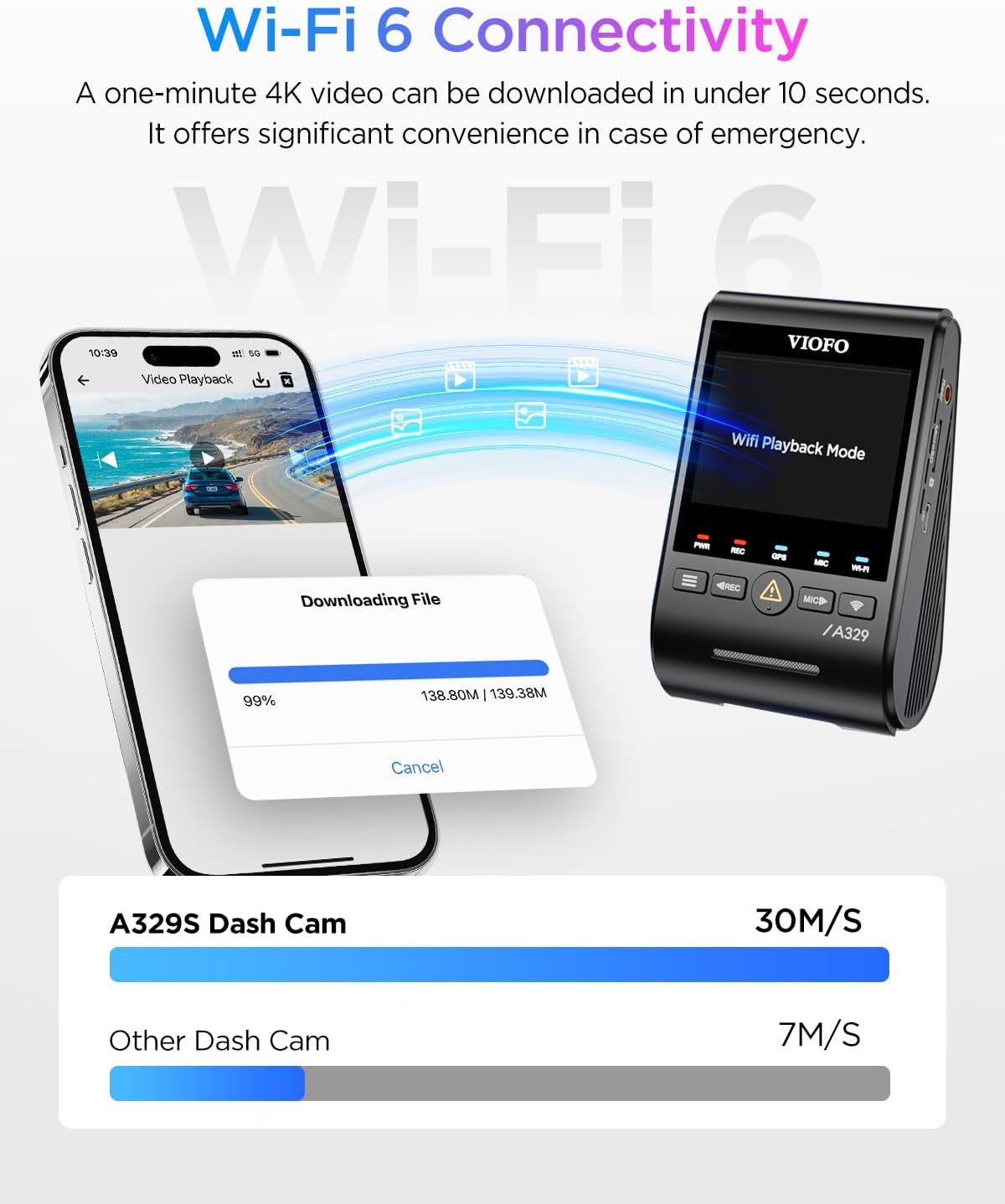
An image demonstrating the Wi-Fi 6 Dual Band connectivity of the VIOFO A329S dash cam, showing a smartphone downloading video files from the dash cam at high speeds.
4. GPS функциясы
The built-in GPS module records your vehicle's location, speed, and time data. This information can be viewed when playing back videos using the VIOFO app or PC player.

An image illustrating the accurate GPS tracking feature of the VIOFO A329S, showing a car driving on a scenic road with GPS coordinates, speed, and time overlaid, and a laptop displaying the video playback with map integration.
5. Үн менен башкаруу
Control your dash cam hands-free with simple voice commands. This feature allows you to:
- "Сүрөткө тартуу"
- "Turn on Wi-Fi"
- "Видеону кулпулоо"
The camera also provides voice notifications for settings changes or memory card errors.

An image demonstrating the smart voice control feature of the VIOFO A329S, showing a driver issuing commands like 'Take photo,' 'Turn on Wi-Fi,' and 'Lock the video' to the dash cam.
6. Video Export and Management
The A329S allows flexible multi-view video export, enabling you to combine footage from different cameras as needed without editing. You can download files directly to your phone via Wi-Fi 6 or use the upgraded USB 3.0 port for faster transfers to a computer.

An image illustrating the flexible multi-view video export feature of the VIOFO A329S, showing how footage from the front, interior, and rear cameras can be combined and shared easily.

An image showing the VIOFO A329S dash cam connected to a smartphone via a USB 3.0 cable, highlighting the ultra-fast video download capability to phones.
Техникалык тейлөө
1. Эстутум картасын башкаруу
- Форматтоо: Regularly format your microSD card (at least once a month) within the dash cam's settings to ensure optimal performance and prevent data corruption.
- Алмаштыруу: Replace high-endurance microSD cards every 6-12 months, depending on usage, as they have a limited lifespan due to continuous writing cycles.
2. Микропрограмманы жаңыртуу
Periodically check the VIOFO official website for the latest firmware updates. Firmware updates can improve performance, add new features, and fix bugs. Follow the instructions provided with the firmware download carefully.
3. Тазалоо
Gently clean the camera lenses with a soft, lint-free cloth. Avoid using harsh chemicals that could damage the lens coating.
Проблемаларды чечүү
| Көйгөй | Мүмкүн чечим |
|---|---|
| Dash камерасы күйбөйт. | Ensure the car charger is properly connected to a working 12V/24V outlet. Check the power cable for damage. Try a different power source if available. |
| Recording stops or fileлар бузулган. | Format the microSD card regularly. Ensure you are using a high-endurance microSD card. Replace the microSD card if it is old or frequently causes issues. |
| Wi-Fi туташуу маселелери. | Ensure Wi-Fi is enabled on the dash cam and your smartphone. Move closer to the dash cam. Restart both the dash cam and your phone. |
| Poor video quality (blurry, glare). | Clean the camera lenses. Ensure the CPL filter is correctly installed and adjusted. Check if the protective film has been removed from the lens. |
| Унаа токтотуу режими иштебейт. | Verify that the optional HK4/HK6 hardwire kit is correctly installed and connected. Check parking mode settings in the dash cam menu. |
| GPS not tracking location/speed. | Камерада так бар экенин текшериңиз view of the sky. Check GPS settings in the menu. Allow a few minutes for the GPS signal to acquire. |
Техникалык шарттар
| Өзгөчөлүк | Деталь |
|---|---|
| Модель аты | A329S |
| Видео тартуунун резолюциясы | Front: 4K@30fps, Rear: 2K@30fps, Cabin: 2K@30fps |
| Image сенсорлор | Front: STARVIS 2 IMX678, Rear & Cabin: STARVIS 2 IMX675 |
| Байланыш технологиясы | Wi-Fi 6 (Dual Band), USB 3.0 |
| Өзгөчөлүктөр | Impact Detection Parking Mode, Next-Gen Wi-Fi 6 Technology, GPS, Voice Control, 3-Channel HDR |
| Сактоо колдоо | microSD card up to 512GB, External SSD up to 4TB |
| Түс | Кара |
| Унаа кызматынын түрү | Car, Van, Minivan |
| Камтылган компоненттер | A329S 3CH Dash Cam, CPL-600 Filter, HK4/HK6 Hardwire Kit (bundle dependent), Type-C SSD Cable (bundle dependent) |
| Батареялар камтылган | Жок |
Кепилдик жана колдоо
For warranty information, technical support, or further assistance, please visit the official VIOFO website or contact VIOFO customer service directly. Keep your purchase receipt as proof of purchase for warranty claims.
Official VIOFO Store: VIOFO Store on Amazon


