JBL BAR 1000 MK2 7.1.4 каналдуу үн панелинин системасы жана AudioQuest Sky 3m HDMI кабелинин колдонуучу колдонмосу
Brand: JBL | Model: BAR 1000 MK2
Introduction
This manual provides detailed instructions for the setup, operation, and maintenance of your JBL BAR 1000 MK2 7.1.4 Channel Soundbar System, bundled with the AudioQuest Sky 3m HDMI Cable. Please read this manual thoroughly before using the product to ensure proper functionality and to maximize your audio experience.

Image: The JBL BAR 1000 MK2 soundbar system, including the main soundbar unit, detachable surround speakers, wireless subwoofer, and the bundled AudioQuest Sky HDMI cable.
Кутуда эмне бар
Таңгакта бардык компоненттер бар экенин текшериңиз:
- JBL BAR 1000 MK2 Soundbar (main unit with detachable surround speakers)
- Зымсыз сабвуфер
- AudioQuest Sky 48 Gbps 8K 10K Ultra High Speed HDMI Cable (3.0 Meters)
- Батареялар менен алыстан башкаруу
- Электр шнурлары
- HDMI Cable (standard, in addition to AudioQuest Sky)
- Wall-mount Bracket Kit with Screws
- Quick Start Guide
- Коопсуздук баракчасы
- Кепилдик картасы
Жайгашуу
1. Soundbar туташтыруу
The soundbar offers multiple connectivity options for your television and other devices.
- HDMI eARC туташуу (сунушталат): Connect the HDMI OUT (TV ARC/TV eARC) port on the soundbar to the HDMI ARC/eARC input on your television using the provided AudioQuest Sky HDMI cable. This connection supports high-resolution audio formats like Dolby Atmos.
- Other HDMI Inputs: The soundbar features three HDMI 2.1 pass-through ports (HDMI 1, HDMI 2, HDMI 3). Connect your gaming consoles, streaming devices, or other media players to these inputs. The soundbar will act as a hub, passing video to your TV and processing audio.
- Оптикалык туташуу: If your TV does not support HDMI ARC/eARC, use an optical cable to connect the OPTICAL input on the soundbar to the optical output on your television. Note that optical connections do not support advanced audio formats like Dolby Atmos.

Сүрөт: жакын план view of the AudioQuest Sky HDMI cable connected to an HDMI 2.1 port, indicating high-speed data transfer for optimal audio and video quality.

Image: A pair of AudioQuest Sky 48 Gbps 8K 10K Ultra High Speed HDMI cables, featuring blue and black design with gold-plated connectors.

Image: The rear panel of the JBL BAR 1000 MK2 soundbar, displaying power input, USB port, Ethernet port, three HDMI inputs, HDMI eARC output, and an optical audio input.
2. Зымсыз сабвуферди туташтыруу
The wireless subwoofer automatically pairs with the soundbar upon power-up. Ensure the subwoofer is placed in a suitable location within your room, preferably near a power outlet.
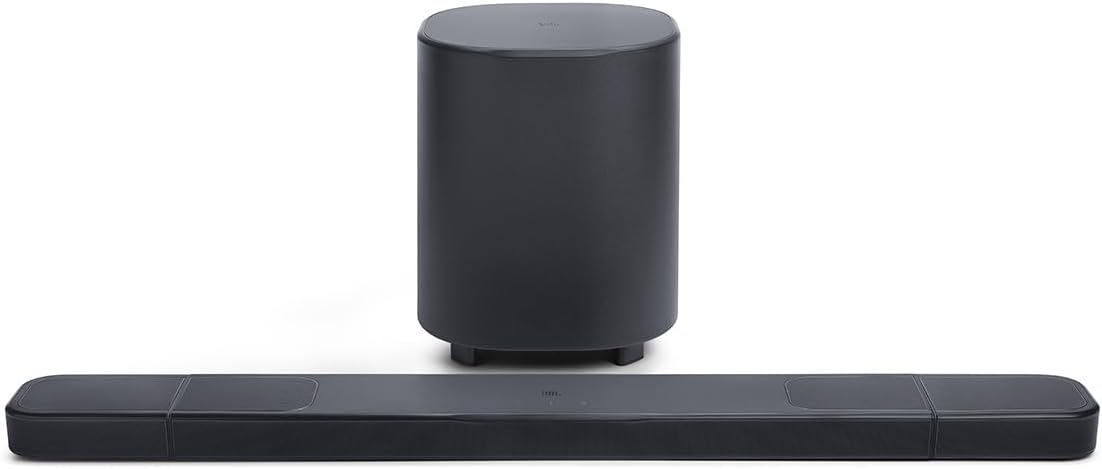
Image: The JBL BAR 1000 MK2 soundbar positioned in front of a television, with its wireless subwoofer placed on the floor beside a cabinet.
3. Detachable Surround Speakers
The JBL BAR 1000 MK2 features detachable, battery-powered surround speakers for flexible audio configurations.
- Тиркеме: For standard stereo or front-focused surround sound, magnetically attach the two smaller speakers to the ends of the main soundbar unit. They will charge automatically when attached.
- Бөлүм: For an immersive 7.1.4 channel surround sound experience, detach the speakers and place them behind your listening area. Ensure they are positioned appropriately for optimal sound dispersion.
- Заряддоо: Each detachable speaker provides approximately 10 hours of battery life. They can be charged by reattaching them to the main soundbar or via their individual USB-C ports.
- Өз алдынча колдонуу: The detachable speakers can also function as standalone Bluetooth speakers, allowing you to use them independently in other rooms.

Image: A close-up of a detachable surround speaker being magnetically connected to the end of the main JBL soundbar unit.

Image: Two detached JBL surround speakers, showing their compact design and the charging/connectivity ports on one side.
4. Үн калибрлөө
The soundbar features an easy sound calibration function. This system analyzes your room's acoustics, including how sound reflects off walls and furniture, to optimize the audio output for your specific environment. Follow the instructions in the Quick Start Guide or the JBL One app to initiate the calibration process.
Иштөө нускамалары
1. Негизги башкаруу элементтери
The soundbar can be controlled using the included remote control or the touch-sensitive buttons on the top panel of the main soundbar unit.
- Кубат баскычы: Системаны күйгүзөт же өчүрөт.
- Үндү көзөмөлдөө: Үндүн жалпы деңгээлин тууралайт.
- Булак тандоо: Киргизүү булактары (HDMI 1, HDMI 2, HDMI 3, TV, Bluetooth) аркылуу циклдерди иштетет.
- Bluetooth жупташууда: Bluetooth жупташтыруу режимин баштайт.

Image: A close-up of the top panel of the JBL BAR 1000 MK2 soundbar, showing the JBL logo and touch controls for volume and power.
The remote control provides dedicated buttons for power, volume, input selection (TV, Bluetooth, HDMI), play/pause, and sound modes for convenient operation.
2. Аудио режимдери жана жөндөөлөрү
- Dolby Atmos жана DTS:X: The system supports these immersive audio formats, providing a three-dimensional sound experience.
- Night Listening Mode: Reduces dynamic range to allow for lower volume listening without missing dialogue or important sound effects, ideal for not disturbing others.
- Басс тууралоо: The JBL One app allows you to adjust the subwoofer's bass level to suit your preference and room acoustics.
- PureVoice 2.0: Enhances dialogue clarity, ensuring voices are distinct even during intense action scenes.
3. Байланыш
- Bluetooth: Connect your mobile devices wirelessly for audio streaming.
- Wi-Fi: Enables AirPlay 2, Google Cast, and direct streaming from compatible services like Spotify and Tidal.
- USB порт: Кызмат же микропрограммалык камсыздоону жаңыртуу үчүн.
Техникалык тейлөө
- Тазалоо: Саундбардын, сабвуфердин жана динамиктердин беттерин тазалоо үчүн жумшак, кургак чүпүрөктү колдонуңуз. Суюк тазалоочу каражаттарды же абразивдүү материалдарды колдонуудан алыс болуңуз.
- Динамик заряддоо: Regularly charge the detachable surround speakers by reattaching them to the main soundbar or using their USB-C ports to maintain battery health.
- Программалык камсыздоонун жаңыртуулары: Periodically check for firmware updates via the JBL One app or the JBL support webоптималдуу аткарууну жана жаңы функцияларга жетүүнү камсыз кылуу үчүн сайт.
Проблемаларды чечүү
If you encounter issues with your JBL BAR 1000 MK2 system, refer to the following common solutions:
- Үн жок: Ensure all cables are securely connected. Verify the correct input source is selected on the soundbar and your TV. Check TV audio output settings (e.g., set to PCM or Bitstream).
- Sound Cutting Out/Blips: This can sometimes be related to Wi-Fi interference or HDMI/CEC communication issues. Try restarting all connected devices (TV, soundbar, source devices). Ensure the soundbar's firmware is up to date. If using Wi-Fi, try moving the soundbar or router to reduce interference.
- Wi-Fi туташуу маселелери: Ensure your Wi-Fi network is active and the password is correct. Try restarting your router and the soundbar. If issues persist, try connecting the soundbar via Ethernet for initial setup or troubleshooting.
- HDMI/CEC/EDID Lockouts (No Video/Audio): This can occur with multiple devices connected. Try connecting problematic devices directly to the TV if possible. Adjust HDMI-CEC settings on your TV and source devices (sometimes disabling CEC on certain devices can resolve conflicts). Ensure all HDMI cables are high-speed and compatible with HDMI 2.1.
- Сабвуфер жупташкан жок: Ensure the subwoofer is powered on and within range of the soundbar. Refer to the Quick Start Guide for manual pairing instructions if automatic pairing fails.
- Overwhelming Bass: Use the JBL One app to adjust and reduce the subwoofer's bass level to your preferred setting.
Техникалык шарттар
| Өзгөчөлүк | Спецификация |
|---|---|
| Модель аты | BAR 1000 MK2 |
| Көлөмдүү үн каналынын конфигурациясы | 7.1.4 |
| Динамиктин максималдуу чыгаруу күчү | 660 Ватт |
| Сабвуфердин диаметри | 10 дюйм (25.4 сантиметр) |
| Frequency Response | 20000 Гц |
| Байланыш технологиясы | Зымсыз (Bluetooth, Wi-Fi) |
| Зымсыз байланыш технологиясы | Bluetooth |
| Аудио чыгаруу режими | Dolby Atmos |
| Өзгөчөлүктөр | USB Port, Network Ready, Detachable Wireless Surround Speakers |
| Продукциянын өлчөмдөрү | Түздүгү 5" x Туурасы 33.6" x Бийиктиги 2" (Саундбар) |
| Элемент Салмагы | 43.4 фунт (жалпы система) |
| Power Source | Электр зымдары |
| AudioQuest Sky HDMI Cable Bandwidth | 48 Gbps (8K/10K Ultra High Speed) |
Кепилдик жана колдоо
The JBL BAR 1000 MK2 system comes with a limited warranty. For specific warranty terms, registration, and technical support, please visit the official JBL webсайтына кириңиз же таңгагыңызга кирген кепилдик картасын караңыз.
Кошумча жардам алуу үчүн, сиз дагы кайрылсаңыз болот Amazonдагы JBL дүкөнү.


