1. Киришүү
Thank you for choosing the GHB ABM720 Baby Monitor Camera. This camera is designed to expand your existing GHB ABM720 Baby Monitor system. Please note that this product is an add-on camera and requires the GHB ABM720 monitor unit (not included) to function. It is not compatible with other baby monitor models.
For optimal performance and to avoid compatibility issues, please ensure your existing GHB ABM720 monitor unit's serial number (S/N) ends with the letter 'E'. If your S/N ends with 'ABCD' (e.g., S/N: 240702C), this camera is not compatible, and you should contact customer service for assistance.
2. Пакеттин мазмуну
Орнотууну улантуудан мурун, пакетте бардык элементтер бар экенин текшериңиз:
- GHB ABM720 Baby Monitor Camera
- Кубаттуу адаптер
- Mounting Screws and Wall Plugs (for optional wall mounting)
- Көрсөтмө (бул документ)
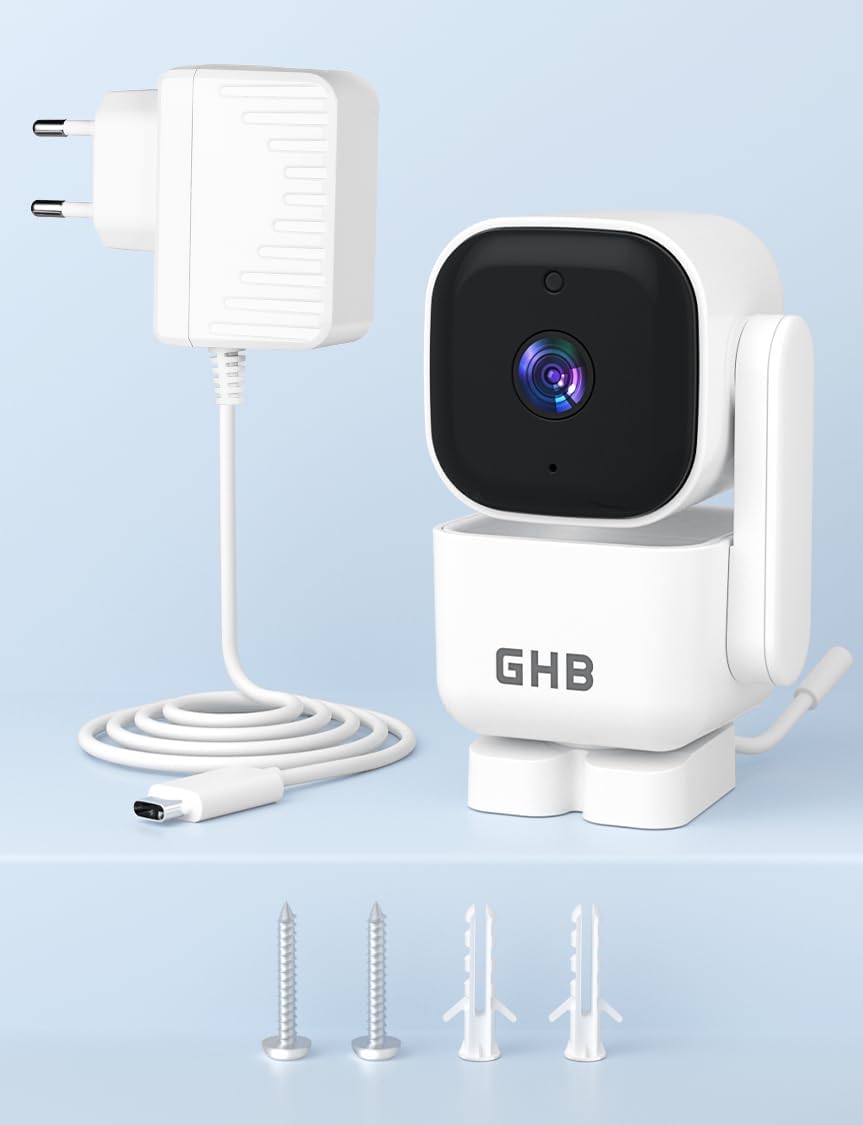
Image: Contents of the GHB ABM720 Baby Monitor Camera package, including the camera unit, power adapter, and mounting hardware.
3. Орнотуу
3.1 Шайкештикти текшерүү
It is crucial to confirm the compatibility of your existing GHB ABM720 monitor unit before using this camera. Locate the serial number (S/N) on the back of your monitor unit. This camera is only compatible if the S/N ends with the letter 'E'. If it ends with 'ABCD' (e.g., S/N: 240702C), this camera will not work with your monitor.

Image: Visual representation of compatibility, highlighting that the camera is exclusively for the GHB ABM720 monitor unit.
3.2 Камераны кубаттоо
- Connect the small end of the power adapter cable to the power input port on the back of the camera.
- Кубат адаптеринин экинчи учун стандарттуу электр розеткасына сайыңыз.
- The camera must always be connected to a power source to function. It does not contain an internal battery.
3.3 Орнотуу жана орнотуу
Place the camera on a flat, stable surface such as a table or shelf, ensuring it has a clear view of the desired area. Alternatively, you can mount the camera to a wall using the provided screws and wall plugs. Ensure the camera is placed out of reach of children.
4. Иштөө нускамалары
Once the camera is powered on and successfully paired with your GHB ABM720 monitor unit, you can utilize its features:
4.1 Pan and Tilt Functionality (PTZ)
The camera supports remote pan and tilt control via your GHB ABM720 monitor. You can rotate the camera:
- Туурасынан: 350 градуска чейин
- Вертикалдуу: 90 градуска чейин
Refer to your GHB ABM720 monitor's manual for specific instructions on how to control the pan and tilt functions.
4.2 Эки тараптуу аудио
The camera features a built-in microphone and speaker, enabling two-way audio communication. This allows you to hear sounds from the camera's location and speak back through the monitor unit.
4.3 Түнкү көрүнүш
The camera is equipped with automatic infrared night vision. In low-light conditions, the camera will automatically switch to night vision mode, providing a clear black and white image of the monitored area.
4.4 HD Resolution
The camera transmits video in 720p HD resolution, providing clear and detailed images on your compatible GHB ABM720 monitor.
5. Техникалык тейлөө
5.1 Тазалоо
To clean the camera, gently wipe the surface with a soft, dry cloth. Do not use abrasive cleaners, solvents, or chemical agents, as these may damage the camera's finish or internal components.
5.2 Кубат туташтыруу
Ensure the camera remains continuously connected to its power adapter for uninterrupted operation. Disconnecting the power will turn off the camera.
6. Кыйынчылыктарды
- Камера күйбөй жатат: Ensure the power adapter is securely connected to both the camera and a working electrical outlet.
- No video/audio on monitor:
- Verify the camera is powered on.
- Confirm the camera is correctly paired with your GHB ABM720 monitor unit. Refer to your monitor's manual for pairing instructions.
- Check for any obstructions between the camera and the monitor that might interfere with the wireless signal.
- Incompatibility message: If your monitor displays an incompatibility message, re-check the serial number (S/N) on your monitor. This camera is only compatible if the S/N ends with 'E'. If it ends with 'ABCD', it is not compatible.
- PTZ control not working: Ensure the camera is powered on and properly connected to the monitor. Refer to your monitor's manual for specific PTZ control operations.
If you encounter issues not covered here, or if troubleshooting steps do not resolve the problem, please contact GHB customer service for further assistance.
7. Техникалык шарттар
| Өзгөчөлүк | Деталь |
|---|---|
| Модель аты | ABM720 |
| Видео жаздыруу чечими | 720p |
| Зымсыз байланыш технологиясы | 2.4 ГГц FHSS |
| Өлчөмдөрү (L x W x Y) | 11 x 6.5 x 14 см |
| Салмагы | 290 грамм |
| Өзгөчөлүктөр | Two-way audio, HD Resolution, PTZ Technology, Night Vision |
| Сунушталган колдонуу | Баланын мониторинги |
| Ички/тышкы колдонуу | Indoor |
| Power Source | AC Power (Mains Powered) |
| Монтаж түрү | Стол орнотуу |
| Компоненттер камтылган | Camera, Power Adapter, Instruction Manual |
8. Кепилдик жана колдоо
8.1 Кепилдик маалыматы
Specific warranty details for the GHB ABM720 Baby Monitor Camera may vary based on your region and point of purchase. Please refer to the warranty information provided at the time of purchase or contact GHB customer service for details regarding warranty coverage and terms.
Бул буюмдун запастык бөлүктөрүнүн бар экендиги жөнүндө маалымат учурда жеткиликтүү эмес.
8.2 Кардарларды колдоо
For any questions, technical assistance, or support regarding your GHB ABM720 Baby Monitor Camera, please contact GHB customer service. You can often find contact information on the GHB official webсайты же продуктуну сатып алган сатуучу аркылуу.
Сиз да зыярат кылсаңыз болот GHB Store on Amazon көбүрөөк маалымат жана ресурстар үчүн.


