1. Киришүү
The SainSmart E2 Filament Dryer Box is designed to optimize the performance of 3D printer filaments by effectively drying, annealing, and dehumidifying them. This device helps prevent common printing issues such as stringing, warping, and clogging, ensuring higher quality and more consistent 3D prints. Its advanced features, including a 110°C maximum temperature and a 500W PTC heating unit, make it suitable for a wide range of filaments, especially engineering-grade materials.

Image: SainSmart E2 Filament Dryer Box highlighting its superior and efficient annealing capabilities for professional engineering materials.
2. Коопсуздук маалыматы
Please read all safety instructions before operating the SainSmart E2 Filament Dryer Box to ensure safe and proper use.
- Электр коопсуздугу: Ensure the device is connected to a grounded power outlet. Do not operate with wet hands or in damp чөйрөлөр.
- Температураны көзөмөлдөө: The E2 features an advanced control system with auto temperature regulation and an overheat alarm (+10°C).
- Ката жөнүндө эскертүүлөр: Heating failure alarms and fan error alerts are integrated for operational safety.
- Автоматтык түрдө өчүрүү: The device includes an auto shut-off function for enhanced safety.
- External Temperature: Even at an internal temperature of 110°C, the outer shell remains below 60°C during normal operation.
- Desiccants: The included desiccant packets are for moisture absorption only. Do not ingest. Keep out of reach of children and pets.
3. Продукт бүтүп калдыview
3.1 Компоненттер

Сүрөт: алдыңкы view of the SainSmart E2 Filament Dryer Box, showcasing its transparent lid and integrated control panel.
- Негизги блок: The primary drying and annealing chamber.
- Тунук капкак: Allows observation of filament during operation.
- Башкаруу панели: Integrated display for setting temperature, time, and mode.
- Filament Spool Holders: Internal rods for mounting filament spools.
- Кубат кабели: For connecting the device to an electrical outlet.
- Desiccant Packets: For additional moisture absorption.
- PTFE түтүктөрү: For guiding filament out of the dryer.
- Heat-Resistant Gloves: For safe handling.
3.2 Негизги өзгөчөлүктөрү
- Жогорку температурага туруштук берүү мүмкүнчүлүгү: Reaches up to 110°C, ideal for engineering filaments.
- Күчтүү жылытуу: Equipped with a 500W PTC heating unit for rapid and efficient heating.
- 3-ин-1 Функциясы: Combines drying, annealing, and smart dehumidifying modes.
- Dual-Layer Sealed Chamber: Enhances insulation and moisture protection with silicone-sealed ports and a magnetic door with gasket.
- Чоң сыйымдуулугу: Accommodates 2x1KG, 2x2KG, or 1x3KG spools with diameters up to 250mm and height up to 153mm.
- Көп катмарлуу коопсуздук коргоосу: Includes auto temperature regulation, overheat alarm, heating failure alarm, fan error alert, and auto shut-off.

Image: Visual representation of the E2's 3-in-1 functionality, including heating, annealing, and moisture protection.
4. Орнотуу
4.1 Кутудан чыгаруу жана текшерүү
Carefully unpack all components from the box. Verify that all items listed in the 'What's in the Box' section are present and undamaged.

Image: The SainSmart E2 Filament Dryer Box and its accessories, including the user manual, power cable, PTFE tubes, and heat-resistant gloves.
4.2 Орнотуу
Place the E2 Filament Dryer Box on a stable, level, and heat-resistant surface. Ensure adequate ventilation around the unit and keep it away from direct sunlight, excessive moisture, and flammable materials.
4.3 Кубат туташтыруу
Connect the provided power cable to the power input port on the back of the E2 unit, then plug the other end into a suitable grounded electrical outlet.
4.4 Desiccant Installation
Open the desiccant compartment (if applicable, refer to the manual diagram for location) and place the provided silica gel desiccant packets inside. These help maintain a low humidity environment within the chamber.

Сүрөт: Жакын план view of silica gel desiccant packets placed within the dryer box.
5. Иштөө нускамалары
5.1 Башкаруу панелинин үстүнөview
The E2 features an intuitive control panel for managing drying and annealing settings. Power on the device using the main power switch. The display will show current temperature, humidity, and operational status.

Image: The digital control panel of the E2 dryer, displaying temperature, humidity, and operational settings.
5.2 Жүктөө Filament
Open the lid of the E2. Place your filament spool(s) onto the internal spool holders. The E2 supports various spool sizes, including 2x1KG, 2x2KG, or 1x3KG spools, with a maximum diameter of 250mm and height of 153mm. Close the lid securely to ensure proper sealing.

Image: Illustration of the E2's flexible large-capacity filament storage, accommodating different spool configurations.
5.3 Кургатуу режими
To dry filament, select the drying mode on the control panel. Set the desired temperature and duration based on the filament type. The 500W PTC heater can rapidly heat the chamber, reaching 50°C in approximately 20 minutes and 70°C in 30 minutes from 25°C ambient temperature.

Image: The E2 dryer in operation, showing internal heating to 110°C for rapid drying.
5.4 Annealing Mode
Annealing is a heat-treatment process that relieves internal stress in plastic parts, enhancing strength and heat resistance. For annealing, select the annealing mode and set the appropriate temperature and hold time. Refer to the recommended settings table for guidance.

Image: The E2 dryer in annealing mode, illustrating the process to eliminate residual stress and enhance material properties.
Tips for Successful Annealing:
- Температураны так көзөмөлдөө: Essential to avoid overheating.
- Test with Small Models: Reduce trial-and-error costs.
- Allow for Shrinkage: Adjust your design accordingly.
- Температураны коюу: Choose the right temperature for the material.
- Бир калыпта жылытуу: Heat the part uniformly.
- Кармап туруу убактысы: Maintain constant temperature.
- Controlled Cooling: Cool gradually for best results.

Image: Guide to mastering annealing, detailing how to anneal and tips for successful results.
5.5 Dehumidifying Mode
The E2's dual-layer sealed design, combined with silicone-sealed ports and replaceable desiccants, provides a smart dehumidifying environment. This mode helps maintain low humidity for filament storage and prepares it for printing.
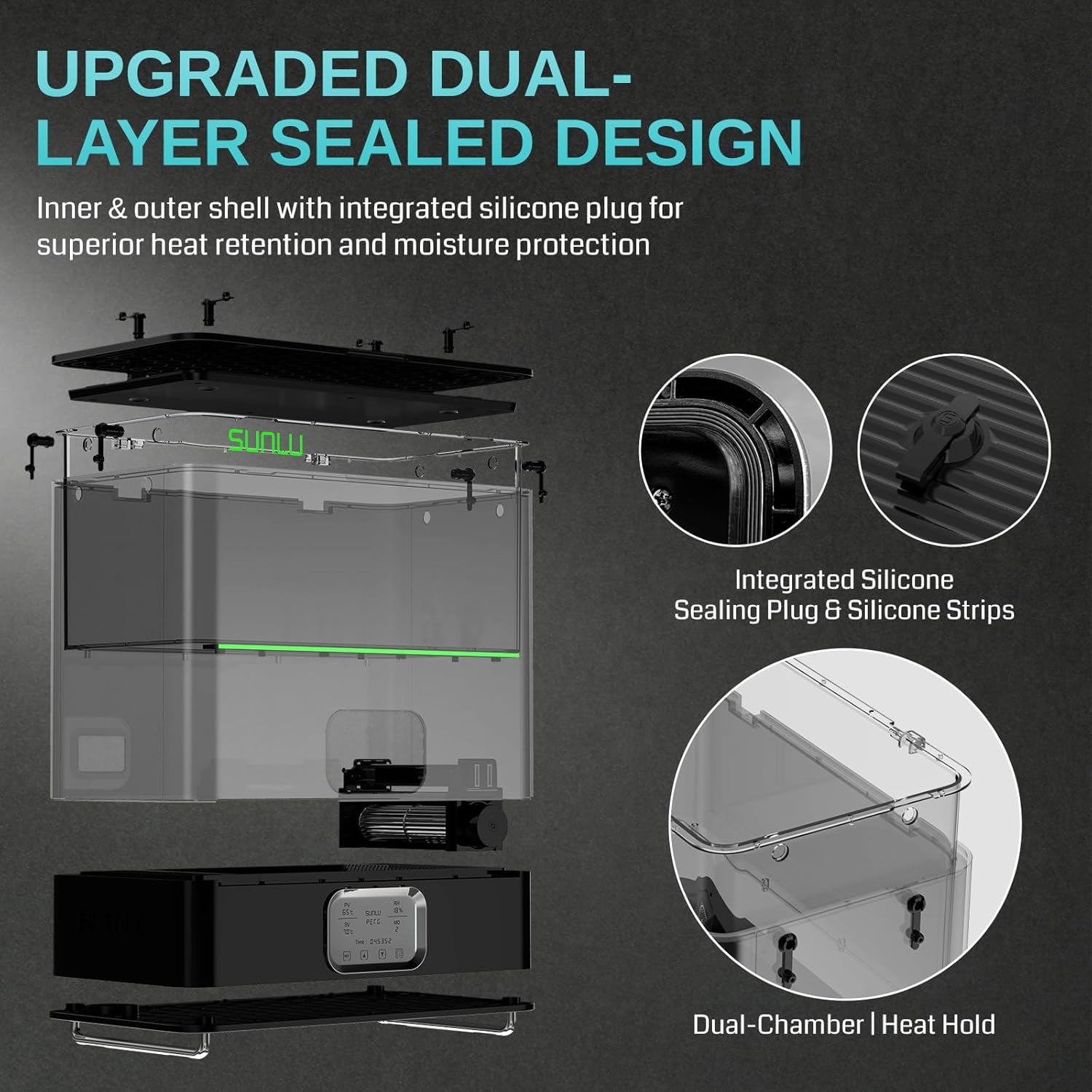
Сүрөт: жарылды view illustrating the upgraded dual-layer sealed design with integrated silicone sealing plug and strips for superior heat retention and moisture protection.
5.6 Сунушталган орнотуулар
The following table provides recommended drying and annealing temperatures and durations for common filament types. These are general guidelines; optimal settings may vary based on specific filament brands and environmental conditions.

Image: Recommended temperature settings for drying and annealing various engineering and standard filaments.
6. Filament шайкештиги
The SainSmart E2 Filament Dryer Box is compatible with a wide range of filament types and diameters, ensuring versatility for various 3D printing needs.
- Filament Diameters: Supports 1.75mm, 2.85mm, and 3.0mm filaments.
- Engineering Filaments: ASA, PVB, PA, PC, PA6, PA12, PA-CF, PA-GF.
- Standard Filaments: PLA, PLA+, PETG, PVA, PCL, ABS, TPU, EASY-PA.

Image: The E2 dryer supporting various filament types, including PLA, TPU, PETG, PVA, and PA-CF.
6.1 Spool Compatibility
The E2 is designed to be compatible with most spools on the market, with a maximum spool size of 250mm diameter and 153mm height.

Image: Various filament spool types from different brands, demonstrating compatibility with the E2 dryer.
7. Техникалык тейлөө
Regular maintenance ensures the longevity and optimal performance of your SainSmart E2 Filament Dryer Box.
- Тазалоо: Periodically wipe the exterior and interior of the unit with a soft, dry cloth. Ensure the unit is unplugged before cleaning. Do not use abrasive cleaners or solvents.
- Кургаткычты алмаштыруу: The silica gel desiccant packets will eventually become saturated. Replace them when they change color (if they are indicating type) or when you notice reduced dehumidifying effectiveness.
- Текшерүү: Regularly check the power cable for any signs of damage. Inspect the silicone seals and gasket for wear and tear to ensure the chamber remains airtight.
8. Кыйынчылыктарды
If you encounter issues with your SainSmart E2 Filament Dryer Box, refer to the following common troubleshooting steps:
| Көйгөй | Мүмкүн себеп | Чечим |
|---|---|---|
| Түзмөк күйбөйт | No power supply; Power cable loose or damaged | Check power connection; Ensure outlet is functional; Replace damaged cable. |
| Filament not drying effectively | Incorrect temperature/time settings; Saturated desiccants; Poor seal | Adjust settings according to filament type; Replace desiccants; Ensure lid is closed securely. |
| Overheat alarm triggered | Internal temperature exceeded safe limit | The unit will auto-shut off. Allow to cool down. Ensure proper ventilation. If persistent, contact support. |
| Fan error alert | Желдеткичтин бузулушу же тоскоолдук | Power off and unplug the unit. Check for any visible obstructions. If the error persists, contact support. |
For issues not covered here, please refer to the official SainSmart support resources.
9. Техникалык шарттар
| Өзгөчөлүк | Спецификация |
|---|---|
| Модель номери | 3D Printer Filament Dryer E2 |
| Продукциянын өлчөмдөрү (L x W x Y) | 15.75 x 8.67 x 12.09 дюйм (400 x 220 x 307 мм) |
| Элемент Салмагы | 14 фунт (6.35 кг) |
| Макс Температура | 110°C |
| Жылыткычтын түрү | 500W PTC Heater |
| Filament диаметри шайкештиги | 1.75мм, 2.85мм, 3.0мм |
| Max Spool Size (Diameter x Height) | 250мм x 153мм |
| Internal Size (L x W x H) | 368 x 169 x 155 мм |
| Annealing Chamber Size (L x W x H) | 250 x 153 x 160 мм |
| Коопсуздук өзгөчөлүктөрү | Auto Temperature Regulation, Overheat Alarm, Heating Failure Alarm, Fan Error Alert, Auto Shut-off |
10. Кепилдик жана колдоо
For warranty information, technical support, or service inquiries, please contact SainSmart customer service through their official website or the retailer where the product was purchased. Please have your product model number and purchase date available when contacting support.


