1. Киришүү
This manual provides detailed instructions for the COLORROOM A30L1 Android 16 Tablet. Please read this manual carefully before using your device to ensure proper operation and to maximize its performance and lifespan. Keep this manual for future reference.

Image: The COLORROOM A30L1 Android 16 Tablet, showcasing анын кооз дизайны.
2. Кутуда эмне бар
Upon unboxing your COLORROOM A30L1 tablet, verify that all the following items are included:
- COLORROOM A30L1 Android 16 Tablet
- USB Type-C кубаттоочу кабель
- Кубаттуу адаптер
- User Manual
- Коргоочу кап
- Экран коргоочу (алдын ала колдонулган же өзүнчө камтылган)

Image: The COLORROOM A30L1 Tablet shown with its included accessories, including a protective case.
Video: An unboxing and feature overview of the Android 16 Tablet, demonstrating its components and capabilities.
3. Продукт бүтүп калдыview
The COLORROOM A30L1 is a high-performance Android 16 tablet designed for both productivity and entertainment. It combines advanced features with a user-friendly interface.
3.1. Негизги өзгөчөлүктөрү
- Дисплей: 10-inch Full HD IPS display with 1280x800 resolution, 300 nits brightness, and 178-degree ultra-wide viewing angle. Widevine L1 certified for 1080P streaming.
- Аткаруу: Android 16 OS, Unisoc T7200 Octa-core processor (1.6 GHz), 12nm process for improved power efficiency.
- Эстутум жана сактоо: 24GB RAM (4GB physical + 20GB virtual) and 64GB internal storage, expandable up to 2TB via microSD card.
- Батарея: High-capacity 6,000mAh battery with 18W PD fast charging support.
- Байланыш: Dual-band 2.4GHz/5GHz Wi-Fi 5 (802.11ac) for high-speed internet, Bluetooth 5.0, and GPS.
- Камералар: 5MP front camera and 8MP rear camera.
- Коопсуздук: Facial recognition unlock and enhanced data privacy protection.
- Аудио: Dual speakers and a 3.5mm headphone jack.

Image: The tablet displaying the Android 16 interface with various application icons.

Image: A visual summary of the COLORROOM A30L1's key features, including battery, OS, CPU, cameras, and connectivity.
3.2. Дисплей жана визуалдык материалдар
Experience vibrant colors and sharp details on the 10.1-inch IPS display. Widevine L1 certification ensures you can enjoy your favorite streaming content in full 1080P HD quality.

Image: A comparison demonstrating the superior 1080P quality with Widevine L1 versus 720P with Widevine L2.
3.3. Performance and Processing
The Unisoc T7200 octa-core processor, built on a 12nm process, delivers efficient and powerful performance for smooth app usage and multitasking. Android 16 enhances security and user experience.

Image: Diagram illustrating the Unisoc T7200 Octa-core processor, highlighting its architecture and capabilities.
3.4. Эстутум жана сактоо
With 24GB of combined RAM (4GB physical + 20GB virtual) and 64GB of internal storage, the tablet handles multiple applications with ease. Expand storage up to 2TB using a microSD card for all your fileс жана массалык маалымат каражаттары.

Image: The tablet with a microSD card, illustrating its expandable storage capability.

Image: Visual representation of the tablet's 24GB RAM and 64GB internal storage, with up to 2TB microSD expansion.

Image: Illustrates the vast storage potential for videos and music on the tablet.
3.5. Батарея жана заряддоо
The 6,000mAh battery provides extended usage times. With 18W PD fast charging via the Type-C port, you can quickly recharge and get back to your activities.

Image: The tablet connected to a Type-C charger, indicating fast charging.

Image: Details on the 6000mAh battery capacity and 18W PD fast charging, showing extended usage time.
3.6. Байланыш
Enjoy stable and fast internet with dual-band 2.4GHz/5GHz Wi-Fi 5. Bluetooth 5.0 allows seamless connection to wireless accessories, and built-in GPS provides accurate location services.

Image: The tablet displaying Wi-Fi and Bluetooth connection indicators.
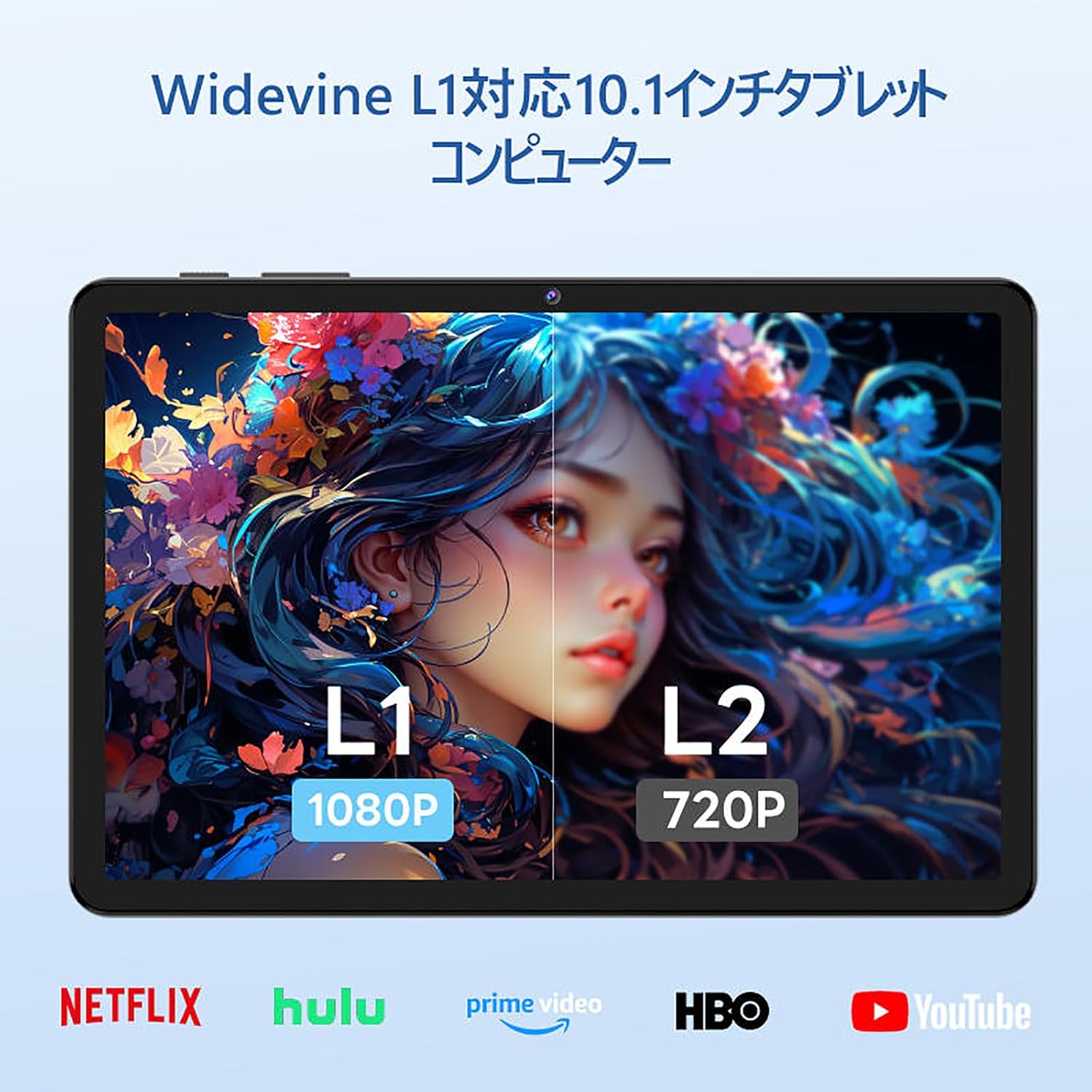
Image: The tablet showing a GPS map, indicating its navigation capabilities.
4. Орнотуу
Follow these steps for the initial setup of your COLORROOM A30L1 tablet:
4.1. Баштапкы күйгүзүү жана тилди тандоо
- Экран күйгүчө кубат баскычын басып, кармап туруңуз.
- On the welcome screen, select your preferred language. For English, choose "English (United States)".
- Click "Start" to proceed.
4.2. Wi-Fi and Data Transfer
It is recommended to skip Wi-Fi connection during initial setup to avoid interruptions, especially if your Wi-Fi environment is unstable. You can connect to Wi-Fi later.
- When prompted to set up your device, click "Skip".
- If asked to connect to Wi-Fi, click "Set up offline" or "Skip". Confirm by clicking "Continue" if prompted.
4.3. Дата жана убакыт орнотуулары
- Select your time zone (e.g., "Japan Standard Time").
- Adjust the date and time if necessary, then click "Next".
4.4. Screen Lock (PIN)
Setting a PIN or screen lock is recommended for security. You can skip this step and set it up later if desired.
- To set a PIN, enter your desired PIN (4 digits or more) and confirm.
- To skip, click "Skip" and confirm the skip action.
4.5. Google кызматтары
- Review the Google Services information.
- Click "See more" multiple times until the "Agree" button appears.
- Click "Agree" to accept the terms and complete the setup.
Your tablet is now set up and ready for use.
Video: A step-by-step guide on the initial setup process for the tablet, including language selection and basic configurations.
5. Иштөө нускамалары
5.1. Негизги навигация жана жаңсоолор
- тийүү: Колдонмону ачуу же нерсени тандоо үчүн сөлөкөтүн таптаңыз.
- Серпүү: Барактарды же мазмунду жылдыруу үчүн манжаңызды экрандын үстүнөн жылдырыңыз.
- Чымчып-кичирейтүү: Сүрөттөрдү чоңойтуу же кичирейтүү үчүн эки манжаңызды колдонуңуз жана web барактар.
- Бөлүнгөн экран: Android 16 supports split-screen multitasking. Drag an app to one side of the screen to use two apps simultaneously.
- Скриншот: Use a three-finger swipe down gesture to capture a screenshot.

Image: The tablet screen showing various applications, demonstrating its multitasking capabilities.

Image: Various scenarios of using the tablet for entertainment, such as watching videos, reading, and video calls.

Сүрөт: Дагы мурункуamples of the tablet being used in daily life, including during holidays and for cooking.
5.2. Медиа ойнотуу жана агым
With Widevine L1 support, you can stream high-definition content from popular services like Amazon Prime Video, Netflix, YouTube, and Hulu.

Image: The tablet displaying a high-definition video from a streaming service.
5.3. Зымсыз проекция
The tablet supports wireless projection, allowing you to mirror your screen to a larger display for an enhanced viewтажрыйбасы.
5.4. GPS функциясы
Utilize the built-in GPS for navigation, location-based services, and finding points of interest. The tablet supports multiple satellite systems for accurate positioning.
6. Техникалык тейлөө
To ensure the longevity and optimal performance of your COLORROOM A30L1 tablet, follow these maintenance guidelines:
- Экранды тазалоо: Экранды акырын сүртүү үчүн жумшак, түксүз чүпүрөктү колдонуңуз. өжөр тактар үчүн, бир аз гampчүпүрөккө суу же экран тазалоочу каражат. Катуу химиялык заттардан алыс болуңуз.
- Программалык камсыздоо жаңыртуулары: Regularly check for and install system updates to ensure you have the latest features, security patches, and performance improvements.
- Батареяга кам көрүү: Ашыкча температурадан алыс болуңуз. Батареянын тез-тезден толугу менен түгөнүп калышына жол бербеңиз. Узак мөөнөткө сактоо үчүн батареяны 50-60% га чейин заряддаңыз.
- Сактагычты башкаруу: Мезгил-мезгили менен ачык-айкын керексиз files, apps, and cache to free up storage space and maintain performance.
- Физикалык коргоо: Use the provided protective case and screen protector to guard against scratches, drops, and impacts.
Video: Instructions on how to apply a screen protector to the tablet, ensuring a bubble-free installation.
7. Кыйынчылыктарды
Эгерде сиз планшетиңизде көйгөйлөргө туш болсоңуз, төмөнкү кеңири таралган чечимдерди караңыз:
- Планшет күйбөйт: Батарея заряддалганын текшериңиз. Планшетти заряддагыч түзүлүшкө туташтырып, кайра күйгүзүүдөн мурун бир нече мүнөт күтө туруңуз.
- Экран жооп бербейт: Try restarting the tablet by holding down the power button for about 10-15 seconds until it powers off, then turn it back on.
- Колдонмолор бузулуп/тоңуп жатат: Close the problematic app and reopen it. If the issue persists, clear the app's cache or reinstall it. Ensure your tablet's software is up to date.
- Wi-Fi туташуу маселелери: Wi-Fi роутериңизди жана планшетиңизди өчүрүп-күйгүзүңүз. Планшетиңиздеги Wi-Fi тармагын унутуп, кайра туташыңыз. Wi-Fi сигналынын диапазонунда экениңизди текшериңиз.
- Жай аткаруу: Фондо иштеп жаткан колдонулбаган колдонмолорду жабыңыз. Кэшти жана убактылууну тазалаңыз fileс. Эгерде башка мүчүлүштүктөрдү оңдоо кадамдарынан кийин дагы эле иштөө көйгөйлөрү сакталып калса, заводдук жөндөөлөргө кайтарууну карап көрүңүз (алдын ала маалыматтарыңыздын камдык көчүрмөсүн сактап коюңуз).
- кубаттоо маселелери: Ensure the charging cable and adapter are securely connected and undamaged. Try using a different compatible charger and cable.
If the problem cannot be resolved using these steps, please contact customer support.
8. Техникалык шарттар
| Өзгөчөлүк | Деталь |
|---|---|
| Бренд | ТҮШ БӨЛМӨ |
| Модель аты | A30L1 |
| Операция системасы | Android 16 |
| Дисплей өлчөмү | 10.1 дюйм |
| Display Resolution | 1280x800 Pixels (IPS) |
| CPU бренди | Unisoc |
| CPU ылдамдыгы | 1.6 GHz (Octa-core T7200) |
| RAM | 24 ГБ (4 ГБ физикалык + 20 ГБ виртуалдык) |
| Ички сактагыч | 64 ГБ |
| Кеңейтүүчү сактагыч | microSD карта аркылуу 2 ТБ чейин |
| Батарея сыйымдуулугу | 6,000mAh |
| Заряддоо | 18W PD Fast Charging (Type-C) |
| Зымсыз түрү | 802.11ac (2.4GHz/5GHz Dual-band) |
| Bluetooth | Bluetooth 5.0 |
| GPS | Ооба |
| Алдыңкы камера | 5 депутат |
| Арткы камера | 8 депутат |
| Элемент Салмагы | 1.07 килограмм |
| Пакеттин өлчөмдөрү | 32.4 x 19.8 x 3.7 см |
9. Кепилдик жана колдоо
COLORROOM offers a 1 жылдык кепилдик кызматы for all tablets purchased from official COLORROOM brand direct stores. This warranty covers manufacturing defects and ensures your product is free from material and workmanship flaws under normal use.
For warranty claims, technical support, or any inquiries regarding your COLORROOM A30L1 tablet, please contact COLORROOM customer service through the retailer where you purchased the product or visit the official COLORROOM webколдоо байланыш маалыматы үчүн сайт.
Кепилдикти текшерүү үчүн сатып алганыңыздын далилин сактап коюңуз.