1. Киришүү
This manual provides essential information for the safe and efficient use of your XIAOMI Redmi 15C smartphone. Please read this guide thoroughly before operating your device to ensure proper functionality and to prevent damage.
The Redmi 15C is designed to offer a reliable mobile experience with its large display, powerful battery, and capable camera system.
2. Коопсуздук маалыматы
- Батареянын коопсуздугу: Do not attempt to replace the battery yourself. Use only authorized service centers. Avoid exposing the device to extreme temperatures or direct sunlight.
- Заряддоо: Use only the original USB cable provided. A power adapter is not included; use a compatible 33W fast charger from a reputable manufacturer.
- Суу жана чаңга туруктуулугу: The device features IP64 dust and water resistance. This rating indicates protection against dust ingress and splashing water from any direction. It is not designed for submersion in water.
- Жоюу: Түзмөктү жана анын батарейкасын жергиликтүү эрежелерге ылайык жоопкерчилик менен жок кылыңыз. Аны тиричилик таштандыларына таштабаңыз.
- Айдоо коопсуздугу: Always prioritize driving safety. Do not use your phone while driving unless absolutely necessary and in compliance with local laws.
3. Пакеттин мазмуну
Пакетиңизде төмөнкү заттар бар экенин текшериңиз:
- XIAOMI Redmi 15C смартфону
- USB кабели (Type-C)
- SIM чыгаруу куралы
- Quick Start Guide
- Кепилдик картасы
Note: A power adapter is not included in the box and must be purchased separately. For optimal charging, use a 33W fast charger.
4. Түзмөк бүттүview
Familiarize yourself with the physical components of your Redmi 15C.
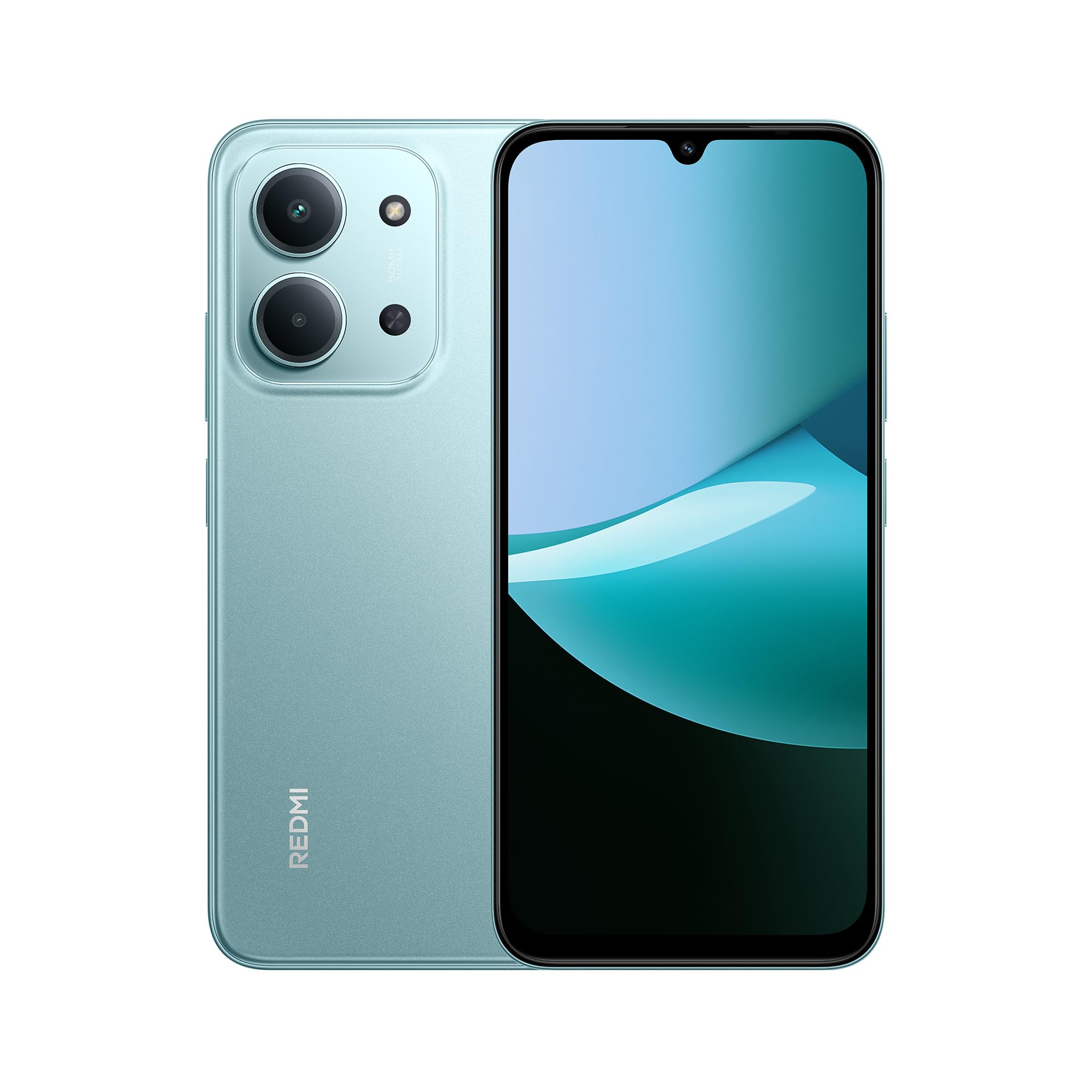
Алдыңкы жана арткы view of the XIAOMI Redmi 15C smartphone in Mint Green.

The slim 7.99mm body of the Redmi 15C, designed for comfortable handling.
Физикалык компоненттер:
- Кубат баскычы: Капталында жайгашкан, түзмөктү күйгүзүү/өчүрүү же экранды ойготуу/уйку режимине өткөрүү үчүн колдонулат.
- Үн баскычтары: Кубат баскычынын жанында жайгашкан, медиа жана чалуу үнүнүн деңгээлин тууралоо үчүн колдонулат.
- USB Type-C порту: Төмөндө жайгашкан, заряддоо жана маалыматтарды өткөрүү үчүн колдонулат.
- SIM/SD карта салгычы: Located on the side, for inserting SIM cards and a microSD card.
- Алдыңкы камера: Дисплейдин жогору жагында жайгашкан.
- Арткы камера системасы: Located on the back, featuring a 50MP AI dual camera.
- Баяндамачы: Аудио чыгаруу үчүн.
- Микрофон: Чалуулар жана жаздыруулар учурунда үн менен киргизүү үчүн.
5. Баштоо (Орнотуу)
5.1. SIM/SD картаны салуу
- Түзмөгүңүздүн капталындагы SIM карта салгычын табыңыз.
- SIM чыгаруу куралын лотоктун жанындагы кичинекей тешикке кыстарыңыз жана лоток чыгып кеткенче бекем басыңыз.
- Place your Nano-SIM card(s) and/or microSD card into the designated slots on the tray. Ensure the gold contacts face downwards. The device supports Dual SIM functionality.
- Аспапка лотокту кылдаттык менен кайра салыңыз.
5.2. Күйгүзүү / Өчүрүү
- Күйгүзүү үчүн: XIAOMI логотиби пайда болгонго чейин Кубат баскычын басып, кармап туруңуз.
- Өчүрүү үчүн: Кубат баскычын басып, кубат менюсу пайда болгонго чейин кармап туруңуз, андан кийин "Өчүрүү" дегенди тандаңыз.
- Кайра баштоо үчүн: Кубат баскычын басып, кубат менюсу пайда болгонго чейин кармап туруңуз, андан кийин "Кайра баштоо" тандаңыз.
5.3. Баштапкы орнотуу устасы
Upon first power-on, the device will guide you through the initial setup process. Follow the on-screen instructions to:
- Тилди жана аймакты тандаңыз.
- Wi-Fi тармагына туташыңыз.
- Шарттарды жана шарттарды кабыл алыңыз.
- Google аккаунтуңузга кириңиз же жаңысын түзүңүз.
- Экранды кулпулоону (PIN код, графикалык ачкыч, сырсөз, манжа изи, жүздөн ачуу) орнотуу.
- Мурунку түзмөктөн дайындарды калыбына келтирүү (милдеттүү эмес).
6. Негизги операция
6.1. Навигация
The Redmi 15C features a responsive touchscreen. Use gestures such as tapping, swiping, pinching, and spreading to navigate the interface.
6.2. Чалууларды жасоо жана билдирүүлөрдү жөнөтүү
- Чалуулар: "Телефон" тиркемесин ачып, номерди киргизип, чалуу сүрөтчөсүн басыңыз.
- Кабарлар: "Билдирүүлөр" колдонмосун ачып, жаңы билдирүү сүрөтчөсүн таптап, алуучуну жана билдирүүңүздү киргизиңиз.
6.3. Wi-Fi жана Bluetooth туташуу
- барыңыз Орнотуулар > Wi-Fi or Орнотуулар > Bluetooth.
- Toggle the respective switch to turn it on.
- Select the desired network or device from the list and enter the password if prompted.
6.4. Камераны колдонуу
The Redmi 15C is equipped with a 50MP AI dual camera system for capturing photos and videos.

Detail of the 50MP AI dual camera system on the Redmi 15C, designed to capture clear and vibrant images.
- "Камера" колдонмосун ачыңыз.
- Каалаган режимиңизди тандаңыз (Сүрөт, Портрет, Видео ж.б.).
- Tap the shutter button to take a picture or start/stop recording a video.
6.5. Батареяны башкаруу
The device features a massive 6000mAh battery for extended usage.

Illustration of the 6000mAh battery inside the Redmi 15C, providing up to 82 hours of music playback.
Түзмөгүңүздү кубаттоо үчүн:

The Redmi 15C supports 33W fast charging, allowing the battery to reach 50% in approximately 31 minutes.
- Connect the USB Type-C cable to the device and a compatible 33W fast charger.
- Avoid overcharging; disconnect the charger once the battery is full.
- To optimize battery life, adjust screen brightness, disable unnecessary features, and close background apps.
7. Өркүндөтүлгөн функциялар
7.1. Processor Performance
The Redmi 15C is powered by a MediaTek Helio G81-Ultra octa-core processor, ensuring smooth performance for daily tasks and applications.

Visual representation of the powerful MediaTek Helio G81-Ultra octa-core processor, designed for consistent smooth performance.
7.2. Immersive Display
Experience content on the immersive 6.9-inch display with a 120Hz AdaptiveSync refresh rate, providing a smoother visual experience.

The 6.9-inch display of the Redmi 15C, featuring up to 120Hz AdaptiveSync for a fluid user interface.
7.3. AI Features with Google Gemini
The Redmi 15C integrates with Google Gemini, an AI assistant designed to help with various tasks such as writing, brainstorming, and learning.

The Redmi 15C demonstrating interaction with Google Gemini, an AI assistant for various tasks. Setup is required for this feature.
8. Техникалык тейлөө
8.1. Аспапты тазалоо
- Аппараттын экранын жана корпусун тазалоо үчүн жумшак, түксүз чүпүрөктү колдонуңуз.
- Катуу химиялык заттарды же абразивдүү материалдарды колдонуудан алыс болуңуз.
- Тазалоочу каражаттарды түз эле аппаратка чачпаңыз.
8.2. Программалык камсыздоону жаңыртуу
Түзмөгүңүздө эң акыркы функциялар, коопсуздук жаңыртуулары жана иштеши жакшыртылганын текшерүү үчүн программалык камсыздоо жаңыртууларын дайыма текшерип, орнотуп алыңыз.
- барыңыз Орнотуулар > Телефон жөнүндө > MIUI версиясы (or similar for Hyper OS).
- "Жаңыртууларды текшерүү" баскычын таптап, экрандагы көрсөтмөлөрдү аткарыңыз.
8.3. Сактагычты башкаруу
Оптималдуу иштөөсүн сактоо үчүн, түзмөгүңүздүн сактагычын үзгүлтүксүз башкарып туруңуз.
- Керексиз жок кылуу fileс, сүрөттөр жана видеолор.
- Колдонулбаган колдонмолорду чыгарып салыңыз.
- Чоң жылдырыңыз filemicroSD картасына (эгер орнотулган болсо) же булут сактагычына көчүрүңүз.
9. Кыйынчылыктарды
Эгерде сиз түзмөгүңүздө көйгөйлөргө туш болсоңуз, төмөнкү чечимдерди колдонуп көрүңүз:
| Маселе | Чечим |
|---|---|
| Түзмөк күйбөйт | Батарея заряддалганын текшериңиз. Кеминде 10 мүнөт кубаттагычка туташып, анан күйгүзүп көрүңүз. |
| Колдонмолор бузулуп же катып жатат | Restart the device. Clear the cache of the problematic app (Орнотуулар > Колдонмолор > [Колдонмонун аты] > Сактагыч > Кэшти тазалоо). |
| Начар тармак сигналы | SIM картаңыз туура салынганын текшериңиз. Түзмөктү өчүрүп-күйгүзүп көрүңүз. Тармактын камтуу аймагында экениңизди текшериңиз. |
| Батарея бат эле түгөнөт | Экран жарыктыгын азайтыңыз. Фондук колдонмолорду жабуу. Колдонулбаган учурда GPS же Bluetooth сыяктуу керексиз функцияларды өчүрүңүз. |
| Түзмөк жай иштеп жатат же жооп бербей жатат | Clear storage space. Restart the device. Check for system updates. |
If problems persist, contact customer support or visit an authorized service center.
10. Техникалык шарттар
Detailed technical specifications for the XIAOMI Redmi 15C.
| Өзгөчөлүк | Спецификация |
|---|---|
| Модель аты | 15C |
| Операция системасы | Hyper OS 2 |
| Процессор | MediaTek Helio G81-Ultra Octa-core |
| RAM | 4 ГБ |
| Сактоо сыйымдуулугу | 128 ГБ |
| Дисплей өлчөмү | 6.9 дюйм |
| Display Resolution | 720 x 1600 |
| Жаңыртуу ылдамдыгы | 120 Гц |
| Арткы камера | 50 MP AI Dual Camera |
| Алдыңкы камера | Ооба |
| Батарея сыйымдуулугу | 6000 мАч |
| Talk Time | 30 саатка чейин |
| Заряддоо | 33W Fast Charging Compatible |
| Байланыш | 4G, Wi-Fi, Bluetooth, GPS |
| SIM колдоо | Кош SIM |
| Өлчөмдөрү (L x W x Y) | 17.3 x 8.1 x 0.82 см |
| Салмагы | 400 г |
| Өзгөчөлүктөр | Wi-Fi Hotspot, Integrated GPS, IP64 Dust and Water Resistance |
11. Кепилдик жана колдоо
Your XIAOMI Redmi 15C smartphone comes with a standard manufacturer's warranty. Please refer to the warranty card included in your package for specific terms and conditions, including warranty period and coverage details.
For technical support, service, or further inquiries, please visit the official XIAOMI support webсайтка же кардарларды тейлөөгө кайрылыңыз. Кепилдик дооматтар үчүн сатып алганыңыздын далилин сактаңыз.