1. Киришүү
This manual provides essential information for setting up, operating, and maintaining your JBL Bar 700MK2 7.1 Channel Soundbar System. This system delivers immersive audio with detachable wireless speakers, Dolby Atmos, and a powerful 10-inch wireless subwoofer. Please read this manual thoroughly before using the product to ensure optimal performance and safety.

Image: The JBL Bar 700MK2 soundbar, two detachable surround speakers, a wireless subwoofer, and a remote control.
2. Кутуда эмне бар
Бардык компоненттерди кылдаттык менен ачып, төмөнкү нерселердин камтылганын текшериңиз:
- 1x JBL Bar 700MK2 Soundbar
- 2x ажыратылуучу зымсыз көлөмдүү динамиктер
- 1x Зымсыз сабвуфер
- 1x 2 батарейкасы бар алыстан башкаруу пульту
- Электр зымдары (аймактын SKUларына жараша 6 даанага чейин)
- 1 х HDMI кабели
- 4 x каптал капкактары
- 2 x L түрүндөгү дубалга орнотулган кронштейн (негизги тилке) + 2 x U түрүндөгү дубалга орнотулган кронштейн (көчүрмө динамиктер үчүн) бурамалар менен комплект
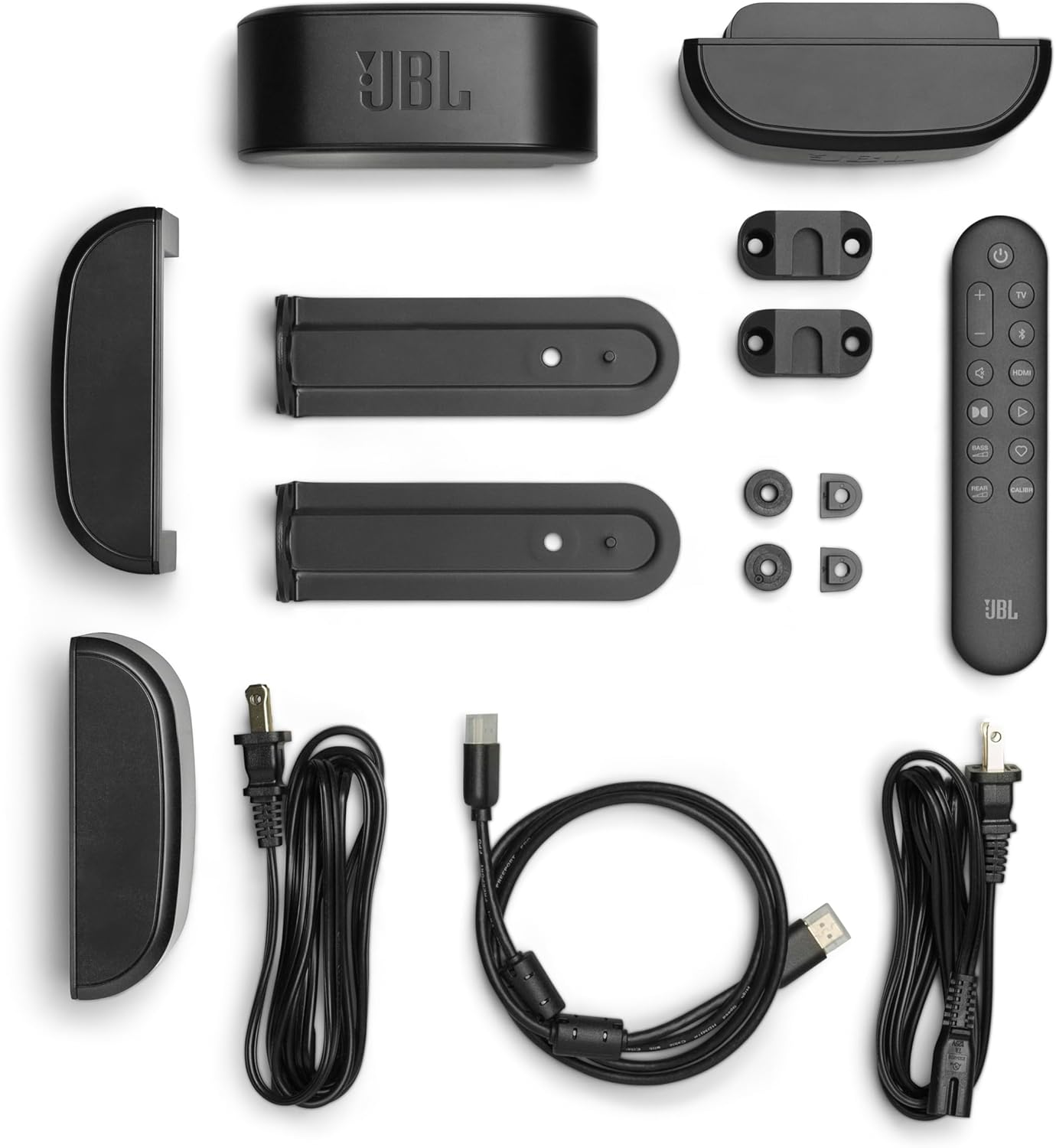
Image: All components included in the JBL Bar 700MK2 packaging, laid out for inspection.
3. Орнотуу
3.1 Орнотуу
Position the soundbar centrally below your television. The wireless subwoofer can be placed anywhere in the room, ideally near a wall for enhanced bass. The detachable surround speakers can be connected to the main soundbar or placed behind your listening position for true surround sound.

Image: A JBL Bar 700MK2 soundbar positioned under a TV on a media console, with the wireless subwoofer on the floor beside it.
3.2 Байланыштар
Connect the soundbar to your TV using the supplied HDMI cable for the best audio quality, especially for Dolby Atmos. Ensure the HDMI cable is connected to the HDMI ARC/eARC port on your TV and the HDMI OUT (TV ARC/TV eARC) port on the soundbar. An optical cable can be used as an alternative connection.

Image: A close-up of the rear panel of the JBL Bar 700MK2 soundbar, highlighting the various input and output ports.
3.3 Ажыратылма динамиктер
The two surround speakers can be detached from the main soundbar. To detach, simply lift them off. To reattach, align them with the magnetic connectors on the soundbar. They charge automatically when connected to the soundbar. For surround sound, place them behind your listening area.

Сүрөт: деталдуу view of the two detachable wireless surround speakers, showing their compact design.
3.4 Зымсыз сабвуферди жупташтыруу
The subwoofer automatically pairs with the soundbar when both are powered on. If pairing is lost, refer to the troubleshooting section or the JBL ONE app for manual pairing instructions.
3.5 JBL ONE App Setup
Download the JBL ONE app from your device's app store. The app guides you through the initial setup, sound calibration, and offers customization options for your soundbar system.
4. Иштөө нускамалары
4.1 Негизги башкаруу каражаттары
- Күч: Use the power button on the soundbar or remote to turn the system on/off.
- Көлөмү: Adjust volume using the remote control or the soundbar's controls.
- Булак тандоо: Switch between HDMI, Optical, Bluetooth, and Wi-Fi sources using the remote.
4.2 Үн режимдери жана жакшыртуулар
- Dolby Atmos: Experience immersive 3D audio for compatible content.
- Көп нурлуу 3.0: Creates a wide, cinematic soundstage that fills your room.
- PureVoice 2.0: Automatically optimizes dialogue clarity, ensuring every word is heard.
- Акылдуу маалыматтар: Enhances subtle audio details for a richer listening experience.
4.3 Night Listening
To enjoy content without disturbing others, activate 'Night Listening' via the JBL ONE app. Place the detachable speakers in front of you. The soundbar and subwoofer will be muted, providing an intimate audio experience through the detached speakers.
Video: Official JBL product video demonstrating the features of the JBL Bar 700MK2, including detachable speakers, Dolby Atmos, and Night Listening mode. This video highlights the system's capabilities for immersive home theater audio.
4.4 Музыка агымы
The JBL Bar 700MK2 supports various music streaming services and ecosystems including AirPlay, Google Cast, Spotify Connect, Tidal Connect, and Roon Ready for high-definition audio playback.
5. Негизги өзгөчөлүктөрү
- Real Surround Sound with Detachable Wireless Speakers: Easily transform your soundbar into a true surround sound system by placing the long-lasting battery-powered speakers behind you.
- 780W Max Output Power and a 10" Wireless Subwoofer: Delivers powerful, room-filling sound with deep, thundering bass.
- Dolby Atmos: Experience extraordinary cinematic sound from all directions with 3D audio.
- Көп нурлуу 3.0: Provides a wide, cinema-like soundstage for immersive audio.
- PureVoice 2.0: Ensures clear and consistent dialogue by optimizing speech based on ambient sound and volume.
- Акылдуу маалыматтар: Enhances subtle sound elements for a detailed and balanced audio field.
- Түнкү угуу: Enjoy private listening with detachable speakers, muting the main soundbar and subwoofer.
- Easy Sound Calibration: The system automatically adjusts sound for optimal 3D surround effects based on your room's acoustics.
- Works with All Ecosystems and Music Streaming Services: Supports AirPlay, Google Cast, Spotify Connect, Tidal Connect, and Roon Ready.
- JBL ONE колдонмосу: Provides comprehensive control, customization, and software updates for your soundbar system.
6. Техникалык шарттар
| Бренд | JBL |
| Модель аты | 700MK2 тилкеси |
| Элемент моделинин номери | JBLBAR700M2BLKAM |
| Динамик түрү | Саундбар |
| Көлөмдүү үн каналынын конфигурациясы | 7.1 |
| Динамиктин максималдуу чыгаруу күчү | 780 Ватт |
| Сабвуфердин диаметри | 10 дюйм |
| Frequency Response | 20 Гц |
| Байланыш технологиясы | Bluetooth, HDMI, оптикалык, USB, Wi-Fi |
| Зымсыз байланыш технологиясы | Airplay, Bluetooth, Wi-Fi |
| Продукциянын өлчөмдөрү | 5"D x 45.8"W x 2"H |
| Элемент Салмагы | 32 фунт |
| Түс | Кара |
| Материал | Пластик |
| Монтаж түрү | Дубалга орнотуу |
| Башкаруу ыкмасы | Алыстан |
7. Кыйынчылыктарды
Эгерде сиз JBL Bar 700MK2 менен көйгөйлөргө туш болсоңуз, төмөнкү кеңири таралган көйгөйлөрдү жана чечимдерди караңыз:
- Кубат жок: Ensure all power cords are securely connected to the soundbar, subwoofer, and a working power outlet.
- Үн жок:
- Check the input source selection on the soundbar.
- Verify that the HDMI or optical cable is correctly connected to both the soundbar and your TV.
- Саундбардын жана сыналгыңыздын үнүн жогорулатыңыз.
- Ensure your TV's audio output is set to external speakers.
- Сабвуфер жупташкан жок: If the subwoofer does not automatically connect, press and hold the pairing button on the back of the subwoofer and then on the soundbar (refer to the JBL ONE app for specific instructions).
- Poor Surround Effect:
- Ensure detachable speakers are placed correctly behind your listening position.
- Run the sound calibration feature via the JBL ONE app.
- Check for obstructions between the soundbar and surround speakers.
- Detachable Speakers Not Charging: Ensure they are securely attached to the main soundbar. Clean the charging contacts if necessary.
- Алыстан башкаруу иштебейт: Батареяларды алмаштырыңыз. Пульт менен саундбардын ортосунда эч кандай тоскоолдук жок экенин текшериңиз.
For further assistance, consult the JBL ONE app or the official JBL support webсайт.
8. Техникалык тейлөө
To ensure the longevity and optimal performance of your JBL Bar 700MK2 system, follow these maintenance guidelines:
- Тазалоо: Use a soft, dry cloth to clean the surfaces of the soundbar, subwoofer, and detachable speakers. Avoid using abrasive cleaners, waxes, or solvents.
- Спикерге кам көрүү: Keep the detachable speakers and their charging contacts clean and free of debris.
- Вентиляция: Ensure adequate ventilation around all components to prevent overheating. Do not block any ventilation openings.
- Сактагыч: If storing the system for an extended period, detach the surround speakers and ensure they are fully charged before storage. Store in a cool, dry place.
9. Кепилдик жана колдоо
The JBL Bar 700MK2 comes with a limited warranty. For detailed information regarding warranty terms, conditions, and registration, please refer to the warranty card included in your product packaging or visit the official JBL webсайт.
For technical support, product registration, or to download the latest software updates, please use the JBL ONE app or visit the JBL колдоо Webсайт.


