1. Киришүү
This manual provides essential instructions for the safe and efficient use of your Oticon Intent Desktop Charger. This device is specifically engineered for Oticon Intent miniRITE R hearing aid models (1, 2, 3, 4) to provide fast and reliable charging. Its compact design makes it suitable for various environments, from your desk to a travel bag.
Маанилүү эскертүү: Бул заряддагыч түзүлүш туура келбейт with Oticon BTE or other hearing aid models. Please verify your hearing aid model before use.
2. Кутуда эмне бар
- Oticon Intent Desktop Charger
- Интеграцияланган USB кубаттоо кабели
- Колдонуучунун Колдонмосу (бул документ)
3. Орнотуу жана биринчи колдонуу
3.1 Заряддоочу түзүлүштү туташтыруу
- Connect the integrated USB cable from the charger to a compatible power source (e.g., a USB wall adapter, computer USB port).
- Ensure the power source is active. A small LED indicator on the charger may light up to confirm power connection.

Figure 1: The Oticon Intent Desktop Charger with its integrated USB cable.
3.2 Placing Hearing Aids for Charging
- Gently place your Oticon Intent miniRITE R hearing aids into the designated charging ports on the desktop charger. The ports are shaped to fit the hearing aids correctly.
- The LED indicators on your hearing aids will light up (typically orange) to confirm that charging has begun.

Figure 2: Hearing aids correctly placed in the desktop charger.
Video 1: Demonstrates the process of connecting the charger and placing the hearing aids for charging.
4. Иштөө нускамалары
4.1 Кубаттоо процесси жана индикаторлор
- The advanced charging technology ensures your hearing aids are quickly and fully charged.
- Толук заряддоо үчүн, адатта, болжол менен 3 саат талап кылынат.
- The LED indicators on the hearing aids will change color (e.g., from orange to green) when fully charged.
- Hearing aids automatically turn on when removed from the charger.

Figure 3: LED lights on the charger indicate the charging status of the hearing aids.
Video 2: Quick and easy guide to using the Oticon Intent Desktop Charger.
Video 3: Detailed instructions on how to use the Oticon Intent Desktop Charger for miniRITE R.
5. Шайкештик
This desktop charger is specifically designed for the following Oticon Intent miniRITE R hearing aid models:
- Oticon Intent miniRITE R 1
- Oticon Intent miniRITE R 2
- Oticon Intent miniRITE R 3
- Oticon Intent miniRITE R 4
Шайкеш келбеген моделдер: Бул заряддагыч түзүлүш туура келбейт with Oticon BTE (Behind-The-Ear) models or any other Oticon hearing aid models not listed above.
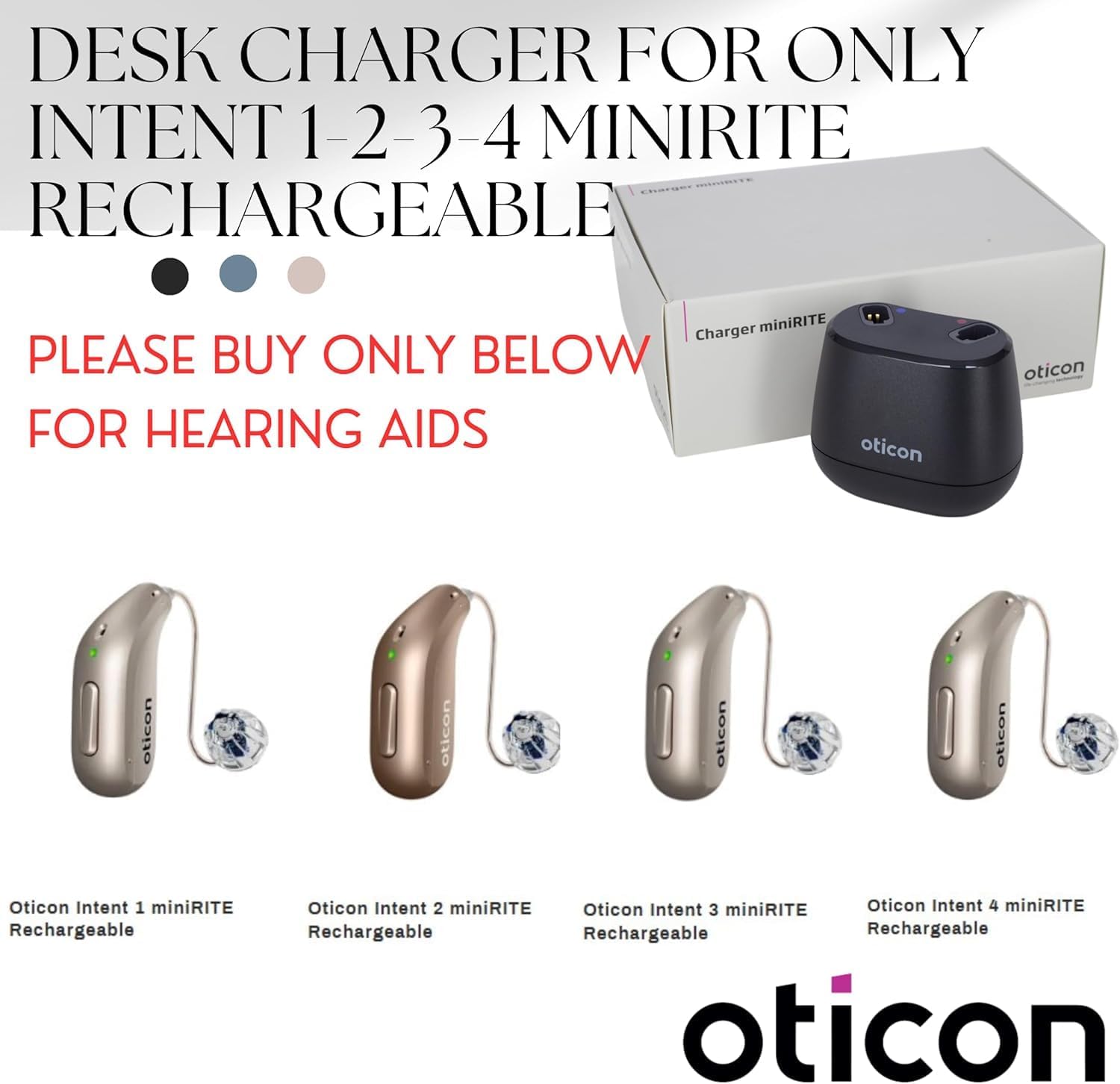
Figure 4: Visual guide to compatible Oticon Intent miniRITE R hearing aid models.

5-сүрөт: Мисamples of hearing aid models that are not compatible with this charger.
6. Техникалык тейлөө
6.1 Заряддагычты тазалоо
- Always disconnect the charger from the power source before cleaning.
- Wipe the charger with a soft, dry cloth. Do not use water or cleaning solutions, as this may damage the device.
- Ensure the charging ports are free from dust or debris. Use a soft brush if necessary.
6.2 Сактоо
Store the charger in a cool, dry place away from direct sunlight and extreme temperatures. When traveling, its compact size allows for easy storage in a travel bag.
7. Кыйынчылыктарды
| Көйгөй | Мүмкүн себеп | Чечим |
|---|---|---|
| Hearing aids not charging. | Charger not connected to power, or hearing aids not correctly seated. | Ensure the USB cable is securely plugged into a working power source. Re-seat the hearing aids firmly into the charging ports. |
| LED индикаторлору күйбөй жатат. | No power to the charger, or a fault with the charger/hearing aid. | Check power connection. Try a different USB port or power adapter. If the issue persists, contact customer support. |
| Hearing aids not turning on after charging. | Temporary software glitch or battery issue. | Remove and re-insert the hearing aids. If they still do not turn on, consult your hearing care professional. |
8. Техникалык шарттар
- Продукциянын өлчөмдөрү: 2.5 x 4.4 x 7.1 дюйм
- Элемент Салмагы: 1 фунт
- Туташтыргыч түрү: 2-Pin
- Шайкеш түзмөктөр: Oticon Intent miniRITE R hearing aid models (1, 2, 3, 4)
- Өзгөчө өзгөчөлүгү: Автоматтык Өчүк
- Түсү: Кызыл/Кара
- Жалпы USB порттору: 1
- Материал: Пластик
- Өндүрүүчү: OTICON
9. Кепилдик жана колдоо
For warranty information, technical support, or any questions regarding your Oticon Intent Desktop Charger, please contact your authorized Oticon dealer or the MSTORE INTL customer service. Refer to the product packaging or original purchase documentation for specific warranty terms and contact details.


