Introduction
This manual provides detailed instructions for the installation, operation, and maintenance of your Alpine ILX-W670-S 7-inch Double-DIN Digital Multimedia Receiver with Backup Bullet Camera. Please read this manual thoroughly before using the product to ensure proper operation and to prevent damage.
Коопсуздук маалыматы
Always observe the following safety precautions to prevent injury or damage to the unit and vehicle:
- Агрегатты айдоодон алаксыта тургандай иштетпеңиз. Ар дайым жол коопсуздугун биринчи орунга коюу.
- Ensure all wiring is correctly connected to prevent short circuits or electrical hazards. Incorrect wiring can cause fire or damage.
- Эгер кандайдыр бир кадамдарга ишене албасаңыз, орнотуу үчүн адиске кайрылыңыз.
- Үндүн катуулугун тез жардам унаалары сыяктуу сырткы үндөрдү угууга мүмкүндүк берген деңгээлде кармаңыз.
- Түзмөктү бөлүктөргө бөлбөңүз же өзгөртпөңүз. Бул зыянга алып келип, кепилдикти жокко чыгарышы мүмкүн.
Пакеттин мазмуну
Пакетте бардык буюмдар бар экенин текшериңиз:
- Alpine ILX-W670-S Digital Multimedia Receiver
- BULCAMC-1 Backup Bullet Camera
- Зымдардын бириктиргичтери жана туташтыргычтары
- Монтаждоочу жабдык
- Колдонуучунун Колдонмосу (бул документ)

1-сүрөт: Alpine ILX-W670-S Digital Multimedia Receiver with included Backup Bullet Camera. The image displays the 7-inch touchscreen receiver unit, the compact bullet-style backup camera, and a small key fob accessory.
Жайгашуу
Ресиверди орнотуу
The ILX-W670-S is designed for standard double-DIN vehicle openings. Its shallow-mount chassis is beneficial for vehicles with limited dash space. Professional installation is recommended for optimal performance and safety.
- Даярдоо: Электр иштерин баштоодон мурун, унаанын терс аккумулятор терминалын ажыратыңыз.
- Монтаждоо: Secure the receiver into the double-DIN opening using the provided mounting hardware. Ensure it is firmly seated.
- Зымдарды туташтыруу:
- Connect the main power harness (constant 12V, accessory 12V, ground).
- Динамик зымдарын унаанын динамик системасына туташтырыңыз.
- Connect the backup camera input cable.
- Connect the USB and AUX input cables as needed.
- For steering wheel control integration, connect the SWC adapter via the 3.5mm mini jack.
- Эгерде тышкы колдонулса amplifiers, connect the 4V pre-outs (front, rear, subwoofer).
- Сыноо: Батареяны кайра туташтырыңыз жана аспаптар тактасын толугу менен кайра монтаждоодон мурун негизги функция сынагынан өтүңүз.
Камераны орнотуу
The BULCAMC-1 bullet camera provides a wide-angle view for enhanced safety when reversing.

2-сүрөт: Жакын план view of the BULCAMC-1 Backup Bullet Camera. This image highlights the compact design and mounting bracket of the camera, which is designed for discreet installation.
- Монтаждоо жери: Choose a central location at the rear of the vehicle, typically near the license plate, that offers a clear, unobstructed view.
- Коопсуз орнотуу: Drill necessary holes (if required) and securely mount the camera using the provided hardware. Ensure the camera is aimed correctly.
- Зымдар:
- Connect the camera's power wire to the vehicle's reverse light circuit (12V) so it activates when the vehicle is in reverse.
- Run the video signal cable from the camera to the camera input on the ILX-W670-S receiver.
- Гидроизоляция: Ensure all connections are properly sealed, as the camera is IP67-68 waterproof rated.
Иштөө нускамалары
Күйгүзүү/өчүрүү
The unit will power on automatically when the vehicle's ignition is turned to the accessory or on position. To turn off the unit, turn off the vehicle's ignition.
Сенсордук экран интерфейси
The ILX-W670-S features a responsive 6.75-inch touchscreen display with 800 x 480 resolution. The home screen is customizable, allowing you to arrange icons and even upload your own background image. The key illumination can be set to one of five colors (red, green, blue, amber, white).
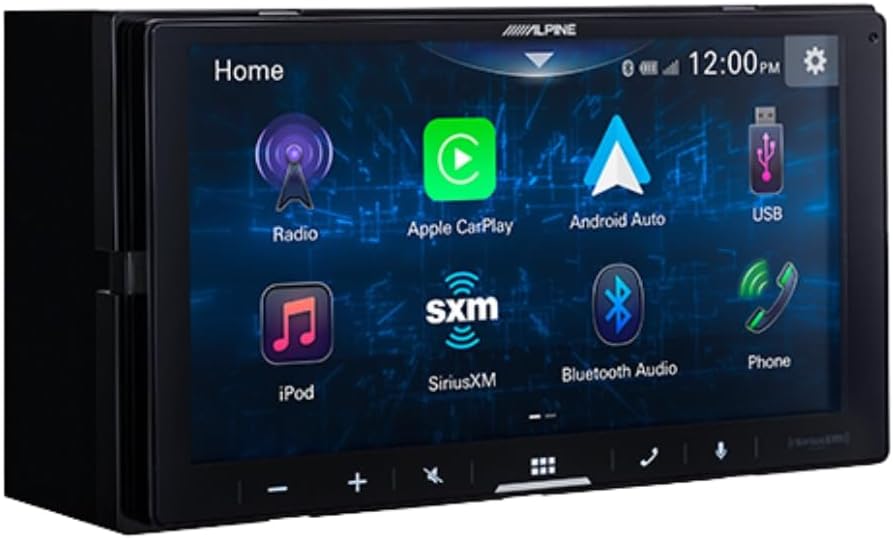
3-сүрөт: Alpine ILX-W670-S home screen displaying various application icons. This image shows the customizable interface with options for Radio, Apple CarPlay, Android Auto, USB, iPod, SiriusXM, Bluetooth Audio, and Phone.
Аудио өзгөчөлүктөрү
- Мадам: Utilize the 13-band graphic EQ to fine-tune audio frequencies to your preference.
- Убакытты тууралоо: The 6-channel time correction feature allows for precise adjustment of sound delivery to each speaker, optimizing the sound stage.
- Кроссоверлер: Adjust front, rear, and subwoofer crossovers to manage frequency distribution to your speakers.
- Sound Boost Menu: Access dedicated controls for bass, mid-bass, and subwoofer output.
- Колдоого алынган аудио форматтары: The unit supports AAC, FLAC, MP3, and WMA audio playback.
Байланыш
- Apple CarPlay жана Android Auto: Connect your compatible smartphone via USB for wired access to navigation, music, messaging, and other apps directly on the receiver's screen.

4-сүрөт: Alpine ILX-W670-S display showing the Apple CarPlay interface. This image illustrates the integration of smartphone applications like Phone, Music, Maps, Messages, and Podcasts onto the receiver's screen.
- Bluetooth: Pair your smartphone for hands-free calling and wireless audio streaming.
- SiriusXM даяр: The unit is compatible with SiriusXM satellite radio (requires a separate SiriusXM Connect Vehicle Tuner and subscription).
- AUX киргизүү: Connect external audio devices using the 3.5mm auxiliary input.
- USB киргизүү: Use the USB port for media playback or smartphone connectivity.
- Руль башкаруусу (SWC): Integrate with your vehicle's factory steering wheel controls using a compatible adapter connected to the 3.5mm mini jack.
Video ойнотуу
The receiver supports various video formats including MP4, MKV, MOV, H.264, FLV, MPEG-4, and AVC. Video playback is typically restricted while the vehicle is in motion for safety reasons.
Backup Camera Operation
When the vehicle is shifted into reverse, the display will automatically switch to the camera view, providing a 155-degree wide-angle perspective. The camera has a low light sensitivity of 0.5 lux, ensuring visibility in various lighting conditions.
Техникалык тейлөө
- Экранды тазалоо: Сенсордук экранды акырын сүртүү үчүн жумшак, түксүз чүпүрөктү колдонуңуз. өжөр тактар үчүн, бир аз гampчүпүрөккө суу же экранды тазалоочу каражат. Абразивдүү материалдардан же катуу химиялык заттардан алыс болуңуз.
- Жалпы кам көрүү: Keep the unit free from dust and debris. Ensure all connections remain secure.
- Камераны тазалоо: Periodically clean the camera lens with a soft cloth to ensure a clear view.
Проблемаларды чечүү
| Көйгөй | Мүмкүн себеп | Чечим |
|---|---|---|
| Аппаратка кубат жок | күйгөн сактагыч; туура эмес зымдар; бош электр байланышы. | Check vehicle fuses and the unit's fuse. Verify power and ground connections. Ensure the ignition is on. |
| Үн чыгышы жок | Volume too low; mute activated; speaker wires disconnected; incorrect audio source selected. | Increase volume. Check if mute is active. Verify speaker wiring. Select the correct audio source. |
| Apple CarPlay/Android Auto туташпай жатат | Faulty USB cable; phone not compatible; software issue; phone settings. | Use a high-quality, certified USB cable. Ensure your phone's OS is updated. Check phone settings for CarPlay/Android Auto permissions. Restart phone and receiver. |
| Камдык камера көрсөтүлбөй жатат | Camera power issue; video cable disconnected; vehicle not in reverse. | Ensure vehicle is in reverse. Check camera power connection (to reverse lights). Verify video cable connection to the receiver. |
| Сенсордук экран жооп бербейт | Temporary software glitch; screen damage. | Restart the unit (turn vehicle off and on). If issue persists, contact support. |
Техникалык шарттар
Alpine ILX-W670-S Digital Multimedia Receiver
- Дисплей: 6.75-inch capacitive touchscreen (800 x 480 resolution)
- Негизги жарыктандыруу: 5-color customizable (red, green, blue, amber, white)
- Ampөмүр берүүчү: Built-in 16W RMS / 45W peak x 4 channels
- Аудио иштетүү: 13-band graphic EQ, 6-channel time correction, Sound Boost menu, Front/Rear/Subwoofer crossovers
- Алдын ала чыгуулар: 3 pairs (Front, Rear, Subwoofer) at 4V
- Киргизүүлөр: 1x AUX (3.5mm), 1x USB, 1x Camera, SWC adapter via 3.5mm mini jack
- Байланыш: Wired Apple CarPlay, Wired Android Auto, Bluetooth (hands-free calling & audio streaming), SiriusXM-ready
- Колдоого алынган аудио форматтары: AAC, FLAC, MP3, WMA
- Колдоого алынган видео форматтары: MP4, MKV, MOV, H.264, FLV, MPEG-4, AVC
- Өлчөмдөрү: 8.75 x 6 x 7 дюйм (Продукт)
- Салмагы: 3.4 фунт
BULCAMC-1 Backup Bullet Camera
- Сенсор: CMOS
- Чечим: 420 XNUMX XNUMX сап
- Минималдуу жарыктандыруу: 0.5 люкс
- View Бурч: 155 градус
- Суу өткөрбөйт рейтинги: IP67-68
- Иштөө температурасы: -30 to 70 ℃ (-22 to 158 ℉)
Кепилдик маалымат
Alpine products are manufactured to high-quality standards. For specific warranty terms and conditions, please refer to the warranty card included with your product or visit the official Alpine webсайт. Кепилдик дооматтар үчүн сатып алганыңыздын далилин сактаңыз.
Колдоо
For further assistance, technical support, or to download the latest firmware updates, please visit the official Alpine webсайтында www.alpine-usa.com. You may also contact Alpine customer service directly for personalized support.


