1. Киришүү
Thank you for choosing the WIWU Magnetic Detachable Keyboard Case. This product is designed to enhance your iPad experience by providing a versatile keyboard, a precise trackpad, and robust protection. This manual provides essential information for setup, operation, and maintenance of your new keyboard case.

Image 1.1: The WIWU Keyboard Case with an iPad, illustrating its magnetic detachment and adjustable stand capabilities.
2. Шайкештик
Бул клавиатура кутусу төмөнкү iPad моделдери үчүн атайын иштелип чыккан:
- iPad Air 13-inch (M2 2024, M3 2025)
- iPad Pro 12.9-inch (3rd Gen 2018, 4th Gen 2020, 5th Gen 2021, 6th Gen 2022)
Маанилүү: Please verify your iPad model before use to ensure proper fit and functionality. This case is жок compatible with iPad Pro 13-inch (M4) 2024.

Image 2.1: Visual guide to compatible iPad models, highlighting specific generations and sizes.
3. Пакеттин мазмуну
- WIWU Magnetic Detachable Keyboard Case
- USB-C заряддоо кабели
- User Manual
4. Орнотуу
4.1 iPadты корпуска тиркөө
- Align your iPad with the protective back panel of the case.
- The strong magnets will securely attach the iPad to the case, ensuring full-edge coverage and protection.
4.2 Connecting the Keyboard via Bluetooth
- Баскычтоптун кубатталганын текшериңиз (4.3-бөлүмдү караңыз).
- Капталында жайгашкан кубат которгучу менен клавиатураны күйгүзүңүз.
- iPad'иңизден төмөнкүгө өтүңүз Орнотуулар > Bluetooth.
- Enable Bluetooth. The iPad will search for available devices.
- Select "WIWU Keyboard" (or similar name) from the list of devices to pair.
- Once paired, the keyboard is ready for use. Bluetooth 5.3 ensures stable and lag-free connectivity.
4.3 Баскычтопту заряддоо
The keyboard features a built-in rechargeable battery. Use the provided USB-C cable to charge the keyboard.
- Кабелдин USB-C учун клавиатуранын кубаттоо портуна туташтырыңыз.
- Экинчи учун USB кубат адаптерине (кошулмада жок) же компьютердин USB портуна туташтырыңыз.
- A full charge takes approximately 2 hours and provides up to 100 hours of continuous use.
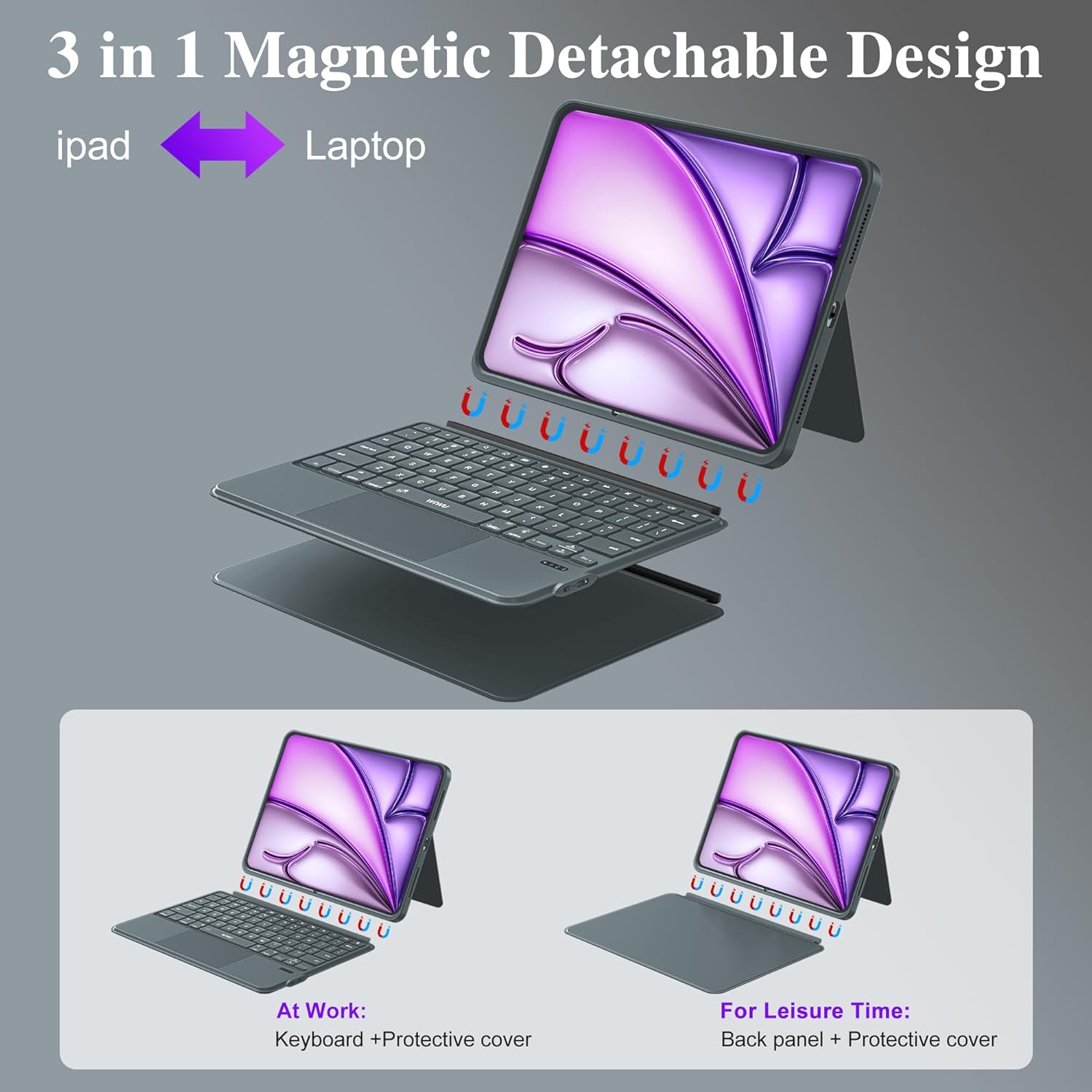
Image 4.1: The keyboard's charging port and indicators for Bluetooth connectivity and battery life.

Image 4.2: The magnetic detachment feature, allowing the keyboard to be separated from the iPad case.
5. Иштөө нускамалары
5.1 Жөнгө салынуучу стенд
The case features a foldable stand that allows for angle adjustments from 0° to 170°. This provides multiple viewing angles for typing, watching videos, or video calls.
5.2 Арткы жарыктандырылган баскычтар
The keyboard includes 7 RGB color backlit keys for comfortable typing in various lighting conditions.
- басыңыз Электр лампасы key to cycle through backlight colors.
- Басыңыз Fn + Light Bulb to adjust backlight brightness levels.
5.3 Keyboard Shortcuts
The keyboard is equipped with dedicated iPadOS shortcut keys to enhance productivity. These include quick access to screenshot, return to desktop, and other multimedia functions.
5.4 Trackpad жаңсоолор
The integrated multi-touch trackpad supports 18 intuitive gestures for navigation, clicking, and app switching, similar to a laptop experience. It also features palm rejection technology.

Image 5.1: Common single-finger trackpad gestures for iPadOS systems above iOS 14.5.

Image 5.2: Details of the keyboard features, including backlit keys and iPadOS shortcuts.
5.5 Режимдердин ортосунда которулуу
The magnetic design allows for easy transformation between three modes:
- Ноутбук режими: iPad attached to the keyboard for typing and trackpad use.
- Планшет режими: Keyboard detached, using only the protective case for tablet functionality.
- Viewрежими: Keyboard detached, using the protective case's adjustable stand for media consumption.
6. Техникалык тейлөө
- Тазалоо: Wipe the case and keyboard with a soft, damp кездеме. Катуу химиялык заттардан же абразивдүү материалдардан алыс болуңуз.
- Сактагыч: Store the keyboard case in a cool, dry place when not in use.
- Коргоо: The PU leather exterior and honeycomb structure back panel provide protection against drops and scratches. Avoid exposing the device to extreme temperatures or direct sunlight.

Image 6.1: Features highlighting the case's durability and design, including the adjustable stand and protective materials.
7. Кыйынчылыктарды
- Баскычтоп туташпай жатат: Ensure Bluetooth is enabled on your iPad and the keyboard is powered on and charged. Try re-pairing the device in iPad's Bluetooth settings.
- Ачкычтар жооп бербейт: Check if the keyboard is charged. If the issue persists, try restarting both the keyboard and your iPad.
- Trackpad иштебей жатат: Ensure the keyboard is connected via Bluetooth. Verify that trackpad support is enabled in your iPad's accessibility settings.
- Арткы жарык иштебейт: Press the backlight key or Fn + backlight key to ensure it's not turned off or at the lowest brightness setting.
8. Техникалык шарттар
| Өзгөчөлүк | Деталь |
|---|---|
| Модель номери | МК-005 |
| Байланыш | Bluetooth 5.3 |
| Батареянын иштөө мөөнөтү | 100 саатка чейин (үзгүлтүксүз колдонуу) |
| Заряддоо убактысы | Болжол менен 2 саат (USB-C) |
| Ачкыч түрү | Scissor-switch keys, 1mm travel |
| Арткы жарык | 7 RGB түстөр |
| Trackpad | Multi-Touch with 18 gesture controls, palm rejection |
| Жөнгө салынуучу стенд | 0°тан 170°ка чейин |
| Материал | Skin-friendly PU Leather, Honeycomb Structure Back Panel |
| Продукциянын өлчөмдөрү | 12.56 x 10.24 x 1.02 дюйм |
| Элемент Салмагы | 2.31 фунт |
9. Кепилдик жана колдоо
For warranty information and technical support, please refer to the official WIWU webсайтка же сатуучуга кайрылыңыз. Кепилдик дооматтар үчүн сатып алуу дүмүрчөгүңүздү сактаңыз.


