1. Киришүү
This manual provides essential information for the safe and efficient operation of your Sovol SV08 MAX CoreXY 3D Printer. The SV08 MAX is a high-speed, large-format 3D printer designed for precision and efficiency, featuring a CoreXY kinematic system, eddy current sensor leveling, and a robust aluminum frame.

Image 1.1: The Sovol SV08 MAX CoreXY 3D Printer, showcasing its large build volume and robust frame.
2. Коопсуздук маалыматы
Жаракат алуунун же түзмөккө зыян келтирүүнүн алдын алуу үчүн принтерди иштетүүдөн мурун бардык коопсуздук көрсөтмөлөрүн окуп чыгып, түшүнүңүз.
- Ысык беттер: The print nozzle and heated bed reach high temperatures during operation. Avoid touching these components directly. Allow them to cool completely before handling.
- Кыймылдуу бөлүктөр: The printer contains moving parts that can cause injury. Keep hands, hair, and loose clothing clear of the print head and gantry during operation.
- Электр коопсуздугу: Ensure the printer is connected to a grounded power outlet. Do not operate with damaged power cords or plugs. Disconnect power before performing maintenance.
- Вентиляция: Operate the printer in a well-ventilated area, especially when printing with materials that may emit fumes.
- Балдар жана үй жаныбарлары: Иштеп жатканда балдарды жана үй жаныбарларын принтерден алыс кармаңыз.
3. Пакеттин мазмуну
Кутудан чыгарууда бардык компоненттер бар экенин текшериңиз:
- Sovol SV08 MAX 3D Printer (partially assembled)
- Электр кабели
- USB кабели
- Filament Spool Holder
- Tool Kit (includes wrenches, screwdrivers, spare nozzles, etc.)
- Колдонуучунун Колдонмосу (бул документ)
- SD Card (with test files and software)
4. Орнотуу
4.1 Ассамблея
The Sovol SV08 MAX comes mostly pre-assembled. Follow the included quick start guide for detailed assembly instructions. Key steps typically include:
- Портативдик түтүктү пайдубалга бекитүү.
- Connecting necessary cables.
- Mounting the filament spool holder.
4.2 Баштапкы деңгээлдөө
The SV08 MAX features an advanced Eddy Current Sensor for automatic bed leveling. This system ensures a precise first layer without manual intervention.

Image 4.2: Close-up of the Eddy Current Sensor performing contactless bed leveling.
- Принтерди күйгүзүңүз.
- Navigate to the 'Leveling' menu on the 4.3-inch touch screen.
- Initiate the automatic bed leveling process. The Eddy Current Sensor will perform an 80-second full-bed scan.
- After automatic leveling, perform a Z-offset calibration using a piece of A4 paper to fine-tune the nozzle height.
4.3 Программалык камсыздоо жана байланыш
The printer is compatible with popular slicing software such as OrcaSlicer (Windows/Mac) and Cura-Ultimaker (Windows/Mac). A customized Cura-Sovol version is also available for Windows.
- Install your preferred slicing software on your computer.
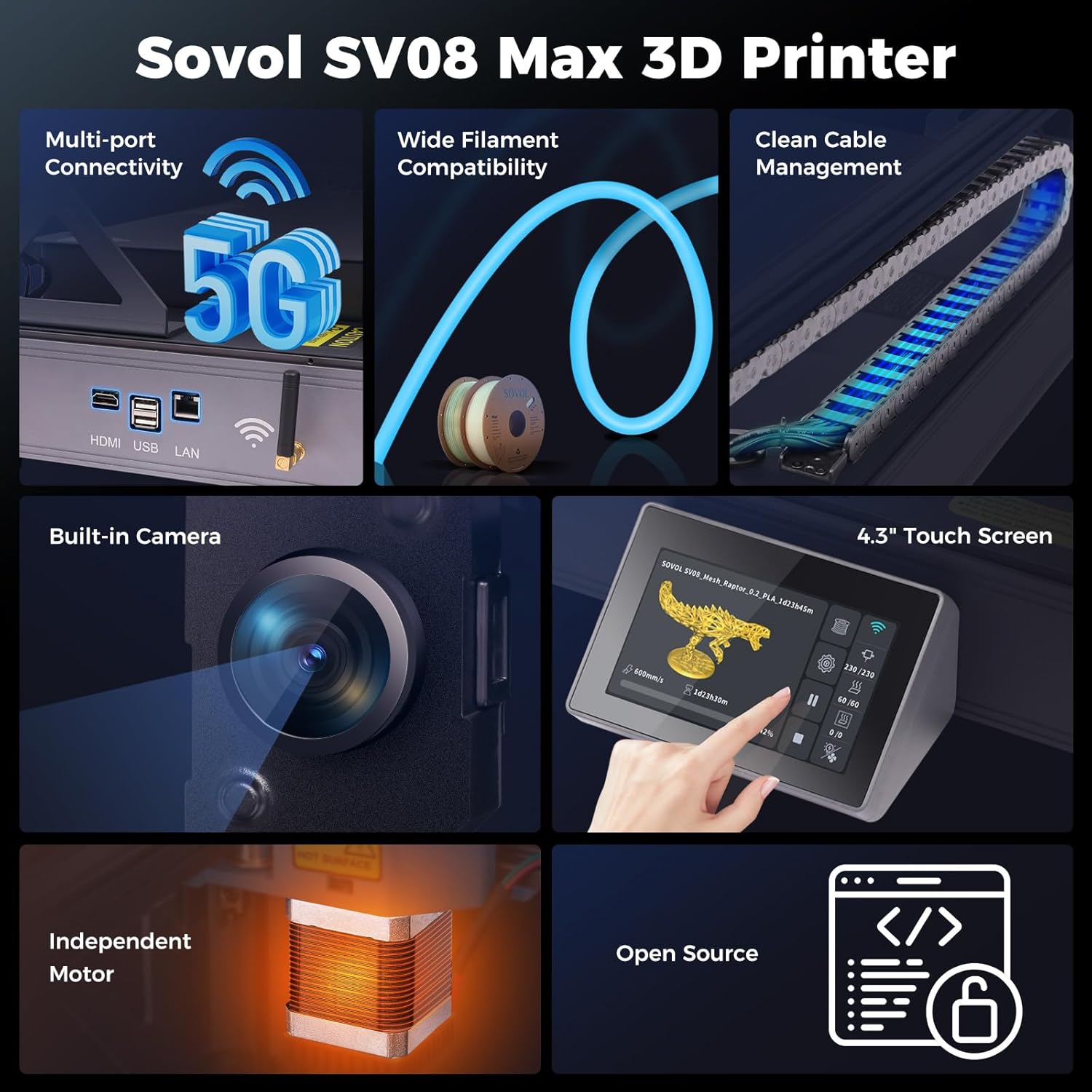
- Connect the printer to your network via LAN or 5G/2.4G WiFi using the external antenna for a stronger signal.
- Configure the printer settings within your slicing software, including build volume (500x500x500mm) and nozzle diameter.
5. Иштөө нускамалары
5.1 Filament Loading
The SV08 MAX features an Auxiliary Feeder System to ensure smooth filament delivery and detect potential issues.

Image 5.1: Diagram of the Auxiliary Feeder System with filament runout and tangle detection.
- Place the filament spool onto the spool holder.
- Feed the filament into the Auxiliary Feeder. The system will automatically push the filament into the extruder.
- On the touch screen, select 'Load Filament' and follow the prompts to heat the hotend and extrude filament until it flows smoothly.
5.2 Басып чыгаруу процесси
The SV08 MAX supports high-speed printing up to 700mm/s with a maximum acceleration of 40,000 mm/s² and a 50mm³/s high-flow nozzle.
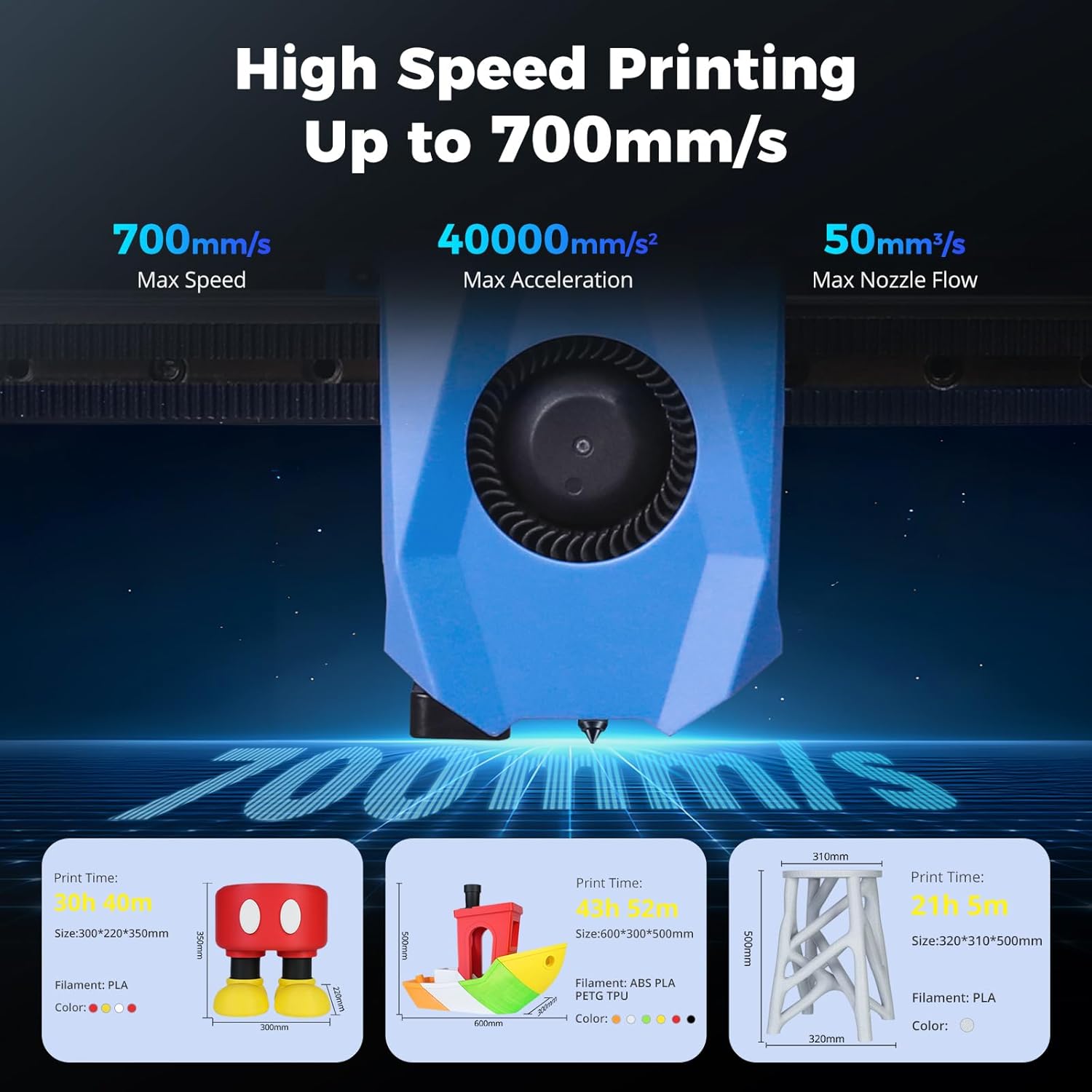
Image 5.2: Illustration of the printer's high-speed capabilities, showing print head movement.
- Prepare your 3D model in the slicing software and generate the GCODE file.
- Transfer the GCODE file to the printer via network (WiFi/LAN) or USB drive.
- Каалаганды тандаңыз file from the printer's touch screen and initiate the print.
- Monitor the print progress using the built-in 1280x720 HD camera, accessible remotely via Obico integration (requires internet connection).

Image 5.3: A laptop displaying the remote monitoring interface of the SV08 MAX's built-in camera.
5.3 Supported Filaments
The high-temperature hotend supports a maximum temperature of 300°C, allowing for a wide range of filament compatibility.
Сүрөт 5.4: Детальдуу view of the high-temperature hotend, capable of reaching 300°C.
Compatible filaments include:
- PLA
- TPU
- PETG
- ABS
- АША
- PA (Nylon)
- PC (поликарбонат)
- PLA-CF (Carbon Fiber Reinforced PLA)
- PETG-CF (Carbon Fiber Reinforced PETG)
- HP-PLA (High-Performance PLA)
The printer comes with two standard 0.4mm nozzles. Optional nozzle sizes (0.4mm, 0.6mm, 0.8mm) are sold separately.
6. Техникалык тейлөө
6.1 Heated Bed Care
The 8mm thick aluminum hotbed with 1300W power provides rapid and even heating. Proper care ensures consistent adhesion.

Image 6.1: Visual representation of the high-power hotbed heating to 100°C.
- Clean the print surface regularly with isopropyl alcohol to remove residue and ensure optimal adhesion.
- Avoid using sharp objects to remove prints, as this can damage the print surface.
6.2 Соргучту тейлөө
- Periodically inspect the nozzle for wear or clogs. Replace worn nozzles to maintain print quality.
- Use the provided cleaning needles to clear minor clogs. For severe clogs, a cold pull or nozzle replacement may be necessary.
6.3 Linear Rails
The XYZ full linear rails provide smooth motion and durability. Periodically inspect and lubricate them according to manufacturer recommendations to ensure optimal performance and longevity.
6.4 Микропрограмма жаңыртуулары
Check the official Sovol website for the latest firmware updates. Keeping your printer's firmware up-to-date can improve performance and add new features.
7. Кыйынчылыктарды
7.1 Басып чыгаруудагы кеңири таралган көйгөйлөр
- Биринчи катмардын начар адгезиясы: Re-calibrate the Z-offset. Ensure the print surface is clean. Adjust bed temperature in slicing software.
- Жипчелердин бүтөлүшү: The Auxiliary Feeder includes clog detection. If a clog occurs, try unloading and reloading the filament. Clean or replace the nozzle if necessary.
- Жип менен сайып/чыйраңдатып: Adjust retraction settings (distance and speed) and print temperature in your slicing software.
- Катмарды которуу: Check that all belts are properly tensioned and pulleys are secure. Ensure the printer is on a stable surface.
7.2 Байланыш маселелери
- WiFi/LAN Connection Failure: Verify network cables are securely connected. Ensure correct WiFi password is entered. Restart the printer and your router.
- Remote Monitoring Not Working: Check internet connection. Ensure Obico integration is correctly configured and the printer is connected to the internet.
8. Техникалык шарттар
| Өзгөчөлүк | Спецификация |
|---|---|
| Модел | Sovol SV08 MAX |
| Build Volume | 500 x 500 x 500 мм (19.7 x 19.7 x 19.7 дюйм) |
| Продукциянын өлчөмдөрү | 28 x 27.6 x 29.5 дюйм |
| Элемент Салмагы | 87.8 фунт |
| Макс басып чыгаруу ылдамдыгы | 700 мм/с |
| Макс ылдамдатуу | 40,000 мм/кв |
| Max Nozzle Flow | 50 mm³/s |
| Максималдуу ысык температура | 300°C |
| Hotbed Power | 1300 Вт |
| Kinematics | CoreXY |
| Linear Rails | XYZ Full Linear Rails |
| Нивелирлөө системасы | Eddy Current Sensor |
| Экструдер | Planetary Dual Gear Direct Extruder |
| Дисплей | 4.3 дюймдук сенсордук экран |
| Камера | Built-in 1280x720 HD Camera |
| Байланыш | WiFi (5G/2.4G), LAN, USB, HDMI |
| Compatible Slicers | OrcaSlicer, Cura-Ultimaker, Cura-Sovol |
| Колдоого алынган File Форматтар | STL, OBJ, STP, STEP, 3MF, AMF, GCODE |
| Frame Material | Aluminum with reinforcing ribs |
9. Кепилдик жана колдоо
Sovol products are covered by a manufacturer's warranty. For specific warranty terms, technical support, or service inquiries, please refer to the official Sovol webсайтка же түздөн-түз кардарларды тейлөөгө кайрылыңыз. Сиз да зыярат кылсаңыз болот Sovol Store on Amazon кошумча маалымат жана ресурстар үчүн.


