1. Киришүү
This manual provides essential information for the setup, operation, and maintenance of your Kinhank MotionX Active Game Console. Please read it thoroughly before using the product to ensure proper functionality and safety.
The Kinhank MotionX is an AI motion-sensing game console designed for interactive play, promoting physical activity for kids and families. It features pre-installed games and offers ongoing content updates without subscription fees.
2. Коопсуздук маалыматы
ЭСКЕРТҮҮ: ТУУГУУ КОРКУНУЧУ - Чакан тетиктер. 3 жашка чейинки балдар үчүн эмес.
Always supervise children during play. Ensure the play area is clear of obstacles to prevent accidents. Do not attempt to disassemble or modify the console. Keep the device away from water and extreme temperatures.
3. Пакеттин мазмуну
Төмөндө тизмеленген нерселердин баары пакетиңизге камтылганын текшериңиз:
- MotionX Game Console
- Алыстан башкаруу
- Кубаттуу адаптер
- HDMI кабели
- Колдонуучунун Колдонмосу (бул документ)

Image: The MotionX Game Console along with its included accessories: a remote control, power adapter, HDMI cable, and user manual.
4. Орнотуу колдонмосу
Follow these steps to set up your Kinhank MotionX Active Game Console:
- Консолду туташтыруу: Connect the MotionX console to your TV, PC, or projector using the provided HDMI cable. Plug the power adapter into the console and a power outlet.

Image: Step 1 of setup, illustrating the connection of the HDMI cable and power adapter to the console's ports.
- Initial Activation (Wi-Fi Required): For the first-time activation and content updates, connect the console to a Wi-Fi network. Navigate to the Wi-Fi settings on your TV screen using the remote control and select your network. Offline play is supported after initial activation.

Image: Step 2 of setup, showing the console's interface for connecting to a Wi-Fi network.
- Open Camera Cover: Slide the physical camera cover to the "Open" position to enable motion tracking.
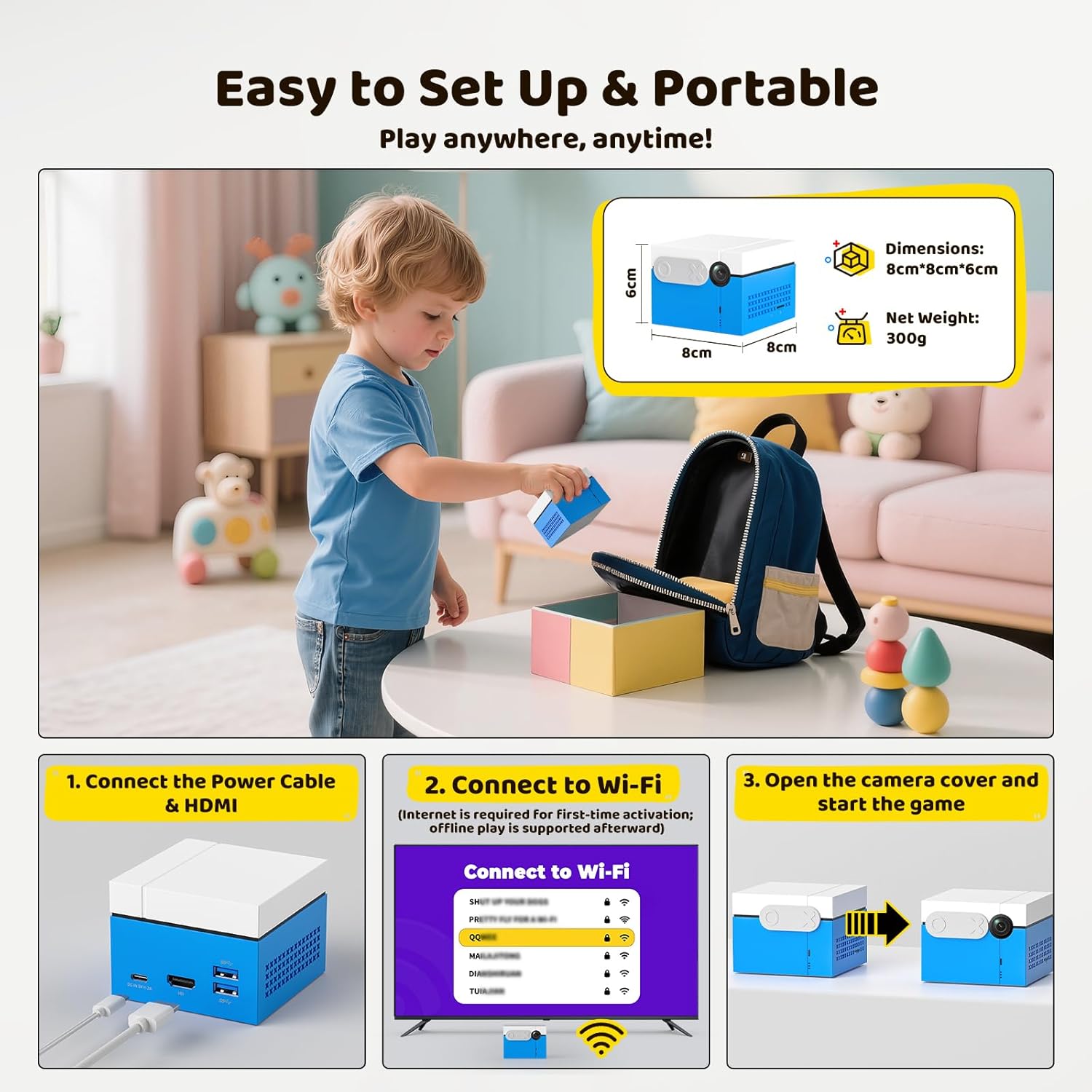
Image: The MotionX console with its camera cover slid open, indicating readiness for use.
- Ойнотуп баштоо: Once connected and the camera is open, you can start playing the pre-installed games.

Image: Step 3 of setup, displaying the game interface with a "Start" prompt, indicating the console is ready for play.
5. Иштөө нускамалары
5.1. Controller-Free Play
The MotionX console utilizes a built-in AI camera for precision movement tracking. No external controllers or wearable devices are needed. Your body movements directly control the game characters and actions.

Image: Children engaging in a motion-controlled game, demonstrating the controller-free interaction with the console.
Кеңеш: For optimal performance, ensure the play area is well-lit and free from obstructions. Stand at an appropriate distance from the console and TV screen for accurate tracking.
5.2. Game Selection and Updates
The console comes pre-loaded with 21 motion games. New games and content updates are provided regularly. To access updates, ensure your console is connected to Wi-Fi and navigate to the update section within the console's menu.

Image: The game selection screen, highlighting the variety of pre-installed games and the availability of continuous updates without subscription.
Note: While core updates are free, future licensed music or branded IP content may be available as optional purchases.
5.3. Multiplayer Mode
The MotionX console supports up to 2 players simultaneously for interactive battles and cooperative play. Future updates may expand support for up to 4 players.

Image: Two children engaged in a competitive game, demonstrating the multiplayer functionality of the console.
5.4. Купуялык функциялары
The console includes a physical sliding camera cover for privacy. When not in use, slide the cover to the "Close" position. All data is stored locally and is not uploaded to the cloud.
Image: The MotionX console demonstrating the physical sliding camera cover in both open and closed states for privacy.
6. Техникалык тейлөө
To ensure the longevity and optimal performance of your MotionX console, follow these maintenance guidelines:
- Тазалоо: Use a soft, dry cloth to clean the exterior of the console. Do not use liquid cleaners or abrasive materials.
- Сактагыч: Консолду салкын, кургак жерде, күндүн түз тийген нурларынан жана өтө жогорку температурадан алыс сактаңыз.
- Камера линзасы: Keep the camera lens clean and free from dust or smudges for accurate motion tracking. Use a lens cleaning cloth if necessary.
- Программалык камсыздоо жаңыртуулары: Regularly check for and install software updates to benefit from new features, game content, and performance improvements.
7. Кыйынчылыктарды
If you encounter issues with your MotionX console, refer to the following common problems and solutions:
| Көйгөй | Мүмкүн чечим |
|---|---|
| Сыналгы экранында сүрөт жок. |
|
| Motion tracking is inaccurate or unresponsive. |
|
| Wi-Fi'га туташпай жатат. |
|
| Games are not updating. |
|
Эгер көйгөй чечилбесе, кошумча жардам алуу үчүн кардарларды колдоо бөлүмүнө кайрылыңыз.
8. Техникалык шарттар
| Өзгөчөлүк | Деталь |
|---|---|
| Продукциянын өлчөмдөрү | 3.15 x 3.15 x 2.36 дюйм (8 см x 8 см x 6 см) |
| Элемент Салмагы | 1.81 фунт (болжол менен 821 г) |
| Модель аты | Кыймыл X |
| Бренд | Kinhank |
| Платформа | Android |
| Түс | Көк |
| Өндүрүүчүнүн сунуш кылган курагы | 3 жаш жана андан жогору |
| Өндүрүүчү | Beijing Jinding Hanke Technology Development Co., Ltd. |
9. Кепилдик жана колдоо
For warranty information and customer support, please refer to the documentation included with your purchase or visit the official Kinhank webсайт. Кепилдик дооматтар үчүн сатып алганыңыздын далилин сактаңыз.
If you require technical assistance or have questions not covered in this manual, please contact Kinhank customer service.


