1. Киришүү
Welcome to the user manual for the MARSTEK 63A 110V Automatic/Manual Transfer Switch. This device is engineered to provide seamless power management by automatically or manually switching between primary (L1) and backup (L2) power sources. It features an LED display for real-time monitoring and incorporates comprehensive protection features to ensure the safety and reliability of your electrical system.
This manual provides essential information for the safe and efficient installation, operation, and maintenance of your transfer switch. Please read it thoroughly before installation and use.
2. Коопсуздук боюнча маанилүү маалымат
Always follow basic safety precautions when installing, operating, and maintaining this product to reduce the risk of fire, electric shock, and injury to persons.
- Орнотуу бардык жергиликтүү жана улуттук электр эрежелерине ылайык квалификациялуу электрик тарабынан аткарылышы керек.
- Disconnect all power sources before performing any installation, wiring, or maintenance.
- Эгер өчүргүч бузулуп калса иштетпеңиз.
- Электр шоктун алдын алуу үчүн туура жерге туташтырууну камсыз кылыңыз.
- This device is designed for indoor use in a dry environment.
- Балдарды электр жабдууларынан алыс кармаңыз.
3. Пакеттин мазмуну
- 1 x MARSTEK 63A 110V Automatic/Manual Transfer Switch
- 1 x DIN Rail
- 1 х Колдонуучунун колдонмосу (бул документ)
4. Продукт бүтүп калдыview
The MARSTEK 63A 110V Automatic/Manual Transfer Switch is a compact device designed for reliable power source switching. It features an LED display for real-time voltage and operational status, and offers both automatic and manual control options.
Негизги өзгөчөлүктөрү
- Automatic or Manual Switching: Seamless transfer between primary (L1) and backup (L2) power sources.
- Комплекстүү коргоо: Overvol камтыйтtage, undervolvoltagд, жана ашыкча ток коргоо.
- Реалдуу убакыттагы мониторинг: High-definition LED display shows voltage жана статусу.
- Оңой орнотуу: DIN rail mountable design.
- Кеңири колдонуу: Suitable for commercial, industrial, and residential backup power systems.
Продукт диаграммасы

This image displays the main unit of the transfer switch, highlighting its compact design and the integrated LED display. The DIN rail is also shown, indicating its mounting method.
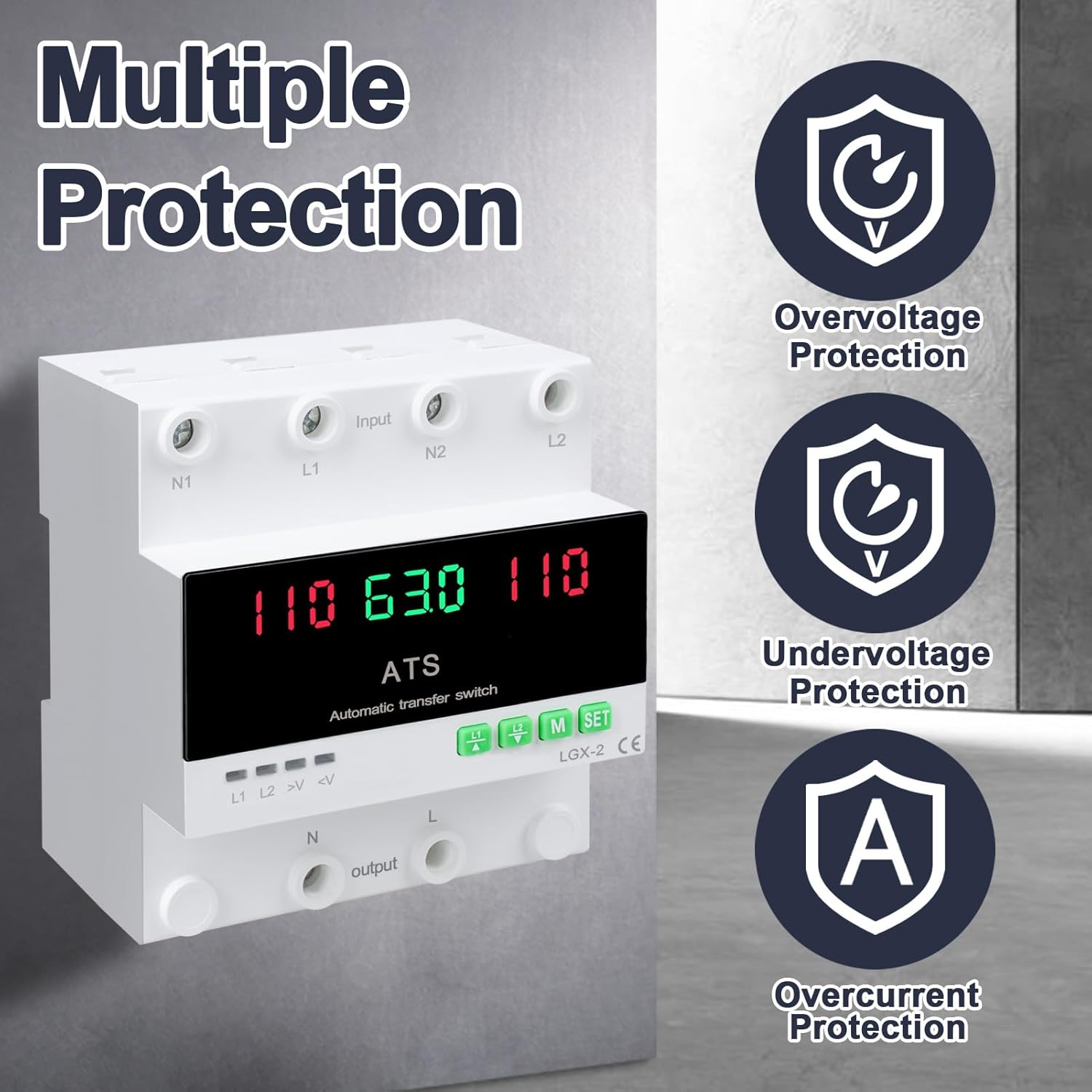
This image illustrates the built-in safety mechanisms of the transfer switch, emphasizing its capability to protect connected devices from electrical instability through overvoltage, undervolvoltage, and overcurrent safeguards.
5. Техникалык шарттар
| Параметр | Нарк |
|---|---|
| Модел | Dual Power 63A |
| Учурдагы рейтинг | 63 Amps |
| Operating Voltage | 120 вольт |
| Иштөө режими | ON-AUTO-MANUAL |
| Продукциянын өлчөмдөрү (L x W x Y) | 4.3 x 3.5 x 3.3 дюйм |
| Салмагы | 13.12 унция |
| Байланыш түрү | Адатта жабык |
| Туташтыргыч түрү | Плагин |
| Терминал | Бурама |
| Circuit Type | 2-жол |
| Байланыш материалы | Жез |
| Номиналдуу жыштык | 50/60 Гц |
| Overvoltage Коргоо босогосу | AC140V |
| Undervoltage Коргоо босогосу | AC90V |
6. Орнотуу жана орнотуу
Proper installation is crucial for the safe and reliable operation of the transfer switch. This device is designed for DIN rail mounting.
Орнотуудан мурун
- Ensure all power sources are disconnected at the main breaker before beginning installation.
- тtage and current ratings of the transfer switch match your electrical system requirements.
- Prepare the installation location, ensuring it is dry, well-ventilated, and easily accessible.
Зымдар диаграммасы

This diagram illustrates the correct wiring connections for the transfer switch. It shows the input terminals for primary power (N1, L1) and backup power (N2, L2), and the output terminals (N, L) to the load. The diagram also labels the LED indicators for L1 output, L2 output, overvoltage, жана undervoltage, as well as the menu/reset and manual ON/OFF buttons.
Орнотуу кадамдары
- Mount the DIN rail securely in your electrical panel or enclosure.
- Attach the transfer switch onto the DIN rail.
- Connect the primary power source (N1, L1) to the designated input terminals.
- Connect the backup power source (N2, L2) to the designated input terminals.
- Connect the load (N, L) to the output terminals.
- Бардык байланыштардын бекемдигин жана тууралыгын эки жолу текшериңиз.
- Once all wiring is complete and verified, restore power to the system.
7. Операция
The MARSTEK transfer switch offers both automatic and manual operation modes.
Автоматтык режим

In automatic mode, the switch prioritizes the primary power source (L1). If L1 fails or experiences voltage fluctuations (undervoltage же ашыкчаtage), the switch will automatically transfer the load to the backup power source (L2). When L1 is restored and stable, the switch will automatically transfer the load back to L1.
Manual Mode

The transfer switch can be manually operated using the buttons on the front panel.
- To close L1: Press the button labeled "L1" (often indicated by an up arrow or similar icon). Press again to open L1.
- To close L2: Press the button labeled "L2" (often indicated by a down arrow or similar icon). Press again to open L2.
In manual mode, the automatic transfer function is overridden. Ensure you understand the implications of manual switching before use.
LED Display and Indicators
The LED display provides real-time information about the system status.
- The main display shows voltage readings for the active power source.
- L1: Indicates L1 output is active.
- L2: Indicates L2 output is active.
- >V: Overvoltage индикатор жарыгы.
- <V: Undervoltage индикатор жарыгы.
- M: Menu selection/Reset button.
- ЖӨНДӨӨ: Manual ON/OFF button.
8. Техникалык тейлөө
The MARSTEK transfer switch requires minimal maintenance.
- Зымдардын туташууларынын бекем жана дат баспагандыгын текшерүү үчүн мезгил-мезгили менен текшерип туруңуз.
- Keep the device clean and free from dust and debris. Use a dry, soft cloth for cleaning.
- Абразивдүү тазалагычтарды же эриткичтерди колдонбоңуз.
- Ашыкча ысып кетүүнүн алдын алуу үчүн аппараттын айланасында жетиштүү желдетүүнү камсыз кылыңыз.
Warning: Always disconnect all power sources before performing any maintenance.
9. Кыйынчылыктарды
Бул бөлүмдө сиз кабылышы мүмкүн болгон жалпы маселелерди чечүү жолдору каралган.
| Көйгөй | Мүмкүн себеп | Чечим |
|---|---|---|
| Түзмөк күйбөй жатат. | No input power; incorrect wiring; internal fault. | Check main breakers and power sources. Verify all wiring connections. If the problem persists, contact support. |
| No automatic transfer. | Device in manual mode; power source within acceptable limits; fault in L1 or L2 detection. | Ensure the device is set to automatic mode. Check voltage levels of both L1 and L2. Contact support if automatic transfer fails despite correct settings. |
| Overvoltage (>V) or Undervoltage (<V) indicator lit. | Киргизүү тtagкөрсөтүлгөн диапазондон тышкары. | Томду текшерүүtage of the active power source. The device will automatically switch if the voltage is outside the set parameters (AC140V overvoltage, AC90V undervoltage). Address the power source issue. |
| Overcurrent protection triggered. | Load exceeds the 63A current rating. | Reduce the connected load. Ensure total current draw does not exceed 63 Amps. |
10. Кепилдик жана колдоо
For warranty information and technical support, please refer to the MARSTEK official webсайтка же сатуучуга кайрылыңыз. Сатып алганыңыздын далили катары сатып алуу дүмүрчөгүңүздү сактаңыз.
Manufacturer: JUXIANG
Бренд: MARSTEK


