1. Киришүү
This manual provides essential information for the safe and efficient use of your DOOGEE Blade 20 Max Rugged Phone. Please read this manual thoroughly before operating your device to ensure optimal performance and longevity.
2. Кутуда эмне бар
Upon opening your DOOGEE Blade 20 Max package, you should find the following items:
- 1 x Blade 20 Max Rugged Phone
- 1 x Type-C USB кабели
- 1 х заряддагыч
- 1 x Экранга басылган коргоочу пленка (алдын ала колдонулган)
- 1 x Жарылууга каршы пленка
- 1 x Packing Box
- 1 x Кол
- 1 x Кепилдик картасы
Video Description: This video demonstrates the unboxing process of the DOOGEE Blade 20 Max Rugged Phone, showcasing all included accessories and the phone itself as it is removed from its packaging.
3. Продукт бүтүп калдыview
The DOOGEE Blade 20 Max is a rugged smartphone designed for durability and high performance. It features a robust build, a large display, and advanced camera capabilities.
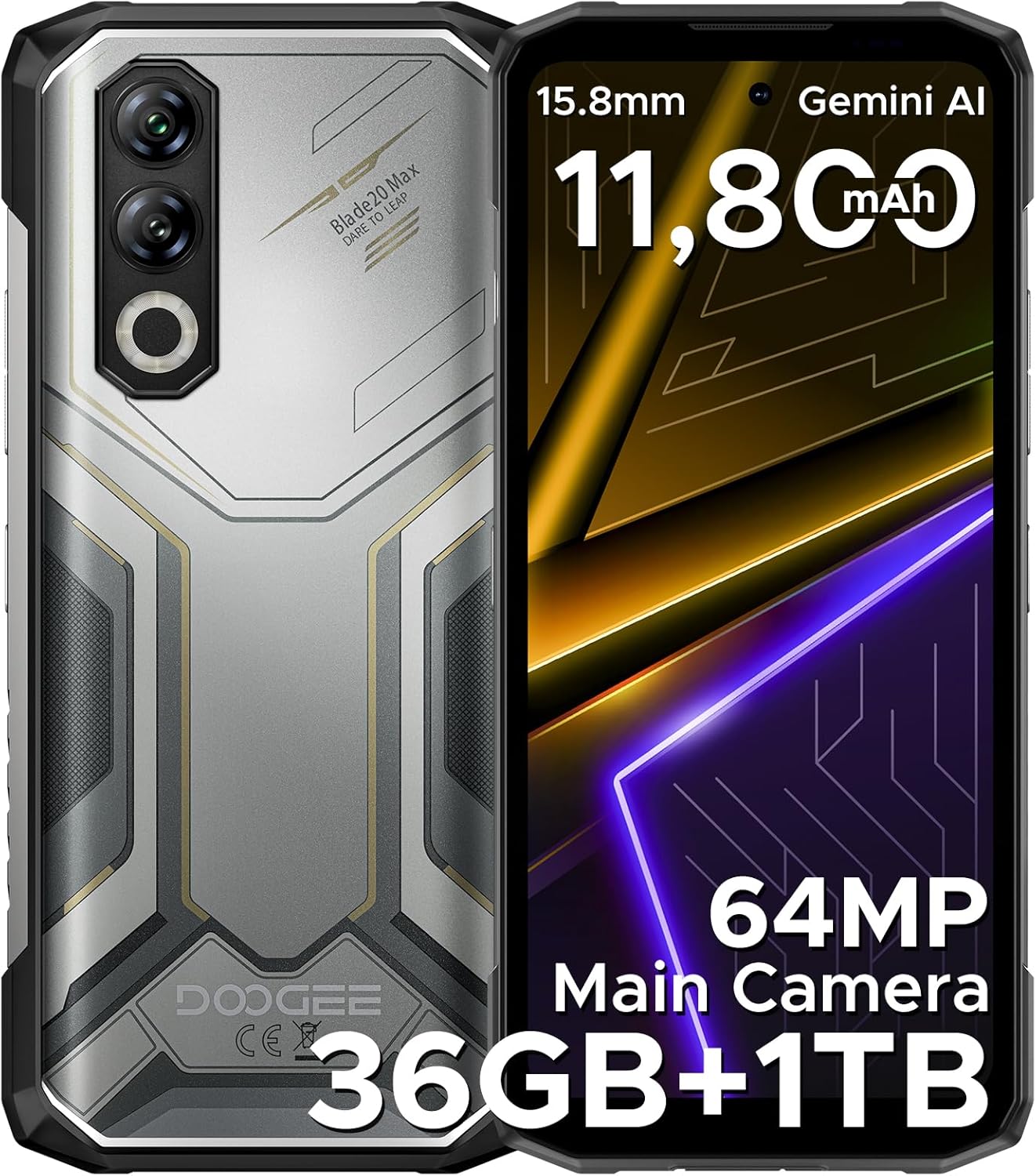
Сүрөттүн сүрөттөлүшү: А деталдуу view of the DOOGEE Blade 20 Max Rugged Phone, showing both the front display and the textured back panel with its multi-camera setup.

Сүрөттүн сүрөттөлүшү: An infographic highlighting key features of the DOOGEE Blade 20 Max, including its 1TB ROM, 15.8mm slim body, 11,800mAh Silicon Battery, 64MP Main Camera, and 20MP Night Vision.
4. Орнотуу
4.1. SIM жана TF карталарын орнотуу
The DOOGEE Blade 20 Max supports a triple-card slot, allowing for two SIM cards and one TF (microSD) card simultaneously.
- Аппараттын капталындагы SIM карта салгычын табыңыз.
- SIM картаны чыгаруучу куралды (эгер бар болсо) ачуу үчүн лотоктун жанындагы кичинекей тешикке салыңыз.
- Carefully place your Nano-SIM cards and TF card into the designated slots on the tray. Ensure they are correctly oriented.
- Лотокту түзмөктүн капталы менен тегиз болгонго чейин акырын телефондун ичине түртүңүз.
4.2. Баштапкы күйгүзүү
- Press and hold the Power button (usually on the right side) until the DOOGEE logo appears on the screen.
- Тил тандоо, Wi-Fi туташуусу жана Google каттоо эсебин орнотуу сыяктуу баштапкы орнотууну аяктоо үчүн экрандагы көрсөтмөлөрдү аткарыңыз.
4.3. Тармак конфигурациясы
This device supports various frequency bands. Before purchasing, it is recommended to verify compatibility with your local carrier's network to ensure proper functionality. Refer to the specifications section for detailed frequency band information.
5. Иштөө нускамалары
5.1. Дисплей
The Blade 20 Max features a 6.6-inch HD+ IPS notch-free punch-hole display with a 120Hz refresh rate for smooth visuals. It offers vibrant colors and clear images.

Сүрөттүн сүрөттөлүшү: An image detailing the 6.6-inch HD+ 120Hz display of the DOOGEE Blade 20 Max, highlighting its Incell screen type, 16.7M screen color, 84% screen-to-body ratio, and 1500:1 screen contrast.
5.2. Аткаруу жана сактоо
Powered by the 6nm Mediatek Helio G100 Octa Core processor and running Android 15, the device offers fast and responsive performance. It comes with 12GB of physical RAM, expandable by an additional 24GB of virtual memory, totaling 36GB RAM. Storage includes a massive 1TB ROM, suitable for extensive data and applications.

Сүрөттүн сүрөттөлүшү: A diagram illustrating the Helio G100 Octa-core chipset, emphasizing its 6nm processing and Mali G57 GPU for efficient performance.

Сүрөттүн сүрөттөлүшү: An illustration showing the 12GB+1TB massive storage configuration of the DOOGEE Blade 20 Max, detailing 36GB RAM (12GB Basic + 24GB Virtual RAM) and 1TB ROM.
Video Description: This video highlights the 1TB ROM storage capacity of the DOOGEE Blade 20 Max, demonstrating its ability to store a large volume of data.
5.3. Камера системасы
The device is equipped with a triple-camera system: a 64MP main camera, a 16MP front camera, and a 20MP night vision camera, allowing for clear photos in various lighting conditions.

Сүрөттүн сүрөттөлүшү: A visual representation of the DOOGEE Blade 20 Max's camera system, highlighting the 64MP main camera, 20MP night vision camera, and 16MP front camera.

Сүрөттүн сүрөттөлүшү: Сүрөт шоуcasing various multi-mode camera features of the DOOGEE Blade 20 Max, including anti-shake, anti-flicker, multi-frame noise reduction, pro mode, and burst mode.
5.4. Батареяны башкаруу
The phone is equipped with a large 11800mAh Silicon Anode Battery, providing extended usage times. It supports 33W fast charging and 5W reverse charging, allowing you to charge other devices.
- Күтүү убактысы: 19 күнгө чейин
- Видео көрүү: 29.9 саатка чейин
- Музыка ойнотуу: 186 саатка чейин
- Чалуу: 100 саатка чейин

Сүрөттүн сүрөттөлүшү: An illustration of the DOOGEE Blade 20 Max's 11800mAh Silicon Anode Battery, highlighting its 33W fast charging and 5W reverse charging capabilities, along with estimated usage times.
Video Description: This video demonstrates the long-lasting 11800mAh battery of the DOOGEE Blade 20 Max Rugged Phone, showcasing its endurance for extended use.
5.5. Коопсуздук өзгөчөлүктөрү
Unlock your device securely using either side fingerprint recognition or facial unlock.

Сүрөттүн сүрөттөлүшү: An infographic illustrating the security features (Face & Side Fingerprint Unlock) and connectivity options (NFC, GPS, Glonass, Galileo, Beidou, 2 SIM + 1 TF Card Slot) of the DOOGEE Blade 20 Max.
5.6. Байланыш
The Blade 20 Max supports Bluetooth, NFC (for Google Pay), Wi-Fi, and multiple navigation systems including GPS, Glonass, Galileo, and Beidou.
5.7. AI өзгөчөлүктөрү
The device includes built-in Gemini AI for enhanced functionality, supporting tasks such as content creation, image analysis, code development, language learning, and smart assistance.

Сүрөттүн сүрөттөлүшү: A visual representation of the Built-in Gemini AI features on the DOOGEE Blade 20 Max, showing examples of content creation, image analysis, code development, language learning, smart assistant, and Gemini Live.
5.8. Android 15 OS Features
Experience a smooth and intuitive user interface with Android 15, offering features like App Cloning, Dual System Mode, Split Screen, Screen Awareness, Live Caption (English Only), Enhanced Privacy Protection, Glove Mode, and Super Clipboard.

Сүрөттүн сүрөттөлүшү: Инфографика көрсөтүүсүasing various features of the Android 15 operating system on the DOOGEE Blade 20 Max, including App Cloning, Dual System Mode, Split Screen, Screen Awareness, Live Caption, Enhanced Privacy Protection, Glove Mode, and Super Clipboard.
6. Туруктуулуктун өзгөчөлүктөрү
The DOOGEE Blade 20 Max is built to withstand harsh environments, featuring:
- IP68 рейтинги: Water-resistant, capable of being submerged in 1.5m of water for 30 minutes.
- IP69K рейтинги: Dustproof and resistant to high-pressure, high-temperature water jets.
- MIL-STD-810H сертификациясы: Military-grade durability, tested for drops from 1.5 meters.

Сүрөттүн сүрөттөлүшү: An image illustrating the IP68, IP69K, and MIL-STD-810H durability ratings of the DOOGEE Blade 20 Max, showing the phone submerged in water, covered in dust, and with a drop test indication.
7. Техникалык тейлөө
To ensure the longevity and optimal performance of your DOOGEE Blade 20 Max, follow these maintenance guidelines:
- Тазалоо: Телефонду дайыма жумшак, нымдуу чүпүрөк менен сүртүп туруңузamp кездеме. Катуу химиялык заттардан же абразивдүү материалдардан алыс болуңуз.
- Программалык камсыздоо жаңыртуулары: Keep your device's software updated to the latest version to benefit from security patches and performance improvements.
- Батареяга кам көрүү: Avoid extreme temperatures. Do not fully discharge the battery frequently. Use the original charger and cable for optimal charging.
- Порт коргоо: Суу жана чаңдан коргоо үчүн бардык порттордун капкактары (USB-C, SIM уячасы үчүн) бекем жабылганын текшериңиз.
8. Кыйынчылыктарды
Эгер сиз түзмөгүңүздө көйгөйлөргө туш болсоңуз, төмөнкү жалпы көйгөйлөрдү чечүү кадамдарын караңыз:
- Түзмөк күйбөй жатат: Ensure the battery is charged. Connect the phone to the charger for at least 15 minutes, then try powering it on again.
- Тармак маселелери: Check if your SIM card is properly inserted. Verify that your carrier's frequency bands are supported by the device. Restart the phone.
- Жай аткаруу: Close unnecessary background applications. Clear cache regularly. Consider performing a factory reset if issues persist (back up your data first).
- Сенсордук экран жооп бербейт: Түзмөктү өчүрүп-күйгүзүңүз. Эгерде көйгөй чечилбесе, кардарларды тейлөө кызматына кайрылыңыз.
9. Техникалык шарттар
| Өзгөчөлүк | Деталь |
|---|---|
| Модель аты | Blade 20 Max |
| Бренд | DOOGEE |
| Операция системасы | Android 15 |
| CPU модели | MediaTek Helio G100 сегиз ядролуу процессору |
| CPU ылдамдыгы | 2.2 ГГц |
| RAM эстутум орнотулган өлчөмү | 36 ГБ (12 ГБ физикалык + 24 ГБ виртуалдык) |
| Эстутум сактоо сыйымдуулугу | 1 ТБ |
| Screen Size | 6.6 дюйм |
| Резолюция | 720 x 1280 |
| Жаңыртуу ылдамдыгы | 120 Гц |
| Батарея сыйымдуулугу | 11800 миллионamp Саат |
| Connectivity Technologies | Bluetooth, NFC, Wi-Fi |
| GPS | Чыныгы (GPS, Глонасс, Галилео, Бейдоу) |
| Өзгөчөлүктөр | Expandable Memory, Fast Charging Support, Rugged Body, Face ID, Fingerprint Recognition, Night Vision Camera |
| Элемент Салмагы | 1 фунт |
| Пакеттин өлчөмдөрү | 8 x 4 x 2 дюйм |
| Туруктуулук рейтингдери | IP68, IP69K, MIL-STD-810H |
| Колдоого алынган жыштык тилкелери | GSM: B2/3/5/8; WCDMA: B1/2/4/5/8; TDD: B34/38/39/40/41; FDD: B1/2/3/4/5/7/8/12/17/18/19/20/25/26/28AB/66 |
10. Кепилдик жана колдоо
Your DOOGEE Blade 20 Max Rugged Phone comes with a warranty. Please refer to the included Warranty Card in your product packaging for detailed terms and conditions, including warranty period and coverage.
For technical support, service, or further inquiries, please visit the official DOOGEE website or contact their customer service channels. Keep your purchase receipt and warranty card handy for any support requests.


