Introduction
This manual provides essential instructions for setting up, operating, maintaining, and troubleshooting your DOOGEE Note 56 smartphone. Please read this guide thoroughly to ensure proper use and to maximize the device's capabilities.
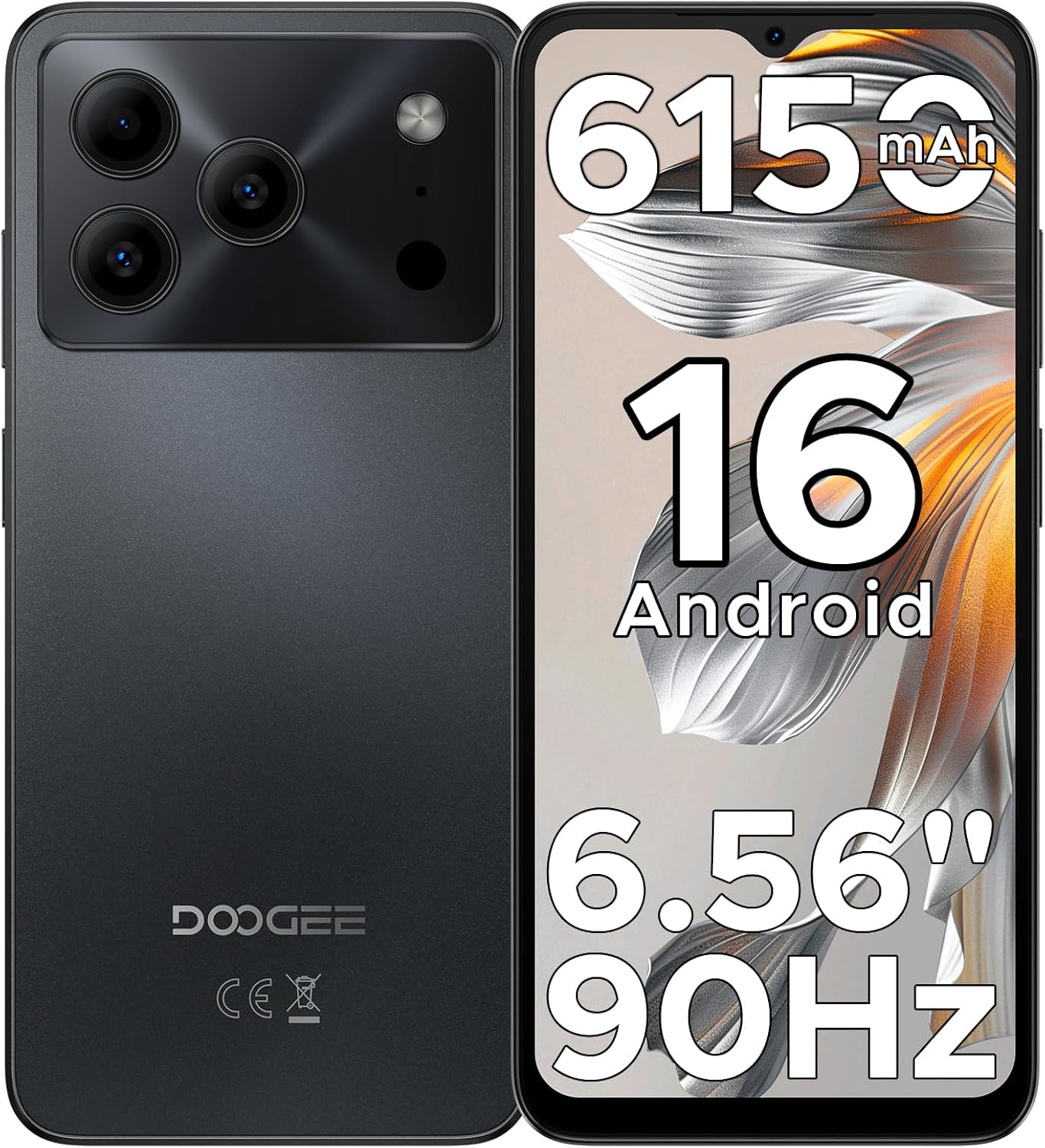
Figure 1: DOOGEE Note 56 Smartphone Overview
1. Орнотуу
1.1 Пакеттин мазмуну
Продукцияңыздын таңгагында бардык элементтер бар экенин текшериңиз:
- 1 x DOOGEE Note 56 Cellphone
- 1 x Type-C портунун кабели
- 1 х заряддагыч
- 1 x Коргоочу пленка (алдын ала колдонулган)
- 1 x SIM картанын төөнөгүчү
- 1 x Packing Box
- 1 х Колдонмо (бул документ)
- 1 x Кепилдик картасы
- 1 x TPU коргоочу кап
1.2 SIM карталарды жана TF картасын салуу
- Телефондун капталындагы SIM карта салгычын табыңыз.
- Insert the SIM card pin into the small hole next to the tray to eject it.
- Place your Nano-SIM cards (up to two) and/or a TF card (microSD) into the designated slots on the tray. Ensure the gold contacts face downwards.
- Телефонго лотокту кылдаттык менен кайра салыңыз.

Figure 2: SIM Card Tray Location (Illustrative)
1.3 Батареяны заряддоо
Before first use, fully charge the phone's battery. Connect the Type-C cable to the phone's charging port and the charger to a power outlet.
- The phone features a 6150mAh Silicon-Carbon Battery.
- It supports 5W reverse charging, allowing you to charge other devices using your phone (requires an OTG cable, sold separately).

Figure 3: 6150mAh Battery Feature
1.4 Күйгүзүү/өчүрүү
- Күйгүзүү үчүн: DOOGEE логотиби пайда болгонго чейин Күйгүзүү баскычын басып, кармап туруңуз.
- Өчүрүү үчүн: Кубат баскычын басып, кармап туруңуз, андан кийин экрандагы параметрлерден "Өчүрүү" дегенди тандаңыз.
2. Иштөө нускамалары
2.1 Android 16 операциялык системасы
The DOOGEE Note 56 runs on the latest Android 16 OS, providing a secure and user-friendly experience. Navigate through the interface using gestures and on-screen controls.

4-сүрөт: Android 16 ОС интерфейси
2.2 Дисплей жана өз ара аракеттенүү
- Экран: The device features a 6.56-inch HD+ IPS waterdrop screen with a 90Hz refresh rate for smooth visuals.
- Жүзүнөн ачуу: Utilize the front camera for quick and secure access to your device.
- 3.5 мм гарнитура уячасы: Connect wired headphones for audio playback.

Figure 5: 6.56" HD+ 90Hz Display
2.3 Камеранын функциялары
The DOOGEE Note 56 is equipped with an 8MP main camera and a 5MP front camera. The camera app includes various modes to enhance your photography:
- Жасалма интеллект көрүнүшүн таануу: Automatically detects 12 scenes and optimizes settings for improved photos.
- HDR: High Dynamic Range for balanced exposure in challenging lighting.
- Түнкү режим: Жарыгы аз шарттарда тартылган сүрөттөрдү жакшыртат.
- Сулуулук режими: Applies enhancements for portraits.
- Портрет режими: Талаанын тереңдигинин эффектин жаратат.
- Pro режими: Manual control over camera settings.
- Smile Capture, Panoramas, Burst Shots, Fun Filters.

Figure 6: Camera Features and AI Scene Recognition
2.4 Байланыш
- 4G кош SIM: Тармакты ийкемдүү колдонуу үчүн эки SIM картаны колдойт.
- Wi-Fi: Интернетке кирүү үчүн зымсыз тармактарга туташыңыз.
- Bluetooth 4.2: Pair with compatible accessories.
- GPS: For navigation and location services.
- FM радиосу: Listen to local radio stations.

Figure 7: Supported Network Connections
2.5 Сактоо жана иштөө
- Процессор: UNISOC SC9863A Octa-Core processor for efficient operation.
- RAM: 24GB RAM (3GB physical + 21GB virtual expansion) for smooth multitasking.
- Ички сактагыч: 64GB for apps and media.
- Кеңейтүүчү сактагыч: Supports up to 2TB via TF (microSD) card (sold separately).

Figure 8: Storage and RAM Configuration
2.6 Smart OS Features
The Android 16 OS includes several smart features:
- Эки системалуу режим: Allows for separate user profiles or environments.
- Супер алмашуу буфери: Enhanced clipboard functionality.
- Эстутумду кеңейтүү: Software-based RAM expansion.
- Screen Optimization: Adjusts display settings for various content.
- Customize Screen Colors: Personalize your display's color profile.
- Smart Body Sensing: (Details not specified, likely related to gestures or proximity).

Figure 9: Smart OS Features Overview
3. Техникалык тейлөө
3.1 Батареяга кам көрүү
- Батареянын иштөө мөөнөтүн начарлатышы мүмкүн болгон экстремалдык температурадан качыңыз.
- Телефонду узак убакытка толук кубатталган же заряды бүтүп калган абалда калтырбаңыз.
- Use only the provided charger and cable for optimal charging.
3.2 Программалык камсыздоо жаңыртуулары
Regularly check for and install system updates to ensure your device has the latest security patches and features. You can usually find this option in Орнотуулар > Система > Системаны жаңыртуу.
3.3 Аппаратты тазалоо
- Телефондун экранын жана корпусун тазалоо үчүн жумшак, түксүз чүпүрөктү колдонуңуз.
- Катуу химиялык заттарды же абразивдүү материалдарды колдонуудан алыс болуңуз.
- Телефонду ашыкча нымдуулукка дуушар кылбаңыз.
3.4 Сактагычты башкаруу
To maintain optimal performance, regularly manage your phone's storage. Delete unnecessary files, uninstall unused apps, and utilize the TF card for additional storage.
4. Кыйынчылыктарды
If you encounter issues with your DOOGEE Note 56, try the following common troubleshooting steps:
| Көйгөй | Чечим |
|---|---|
| Телефон күйбөйт | Батарея заряддалганын текшериңиз. Заряддагычты туташтырыңыз жана кайра күйгүзүү аракетинен мурун бир нече мүнөт күтүңүз. |
| Батарея бат эле түгөнөт | Close unused apps, reduce screen brightness, disable Wi-Fi/Bluetooth when not in use. Check battery usage in settings to identify power-consuming apps. |
| Колдонмолор жай же бузулуп жатат | Колдонмонун кэшин тазалоо (Орнотуулар > Колдонмолор > [Колдонмонун аталышы] > Сактагыч > Кэшти тазалоо). Телефонду өчүрүп-күйгүзүңүз. Жетиштүү бош орун бар экенин текшериңиз. |
| Wi-Fi/Мобилдик дайындарга туташуу мүмкүн эмес | Toggle Wi-Fi/Mobile Data off and on. Restart the phone. Check router/network settings. Ensure SIM cards are correctly inserted and activated. |
| Face Unlock not working | Ensure your face is well-lit and clearly visible to the front camera. Re-register your face data in security settings if the issue persists. |
For more complex issues, refer to the DOOGEE support webсайтка же кардарларды тейлөөгө кайрылыңыз.
5. Техникалык шарттар
| Өзгөчөлүк | Деталь |
|---|---|
| Модель аты | ЭСКЕРТҮҮ 56 |
| Операция системасы | Android 16 |
| CPU | UNISOC SC9863A Octa-Core, 1.6 GHz |
| RAM | 24 ГБ (3 ГБ физикалык + 21 ГБ виртуалдык) |
| Ички сактагыч | 64 ГБ |
| Кеңейтүүчү сактагыч | Up to 2 TB via TF card (microSD) |
| Дисплей өлчөмү | 6.56 дюйм |
| Дисплей түрү | HD+ IPS Waterdrop Screen, 90Hz Refresh Rate |
| Арткы камера | 8 депутат |
| Алдыңкы камера | 5 депутат |
| Батарея сыйымдуулугу | 6150 мАч |
| Байланыш | 4G Dual SIM, Wi-Fi, Bluetooth 4.2, GPS, USB Type-C |
| Аудио Jack | 3.5 мм |
| Өзгөчөлүктөр | Face Unlock, OTG Reverse Charging, Expandable Memory, Dual SIM |
| Өлчөмдөр | 7.63 x 4.09 x 2 дюйм (Пакеттин өлчөмдөрү) |
| Элемент Салмагы | 14.6 унция |
6. Кепилдик жана колдоо
Your DOOGEE Note 56 smartphone comes with a warranty. Please refer to the included Warranty Card in your package for detailed information regarding warranty terms, conditions, and duration.
For technical support or further assistance, please visit the official DOOGEE website or contact their customer service department. Contact information can typically be found on the warranty card or the manufacturer's webсайт.


